SciFig

Free Eye Anatomy Diagram Generator Online

Make clear eye structure figures with view-specific labels, practice modes and editable downloads.

Eye anatomy diagram editor

Describe what you need in the box above.

Start with up to 150 free credits|No credit card required

Get up to 350 free credits on day one when you join through an invite.

3 figure engines · 500+ templatesEvery label editable · 60+ color schemesEditable PPTX · Layered SVG · 8K PNG / JPG

Eye anatomy diagram editor

Choose a view, edit structure labels and move label endpoints. Export the labeled diagram, numbered worksheet or answer key.

Free Eye Anatomy Diagram Generator Online— templates & examples

Updated

Free scientific tools

Free Eye Anatomy Diagram Generator Online

Make clear eye structure figures with view-specific labels, practice modes and editable downloads.

An eye anatomy diagram identifies structures in a section through the eyeball or a front view. Make clear eye structure figures with view-specific labels, practice modes and editable downloads. Separate section and front views. View-specific visible structures. Stable structure identifiers.

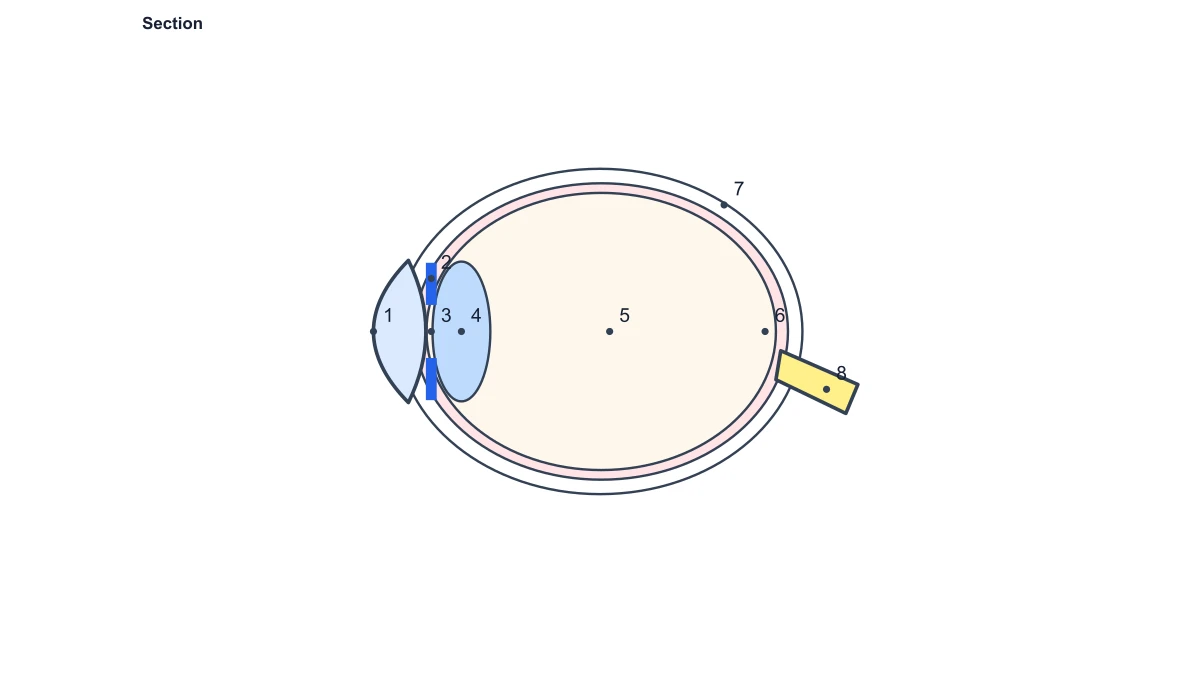
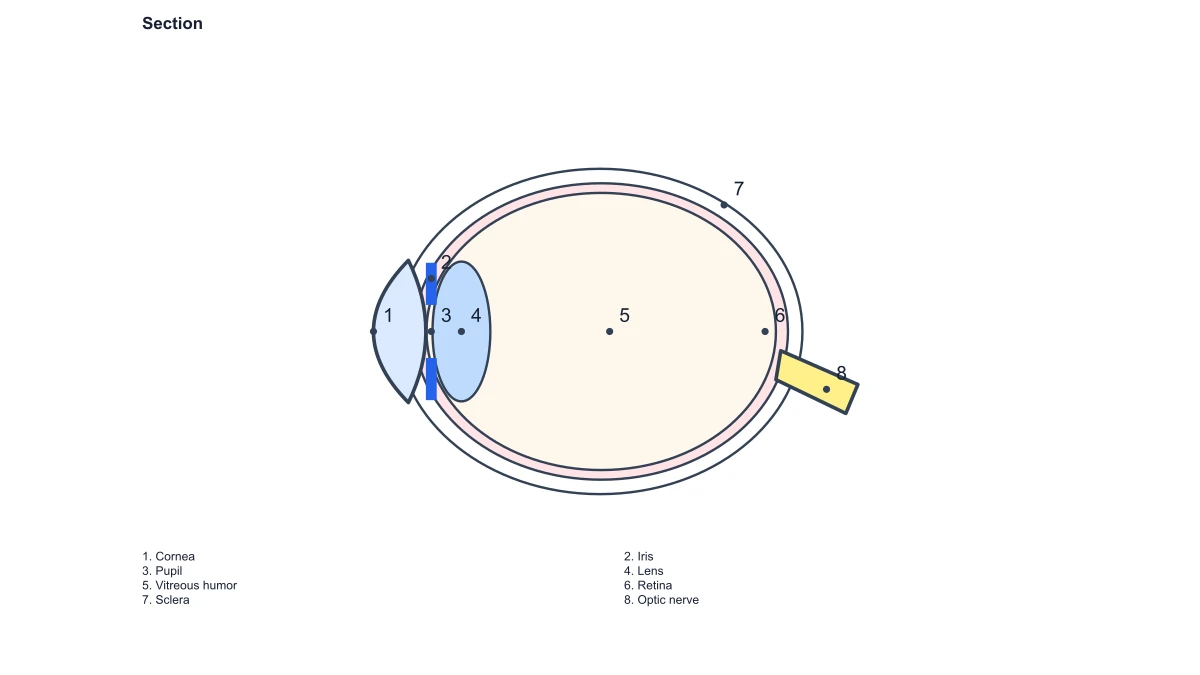
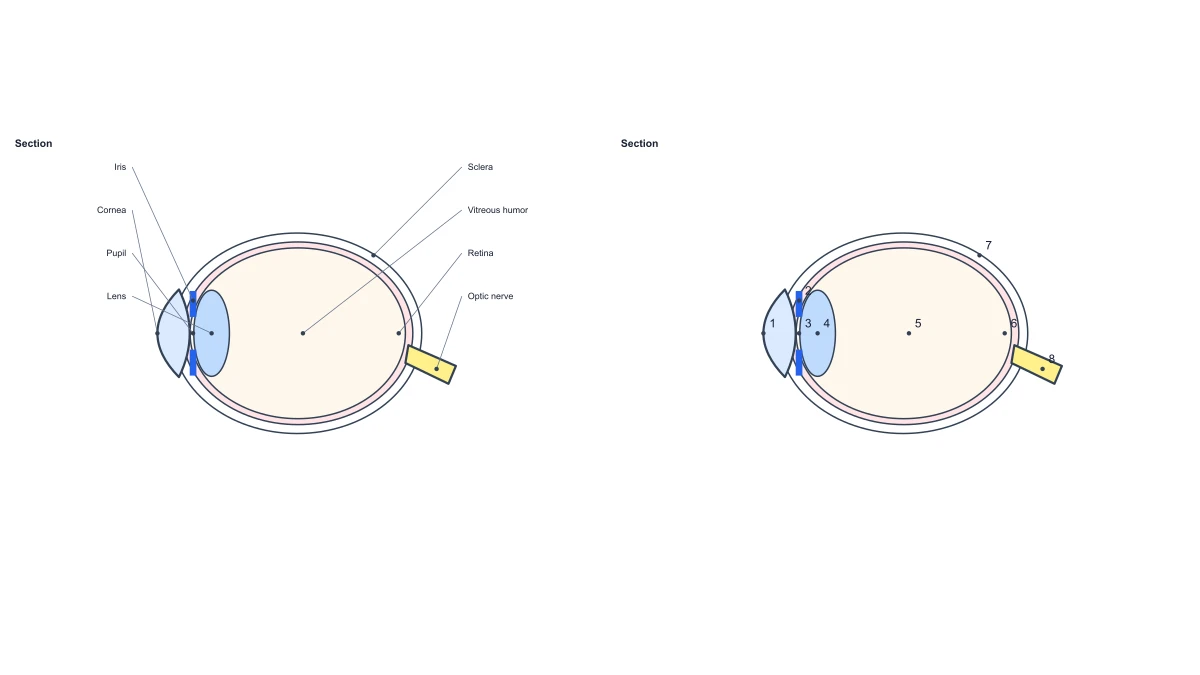
Eye section and numbered eye structure comparison
  • Choose the eye anatomy view
  • Label the cornea, lens and retina
  • Prepare eye labeling activities
  • Reuse an eye figure across lessons

Eye Anatomy Diagram Generator Features

Separate section and front views. View-specific visible structures. Stable structure identifiers.

Choose the eye anatomy view

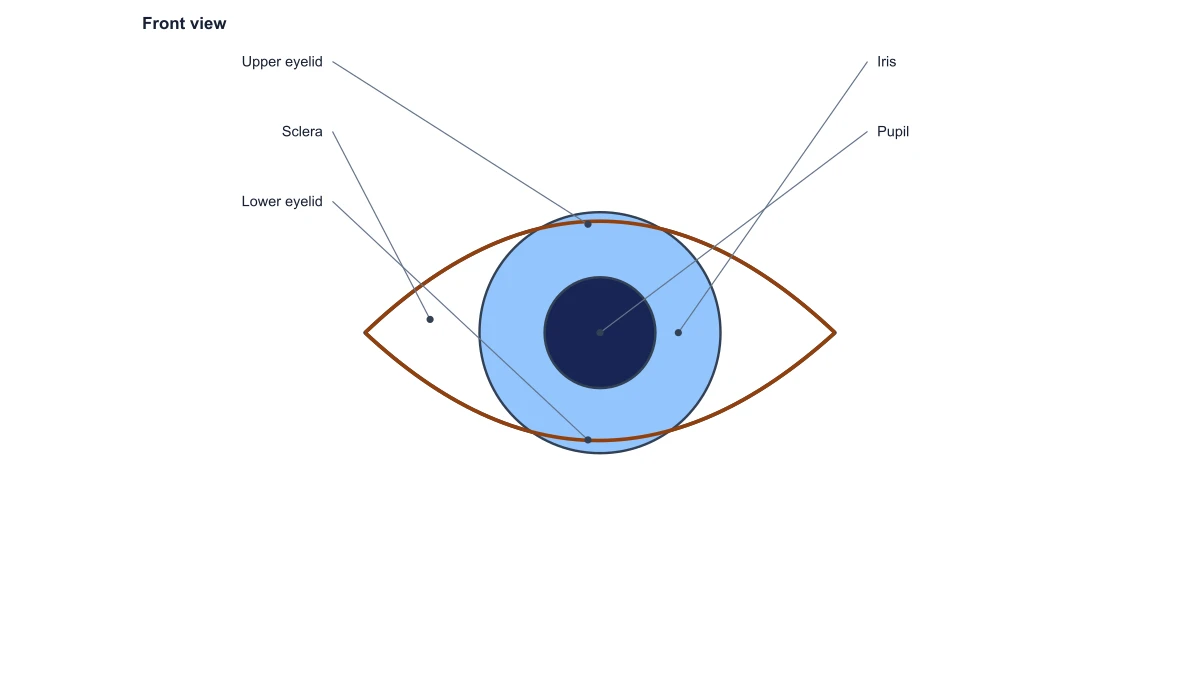
Use the eye section to locate structures inside the eyeball, or select the front view to discuss the visible iris and pupil. Each view has its own drawing and anchors, so the labels describe structures actually present in that view.

  • Separate section and front views
  • View-specific visible structures
  • Stable structure identifiers
Choose the eye anatomy view

Label the cornea, lens and retina

Edit the names attached to the eye’s structures while their leaders stay bound to the correct anatomy. Move a label away from a crowded area to give the lens, retina or optic nerve a readable place in the surrounding figure.

  • Editable anatomical names
  • Adjustable leader positions
  • Distinct anterior and posterior structures
Label the cornea, lens and retina

Prepare eye labeling activities

Use a numbered eye diagram for a class exercise, a blank figure for free labeling, or the named reference when introducing the anatomy. The corresponding answer view preserves the structural identities from the practice version.

  • Written and numbered labels
  • Blank exercise figure
  • Consistent answer mapping
Prepare eye labeling activities

Reuse an eye figure across lessons

Export the diagram as SVG or PNG for a teaching slide, poster or worksheet. Save its JSON project to retain the chosen view and label layout when another lesson needs the same eye anatomy with different terminology.

  • SVG vector output
  • PNG image output
  • Reopen saved JSON settings
Reuse an eye figure across lessons

How to Create Your Diagram

Open the eye anatomy diagram generator and choose the view that shows your target structures.

  1. Select a section or front view

    Open the eye anatomy diagram generator and choose the view that shows your target structures. The section exposes internal anatomy; the front view concentrates on the outward-facing eye structures.

  2. Adapt the labels

    Change the available structure names to match the lesson and move their labels where they read clearly. The structure anchors retain the relationship between each name and its anatomical location.

  3. Choose a reference or exercise

    Keep the written labels for a reference illustration, or switch to numbered or blank mode. Use the answer presentation when preparing the matching solution for the same structure set.

  4. Download the finished eye diagram

    Export SVG or PNG for your course material. Save the current project as JSON when you want to retain the view, structure names and leader layout for subsequent editing.

Anatomy Figures for Teaching

An introductory anatomy slide can place the eye section beside a short explanation of its anterior and posterior structures.

Eye section and numbered eye structure comparison

Introduce eyeball structures

An introductory anatomy slide can place the eye section beside a short explanation of its anterior and posterior structures. Labels distinguish the cornea, lens and retina within one spatial reference.

Explore this example
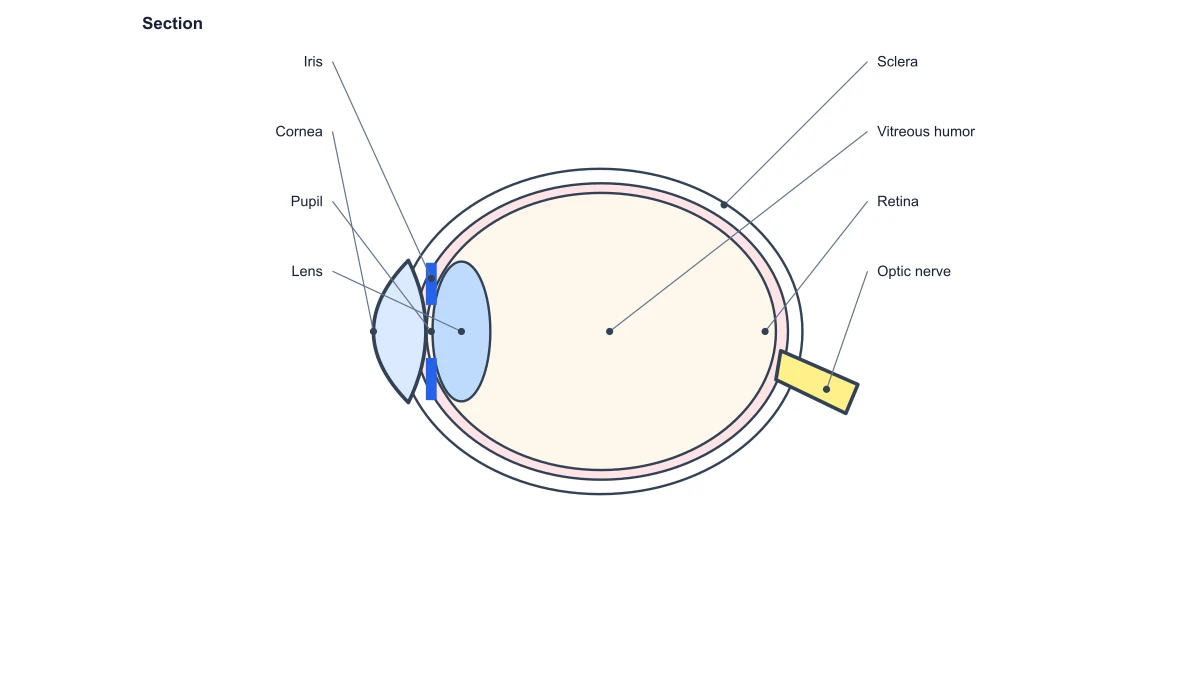
Section through an eye with cornea, lens, retina and optic nerve labels

Explain the visible iris and pupil

Use the front view when the discussion concerns the visible eye surface. Its structure set keeps the illustration focused instead of overlaying internal-section labels onto an incompatible view.

Explore this example
Front view of an eye with iris and pupil labels

Create a classroom worksheet

Prepare a numbered or unlabeled eye diagram and a corresponding answer figure. The same structural identifiers make the solution easy to match to the exercise.

Explore this example
Numbered eye section for anatomy practice

Prepare a visual revision guide

Combine the eye section with short course notes in a revision handout. Move long labels into the available margins and export the result as a vector figure.

Explore this example
Eye section numbers and matching structure answers

Connect anatomy with optics teaching

Use the anatomy diagram to establish where the lens sits, then continue to the ray diagram tool for a separate optical calculation. The two figures answer different questions in the same lesson.

Explore this example
Section through an eye with cornea, lens, retina and optic nerve labels

Share a multilingual course asset

Save an eye project for a teaching team and adapt its label names to the terminology used by the class. The view and structure anchors remain available when the annotations change.

Explore this example
How Researchers Use SciFig

The eye anatomy diagram generator gave my lecture a section view with the lens, retina and optic nerve in the same figure. I adjusted the label positions to leave room for the accompanying explanation. The vector download fitted our course booklet, and the numbered view became a separate revision exercise.

Amelia Grant

Visual neuroscience teaching fellow · University of Glasgow

Free tools

A tool for every scientific figure

140 focused generators for the scientific figure you need — each opens in the right workspace with a matching example.

Illustrations, structures and concept diagrams

75 tools
Chemistry Structure Generator example figureChemistry Structure GeneratorGraphical Abstract Maker example figureGraphical Abstract MakerFree Body Diagram Generator example figureFree Body Diagram GeneratorCircuit Diagram Maker example figureCircuit Diagram MakerAI Scientific Image Generator example figureAI Scientific Image GeneratorEditable 96-Well Plate example figureEditable 96-Well PlateLewis Dot Structure Generator example figureLewis Dot Structure GeneratorDNA Structure Diagram Generator example figureDNA Structure Diagram GeneratorWiring Diagram Maker example figureWiring Diagram MakerP&ID Diagram Generator example figureP&ID Diagram GeneratorScientific Poster Generator example figureScientific Poster GeneratorCladogram Maker example figureCladogram MakerFood Web Maker example figureFood Web MakerMedical Illustration Generator example figureMedical Illustration GeneratorPCR Diagram Generator example figurePCR Diagram GeneratorPPT Text to Visual Converter example figurePPT Text to Visual ConverterMitosis Diagram Generator example figureMitosis Diagram GeneratorAI Infographic Generator example figureAI Infographic GeneratorAnatomical Drawing Generator example figureAnatomical Drawing GeneratorAnimal and Plant Cell Comparison example figureAnimal and Plant Cell ComparisonAnimal Cell Diagram Generator example figureAnimal Cell Diagram GeneratorAntibody Structure Diagram Generator example figureAntibody Structure Diagram GeneratorApoptosis Diagram Generator example figureApoptosis Diagram GeneratorAutophagy Diagram Generator example figureAutophagy Diagram GeneratorBacteria Diagram Generator example figureBacteria Diagram GeneratorBlueprint Maker example figureBlueprint MakerBohr Model Maker example figureBohr Model MakerBrain Anatomy Diagram example figureBrain Anatomy DiagramCalvin Cycle Diagram Generator example figureCalvin Cycle Diagram GeneratorCarbon Cycle Diagram Generator example figureCarbon Cycle Diagram GeneratorCell Cycle Diagram Generator example figureCell Cycle Diagram GeneratorCell Membrane Diagram example figureCell Membrane DiagramCellular Respiration Diagram Generator example figureCellular Respiration Diagram GeneratorComplement System Diagram Generator example figureComplement System Diagram GeneratorCRISPR-Cas9 Diagram Generator example figureCRISPR-Cas9 Diagram GeneratorDNA Replication Diagram Generator example figureDNA Replication Diagram GeneratorEar Anatomy Diagram example figureEar Anatomy DiagramElectron Configuration Diagram Generator example figureElectron Configuration Diagram GeneratorElectron Transport Chain Diagram Generator example figureElectron Transport Chain Diagram GeneratorELISA Diagram Generator example figureELISA Diagram GeneratorEye Anatomy Diagram example figureEye Anatomy DiagramFoot Anatomy Diagram example figureFoot Anatomy DiagramGel Electrophoresis Diagram Generator example figureGel Electrophoresis Diagram GeneratorGene Regulation Diagram Generator example figureGene Regulation Diagram GeneratorGlycolysis Diagram Generator example figureGlycolysis Diagram GeneratorHeart Diagram example figureHeart DiagramImage to Editable SVG Converter example figureImage to Editable SVG ConverterImmune Checkpoint Diagram Generator example figureImmune Checkpoint Diagram GeneratorImmune Response Diagram Generator example figureImmune Response Diagram GeneratorInflammasome Diagram Generator example figureInflammasome Diagram GeneratorKrebs Cycle Diagram Generator example figureKrebs Cycle Diagram GeneratorLab Diagram Maker example figureLab Diagram MakerMeiosis Diagram Generator example figureMeiosis Diagram GeneratorMetabolic Pathway Diagram Generator example figureMetabolic Pathway Diagram GeneratorMicroscope Diagram example figureMicroscope DiagramMolecular Orbital Diagram Generator example figureMolecular Orbital Diagram GeneratorNitrogen Cycle Diagram Generator example figureNitrogen Cycle Diagram GeneratorPedigree Chart Maker example figurePedigree Chart MakerPhospholipid Diagram Generator example figurePhospholipid Diagram GeneratorPhosphorus Cycle Diagram Generator example figurePhosphorus Cycle Diagram GeneratorPhotosynthesis Diagram Generator example figurePhotosynthesis Diagram GeneratorPhylogenetic Tree Maker example figurePhylogenetic Tree MakerPhysics Vector Diagram Maker example figurePhysics Vector Diagram MakerPlant Cell Diagram Generator example figurePlant Cell Diagram GeneratorPlasmid Map Maker example figurePlasmid Map MakerProtein Synthesis Diagram Generator example figureProtein Synthesis Diagram GeneratorPunnett Square Maker example figurePunnett Square MakerRay Diagram Maker example figureRay Diagram MakerRNA Structure Diagram Generator example figureRNA Structure Diagram GeneratorScientific Color Palette Generator example figureScientific Color Palette GeneratorSignaling Pathway Diagram Generator example figureSignaling Pathway Diagram GeneratorSingle Line Diagram Generator example figureSingle Line Diagram GeneratorT-Cell Activation Diagram Generator example figureT-Cell Activation Diagram GeneratorWater Cycle Diagram Generator example figureWater Cycle Diagram GeneratorWestern Blot Diagram Generator example figureWestern Blot Diagram Generator
Eye Anatomy Diagram Generator Questions

1.

2.

3.

4.

5.

6.

Call to action background

Create with SciFig

Free Eye Anatomy Diagram Generator Online

Open the free tool

Free to start · No credit card required · Built for researchers