SciFig

Describe the scientific figure you need

Start from text, a sketch, a reference, a PDF, or a lab photo — publication-ready, every element editable.

Describe what you need in the box above.

Start with up to 150 free credits|No credit card required

Get up to 350 free credits on day one when you join through an invite.

3 figure engines · 500+ templatesEvery label editable · 60+ color schemesEditable PPTX · Layered SVG · 8K PNG / JPG

Free Molecular Orbital Diagram Generator for Chemistry— templates & examples

Updated

molecular orbital diagram

Free Molecular Orbital Diagram Generator for Chemistry

Explain bonding with a molecular orbital diagram built from your description.

A molecular orbital diagram generator creates a visual explanation of molecular orbitals and their electron occupancy. With SciFig, give the molecule, orbital labels, energy-level order and electron arrangement you want to show, and Illustration generates an AI figure. You can illustrate familiar O₂ and N₂ teaching examples, compare bonding and antibonding levels, or visualize a set of levels supplied in your own notes. The editable figure can support a chemistry lesson, presentation or research explanation, with labels and styling you can refine before export.

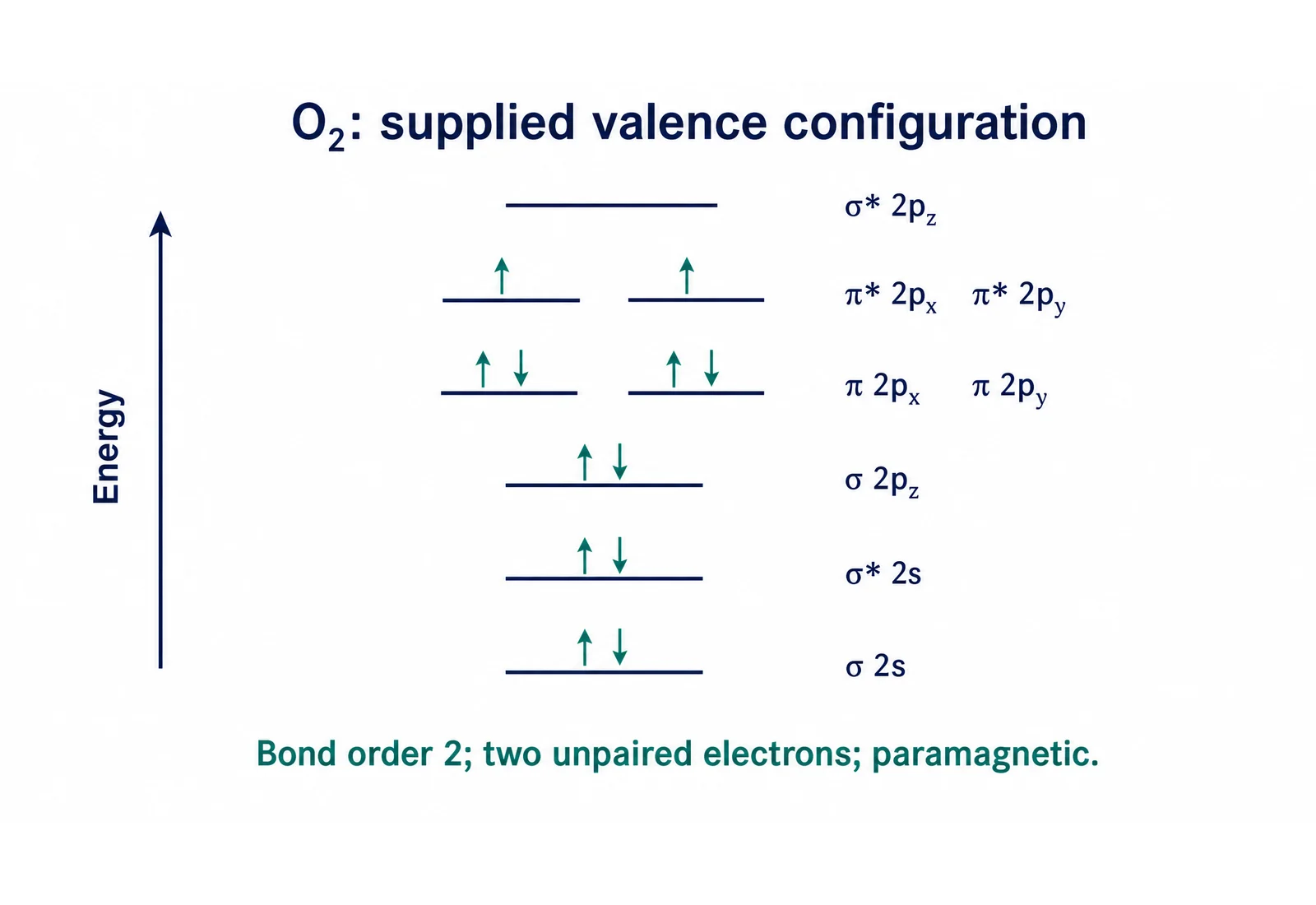
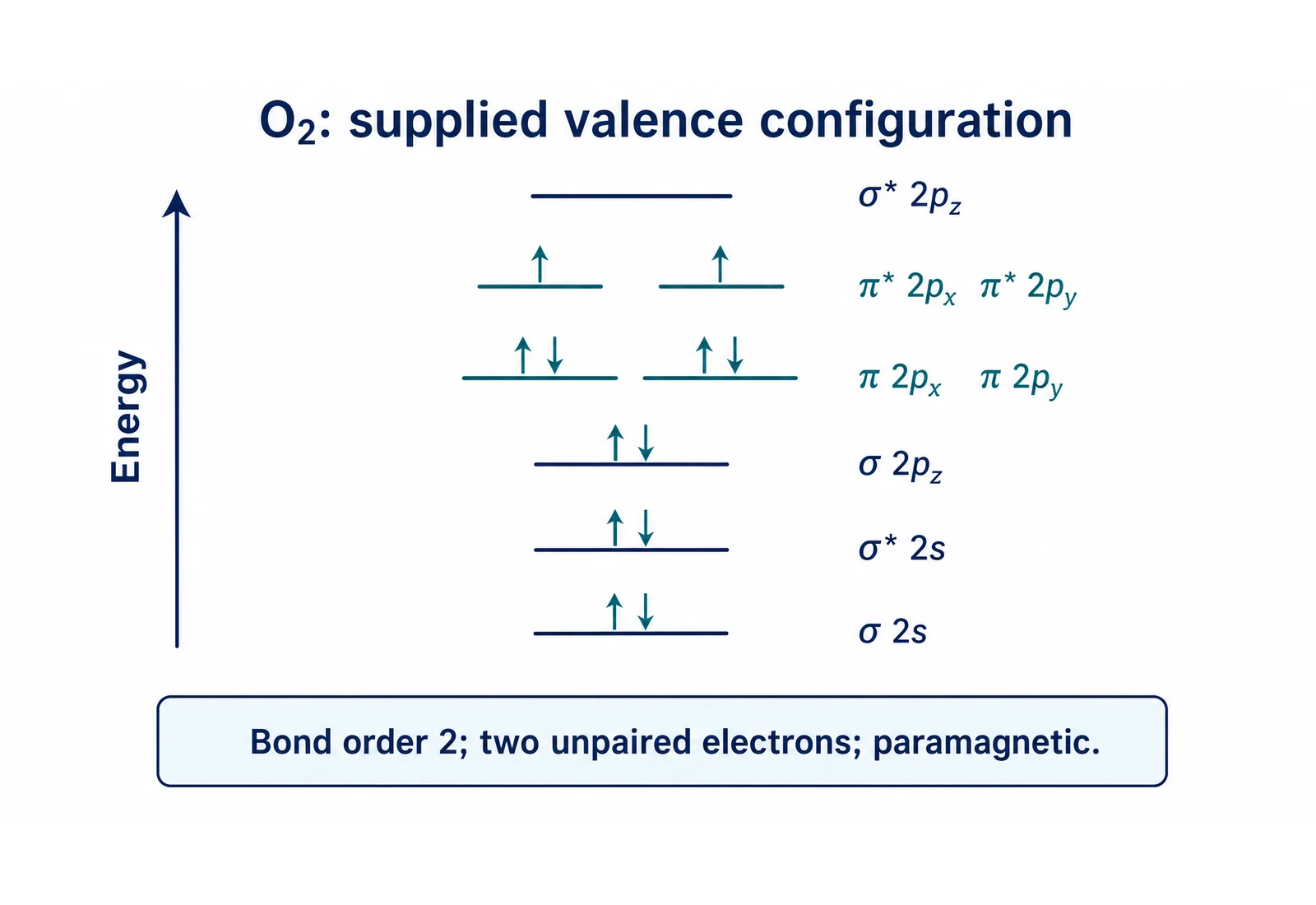
Qualitative O2 molecular orbital diagram with 12 valence electrons, two unpaired electrons, bond order two and a paramagnetic label
  • Show orbital levels and electron occupancy
  • Illustrate oxygen and nitrogen examples
  • Use supplied levels for another explanation
  • Refine labels and export

Molecular orbital diagram generator Features

Choose a structure that serves your explanation, with the labels and relationships supplied in your prompt.

Show orbital levels and electron occupancy

Give the molecular orbital diagram maker the labels, level order and electron arrangement you want. The AI figure can show energy increasing upward, bonding and antibonding levels, and arrows for supplied occupancies. A focused prompt helps keep the explanation centered on the chemical idea rather than decorative artwork. Give the molecular orbital diagram generator the levels and occupancy needed for your example.

  • List the orbital labels
  • Supply the level ordering
  • Describe the electron arrows
Try this example

Illustrate oxygen and nitrogen examples

The reviewed examples cover O₂ with 12 valence electrons and two unpaired electrons, and N₂ with ten valence electrons and paired occupancy. The mo diagram generator can use your supplied arrangement to create a teaching figure with notes such as bond order and magnetic behavior.

  • Explain supplied valence-electron arrangements
  • Distinguish paired and unpaired electrons
  • Keep molecule-specific labels clear
Try this example

Use supplied levels for another explanation

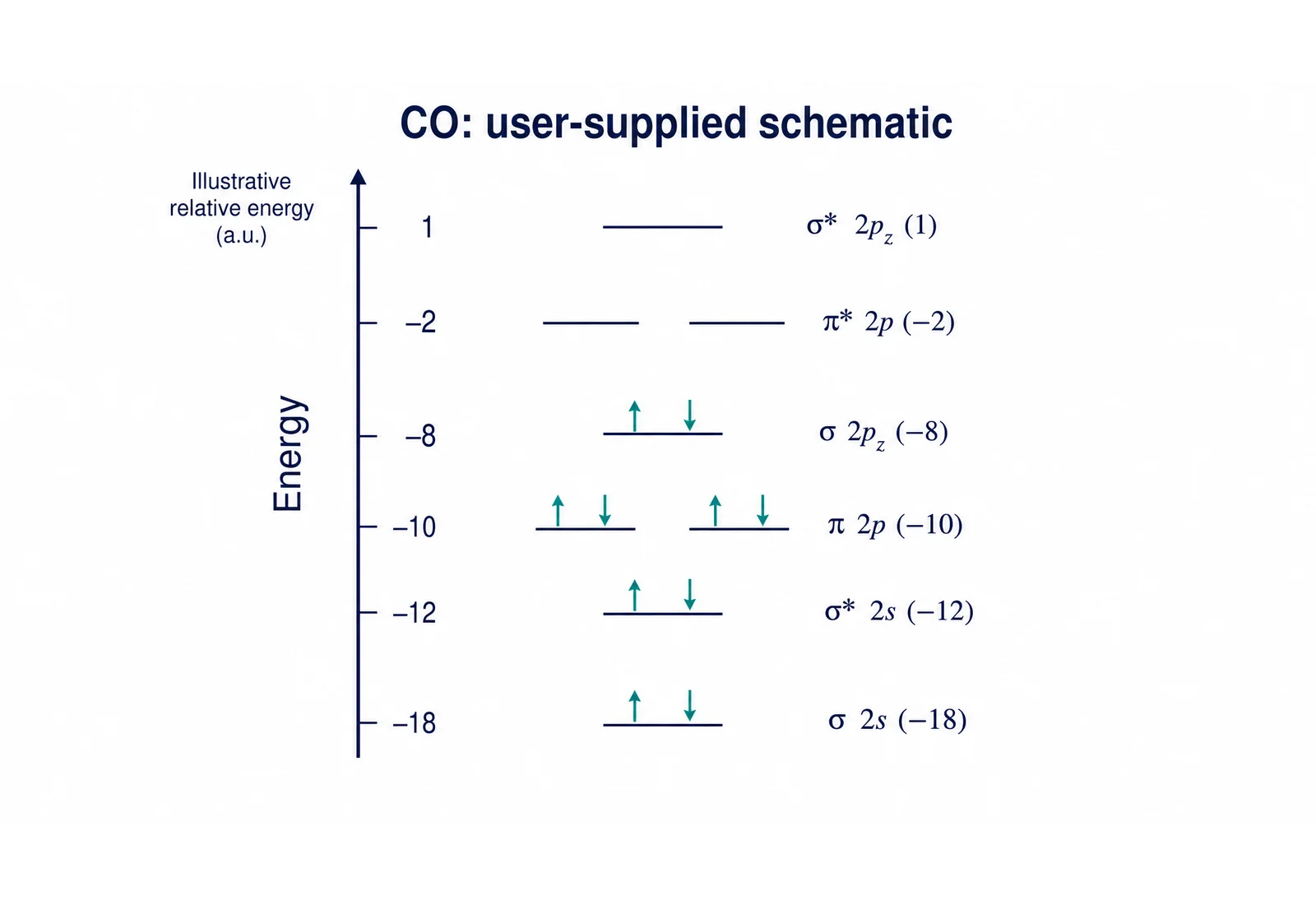
When you already have an energy-level scheme, provide the labels, ordering, units and occupancy with the prompt. The generator turns that material into a visual diagram. The supplied CO example on this page uses arbitrary units and a qualitative arrangement, so its vertical gaps are not presented as a computed energy scale.

  • Preserve user-supplied material
  • Name the units and figure purpose
  • Separate illustration from computed energies
Try this example

Refine labels and export

You can edit the generated illustration’s wording and appearance and export SVG, PNG, JPG or PPTX. Keep electron arrows and orbital names readable at the size used in your document. The molecular orbital diagram maker is useful for a figure that explains supplied chemistry, rather than a replacement for an electronic-structure calculation.

  • Adjust the figure for a slide or document
  • Keep orbital labels readable
  • Export an editable figure or image
Try this example

Molecular orbital diagram generator Steps

Start from a specific explanation, supply the details and refine the result for your document.

  1. Identify the molecule and explanation

    Name the molecule and the concept: occupancy, bonding versus antibonding, or a comparison between supplied arrangements. State which orbitals and electron assignments are given in your source notes, and identify the point you want students or readers to explain from that arrangement.

  2. Supply the orbital arrangement

    Give the level labels, their order, electron count and arrow assignments. Include any bond-order or magnetic-property labels you want the figure to carry. For a qualitative figure, describe the relative positions explicitly; for a supplied numerical scheme, provide the units and values that should be represented in the diagram.

  3. Generate the diagram

    Describe the layout and visual style, then generate through Illustration. You can open the result in the editor to refine the labels and appearance. You can retain the given electron assignments while changing spacing, colors or label placement, helping the final figure support the explanation in your chemistry document.

  4. Export for the intended document

    Choose a vector or image format for a teaching slide, worksheet or chemistry explanation. Retain the prompt and project with the figure. For a comparison, you can keep the same label style across figures so readers can connect each displayed occupancy with the corresponding arrangement in your notes.

Molecular orbital diagram generator Uses

These tasks connect a concrete input with the figure you want to explain or share.

Qualitative O2 molecular orbital diagram with 12 valence electrons, two unpaired electrons, bond order two and a paramagnetic label

Explain oxygen’s unpaired electrons

Use the supplied O₂ occupancy to show the two unpaired electrons in separate pi-star orbitals and discuss the associated paramagnetic behavior. Keep the two antibonding pi levels and their electron arrows readable, so learners can connect the supplied occupancy with the magnetic-property label shown beside the figure.

Explore this example
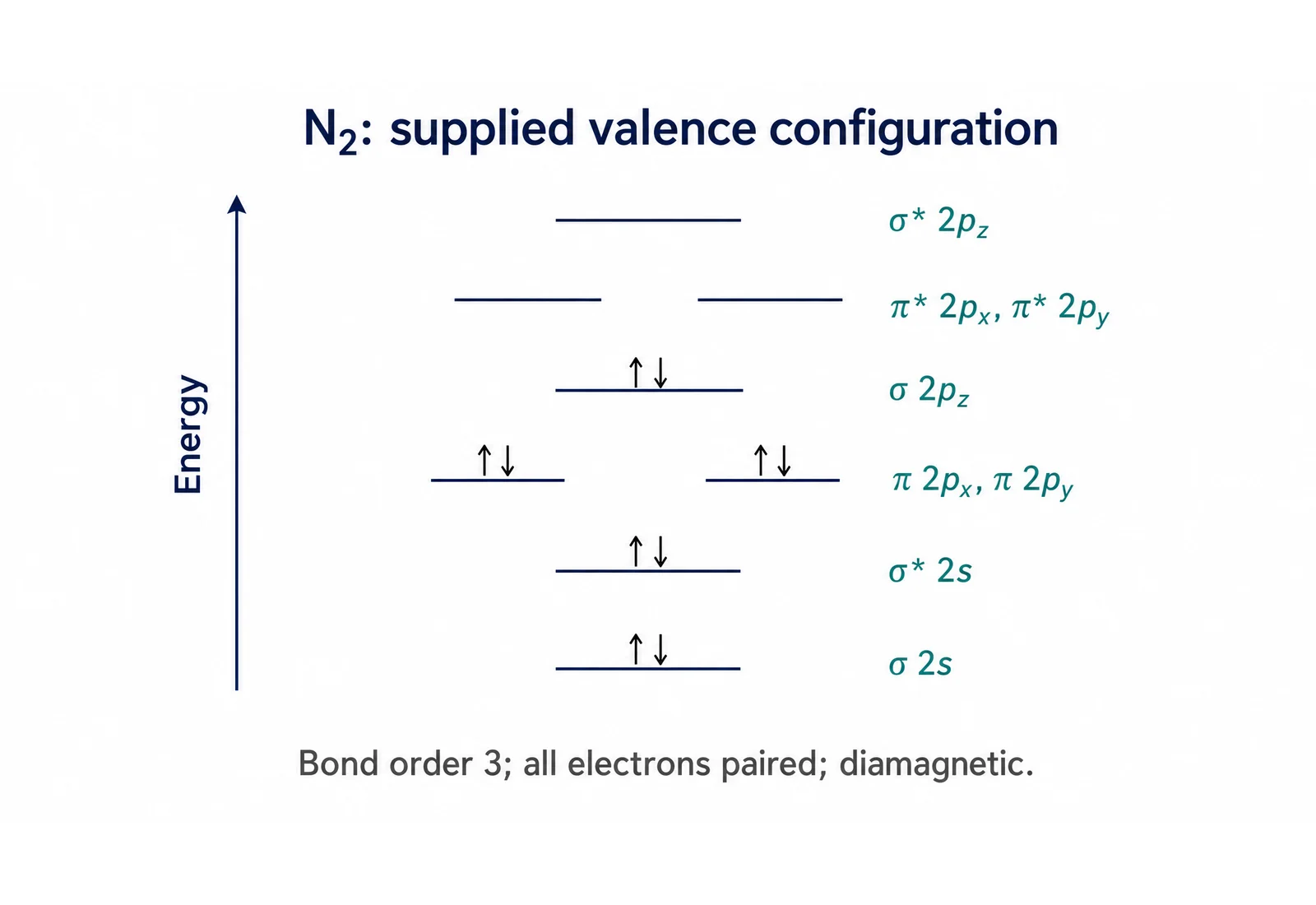
Qualitative N2 molecular orbital diagram with ten valence electrons, pi2p below sigma2p, paired occupancy and bond order three

Teach nitrogen bonding

Show the supplied N₂ level order and paired occupancy alongside a bond-order label. Keep the orbital names visible in the teaching figure. Include the supplied ten valence electrons and distinguish the occupied bonding levels from their antibonding partners, so students can follow how the displayed assignments support the explanation.

Explore this example

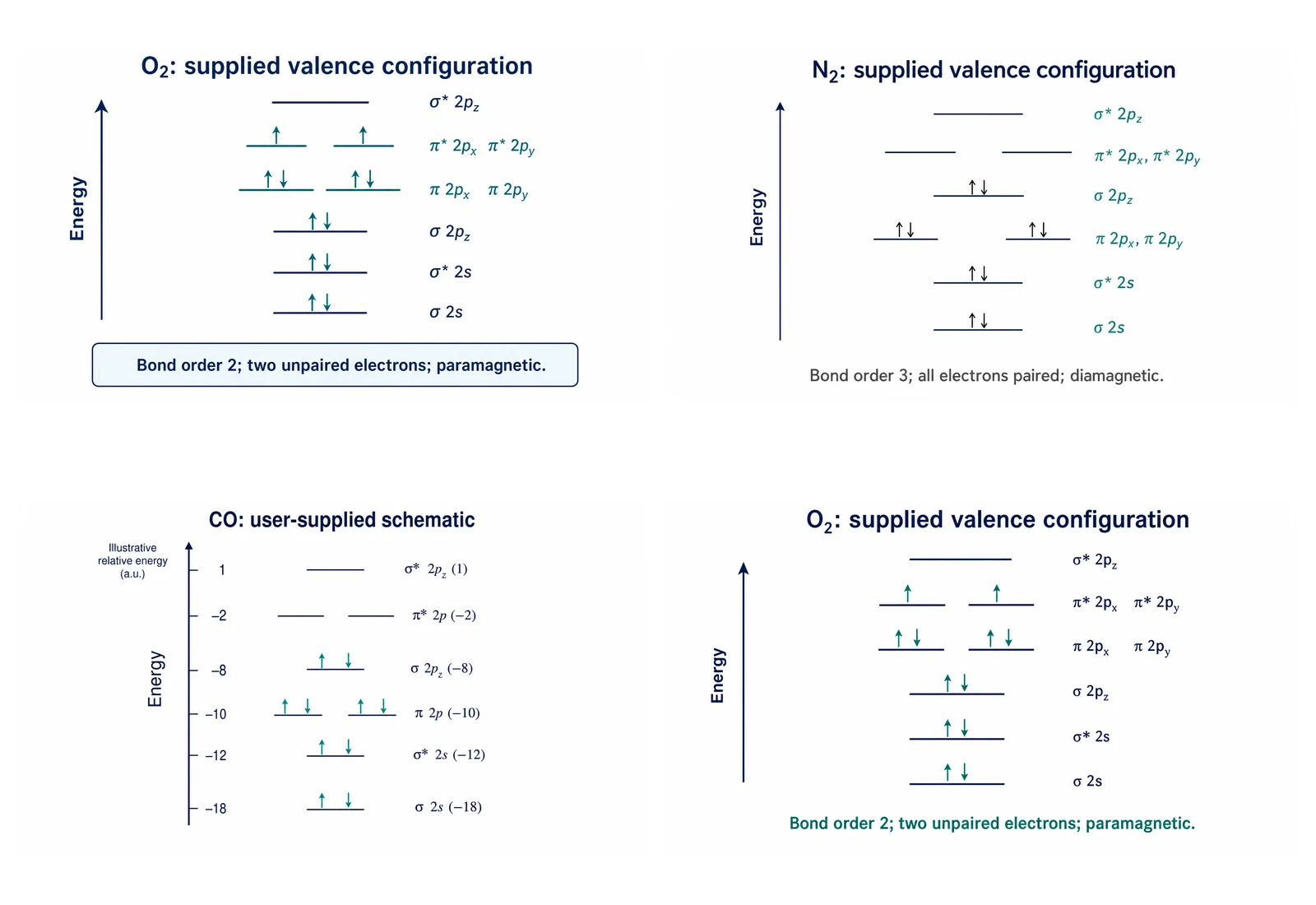
Comparison montage of reviewed oxygen, nitrogen and supplied-level molecular orbital teaching examples

Compare two supplied arrangements

Place reviewed diagrams together to discuss their different occupancies. A comparison montage supports explanation without pretending to calculate either energy scheme. Use consistent orbital names and a shared reading direction, then discuss the specific electron assignments that differ between the arrangements provided in your source material.

Explore this example
Qualitative CO example based on user-supplied orbital levels in arbitrary units, not a calculated energy scale; schematic and not to scale

Visualize a supplied energy-level scheme

Turn labels and occupancies from notes into an illustrative figure. Identify arbitrary units or a qualitative scale when those are the supplied inputs. Keep each supplied value attached to its orbital label, so a reader can relate the figure back to the original energy-level scheme without confusing illustration with measurement.

Explore this example
Reviewed oxygen molecular orbital teaching diagram with bonding and antibonding labels and electron arrows

Prepare chemistry presentation slides

Choose readable electron arrows and short orbital labels for a projected slide. You can edit the figure to match the terms used in the lesson. Place the diagram beside the relevant equation or explanation, and use consistent colors for the same orbital categories when the presentation includes several related teaching examples.

Explore this example
Qualitative O2 molecular orbital diagram with 12 valence electrons, two unpaired electrons, bond order two and a paramagnetic label

Connect orbitals to molecular structure

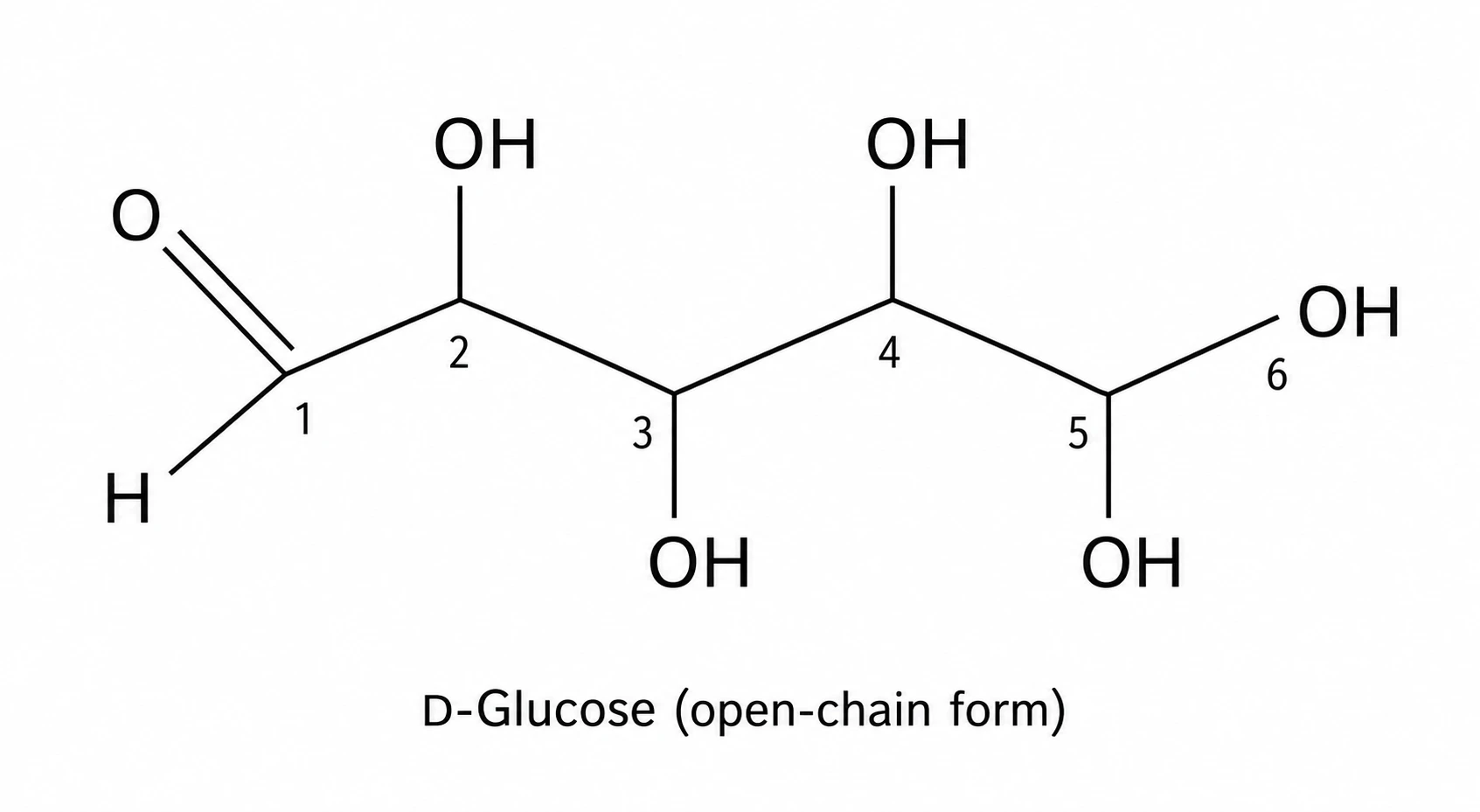
Link the orbital explanation with a separate molecular-structure diagram when a document needs both concepts. Keep the two figures’ purposes distinct. The orbital diagram explains the given electron arrangement; the structure figure shows the molecule or bonds being discussed, giving readers a complementary view in the same document.

Explore this example
Molecular orbital diagram generator Scenarios

Illustrative ways to use the tool in a lesson, report or research discussion.

I would show the O₂ occupancy beside its magnetic-property note so students can follow the role of the unpaired electrons.
Alex R.

Chemistry lecturer

These are illustrative use scenarios with fictional names, not verified customer reviews.

Free tools

A tool for every scientific figure

94 focused generators for the scientific figure you need — each opens in the right workspace with a matching example.

Molecular orbital diagram generator Questions

1.

2.

3.

4.

5.

6.

Call to action background

Turn your explanation into a figure

Molecular orbital diagram generator: Create Your Figure

Create your figure

Free to start · No credit card required · Built for researchers