
Free Multi-Layer Pie Chart Maker
Generate a multi-layer pie chart in seconds — nested rings, concentric segments, and double pie comparisons with clean labeled slices for hierarchical data and reports.
Start with up to 150 free credits|No credit card required
Get up to 250 free credits on day one when you join through an invite.
Updated
Free Multi-Layer Pie Chart Maker— templates & examples
Everything you need to build your multi-layer pie chart
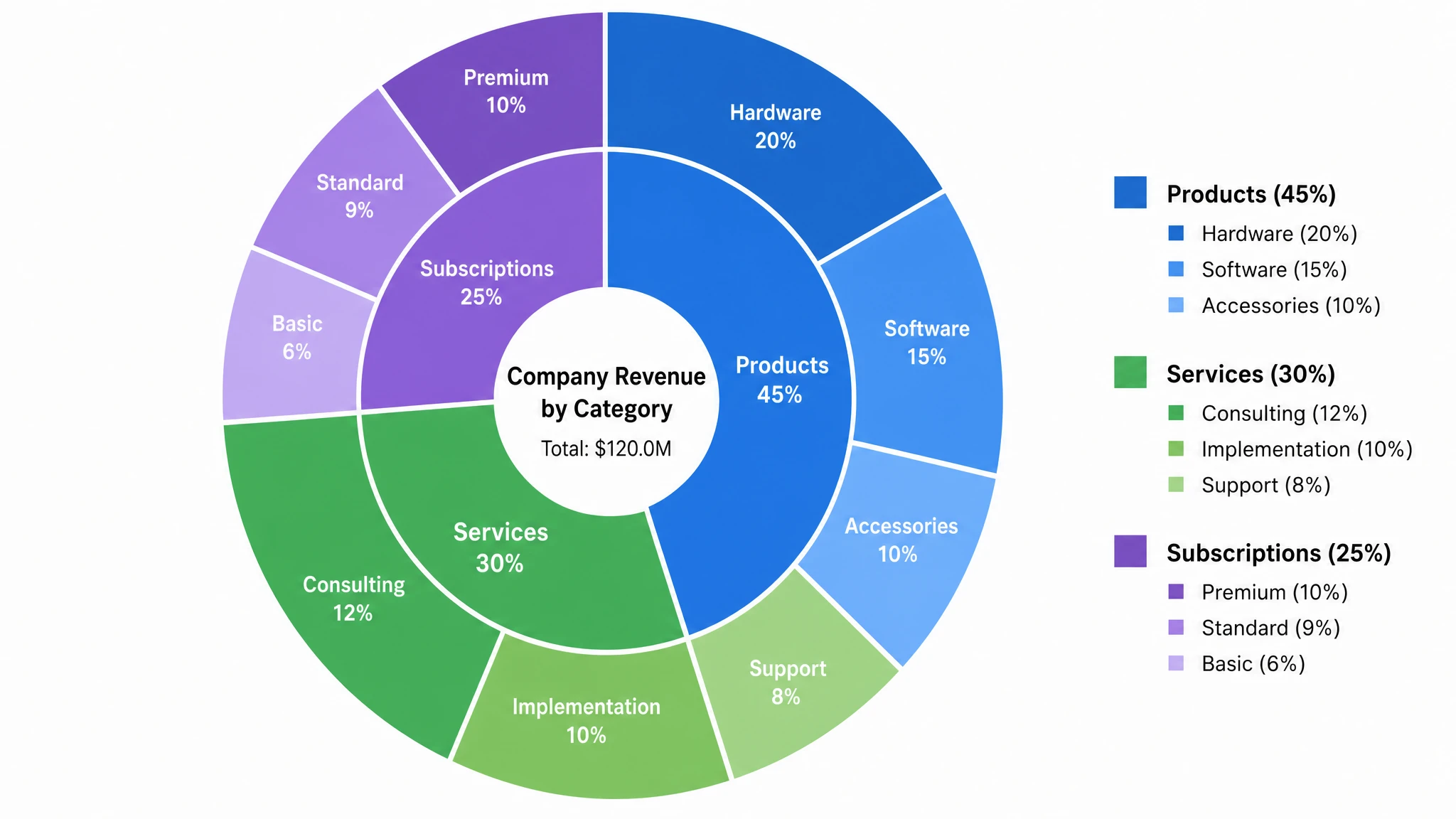
Nested rings from hierarchical data
Upload or paste a table with a parent category, a subcategory and a value for each row, and SciFig DataChart draws a two-ring nested pie chart from the exact numbers. The inner ring shows each parent's share of the grand total, every outer slice sits inside its parent's angle, and repeated rows are summed. Category names and values are listed in the legend, and percentages are repeated inside slices large enough to hold them. To sketch an explanatory figure from totals you have already calculated, describe the rings and labels to this multi layer pie chart maker in SciFig AI Illustration instead.
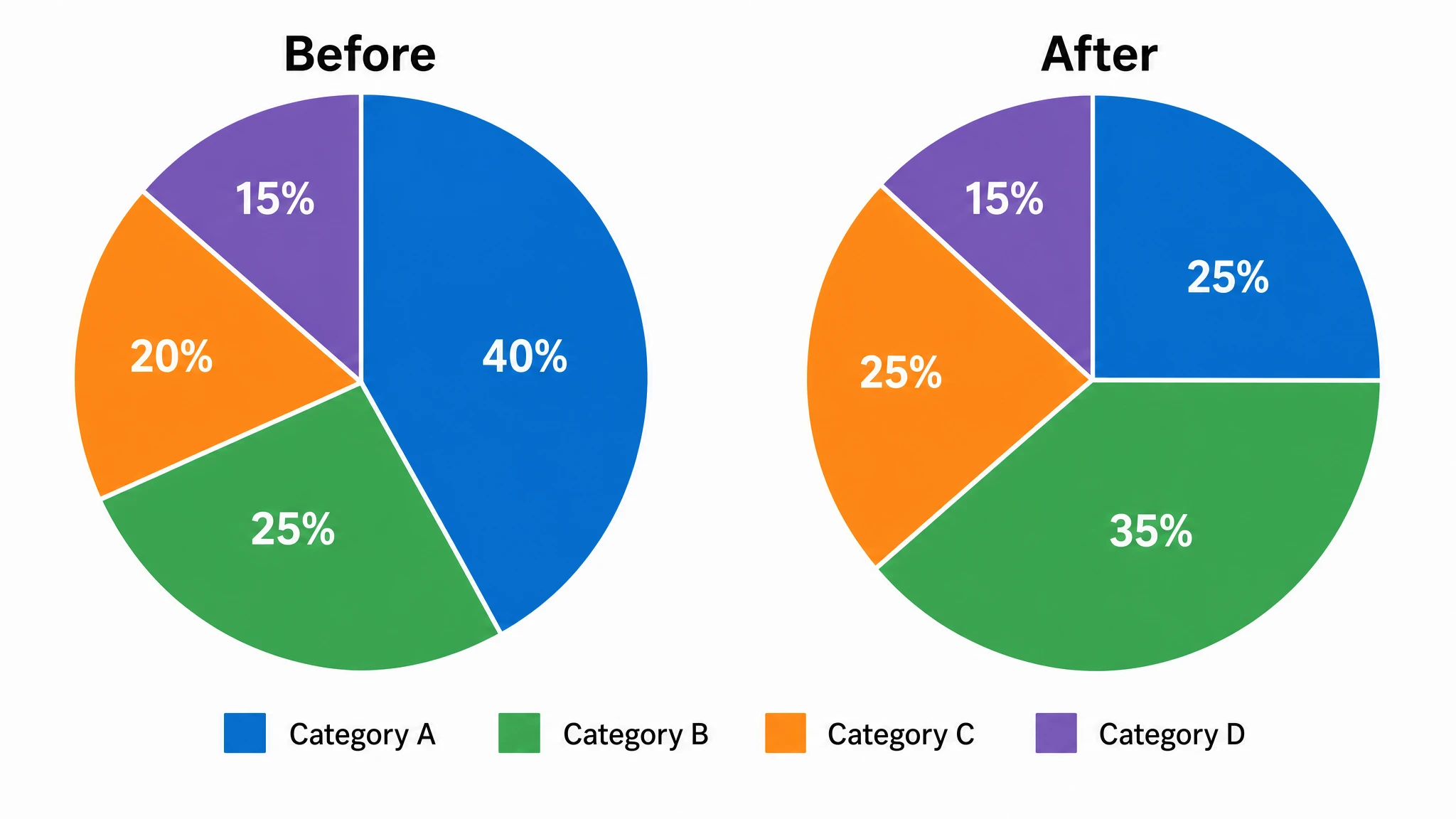
Double pie charts for comparison
A double pie chart places two pies side by side to compare datasets or time periods, while a nested pie chart uses concentric rings to show subdivisions. Use SciFig AI Illustration to create the comparison from your category values, denominators and color legend.
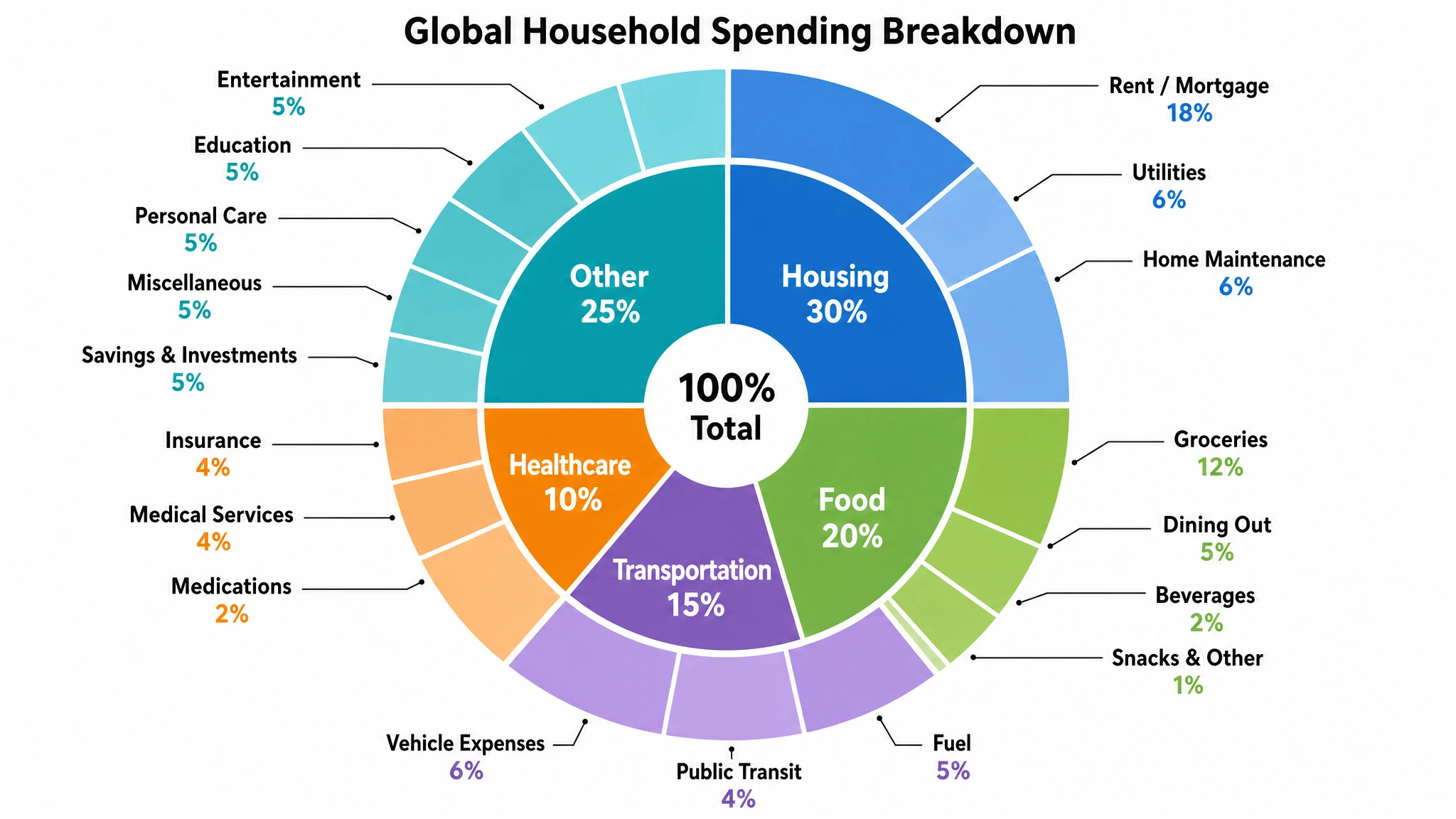
Readable labels at every layer
More rings means more slices, so legible labeling is critical. SciFig positions labels inside or beside each segment, adds leader lines for thin outer slices, and lets you show category names, percentages, or raw values. The result is a fully labeled multi-layer pie chart — whether a compact nested pie chart or a deep sunburst chart — that stays clean enough for reports, slides, and publication-ready figures.
What is a multi-layer pie chart?
A multi-layer pie chart is a circular chart built from two or more concentric rings, where each ring breaks a category from the layer inside it into finer subcategories. Also called a nested pie chart, double pie chart, or sunburst chart, it is ideal for showing hierarchical data in one compact figure. SciFig's multi layer pie chart maker turns your categories and values into a fully editable figure with labeled slices, so you can compare proportions across layers.
Why use a multi-layer pie chart
- A multi-layer pie chart shows part-to-whole relationships at several levels of detail in a single compact figure
- Concentric rings reveal how each top-level category divides into subcategories without a second chart
- A nested pie chart keeps hierarchical data together, so viewers see parent and child proportions at once
- Color-coded layers make patterns across categories easier to spot than rows in a table
- A double pie chart places two datasets side by side for fast before-and-after or group comparisons
- Labeled slices and a sunburst layout scale to three or more levels without overwhelming the reader
- Editable figures let you update categories or values without rebuilding the entire chart
Parts of a multi-layer pie chart
- Inner ring — the top-level categories that account for the whole, sized by their share of the total
- Outer rings — concentric segments that break each inner category into its subcategories
- Concentric segments — wedges aligned across rings so every child slice sits within its parent angle
- Slice labels — category names, percentages, or values placed in or beside each segment
- Leader lines — thin connectors that keep labels readable for small outer slices
- Color legend — a shared key that ties colors to categories across all layers
- Center hub — an optional open center that turns the chart into a multi-ring donut or sunburst
Where multi-layer pie charts are used
- Business reports breaking revenue down by region and then by product line
- Survey analysis showing responses grouped by segment and then by answer choice
- Budget presentations splitting spending by department and then by line item
- Research figures displaying sample composition across nested classification levels
- Dashboards comparing two periods with a double pie chart of key proportions
- Education materials that teach hierarchy and part-to-whole reasoning with concentric pie charts
- Slide decks needing one compact figure instead of several separate pie charts
How to make a multi-layer pie chart
Upload your table
Upload a CSV or Excel file with the measurements and column names needed for your chart.
Set up the chart and analysis
Choose a chart type, then set the column mapping, units, filters and statistical options; SciFig DataChart plots every value from your table.
Download your results
Export the chart and analysis files, or convert the result to SVG for editing in SciFig Vector Canvas.
Free Multi-Layer Pie Chart Maker — Frequently Asked Questions
Common questions about Free Multi-Layer Pie Chart Maker.
More tools

Circuit Diagram Maker
Draw electronic circuit schematics

Free Body Diagram Generator
Show forces acting on an object

Graphical Abstract Maker
Summarize your study in one panel
SciFig
Free AI Scientific Figure Generator for Illustrations, Images, Charts and Flowcharts
Models
Default to GPT Image 2 for journal papers; switch to Nano Banana Pro for slides and posters; pick Nano Banana 2.1 for routine figure work
Tutorials
Seven short walkthroughs of the AI scientific figure generator
Blog
Tutorials, tool comparisons, and publication tips for researchers.
Inspiration
Explore publication-ready illustrations, charts and flowcharts. Copy a prompt or open any template as the starting point for your own figure.
Pricing
View pricing

Ready to publish?
Make your own multi-layer pie chart in minutes.
Start for freeFree to start · No credit card required · Built for researchers