
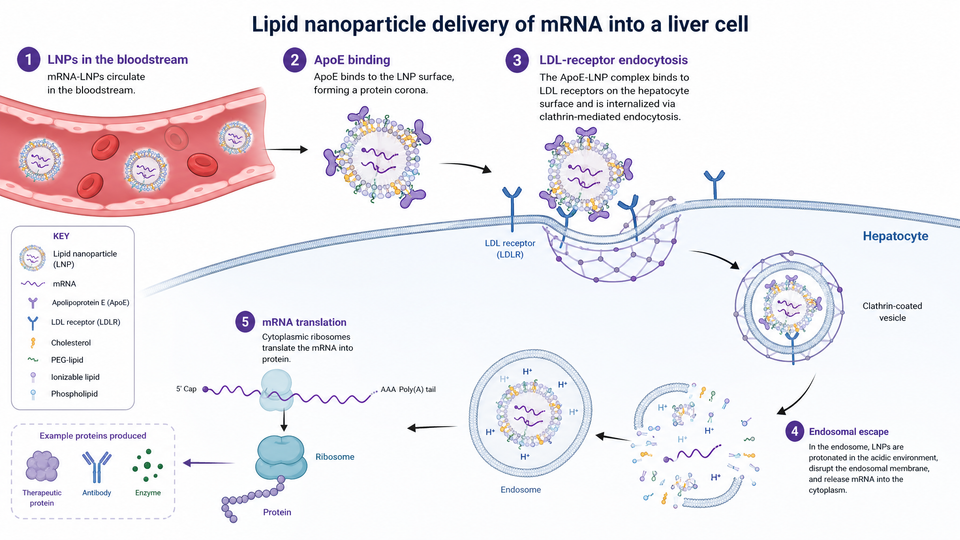
SciFig AI Illustration
Turn text, sketches, reference images, PDFs or photos into scientific illustrations. Refine a selected region, correct labels, adjust colors and continue in Vector Canvas.
Open workspaceBuilt for research communication
SciFig brings SciFig AI Illustration (AI scientific illustration), SciFig DataChart (data-driven charts) and SciFig FlowChart (flowcharts and diagrams) into one platform. Start with your own ideas, references or data, generate an editable figure, then refine every detail and export.
Researchers need more than a first image. Figures change as a project develops: labels need corrections, data needs checking, and layouts need refinement. SciFig has grown from separate illustration tools into three connected workspaces that support this process.
Choose the starting point that fits your material.
Turn text, sketches, reference images, PDFs or photos into scientific illustrations. Refine a selected region, correct labels, adjust colors and continue in Vector Canvas.
Open workspace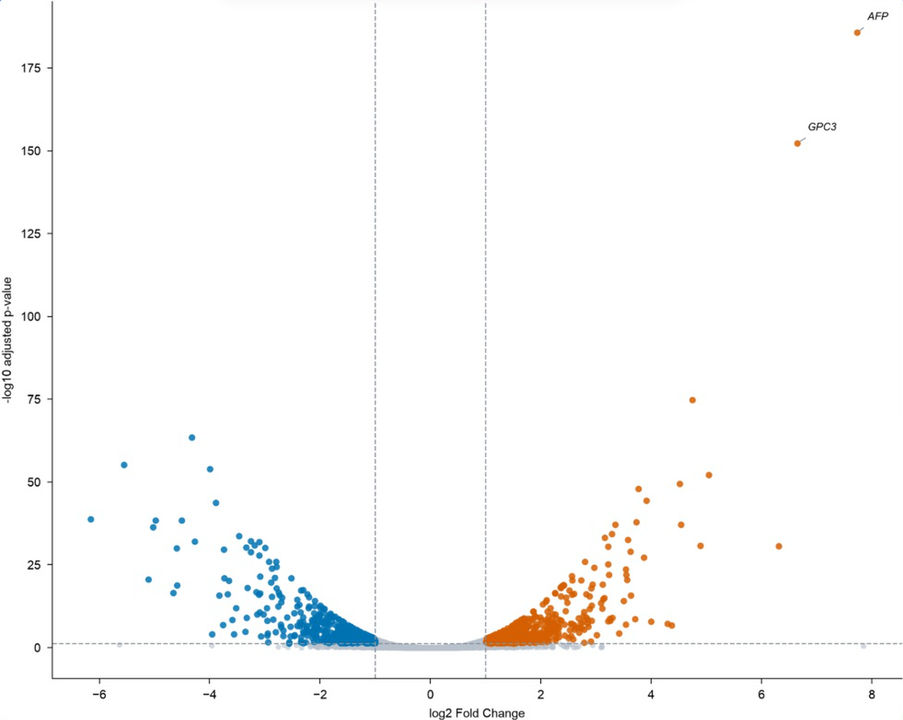
Build accurate charts from your own dataset: SciFig DataChart plots every value from your file, and you refine the presentation by request or download the Python code behind the chart.
Open workspace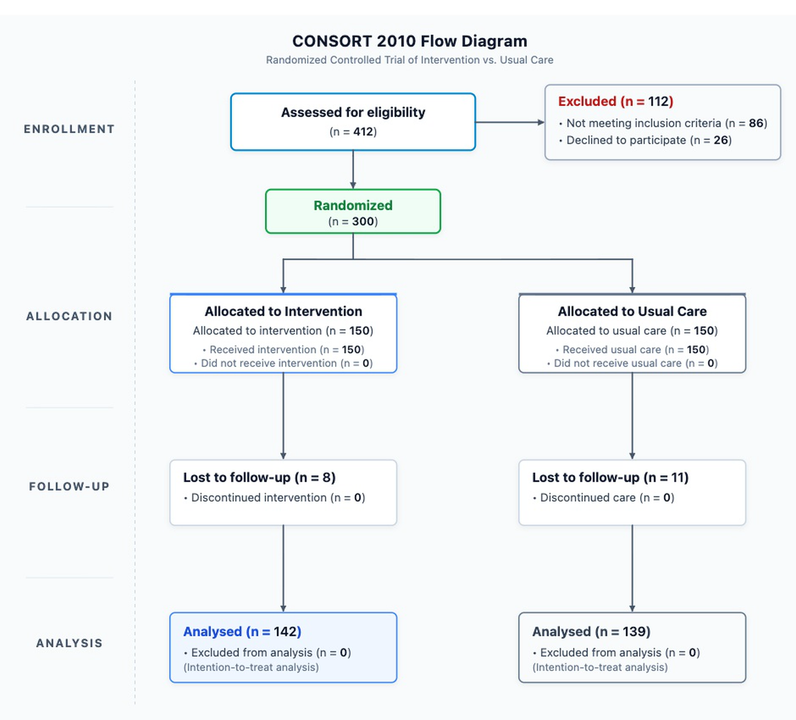
Explain a method, study design or process as a native SVG diagram, with every node, connection and label editable.
Open workspaceFrom your material to an editable, export-ready figure.
Start with a research idea, reference, dataset or workflow. Check that you have permission to use each input.
Pick the workspace and input mode; SciFig generates an editable figure.
Refine labels, units, relationships and visual clarity in place. SciFig AI Illustration includes regional edits, text and color changes, white backgrounds, enhancement, upscaling and SciFig Vector Canvas.
Choose an available format for the workspace and export your figure for publication or presentation. You can download a license PDF for free.
Built around your expertise — every element stays editable.
SciFig DataChart plots every value from your file and SciFig FlowChart takes its counts from your description, while every illustration label stays editable for your expertise.
An explanatory illustration is not an original research image. SciFig DataChart plots the data you provide, so keep your source data alongside the chart.
Record the tools, inputs and relevant editing steps. You can refer to SciFig’s citation templates for citation and AI disclosure; journal requirements vary.
SciFig is an independently developed product. Alex Carter is the named founder and editorial contact for our journal guides. We publish practical guidance with sources and limits, rather than claiming that AI can guarantee scientific accuracy or publication.

Founder and independent developer
Alex Carter develops SciFig and maintains its scientific poster and research presentation templates. He is responsible for the editorial standards of SciFig journal guides: checking sources, explaining what has been verified, and making the limits of each analysis clear.
Explore the project, download templates, prepare figure prompts with our companion skill, and connect AI assistants through the official MCP plugin.
See how illustrations, charts and graphs, and flowcharts fit into a research workflow. Explore demonstrations, starter examples and product updates.
Explore the projectBrowse the editable PowerPoint collection by poster size and presentation scenario, with previews and instructions.
Browse templatesConnect your AI assistant to SciFig to create scientific illustrations, charts and graphs, and editable flowcharts, then refine and export the results with your SciFig account.
Explore the official pluginAn open-source companion for agents that helps structure a research idea and prepare a figure prompt. Generation depends on the tools configured in your agent.
View the skillBring SciFig AI Illustration, SciFig DataChart and SciFig FlowChart into your research workflow through the public API and remote MCP server. Generate, edit and export with the same SciFig account and credit balance.
Prepare a citation, find official materials for an introduction, or explore our existing Scholars Program. Each resource explains its own conditions.