What program should you use for scientific drawing? Compare the 10 best scientific illustration tools in 2026, free and paid, from AI generators to Illustrator.
SciFig Team
SciFig editorial team
Scientific publishing in 2026 has become unforgiving about visuals. Journals that once accepted hand-drawn schematics now mandate vector-ready, color-profiled figures that survive 600 dpi print reproduction. Reviewers expect pathway diagrams, experimental workflows, and data visualizations to be clear enough to understand at a glance — and editors will desk-reject manuscripts whose figures fall below bar. Meanwhile, research budgets are tighter than ever, postdoc positions come with zero design budget, and submission deadlines have not gotten any more forgiving. The gap between what science demands visually and what most researchers can produce by hand has never been wider.
The good news: the scientific figure tooling landscape has expanded dramatically. Between mature vector editors, biology-specific icon libraries, and a new wave of AI-powered scientific figure generators, there are more ways to produce publication-quality figures than ever before. The hard part is picking the right scientific figure tool for your specific workflow, skill level, and budget.
This guide covers the 10 best scientific illustration tools available in 2026 — AI figure platforms, dedicated scientific illustration tools, general vector editors, and domain software, the programs for scientific illustration that researchers actually use — with honest assessments of who each scientific figure tool is actually built for.
Quick Answer: What Program Should You Use for Scientific Drawing?
There is no single best software for scientific figures, and no one answer to which software is best for scientific illustrations; the right program depends on the figure you need to draw:
Choose SciFig if you want one place for scientific illustrations, data charts and flowcharts. Describe a mechanism, upload a sketch or reference image, and SciFig AI Illustration generates the figure and can vectorize it into editable SVG; upload a CSV or Excel table and SciFig DataChart draws an accurate chart from your numbers; describe an experimental workflow and SciFig FlowChart builds a diagram where every box and arrow can be edited. Free to start, no card required: 3 figures on day one and up to about 44 in your first month, with free editing and SVG, PNG and PPTX export. A free publication license PDF covers publication and commercial use of figures you create in SciFig.
Choose BioRender if you prefer assembling life science figures from a large pre-drawn icon library.
Choose Adobe Illustrator or Inkscape if you want to draw and refine every vector path yourself, the way a professional scientific illustrator works. Inkscape is the free option.
Choose PowerPoint if you need a quick box-and-arrow schematic with zero onboarding.
Choose ChemDraw if your figure is built around chemical structures and reaction schemes.
Choose GraphPad Prism if you are plotting measured data and running the statistics in the same program.
If you are looking for the best free tools to make scientific images, start with SciFig: daily free check-in credits cover generation, and the vector canvas, SciFig DataChart, SciFig FlowChart and SVG/PPTX export let you finish the figure in one place. Inkscape and SciDraw are the manual free options if you prefer to draw everything yourself.
The Scientific Visualization Landscape in 2026
For most of the past decade, scientific illustration tools fell into two rough camps: specialized bio-art software (think BioRender-style drag-and-drop icon libraries) and general-purpose vector editors (Adobe Illustrator, Inkscape) that researchers repurposed for figure work. Both camps required significant time investment — either learning a library's specific icon vocabulary or mastering bezier curves and layer management.
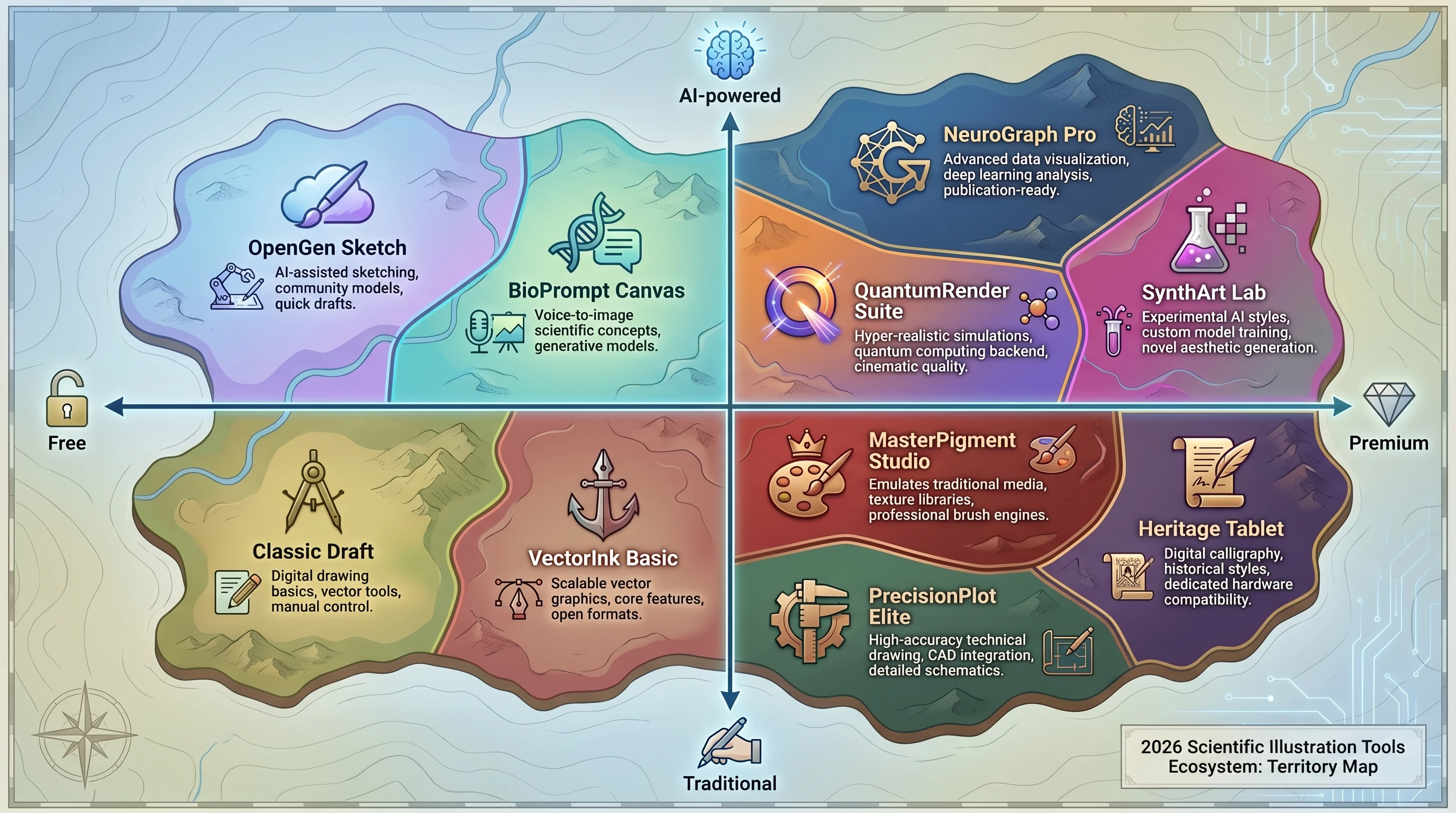
2026 scientific figure tools landscape map: 10 tool territories arranged by axes AI-powered vs Traditional and Free vs Premium (Figure generated with SciFig)
The past two years introduced a genuine third category: AI-native illustration tools that accept natural language descriptions and return complete figures. These are not simple clipart generators; the best ones understand domain-specific terminology, common experimental design conventions, and journal formatting requirements. They have begun to close the gap between "what a researcher can describe" and "what a professional scientific illustrator would produce."
As of 2026, the choice is no longer purely traditional vs. AI — it is about matching the tool's strengths to your specific figure type, deadline, and skill set.
1. BioRender
Best for: Life science researchers who need standardized, professional-looking biological figures quickly.
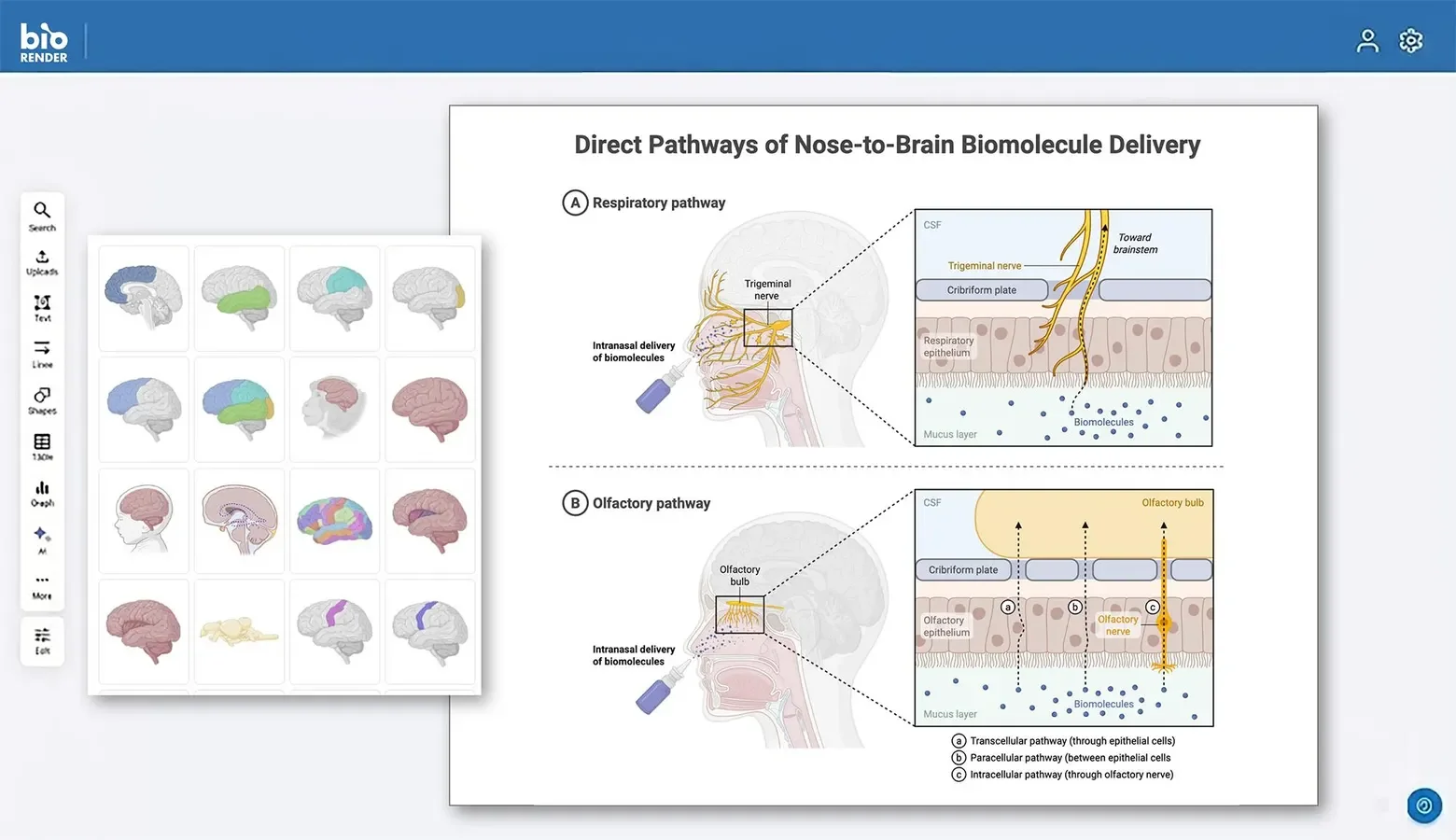
BioRender remains the dominant tool for cell biology, molecular biology, and biomedical scientific figures. Its core value proposition is a curated library of over 50,000 pre-drawn scientific icons — organelles, proteins, cells, lab equipment, model organisms — maintained to a consistent visual style. Researchers drag icons onto a canvas, arrange them into pathways or experimental workflows, and export figures that look professionally made without requiring any drawing skill.
BioRender interface
Pros:
Enormous, well-organized icon library covering most of life science
Consistent visual style across all elements
Built-in publication licensing (important for journal submission)
Active community templates to accelerate common figure types
No design skill required
Cons:
Icons are standardized, which means figures can look generic or interchangeable across papers
Limited to the biology domain — not suited for chemistry, physics, or engineering figures
Subscription required for publication use; free tier is non-commercial only
Figures are built mainly from library icons, plus images and icons you upload
Pricing: The academic Individual plan is $35/month billed yearly, with publication rights; the free plan includes limited AI credits for flat figures, and full AI-assisted generation is an add-on from $4/month billed yearly ($5 monthly) for academic users. Lab and institution plans are available for groups.
2. Adobe Illustrator
Best for: Researchers or science communicators who need maximum creative control and have time to invest in learning the tool.
Adobe Illustrator is the industry-standard vector editor, used by professional scientific illustrators, graphic designers, and publishers. Every element in an Illustrator file is a mathematically precise vector object — infinitely scalable, print-ready at any resolution, fully editable at the node level. For complex figures that demand custom artwork, precise typography, or non-standard visual styles, Illustrator remains the gold standard.
Pros:
Unmatched precision and creative flexibility
Output is publication-ready at any scale
Extensive ecosystem of plugins, brushes, and scientific drawing resources
Industry-standard file formats (SVG, AI, PDF, EPS) are universally accepted
Powerful typography tools for figure labels and legends
Cons:
Steep learning curve — productive use requires weeks of practice, mastery takes months
Expensive subscription with no perpetual license option
No domain-specific scientific content; you build everything from scratch or from external assets
Overkill for straightforward schematic figures
Pricing: Available as part of Adobe Creative Cloud at approximately $264/year for a single app, or bundled with the full CC suite.
3. SciFig
Best for: Researchers who want editable, publication-ready illustrations, data charts and flowcharts from a description, their own data, or a sketch — without learning any design software.
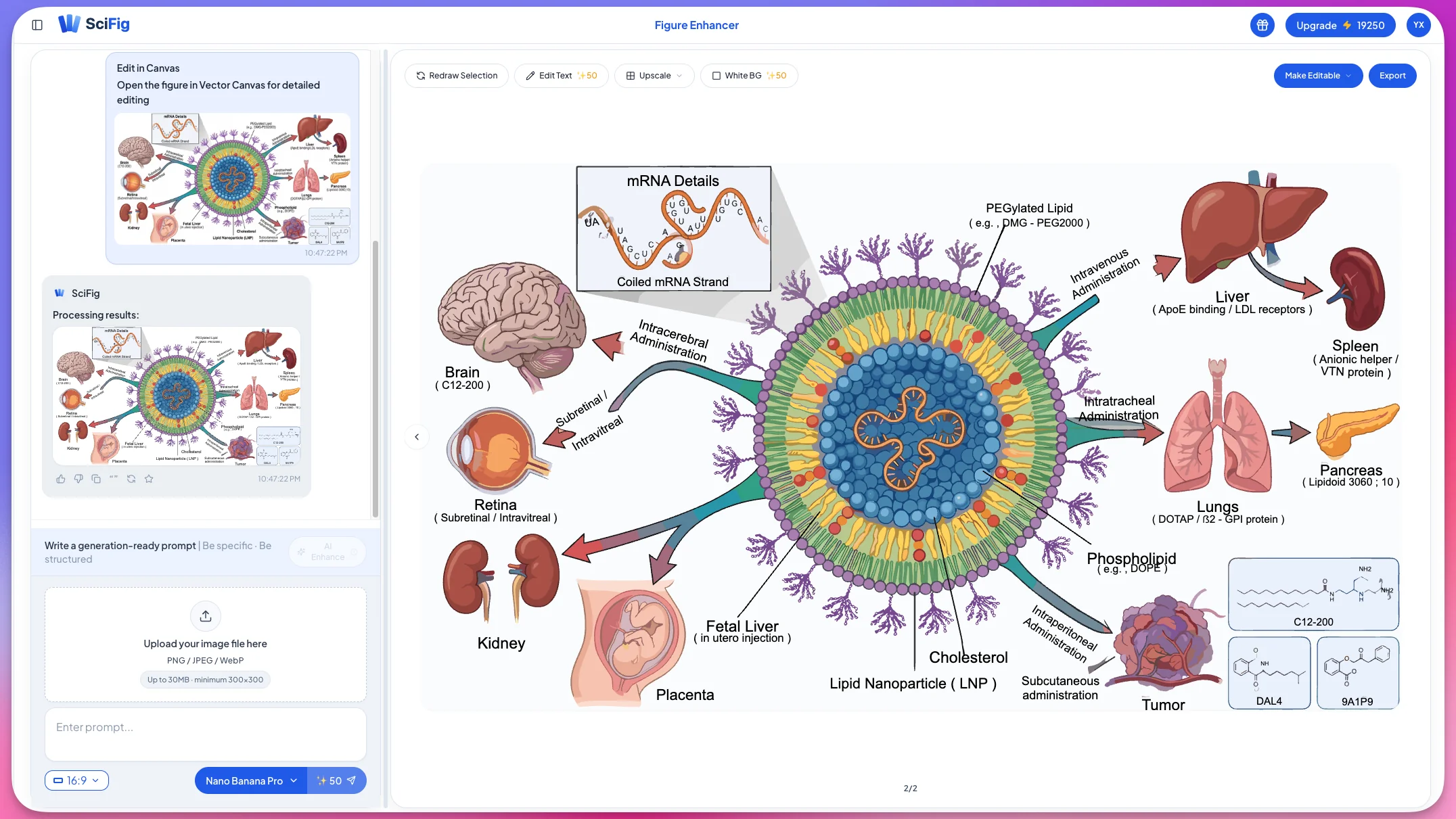
SciFig is an AI-native scientific figure platform built specifically for the research workflow. Rather than dragging icons or manipulating bezier curves, users describe the scientific figure they need in plain language — "a diagram showing CRISPR-Cas9 cutting a DNA double helix with a guide RNA" — and the AI text-to-figure generator produces a complete, domain-accurate illustration. The platform understands scientific terminology across biology, chemistry, physics, and medical research. For a tutorial on generating a specific figure type end-to-end, see our cell signaling pathways walkthrough.
SciFig AI figure generation
Available workflows:
SciFig is an all-in-one platform: SciFig AI Illustration (AI scientific illustration) creates mechanism and concept figures from descriptions, sketches, or reference material and can vectorize them into editable SVG; SciFig DataChart (data-driven charts) turns your own table into an accurate chart; SciFig FlowChart (flowcharts and diagrams) draws workflows and structure diagrams as native, editable SVG.
Choose by task:
SciFig AI Illustration — mechanism, pathway, and concept figures generated from text, a sketch, or a reference image, then vectorized into editable SVG in the vector canvas, where you can change any label, colour or shape
SciFig DataChart — upload your CSV or Excel data and get an accurate scatter plot, box plot, heatmap or other chart with statistics, plus the plotting Python code to reproduce or customize it, via the AI chart generator
SciFig FlowChart — describe an experimental workflow or model and get a clean diagram as native SVG, with every box, label and arrow editable, via the text-to-diagram generator
Pros:
Free to start, no card required: 150 credits on day one (3 figures), daily check-in credits that grow with your streak (up to 150 a day) — up to about 44 figures in your first month; invite a friend and you both get 200 more credits
Editing, saving, and export are free — edit paths, text, and colors on the canvas and export SVG, PNG, JPG, or PPTX without spending credits
Not limited to a fixed icon catalog, so it covers biology, chemistry, physics, and medical topics
Failed generations are refunded automatically
A free one-page publication license PDF grants non-exclusive, worldwide, perpetual rights to publish and commercially use figures created or edited in SciFig
Cons:
Not a chemical structure editor: if you need machine-readable structures (SMILES or MOL), draw them in ChemDraw or a free alternative and bring the SVG into your SciFig figure
Pricing:Free to start, no card required:150 credits on day one (3 figures), daily check-in credits that grow with your streak — ×2 on day 3 and ×3 on day 7 of each week, up to 150 a day — for up to about 44 figures in your first month. Invite a friend and you both get 200 more credits. You retain ownership of your generated figures and have publication and commercial use rights.
SciFig also offers paid plans that unlock higher output, more advanced editing and stronger AI capabilities. Starter is $8.33/month with a yearly subscription ($100/year); students, educators and researchers get an extra 20% off one new purchase, on top of yearly savings; and paid credits never expire — unused paid credits roll over, and you keep them even after you cancel. See pricing for details.
See AI Scientific Figure Generation in Action
Watch how researchers create publication-ready scientific figures from text descriptions.
Best for: Researchers creating infographic-style summaries, graphical abstracts, and science communication content.
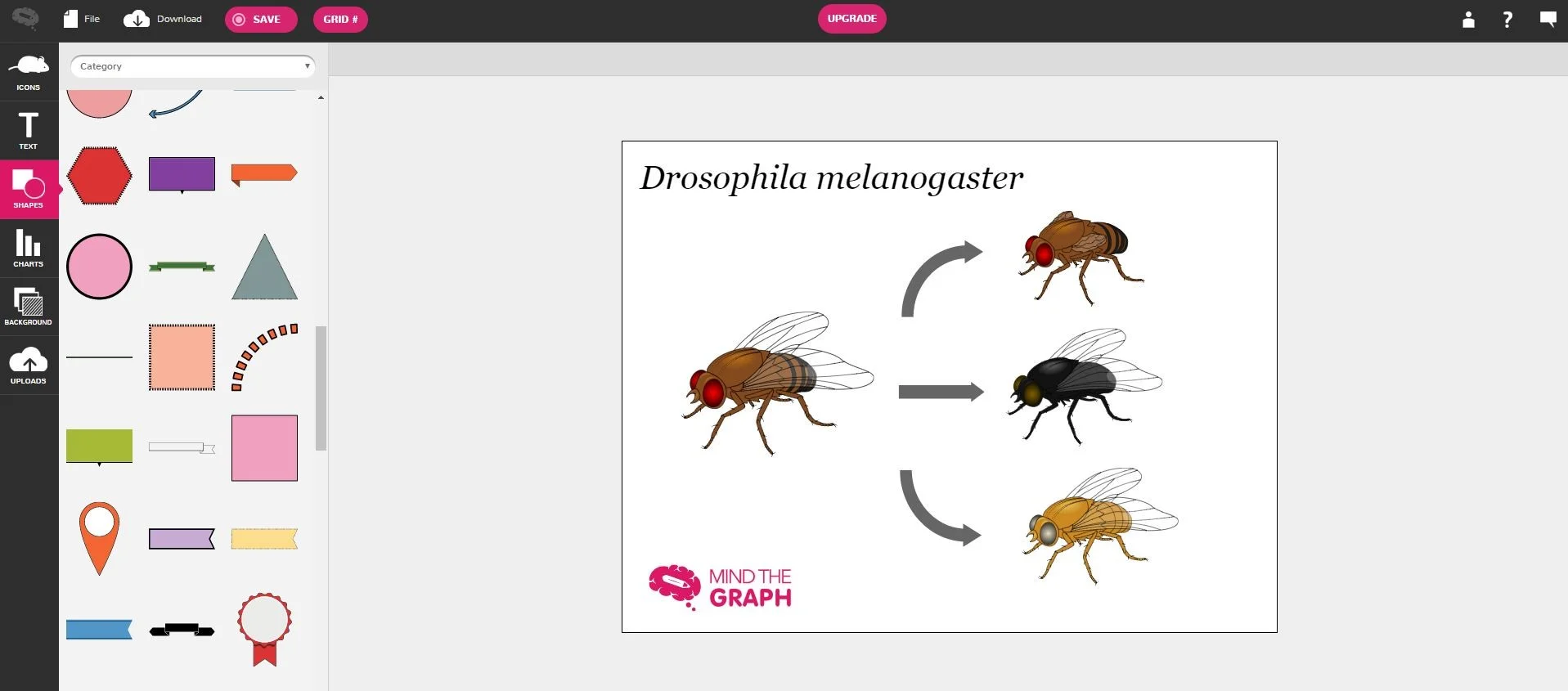
MindTheGraph occupies a niche between BioRender and general infographic tools. It offers a library of illustrated scientific icons combined with a layout system designed specifically for graphical abstracts, poster figures, and visual summaries intended for non-specialist audiences. If your goal is a shareable figure for social media, a conference poster's visual summary, or a journal's graphical abstract requirement, MindTheGraph's templates are well-calibrated for that use case.
MindTheGraph interface
Pros:
Templates designed specifically for graphical abstracts
Good balance between visual polish and ease of use
Icons span multiple scientific domains
Supports team collaboration on figures
Cons:
Less suited to detailed mechanistic or technical diagrams
The infographic aesthetic may not match all journal figure conventions
The full icon library is part of its subscription plans
Pricing: Free tier available; paid plans start around $49/month or are available annually at a discount.
5. PowerPoint
Best for: Quick schematic figures, presentation slides, and researchers who need zero onboarding.
PowerPoint deserves an honest place on this list because a significant portion of figures in published papers are made with it — and for good reason. Its shape tools, SmartArt diagrams, and basic drawing capabilities are sufficient for flow charts, simple pathway schematics, and experimental design overviews. Every researcher already has it. There is no onboarding curve. For figures that are primarily boxes, arrows, and text labels, PowerPoint is often the fastest option.
Pros:
Zero learning curve for most researchers
Already installed and licensed for most academic users
Sufficient for flow charts, simple schematics, and process diagrams
Easy to iterate and share with collaborators
Cons:
Raster export at low default DPI — requires careful settings for print-quality output
Not a true vector editor; complex figures degrade when scaled
Limited precision for detailed illustrations
Figures often have a visually generic "PowerPoint look" that reviewers may notice
Pricing: Included in Microsoft 365, which most academic institutions provide free or at low cost.
6. SciDraw
Best for: Researchers on a tight budget who need specific, reusable scientific figure components.
SciDraw (scidraw.io), the community library — not the AI site sci-draw.com — is a community-maintained repository of free, publication-quality SVG illustrations covering neuroscience, biology, chemistry, and related fields. Rather than generating figures, it provides a library of peer-contributed vector assets that researchers can download, customize, and incorporate into their figures. The quality is high because contributors are typically researchers themselves, and SVG files are fully editable in any vector editor.
SciDraw repository
Pros:
Completely free, with open licensing for most assets
High-quality SVG files editable in Illustrator, Inkscape, or any vector editor
Community contributions mean the library grows organically
Good coverage of neuroscience and systems biology imagery
Cons:
Requires a secondary vector editor to assemble complete figures
Coverage is uneven — some domains are well-represented, others have few assets
No drag-and-drop canvas; SciDraw is a source library, not a scientific figure-building platform
Pricing:Free. Open access, no subscription required.
Create Scientific Figures Now
Describe your scientific figure in natural language — get publication-ready illustrations in minutes.
Best for: Researchers who want full vector editing power without the Adobe Illustrator price tag.
Inkscape is the leading open-source vector graphics editor, and in 2026 it has matured into a genuinely capable tool for scientific figure work. It supports the full SVG standard, handles complex path operations, and can import and export to most formats that journals require. For researchers comfortable with a learning curve but unwilling to pay for Adobe software, Inkscape offers a compelling alternative — particularly when combined with free asset sources like SciDraw.
Pros:
Completely free and open source
Full-featured vector editor with support for complex path operations
Excellent SVG support — outputs are standards-compliant and editable
Active community with scientific figure-focused tutorials
Cross-platform (Windows, Mac, Linux)
Cons:
Steeper learning curve than drag-and-drop tools
Performance can lag on very complex files
Some advanced features (e.g., typography control) are less polished than Illustrator
No built-in scientific content library
Pricing:Free. Open source, no subscription required.
8. Illustrae
Best for: Researchers who want AI-generated graphical abstracts and posters with a stylized look.
Illustrae is an AI platform that turns text prompts, sketches or images into scientific illustrations, graphical abstracts and academic posters. Generated figures open on a canvas where you can arrange, resize and combine elements, request edits in plain language, and export high-resolution PNG.
Pros:
AI generation from text, sketches or images
Polished, stylized look suited to graphical abstracts and posters
Web-based, requires no software installation
Edits by plain-language instruction
Cons:
No free plan
Pricing: Paid plans only, with no free plan; see its site for current rates.
9. BioDraws
Best for: R users who want to generate biological illustrations programmatically within their analysis workflow.
BioDraws is an R package that generates pre-built biological illustration templates programmatically, making it uniquely suited for researchers who already work in R for data analysis. Rather than a GUI canvas, figures are produced via R function calls — which means they can be integrated directly into R Markdown documents, Quarto reports, and reproducible research workflows. It covers common cell biology and molecular biology components.
BioDraws templates
Pros:
Fully integrates with R-based research workflows and reproducible documents
Programmatic generation means figures are version-controlled alongside code
Free and open source
Useful for automating figure generation across multiple experiments
Cons:
Limited to R users — not accessible without programming knowledge
Template library is smaller than GUI-based tools
Less suitable for complex, highly customized figures
Requires combining with other R graphics packages for complete figure layouts
Pricing:Free. Available on CRAN and GitHub.
10. ChemDraw
Best for: Chemists and biochemists who need accurate chemical structure drawings.
ChemDraw is the undisputed standard for chemical structure illustration in chemistry, biochemistry, and pharmaceutical research. It handles 2D and 3D molecular structures, reaction schemes, and stereochemistry with accuracy that general-purpose design tools cannot replicate. For any figure that involves chemical structures — from simple molecules to complex synthesis pathways — ChemDraw's output is journal-expected and reproducible from structure data.
Pros:
Industry-standard for chemical structure representation
Integrates with databases and molecular modeling tools
Long-standing tool with wide institutional licensing
Cons:
Domain-specific — only valuable for chemistry-focused figures
Expensive without institutional access
Not a general-purpose figure tool; needs to be combined with other software for complete figures
Pricing: Individual licenses are expensive (several hundred dollars); most academic researchers access it through institutional site licenses provided by their institution.
Comparison Table
The following table summarizes the key attributes of each tool to support quick decision-making:
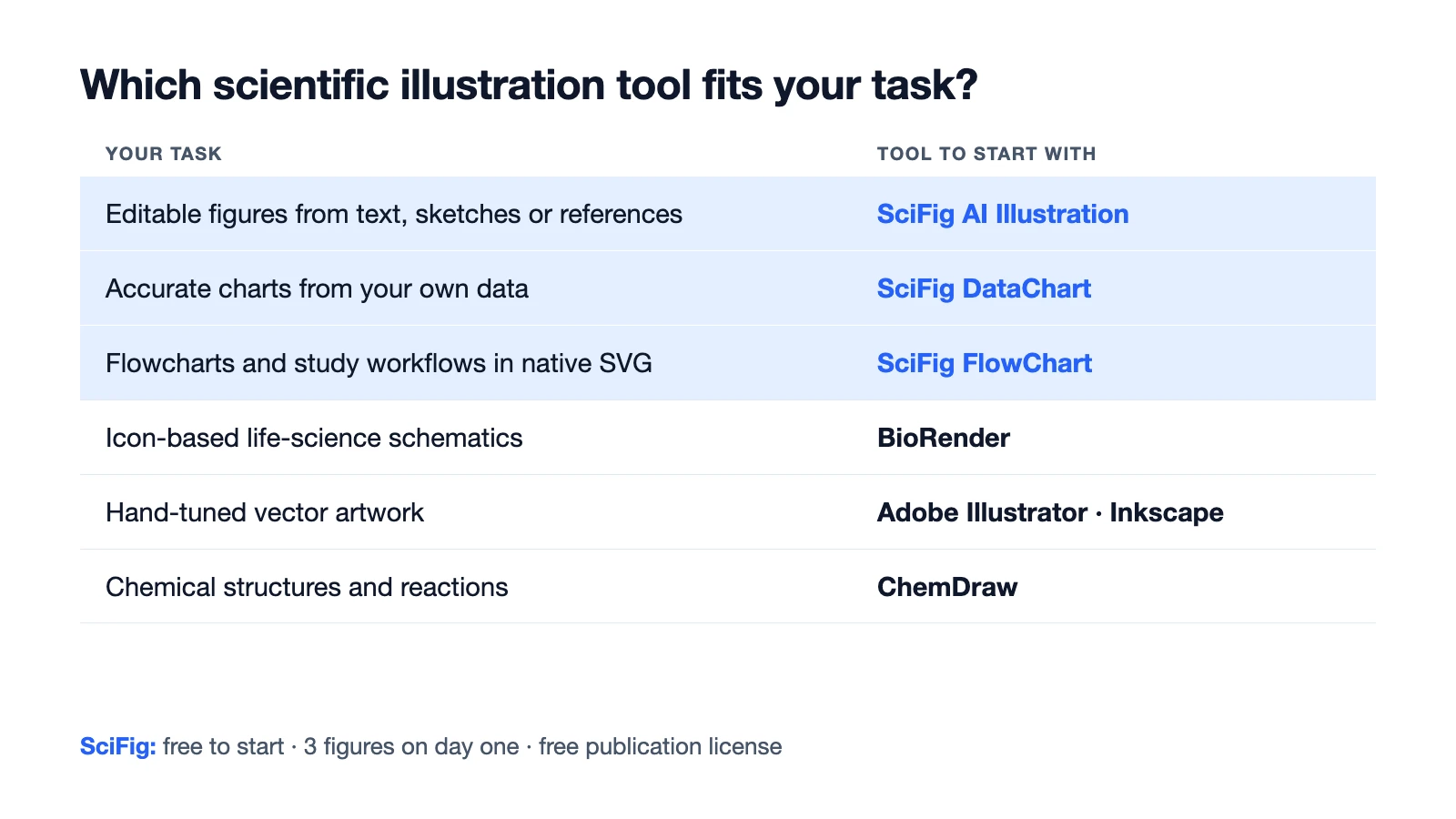
Decision chart matching figure tasks to tools: SciFig AI Illustration, DataChart and FlowChart, plus BioRender, Illustrator, Inkscape and ChemDraw (Figure generated with SciFig)
Tool
Type
Best For
Pricing
AI-Powered?
BioRender
Icon library / drag-and-drop
Life science figures
$35/mo billed yearly (academic Individual); AI add-on from $4/mo
Limited free AI credits; full AI via add-on
Adobe Illustrator
Vector editor
Complex custom artwork
~$264/yr
No
SciFig
All-in-one AI figure platform: SciFig AI Illustration + SciFig DataChart + SciFig FlowChart
Editable illustrations, accurate charts from your data, native SVG flowcharts; vectorization to editable SVG; all domains; free publication license
Free to start (3 figures on day one, up to ~44 in month one) · Starter $8.33/mo yearly
Yes
MindTheGraph
Infographic builder
Graphical abstracts
Free tier + from ~$49/mo
No
PowerPoint
Presentation software
Quick schematics
Included in M365
No
SciDraw
SVG asset library
Free reusable components
Free
No
Inkscape
Vector editor
Free vector editing
Free
No
Illustrae
AI generation
Graphical abstracts, posters
Paid plans only, no free plan
Yes
BioDraws
R package
Programmatic R workflows
Free
No
ChemDraw
Chemistry-specific
Chemical structures and reactions
Institutional / expensive
No
Which Scientific Illustration Tool Should You Choose?
Picking the right scientific figure tool depends on three factors: your domain, your design skill level, and your time budget. Start from the figure you need to draw:
Task
Programs to use
Pathway or cell schematic
SciFig text-to-figure to generate an editable mechanism from a description and vectorize it to SVG; BioRender for icon assembly; Illustrator or Inkscape for hand-drawn vector work; BioDraws for scripted R workflows
If you are a life scientist building pathway or experimental design figures, BioRender's icon library is fast for standard figures; SciFig covers the same pathways and cells by generating them from your description, and the result stays editable for the mechanisms no library has. SciFig FlowChart handles the experimental workflow, and SciFig DataChart plots the results from your data.
If you need figures in any domain — biology, chemistry, physics, medicine or engineering — or want to go from a description or your data to a complete figure without learning any interface, SciFig covers the widest range of scientific subjects with the lowest time investment. It is especially useful for researchers who know what they want to show but lack the design hours to build it manually.
If you need maximum creative control and publish complex, highly customized figures, invest the time in Adobe Illustrator. No other tool matches its precision, and the skill compounds across every future figure you make.
If budget is the primary constraint, SciFig's daily free credits plus free editing and SVG/PPTX export give you a free AI-to-vector workflow, and Inkscape + SciDraw is the fully manual free stack. Add BioDraws if your workflow is R-based and reproducibility is a priority. For a full two-phase workflow that combines AI generation with free refinement tools, see our Nature-level figures on a budget guide.
For graphical abstracts and science communication content, MindTheGraph's templates are purpose-built for that use case and will save meaningful time over assembling layouts from scratch.
For chemistry-specific figures, ChemDraw is not optional — it is the standard, and most institutions provide access. Use it in combination with a general-purpose vector editor for complete figures.
The scientific figure tools that serve most researchers best are not necessarily the most expensive or the most technically capable — they are the ones that match your actual workflow, get out of your way, and let you spend your time on the science.
If you want to move from comparison to action, SciFig's text-to-figure, sketch-to-figure, and vector-canvas cover the strongest AI-native workflow on this list. If you prefer a flatter, search-style entry point first, the AI scientific image generator is the fastest way to test whether a figure-generator workflow fits your research style.
Best AI for Scientific Diagrams vs Best Traditional Tool
One useful way to read this ranking is to separate “best overall scientific figure tool” from best AI for scientific diagrams. The overall winner depends on workflow maturity, figure type, and existing licenses. The AI winner depends on something narrower: how well a tool turns a rough research description into a correct figure and how easily you can change any part of it.
If your diagrams are standard and repetitive, a traditional library tool can still be the best value. If your diagrams are novel, niche, or mechanism-heavy, AI-native tools rise quickly because they remove the catalog ceiling. That is why the more practical question in 2026 is often not just “which software is best?” but “which workflow gets me to a reviewer-safe scientific diagram fastest?”
Frequently Asked Questions
For free options, SciFig is free to start, no card required — 3 figures on day one and up to about 44 in your first month — with free editing and SVG, PNG and PPTX export across SciFig AI Illustration, SciFig DataChart and SciFig FlowChart. Inkscape (full-featured vector editor) and SciDraw (community SVG library) are the manual free combination, and BioDraws is free for R users. The best free tool depends on your domain and whether you prefer GUI or programmatic workflows. For a complete free workflow walkthrough, see our Nature-level figures on a budget guide.
Most scientists combine a few programs. BioRender is common for life science schematics, Adobe Illustrator and Inkscape for vector drawing and final layout, PowerPoint for quick diagrams, GraphPad Prism for data plots, and ChemDraw for chemical structures. SciFig now generates editable figures from text, your data, a sketch, or a reference image; you can vectorize them, edit any element in its canvas, or export SVG to another editor.
For generated figures, SciFig is free to start: no credit card, 3 figures on day one and up to about 44 in your first month, and free editing and SVG, PNG, and PPTX export. For drawing by hand, Inkscape is the strongest free vector editor. BioDraws is free for R users who want scripted biological illustrations.
Start with SciFig's free daily credits to generate figures from text, sketches, or reference images, and download the free publication license PDF for figures you create there. Then edit any element in SciFig's vector canvas, use SciFig FlowChart for diagrams and SciFig DataChart for data plots; free asset libraries such as SciDraw can add reusable SVG components.
Usually yes, but the rights come from each tool's own license. Figures created or edited in SciFig come with a free one-page publication license PDF that grants non-exclusive, worldwide, perpetual rights to publish and use them commercially, and you own the figures you generate. Inkscape and draw.io are free software, so the rights depend on the assets you place in the drawing. Asset libraries such as SciDraw license each illustration individually, and some require attribution. BioRender's free plan does not include publication rights.
Yes. SciFig provides SciFig AI Illustration for mechanism and concept artwork, SciFig FlowChart for native, editable SVG diagrams, and SciFig DataChart for charts generated accurately from your original table. You can edit any element in the workspace, vectorize to editable SVG, and choose the export the manuscript needs; for the methods note, you can follow the journal's AI policy.
BioRender's icon library does save time on standard life-science figures, but its academic Individual plan is $35/month billed yearly, with full AI-assisted figure generation as an add-on beyond its limited free AI credits. For most researchers, SciFig is the better value: Starter is $8.33/month with a yearly subscription, you can start free with 3 figures on day one, every figure comes with a free publication license PDF, and one workspace covers biology, chemistry, medicine and physics with SciFig AI Illustration, SciFig DataChart and SciFig FlowChart — all editable and exportable as SVG or PPTX.
Biology-specific tools (BioRender, BioDraws) have limited value outside their domain. SciFig is designed for broad scientific coverage including chemistry, physics, neuroscience, and medicine. Adobe Illustrator and Inkscape are domain-agnostic but require design skill. ChemDraw is the standard for chemistry specifically.
This depends on the tool and the journal. BioRender requires a citation in figure legends for published work (e.g., "Created with BioRender.com"). Most journals have accepted this as standard practice. For figures made with AI platforms such as SciFig, you can disclose AI use according to the journal's AI content policy, which varies by publisher; the journal's author guidelines are the reference.
SciFig is built for scientific diagrams that need accuracy, editability and speed. Attractive science-shaped art is easy; a diagram with a wrong label that forces a redraw is the real problem. SciFig vectorizes figures into editable SVG so you can change any label or structure, SciFig DataChart plots from your own data, and SciFig FlowChart outputs native SVG diagrams that fit straight into a paper or poster.
SciFig keeps the whole scientific figure workflow in one place, which is what matters most in a figure generator website: text, sketch, reference or data input; element-level editing in the vector canvas; and SVG, PNG or PPTX export with a free publication license. Researchers need more than a gallery of outputs; they need a place where figures can be generated, changed, and reused.
Keep going
Recommended resources
Templates, tools, and further reading for your research