
Free Scatter Plot Maker
Generate accurate scatter plots with trend lines and correlation indicators — describe your X and Y variables and SciFig's scatter plot maker produces the figure for your paper.
Start with up to 150 free credits|No credit card required
Get up to 250 free credits on day one when you join through an invite.
Updated
Free Scatter Plot Maker— templates & examples
Everything you need to build your scatter plot
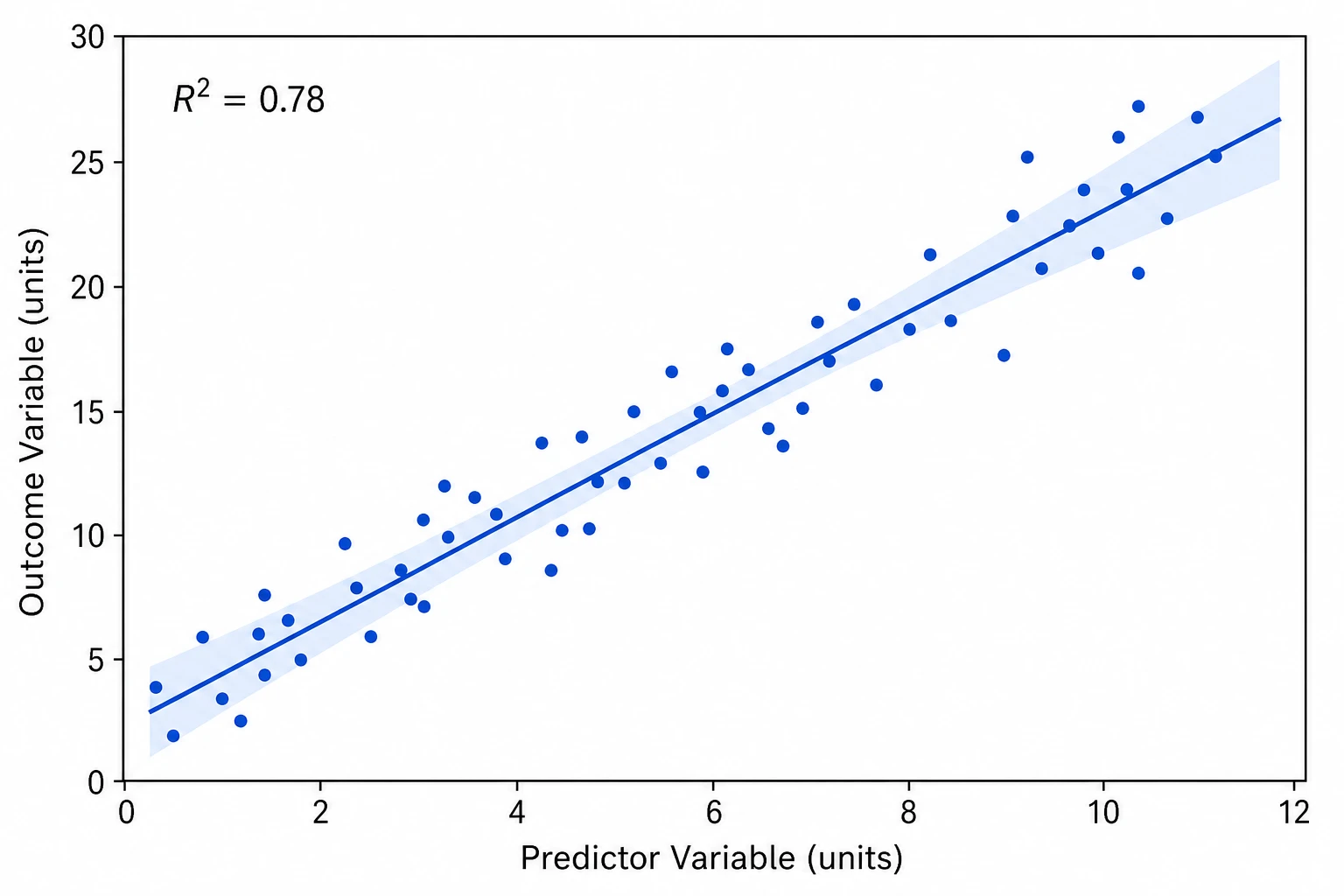
Scatter plot maker with accurate point placement and labeled axes
A reliable scatter plot maker must position data points correctly on scaled axes and label both axes with variable names and units. Upload your paired measurements to SciFig DataChart and describe the X and Y variables, and SciFig generates a clean, accurate scatter plot with properly scaled axes — the foundation every linear regression scatter plot maker figure needs before the trend line is added.
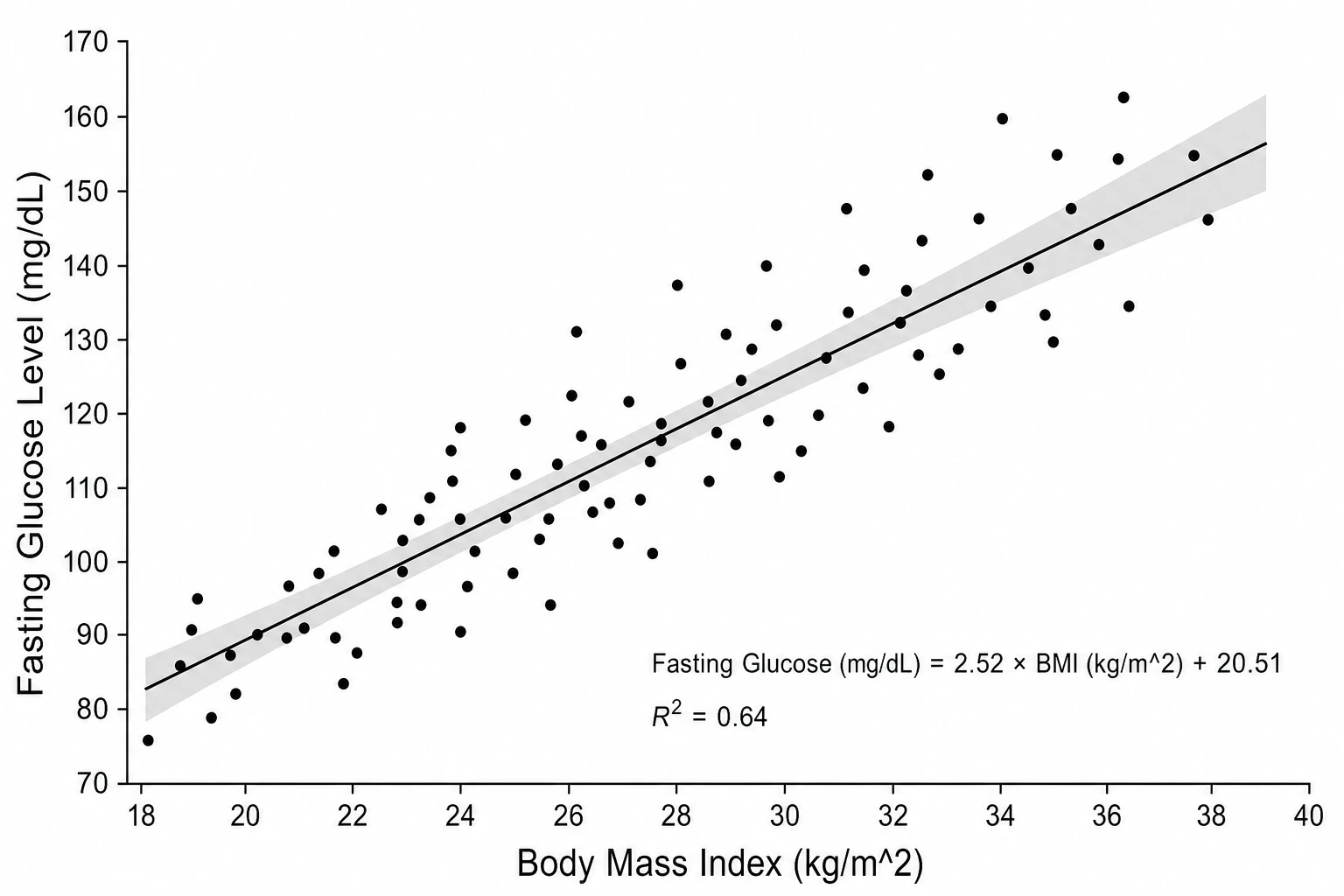
Linear regression scatter plot maker with trend line and R² annotation
Most research scatter plots require a linear regression trend line with an R² value to demonstrate the strength of the relationship. SciFig's linear regression scatter plot maker overlays the best-fit line, adds a shaded 95% confidence band, and annotates the figure with the equation and R² — everything reviewers expect from a scatter plot with trend line in a published manuscript.
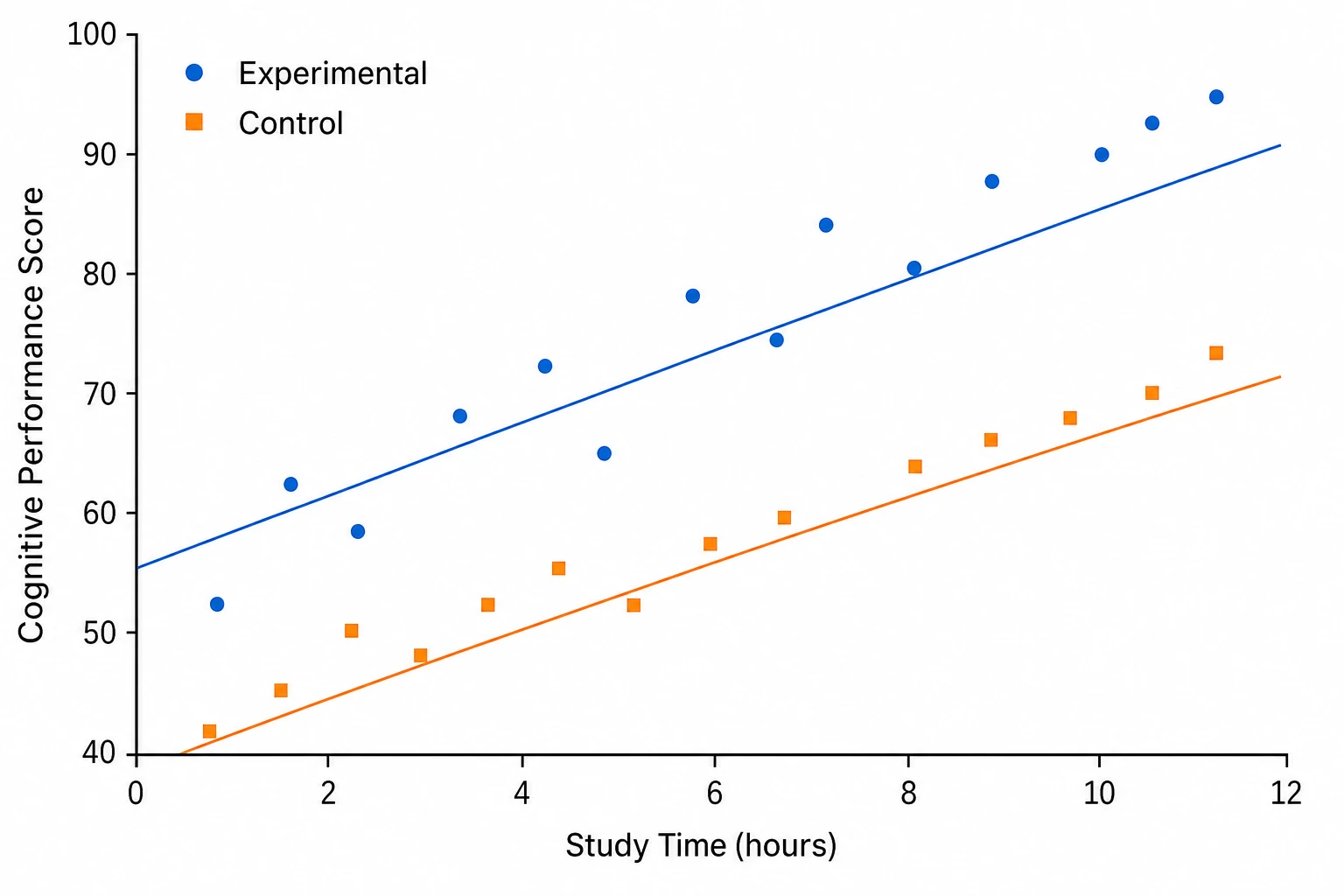
Multi-group scatter plots with per-group trend lines
Scatter plots comparing subpopulations or experimental conditions require distinct marker styles and optionally separate regression lines per group. SciFig's scatter plot maker color-codes each group, assigns unique point shapes for accessibility, and draws separate trend lines when requested — producing a multi-group scatter plot that is clear at journal print size.
What is a scatter plot?
A scatter plot is a two-axis figure that plots paired data points to reveal the relationship between two continuous variables, with each point positioned by its X and Y values and the point cloud showing direction, strength, and linearity. Scatter plots are standard in biology, psychology, and social science for reporting correlations. Upload paired numeric measurements and any group labels. Choose the column mappings in SciFig DataChart and generate the plot from your table.
Why researchers use a scatter plot maker
- Reveals direction, strength, and linearity of relationships between two continuous variables
- Required for reporting Pearson or Spearman correlations in biology, medicine, and psychology
- Linear regression scatter plot maker output provides the standard figure for regression results sections
- Identifies outlier data points that influence the correlation visually before statistical testing
- More informative than a single correlation coefficient — shows the full point cloud distribution
- Accepted by all major journals as a primary figure type for bivariate continuous data
Key components of a scatter plot
- Data points — individual observation markers positioned by X value and Y value
- X-axis — horizontal axis for the predictor or independent variable with label and units
- Y-axis — vertical axis for the outcome or dependent variable with label and units
- Trend line — linear regression line showing the best-fit relationship across all points
- Confidence band — shaded region around the trend line indicating the 95% prediction interval
- R² annotation — coefficient of determination showing the proportion of variance explained
Where scatter plots are used in research
- Biology and medicine: correlating biomarker levels with clinical outcomes using a scatter plot maker
- Psychology: displaying the relationship between two test scores or behavioral measures
- Linear regression scatter plot maker figures for epidemiology studies showing dose-response relationships
- Economics and social science: scatter plots showing the relationship between socioeconomic variables
- Environmental science: correlating pollutant concentration with ecological or health outcomes
- Education research: scatter plot figures showing the association between study time and test performance
How to make a scatter plot
Upload your table
Upload a CSV or Excel file with the measurements and column names needed for your chart.
Set up the chart and analysis
Choose a chart type, then set the column mapping, units, filters and statistical options; SciFig DataChart plots every value from your table.
Download your results
Export the chart and analysis files, or convert the result to SVG for editing in SciFig Vector Canvas.
Free Scatter Plot Maker — Frequently Asked Questions
Common questions about Free Scatter Plot Maker.
More tools

Circuit Diagram Maker
Draw electronic circuit schematics

Free Body Diagram Generator
Show forces acting on an object

Graphical Abstract Maker
Summarize your study in one panel
SciFig
Free AI Scientific Figure Generator for Illustrations, Images, Charts and Flowcharts
Models
Default to GPT Image 2 for journal papers; switch to Nano Banana Pro for slides and posters; pick Nano Banana 2.1 for routine figure work
Tutorials
Seven short walkthroughs of the AI scientific figure generator
Blog
Tutorials, tool comparisons, and publication tips for researchers.
Inspiration
Explore publication-ready illustrations, charts and flowcharts. Copy a prompt or open any template as the starting point for your own figure.
Pricing
View pricing

Ready to publish?
Make your own scatter plot in minutes.
Start for freeFree to start · No credit card required · Built for researchers