
Nano Banana 2.1 vs GPT Image 2.5: Scientific Figures 2026
Choose Nano Banana 2.1 or GPT Image 2.5 for scientific figures: compare capabilities, adapt research prompts and edit every label and element in SciFig.
Explore the prompt guide →SciFig's editorial-style figure model — strongest on readability and polish, best for slides, posters, and simplified BioRender-style scientific figures.
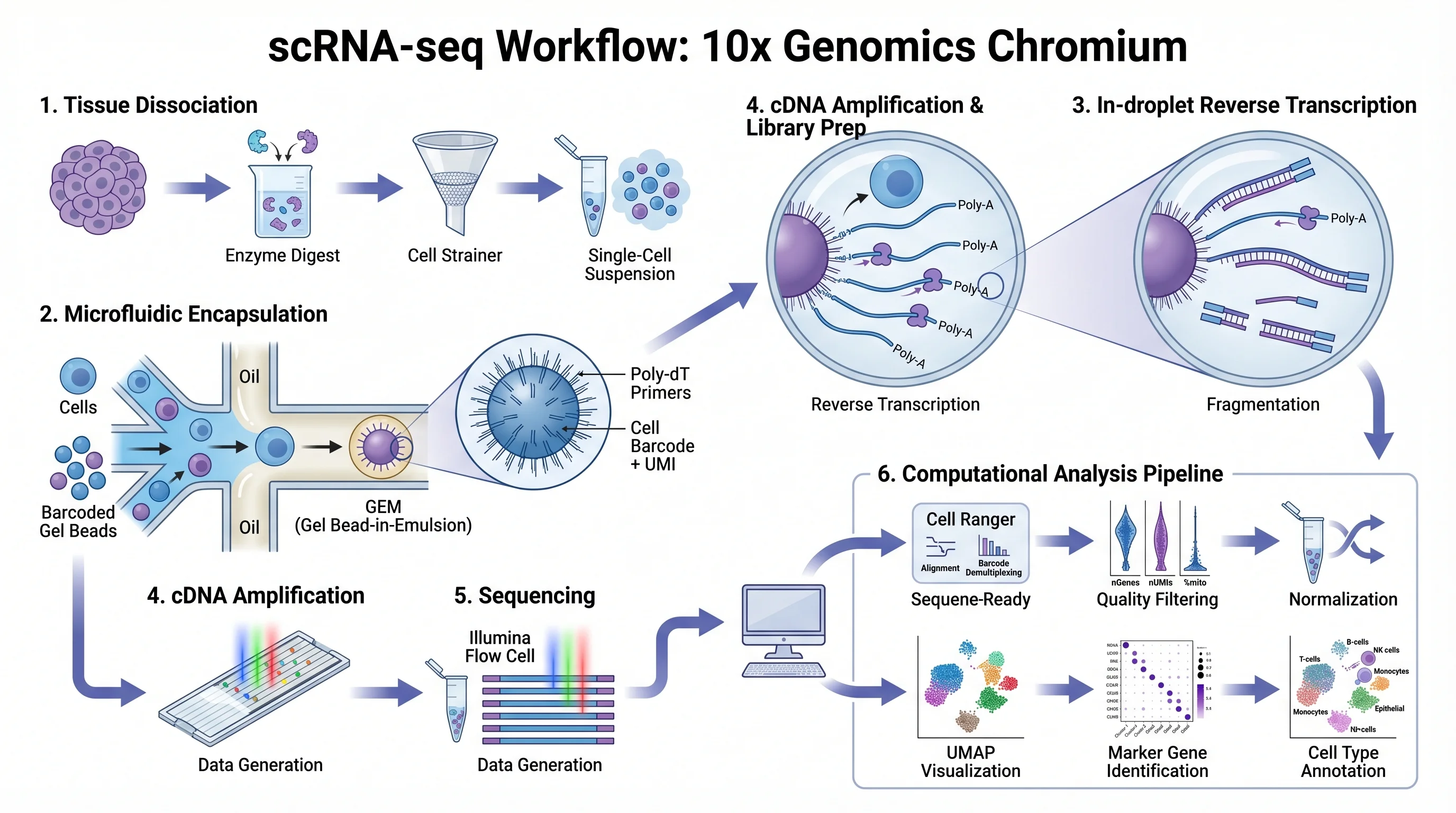
Why It Matters
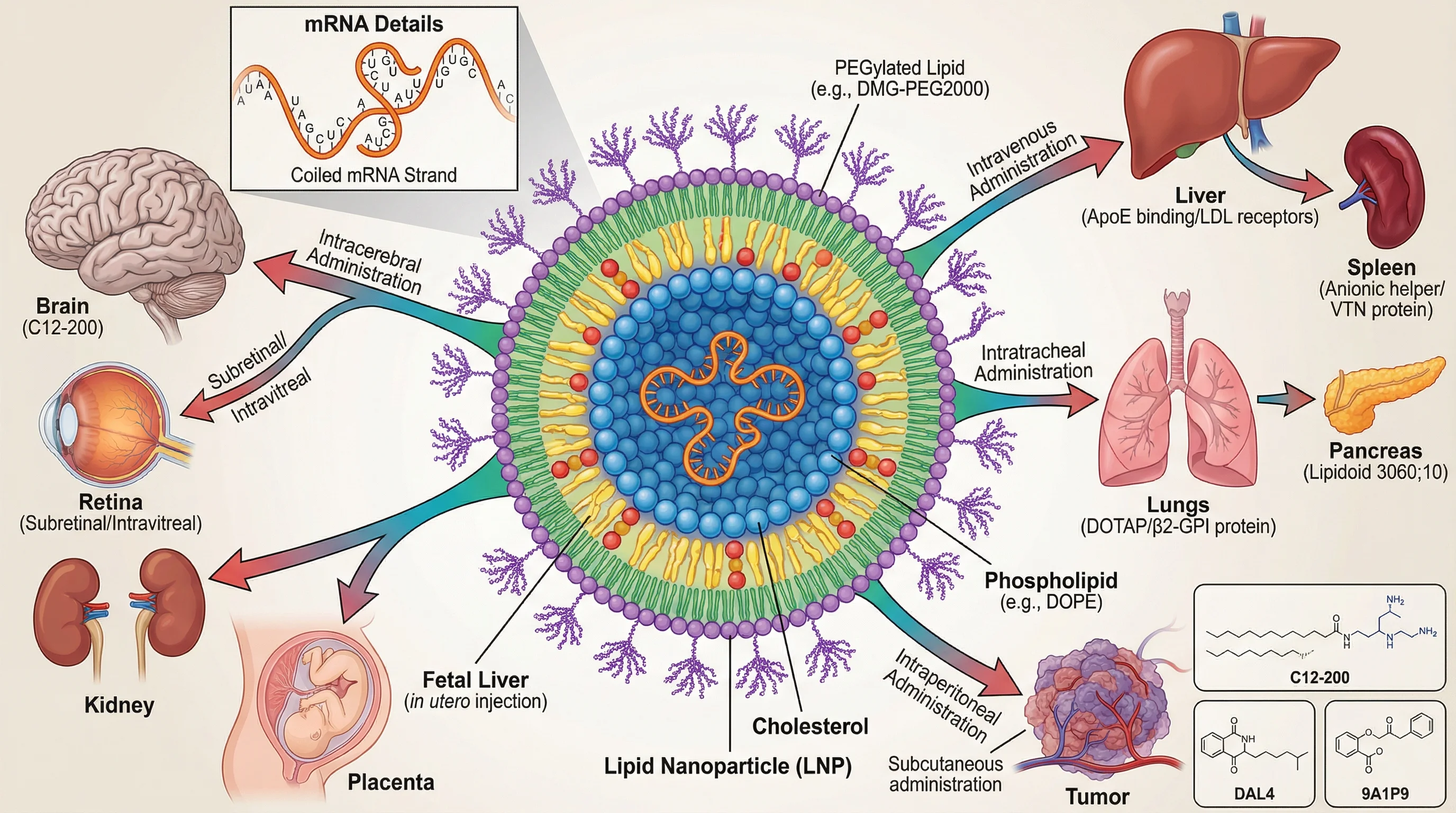
Nano Banana Pro leads where readability and aesthetic polish matter most — slide decks, conference posters, BioRender-style mechanism cartoons, and any figure that has to communicate fast at first read.
When readability beats annotation density — a slide deck with 30 seconds of attention per figure, a poster viewed from 4 meters, a social-media thumbnail — Nano Banana Pro's cleaner composition wins.
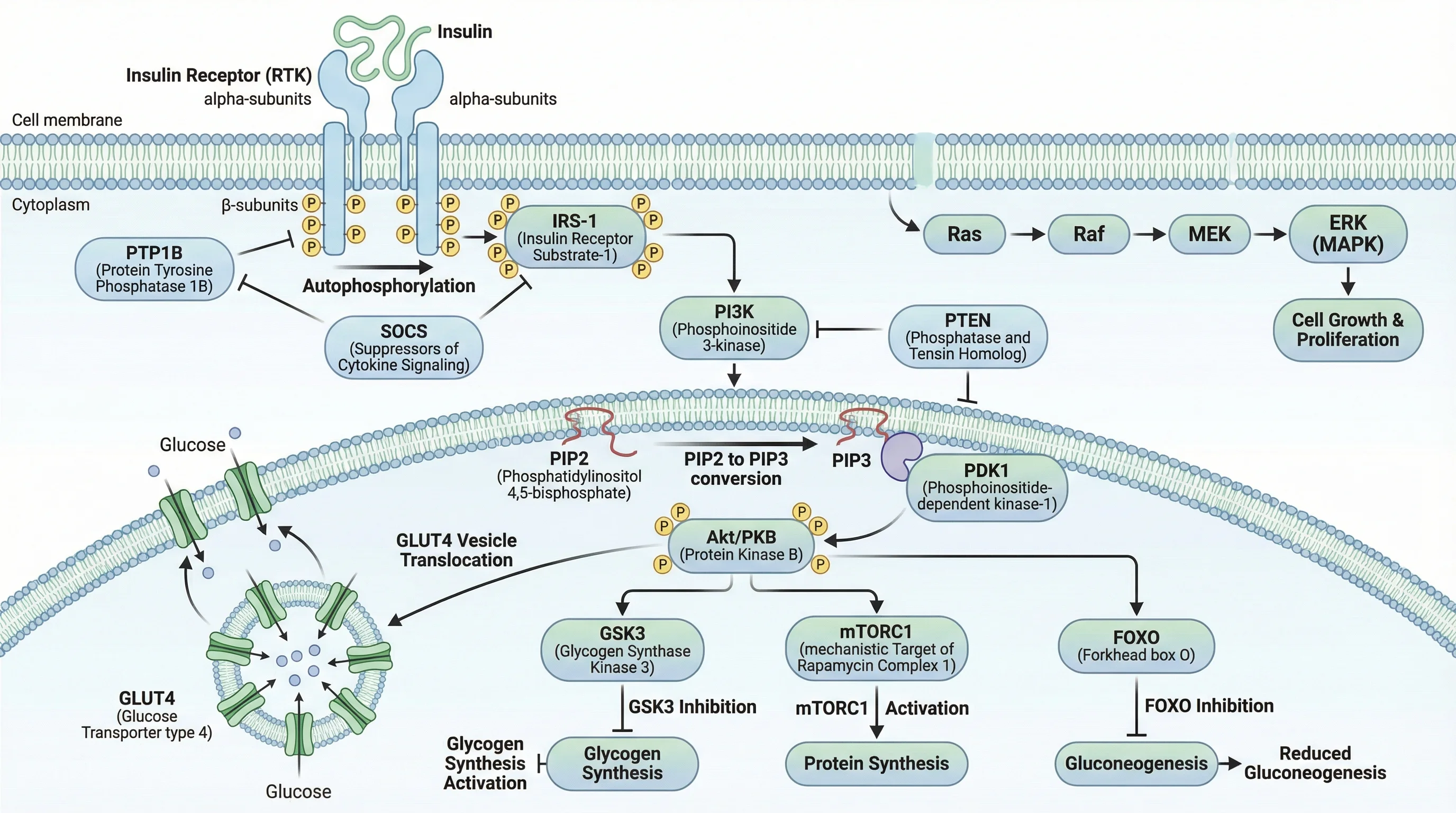
On step-by-step mechanism diagrams (clean step-by-step layouts), Nano Banana Pro's simplification beats information-dense alternatives — exactly the BioRender-style look teaching and conference figures need.
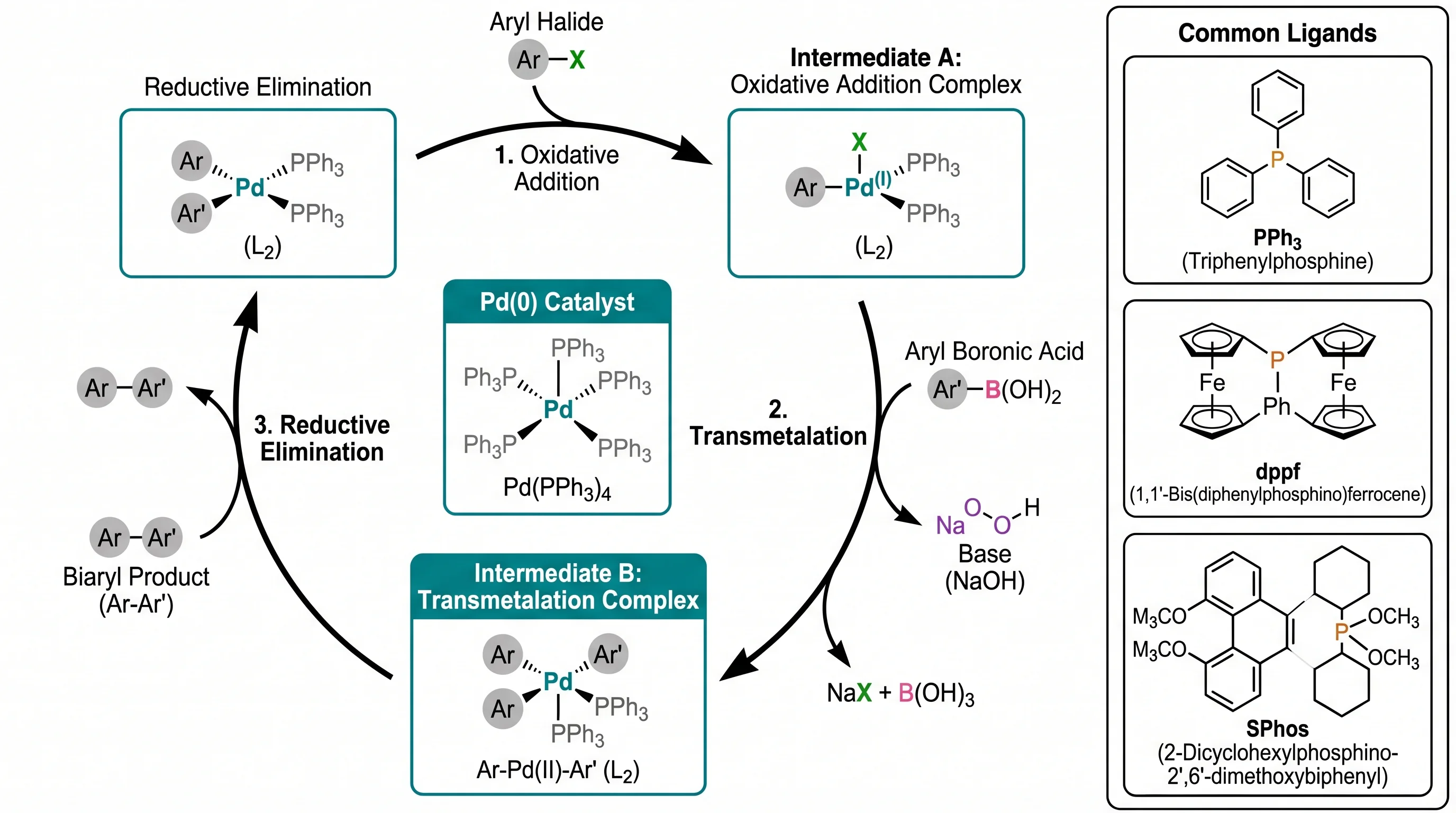
Where structural intuition matters — layer stacking, dual-panel process diagrams, business-event annotations — Nano Banana Pro's compositional creativity wins.
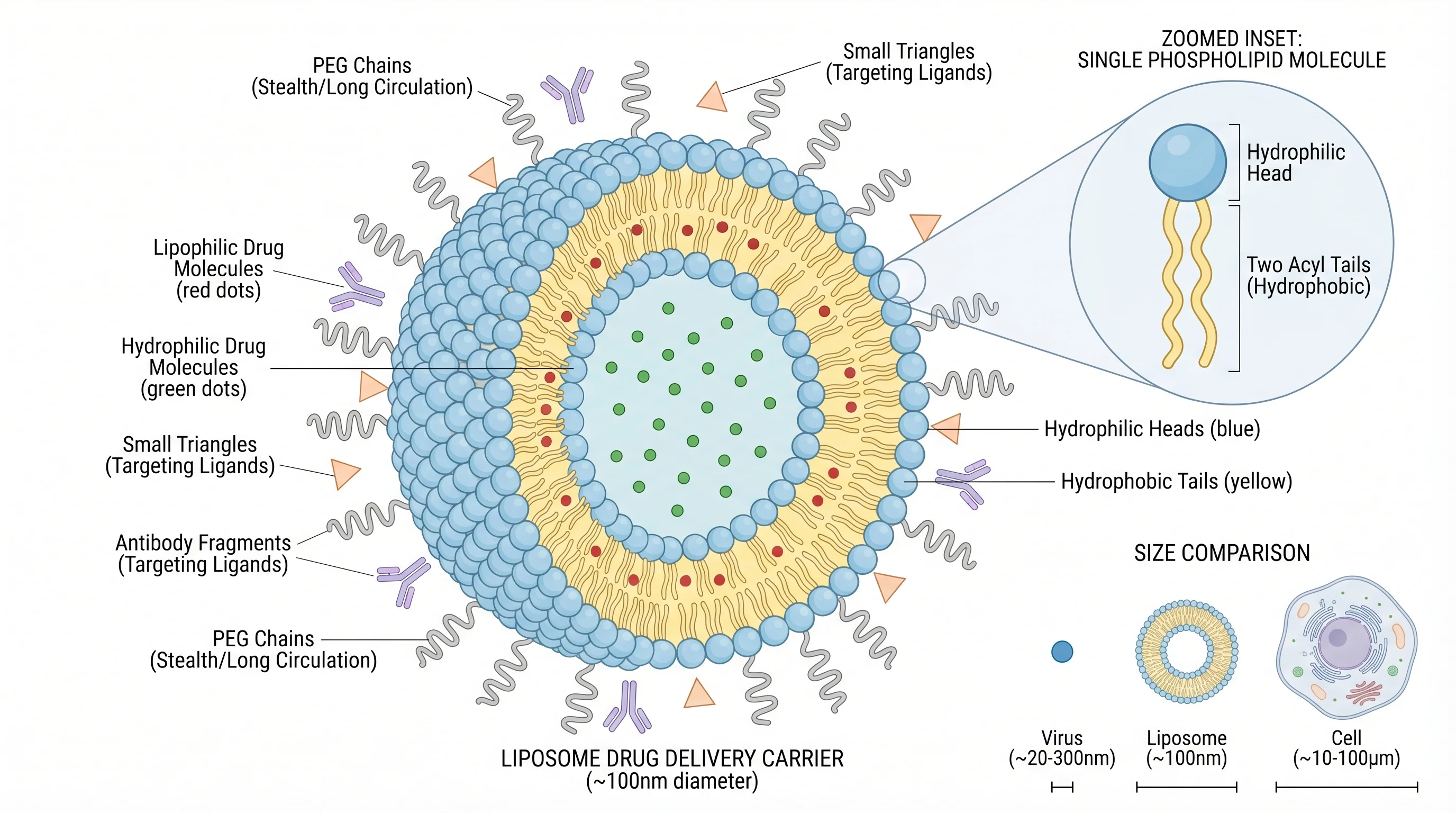
SciFig can route Nano Banana Pro through Text-to-Figure, Sketch-to-Figure, Reference-to-Figure, Photo-to-Figure, Figure Enhancer, and PDF-assisted modes — keep one editorial-style standard across slide / poster / web figure work.
Scene Router
Choose the figure task first. SciFig keeps Nano Banana Pro selected across the modes where you want stronger editorial-style scientific aesthetics.
Generate a fresh scientific figure from prompt while keeping Nano Banana Pro as the selected rendering model.
Best for editorial-style figure generation where readability and BioRender-style polish lead.
Open Text-to-FigureKeep Nano Banana Pro selected when an existing figure needs cleanup, label fixes, or a stronger editorial-style finish.
Best for enhancement tasks where visual finish matters more than text-heavy annotation control.
Open Figure EnhancerUse Nano Banana Pro to turn a rough draft into a cleaner, more editorial-style scientific figure.
Best for researcher sketches that need stronger scientific-illustration polish.
Open Sketch-to-FigureRebuild a reference image in a new figure while keeping Nano Banana Pro's editorial-style SciFig finish.
Best for borrowing structure while preserving a more polished scientific finish.
Open Reference-to-FigureUse Nano Banana Pro after SciFig extracts context from a paper PDF and regenerates the figure in a cleaner visual form.
Best for extract-then-regenerate cases that need stronger visual polish in the final figure.
Open PDF-to-FigureUse photographs of equipment or a laboratory setup to guide a conceptual schematic.
Best for translating real-world input into cleaner editorial-style figure language.
Open Photo-to-FigureModel Comparison
Choose Nano Banana Pro for readability and editorial polish; choose GPT Image 2 when notation rigor and journal submission accuracy matter most.
Figure Types
Nano Banana Pro is most useful when the scientific figure needs to look editorially polished and slide-ready from the first pass.
Explore the latest image models
Nano Banana 2.1 vs GPT Image 2.5: Scientific Figures 2026
Choose Nano Banana 2.1 or GPT Image 2.5 for scientific figures: compare capabilities, adapt research prompts and edit every label and element in SciFig.
Explore the prompt guide →GPT Image 2.5 Flare vs Sunburst: Scientific Figures 2026
Compare GPT Image 2.5 Flare and Sunburst for scientific figures: 24 outputs reveal differences in labels, layout, focused edits and generation time.
Explore the prompt guide →FAQ
These questions focus on why Nano Banana Pro stays useful for scientific illustration inside SciFig's scientific figure modes.

Start in SciFig
Free to start · No credit card required · Built for researchers