
Neural Network Diagram Generator
Create precise neural network diagrams showing layers, neurons, convolutional filters, and activation functions — describe your architecture, generate a research figure instantly.
Figure prompt
Describe the figure you want to create
Not sure where to start? Use Example.
Start with 100 free credits|No credit card required
Get up to 300 free credits on day one when you join through an invite.
Reviewed by SciFig TeamUpdated
Neural Network Diagram Generator— templates & examples
Everything you need to generate a neural network diagram
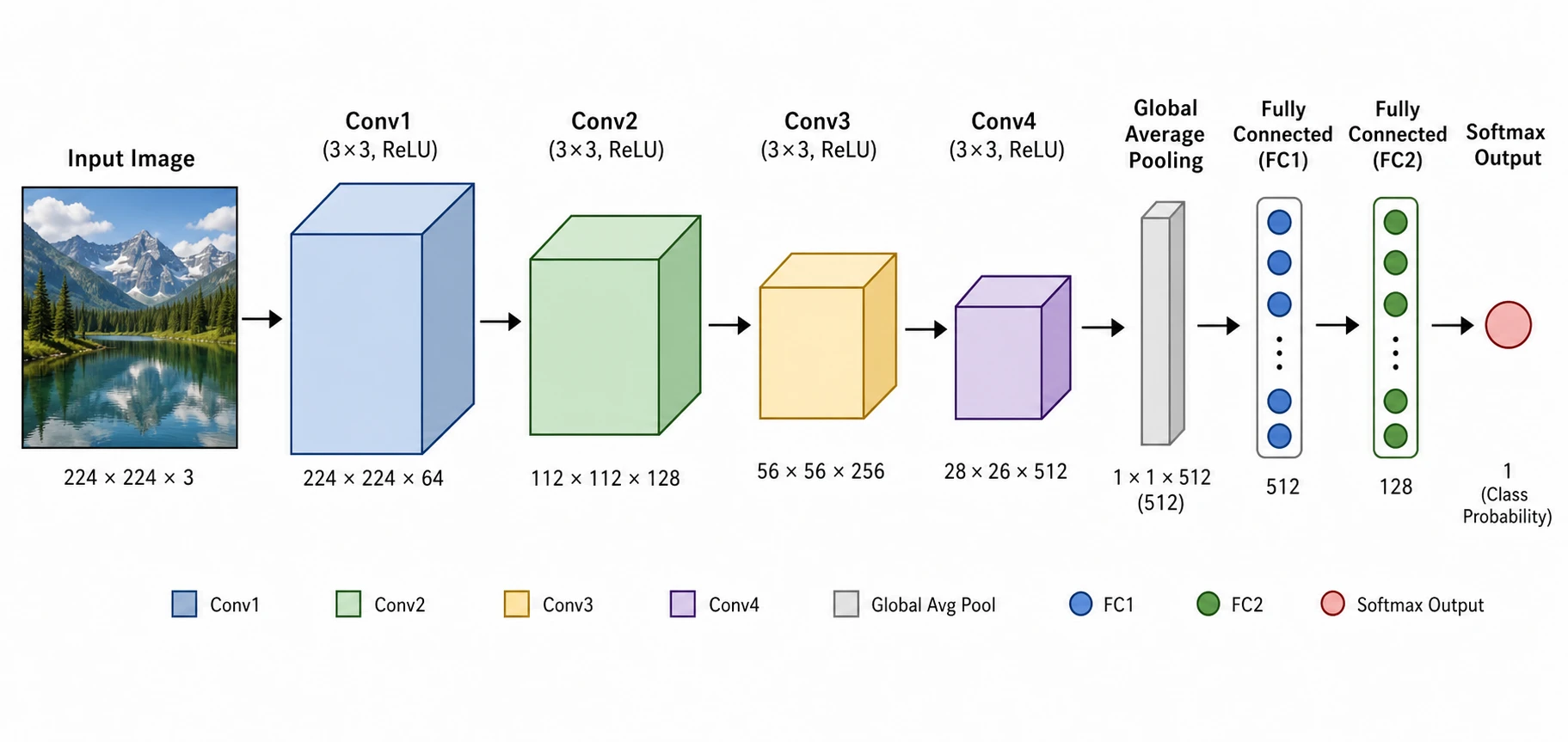
Generate neural network diagrams from architecture descriptions
A publication-quality neural network diagram must communicate layer types, dimensions, and connectivity at a glance — without cluttering the figure with code or equations. SciFig's neural network diagram generator takes a plain-language description of your model — input size, layer sequence, filter counts, activation functions — and produces a structured, labeled neural network architecture diagram in seconds. Use it for your next paper, poster, or technical report without manual drawing.
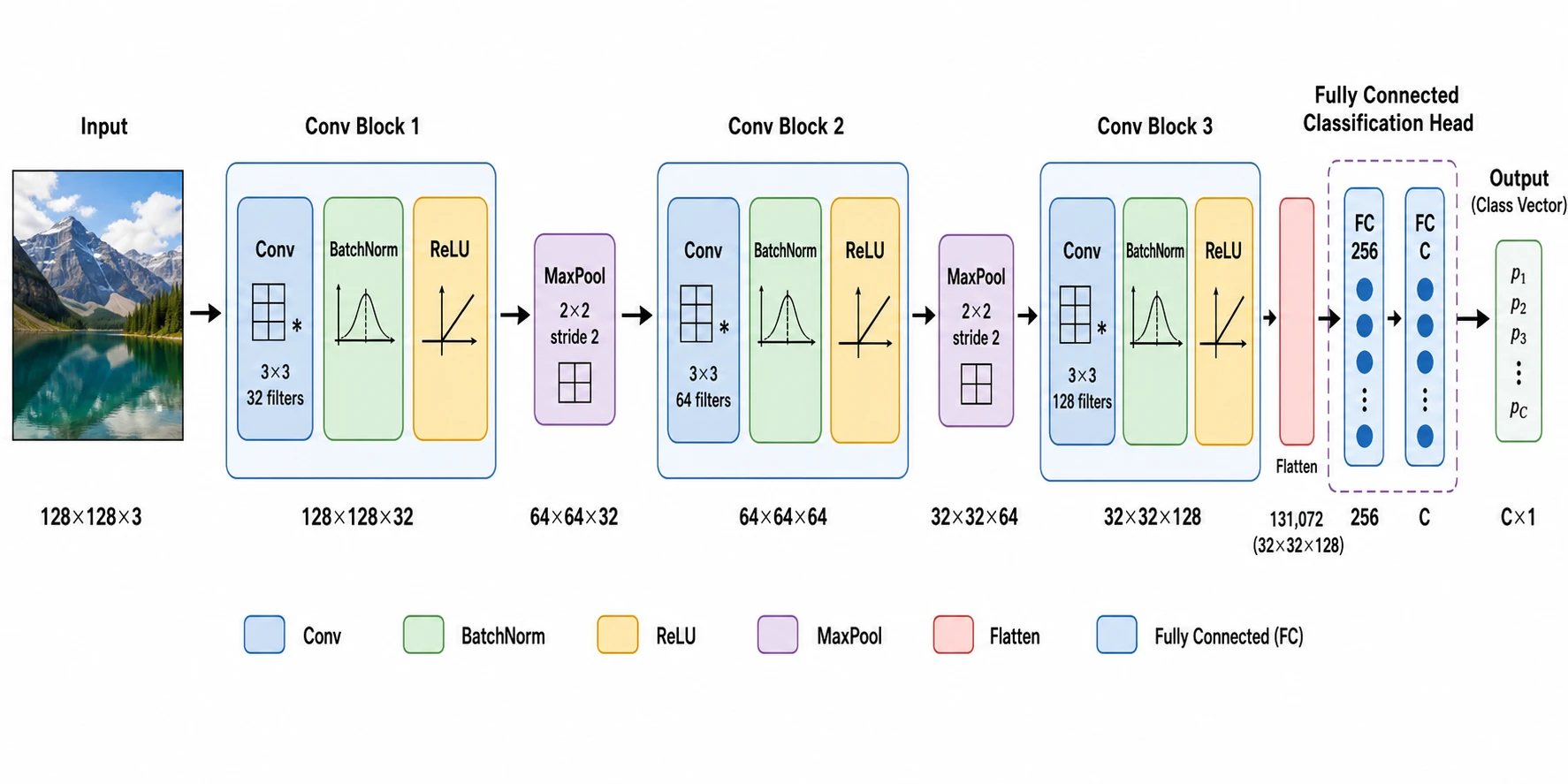
Convolutional neural network visualization for research figures
CNN architectures are notoriously hard to draw by hand: feature-map dimensions shrink through pooling, filter banks expand through depth, and each layer needs accurate labels to be reproducible. SciFig's convolutional neural network visualization diagram maker renders each convolutional block with kernel size, stride, output shape, and activation clearly labeled — generating the kind of neural network architecture diagram that appears in top computer vision papers, in seconds rather than hours.
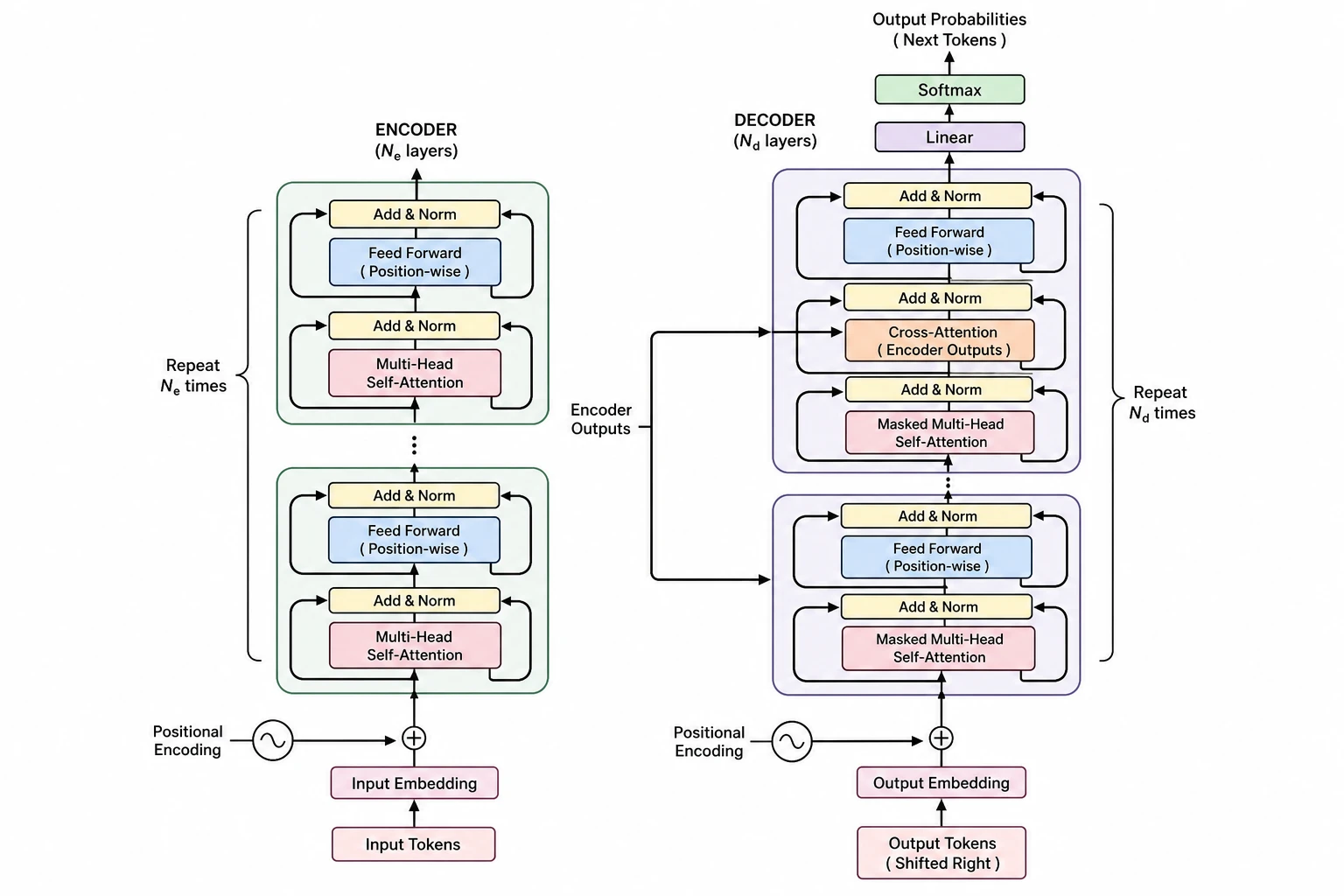
Edit and export neural network diagrams at any resolution
Journal submissions, conference posters, and slides all require different image sizes and color schemes. Every neural network diagram generated by SciFig is fully editable: relabel any layer, recolor the activation blocks to match your paper's palette, and resize the neural network architecture diagram to fit a single column or a full-page figure. Export at print resolution for submission or at screen resolution for presentations.
What is a neural network diagram?
A neural network diagram shows the layers, neurons, weights, and connections that define a deep learning model. Researchers use these diagrams in papers and presentations, where a clear figure is more informative than equations or code. With SciFig's neural network diagram generator you describe your architecture — layer types, filter counts, and output — and receive a clean, editable neural network architecture diagram that meets the conventions of top machine learning publications.
Why researchers need a neural network diagram generator
- Reviewers and readers expect a clear neural network diagram to evaluate model novelty
- Manual drawing of layer blocks and arrows is error-prone and time-consuming
- Accurate layer dimensions and filter counts must appear in the neural network architecture diagram for reproducibility
- A well-structured neural network diagram is more informative than architecture code in a paper figure
- Thesis committees and grant panels require visual architecture documentation
- Convolutional neural network visualization helps non-expert stakeholders understand deep learning models
Key components of a neural network diagram
- Input layer — shows data shape such as image dimensions or sequence length
- Convolutional layers — labeled with kernel size, stride, padding, and output feature-map dimensions
- Pooling layers — max or average pooling with spatial reduction ratios
- Activation functions — ReLU, sigmoid, GELU, or softmax applied after linear transformations
- Recurrent and attention layers — LSTM cells, GRU units, or multi-head attention blocks
- Fully-connected layers — flatten operations and dense layers with neuron counts
- Output layer — classification head, regression output, or generative sampling node
Where neural network diagrams are used
- Machine learning and computer vision conference papers such as NeurIPS, CVPR, and ICCV
- Journal articles in IEEE, Nature Machine Intelligence, and JMLR
- PhD theses and master's dissertations in AI and data science
- Grant proposals requiring visual description of proposed model architectures
- Technical documentation for open-source deep learning frameworks and models
- Educational materials and course slides explaining neural network architecture concepts
How to make a neural network diagram
Describe your neural network diagram
Tell SciFig what to draw in plain language — no design tools required.
Generate with SciFig
Get a clean, publication-ready figure that matches your description in seconds.
Edit & export
Vectorize it into editable SVG, relabel everything, and export for your paper, poster, or slides.
Neural Network Diagram Generator — Frequently Asked Questions
Common questions about Neural Network Diagram Generator.
More tools

Circuit Diagram Maker
Generate accurate circuit diagrams with labeled schematic symbols for research papers, lab reports, and technical publications.

Free Body Diagram Generator
Create accurate, publication-ready free body diagrams with labeled force vectors for weight, normal force, friction, and tension in seconds.

Graphical Abstract Maker
Generate a publication-ready graphical abstract — a single-panel visual summary that captures your study's methods, key finding, and result with clear icons and flow arrows.
Home
Free AI Scientific Figure Generator and Figure Maker — Create Research Figures, Images, Illustrations and Diagrams
Text-to-Figure
Generate a figure from a plain-language description
Models
Default to GPT Image 2 for journal papers; switch to Nano Banana Pro for slides and posters; pick Nano Banana 2 for routine figure work
Tutorials
Seven short walkthroughs of the AI scientific figure generator
Blog
Tutorials, tool comparisons, and publication tips for researchers.
Inspiration
Explore publication-ready scientific figure examples, copy the prompts, and use them as starting points for your own work.

Ready to publish?
Make your own neural network diagram in minutes.
Start for freeFree to start · No credit card required · Built for researchers