

Official brand resources
Everything you need to introduce SciFig.
For researchers, educators, journalists and community creators: curated logos, product examples and videos from the current SciFig platform.
Logos, selected images, product descriptions and usage terms. The language pack also includes the matching brand and vertical videos plus three workspace demos.
Describe SciFig in your own context
Use these descriptions as background, then add your own experience.
One sentence
SciFig is an AI-assisted platform for scientific illustrations, charts and graphs and flowcharts.
Short introduction
SciFig helps researchers, educators and science communicators turn ideas, data and workflows into visual explanations. Its Illustration, DataChart and FlowChart workspaces support creating a draft, editing the result and exporting it for the intended use. Users review the scientific content and follow applicable publication and licensing requirements.
Product overview
SciFig brings three research visualization workspaces into one independently developed platform. Illustration starts from text, sketches, reference images, PDFs or photos, with tools for refining regions, labels, colors and presentation. DataChart works with the user’s own data to create charts that can be inspected and refined. FlowChart turns methods, study designs and processes into structured diagrams. Tutorials guide users through the workflow, while citation resources help them describe their use of the tools. SciFig supports research communication; it does not replace scientific review, establish the validity of data or guarantee acceptance by a journal. Users should keep their source material, check the result and confirm the license and policies relevant to their intended use.
Logos and brand guidance
Use the official artwork and keep the SciFig name legible.


Write the brand as SciFig and link to https://scifig.ai. Preserve the logo’s proportions and leave clear space around it. Use the light wordmark on a dark background and the dark wordmark on a light background. Do not imply an endorsement or partnership.
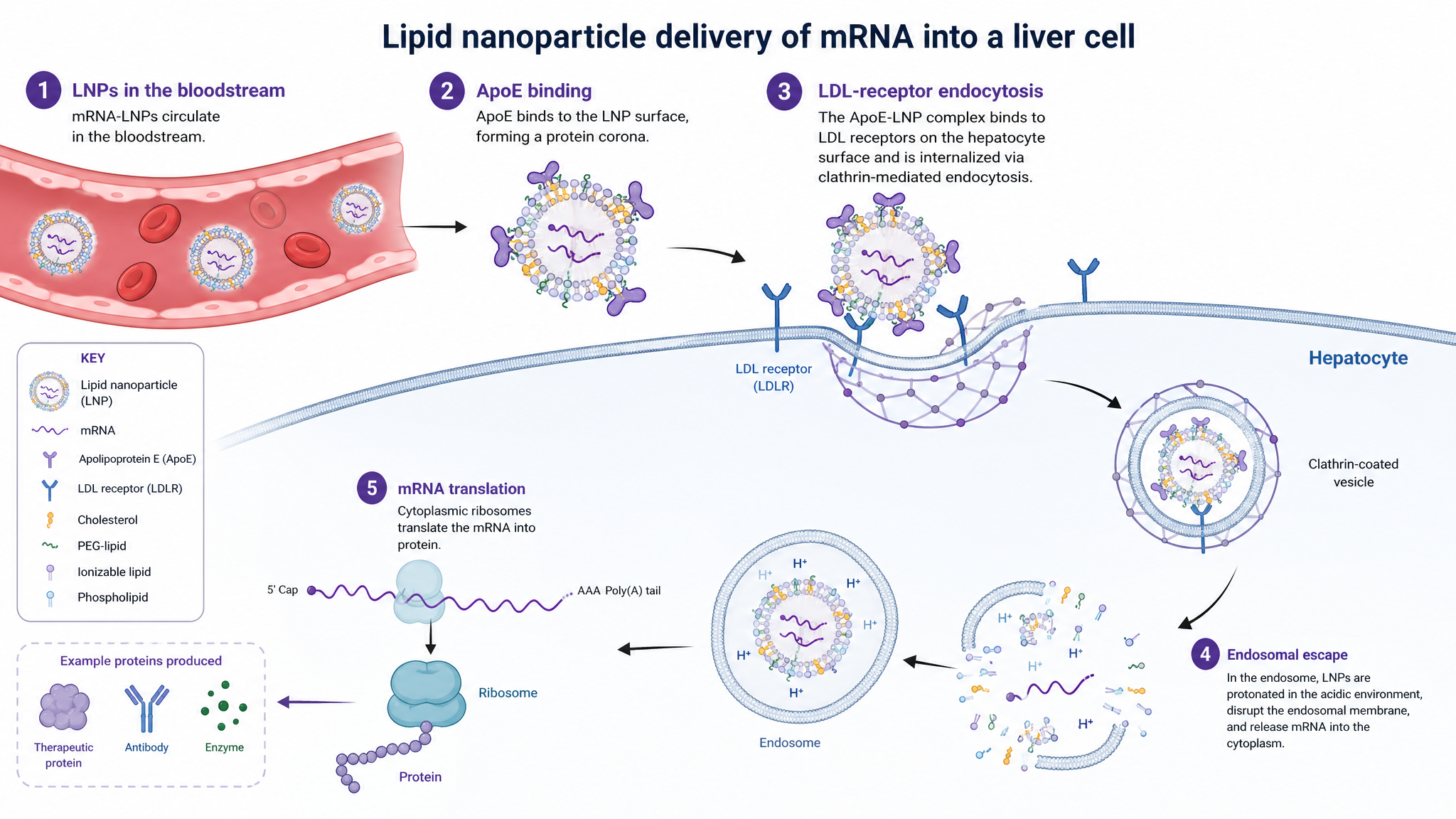
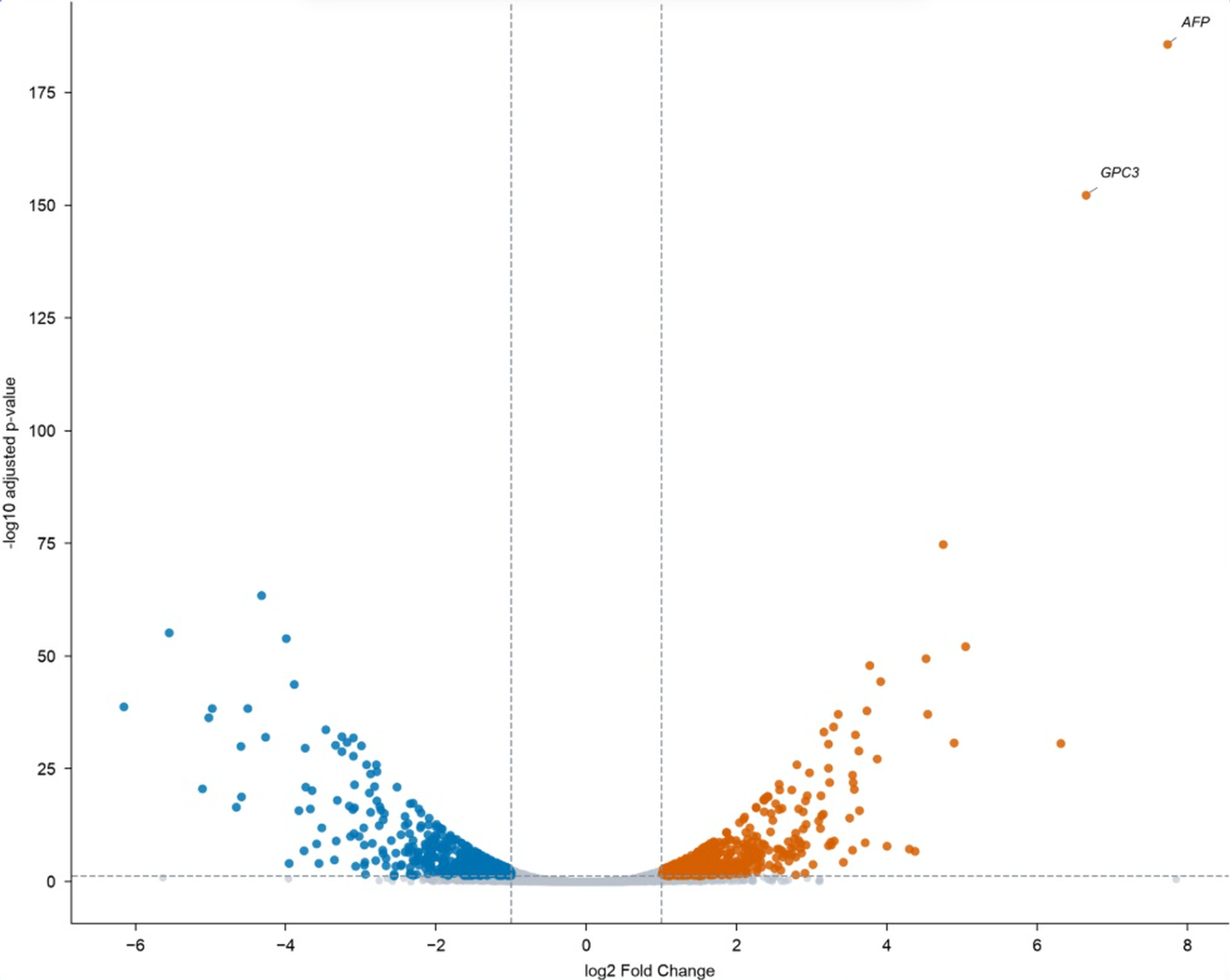
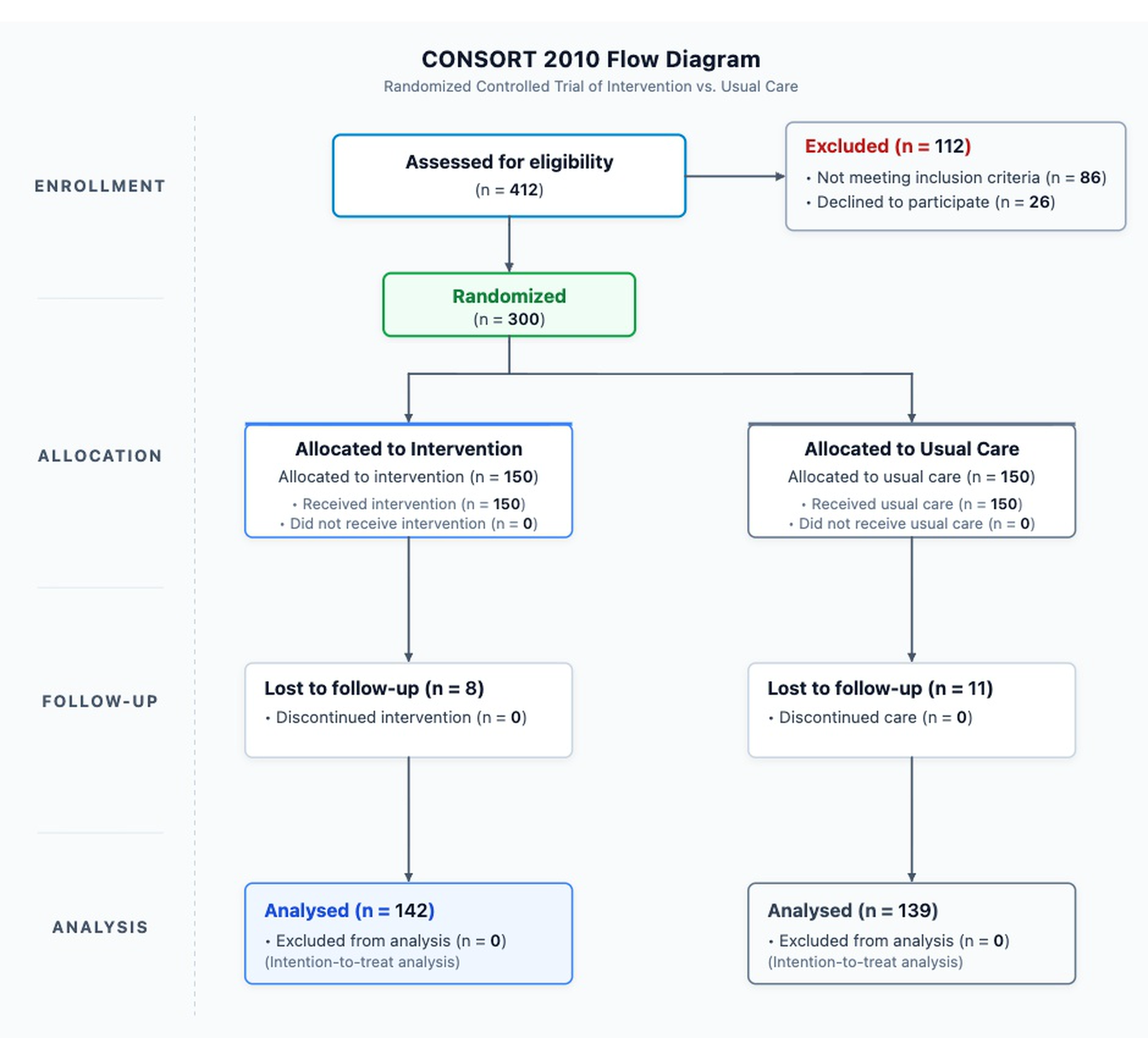
Selected product images
Examples from the Illustration, DataChart and FlowChart workspaces.
Video library
Preview only the clips you need, then download the MP4.
Text to Figure
Silent demo (interface text may be English)
- Duration
- 25.2 seconds
- Format
- MP4 · 16:9
- File size
- 2.8 MB
Figure Enhancer
Silent demo (interface text may be English)
- Duration
- 22.1 seconds
- Format
- MP4 · 16:9
- File size
- 2.4 MB
Sketch to Figure
Silent demo (interface text may be English)
- Duration
- 22 seconds
- Format
- MP4 · 16:9
- File size
- 2.4 MB
Reference to Figure
Silent demo (interface text may be English)
- Duration
- 30.3 seconds
- Format
- MP4 · 16:9
- File size
- 2.8 MB
PDF to Figure
Silent demo (interface text may be English)
- Duration
- 30 seconds
- Format
- MP4 · 16:9
- File size
- 2.8 MB
Photo to Figure
Silent demo (interface text may be English)
- Duration
- 24.3 seconds
- Format
- MP4 · 16:9
- File size
- 2.6 MB
Vector Canvas tutorial
Silent demo (interface text may be English)
- Duration
- 26.9 seconds
- Format
- MP4 · 16:9
- File size
- 2.8 MB
DataChart workspace
Silent demo (interface text may be English)
- Duration
- 28.4 seconds
- Format
- MP4 · 16:9
- File size
- 2.1 MB
FlowChart workspace
Silent demo (interface text may be English)
- Duration
- 20.1 seconds
- Format
- MP4 · 16:9
- File size
- 1.9 MB
Illustration workspace
Silent demo (interface text may be English)
- Duration
- 22.3 seconds
- Format
- MP4 · 16:9
- File size
- 2.4 MB
Text editing
Silent demo (interface text may be English)
- Duration
- 21.2 seconds
- Format
- MP4 · 16:9
- File size
- 1.8 MB
Color editing
Silent demo (interface text may be English)
- Duration
- 15 seconds
- Format
- MP4 · 16:9
- File size
- 1.2 MB
Regional editing
Silent demo (interface text may be English)
- Duration
- 19.4 seconds
- Format
- MP4 · 16:9
- File size
- 1.6 MB
Upscaling
Silent demo (interface text may be English)
- Duration
- 14.5 seconds
- Format
- MP4 · 16:9
- File size
- 1.8 MB
Vector Canvas
Silent demo (interface text may be English)
- Duration
- 23 seconds
- Format
- MP4 · 16:9
- File size
- 1.6 MB
White background
Silent demo (interface text may be English)
- Duration
- 12.4 seconds
- Format
- MP4 · 16:9
- File size
- 1.8 MB
DataChart complete workflow
Silent demo (interface text may be English)
- Duration
- 63.3 seconds
- Format
- MP4 · 16:9
- File size
- 8.6 MB
FlowChart complete workflow
Silent demo (interface text may be English)
- Duration
- 61 seconds
- Format
- MP4 · 16:9
- File size
- 8.1 MB
Illustration complete workflow
Silent demo (interface text may be English)
- Duration
- 75.7 seconds
- Format
- MP4 · 16:9
- File size
- 10.3 MB
SciFig vertical introduction
English
- Duration
- 17.2 seconds
- Format
- MP4 · 9:16
- File size
- 6.8 MB
Understand the Illustration toolkit
The videos cover six input modes and selected editing steps. Illustration also includes enhancement and export: eight capabilities support refining and delivering a figure. Input modes, editing capabilities and model choices describe different parts of the workflow.
Preparing a Scholars Program application?
Official materials can explain what SciFig does. Your application must still contain your own original account of real use and meet the existing track requirements. Copying a product description does not establish eligibility.
Media material usage terms
You may use the final files explicitly provided in this Media Kit free of charge to introduce or discuss SciFig in editorial, educational and public product recommendations.
Permitted uses
Copy and share the provided logos, images and finished videos in articles, teaching materials, resource pages and social posts. Resize or crop responsibly and add accurate captions or subtitles. Identify SciFig and link to its official website where practical.
Conditions and exclusions
Keep the brand identity and meaning accurate. Do not sell the assets as standalone products, rebrand them as your own, suggest an official partnership or endorsement, or extract music, fonts or other third-party elements for separate use. Third-party rights remain with their respective owners. These terms cover the listed media files, not user-generated figures or publication rights.
Only curated final files are included. Drafts, private recordings, source projects, standalone audio and font files are excluded.
Need a different format or permission?
Contact SciFig with the intended use and the material you need.