SciFig

Describe the scientific figure you need

Start from text, a sketch, a reference, a PDF, or a lab photo — publication-ready, every element editable.

Attach an image to continue.

Go to the DPI calculator

Start with up to 150 free credits|No credit card required

Get up to 350 free credits on day one when you join through an invite.

3 figure engines · 500+ templatesEvery label editable · 60+ color schemesEditable PPTX · Layered SVG · 8K PNG / JPG

Check the DPI of your figure

Enter the pixel size or read it from a PNG or JPEG, then set the width it will print at. Everything is calculated in your browser; the image is not uploaded.

Effective DPI
717.18
Print height
56.67 mm
Minimum pixels
1004 × 670

Meets the target DPI

The aspect ratio is preserved. Effective DPI uses pixels and print size, not embedded DPI metadata.

Image DPI Calculator for Scientific Figures— templates & examples

Pixels, print width and resolution

Image DPI Calculator for Scientific Figures

Find out whether a figure will print sharply at the size a journal, thesis or poster gives it.

Use this image DPI calculator before you submit a figure or send a poster to print. Enter the pixel width and height, or read them from a PNG or JPEG on your device, then type the width the figure will occupy on the page in millimetres or inches. The calculator returns the effective DPI at that size, the printed height with the aspect ratio kept, and the minimum pixel size for your target, which is 300 DPI unless you change it. Nothing is uploaded, and the DPI tag stored in the file is not used.

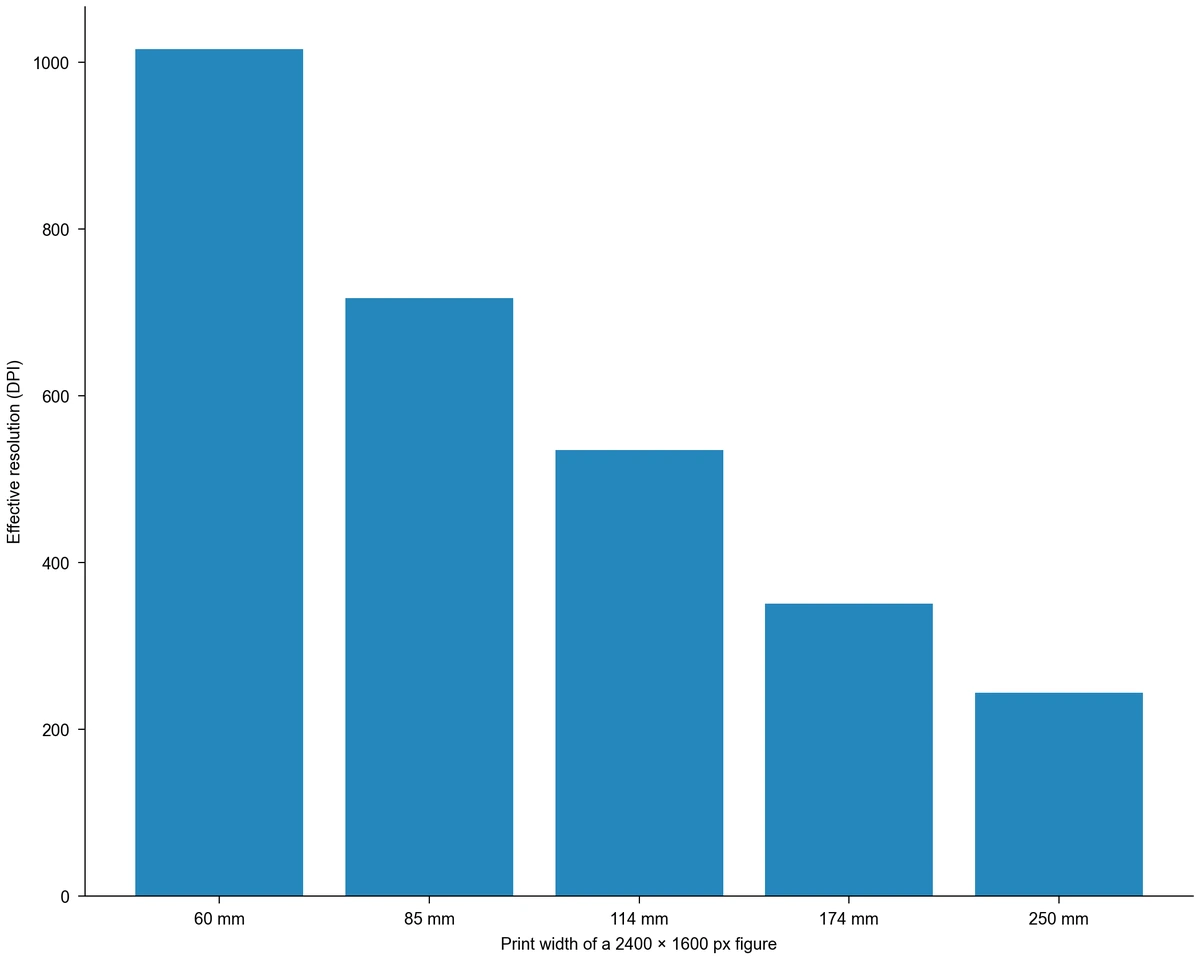
Bar chart of the effective DPI of one 2400 × 1600 px figure: 1016 DPI at 60 mm, 717 at 85 mm, 535 at 114 mm, 350 at 174 mm and 244 at 250 mm print width
  • Type pixel sizes or read them from a PNG or JPEG
  • Set the print width in millimetres or inches
  • See the effective DPI and the printed height
  • Get the minimum pixels for any target DPI

Image DPI Calculator Features for Print Checks

Each part of the calculator answers one question about a figure: how many pixels it has, how wide it will print and whether that is enough.

Enter pixel sizes or read them from a file

Type the pixel width and height of an exported figure, or choose a PNG or JPEG and the image DPI checker reads its dimensions in your browser. Files up to 20 MB and 64 megapixels are accepted, and the image never leaves your device. Reading another file replaces the previous size, so you can compare several exports of the same figure in turn.

  • Read PNG and JPEG dimensions locally
  • Accept files up to 20 MB and 64 megapixels
  • Type sizes directly for TIFF or other formats
Read a figure's size

Set the printed width in millimetres or inches

Journals, thesis templates and print shops state widths in different units, so the print width accepts millimetres or inches and keeps the physical width when you switch. The calculator then works out the printed height from the aspect ratio of your pixels, which shows whether a tall figure still fits the page. In this sense it is also a print size calculator for figures.

  • Switch units without losing the width
  • Keep the aspect ratio of the pixels
  • See the printed height before layout
Set a print width

See effective DPI and the minimum pixel size

Effective DPI is the pixel width divided by the printed width in inches. The calculator shows it next to your target and states whether the figure meets it, then gives the minimum width and height in pixels for that target at the same size. A figure of 2400 × 1600 px printed at 85 mm, for example, reaches about 717 DPI.

  • Compare the effective DPI with your target
  • Get minimum pixels for 300, 600 or 1000 DPI
  • Change the target for line art or posters
Find the pixels you need

Ignore the DPI tag stored in the file

Many images carry a DPI value in their metadata, often 72 or 96, that has no effect on the pixels. Two files with the same pixel size print identically at the same width whatever that tag says, so this image DPI calculator uses only the pixels and the print size. If the result is below target, export again at a larger pixel size or print the figure smaller.

  • Base the result on pixels, not metadata
  • Skip resampling a figure just to change its tag
  • Re-export or print smaller when below target
Check a file now

Image DPI Calculator Steps from File to Print Size

Check a figure in four steps before submission, printing or page layout.

  1. Find the pixel size of the figure

    Type the width and height in pixels from your plotting or imaging software, or choose the exported PNG or JPEG so the image DPI checker reads them for you without uploading the file. Use the size of the exported file, not the size it appears on screen.

  2. Enter the width it will print at

    Use the column or panel width from the journal guidelines, thesis template or poster layout, in millimetres or inches. A single journal column is often about 85 to 90 mm wide and a full page width about 170 to 190 mm, but follow the numbers your publisher gives.

  3. Set the target DPI

    Keep 300 DPI for photographs and color figures, or raise it when the guidelines ask for more for line art. The DPI calculator for printing then shows the effective DPI, the printed height and whether the figure meets the target.

  4. Fix a figure that falls short

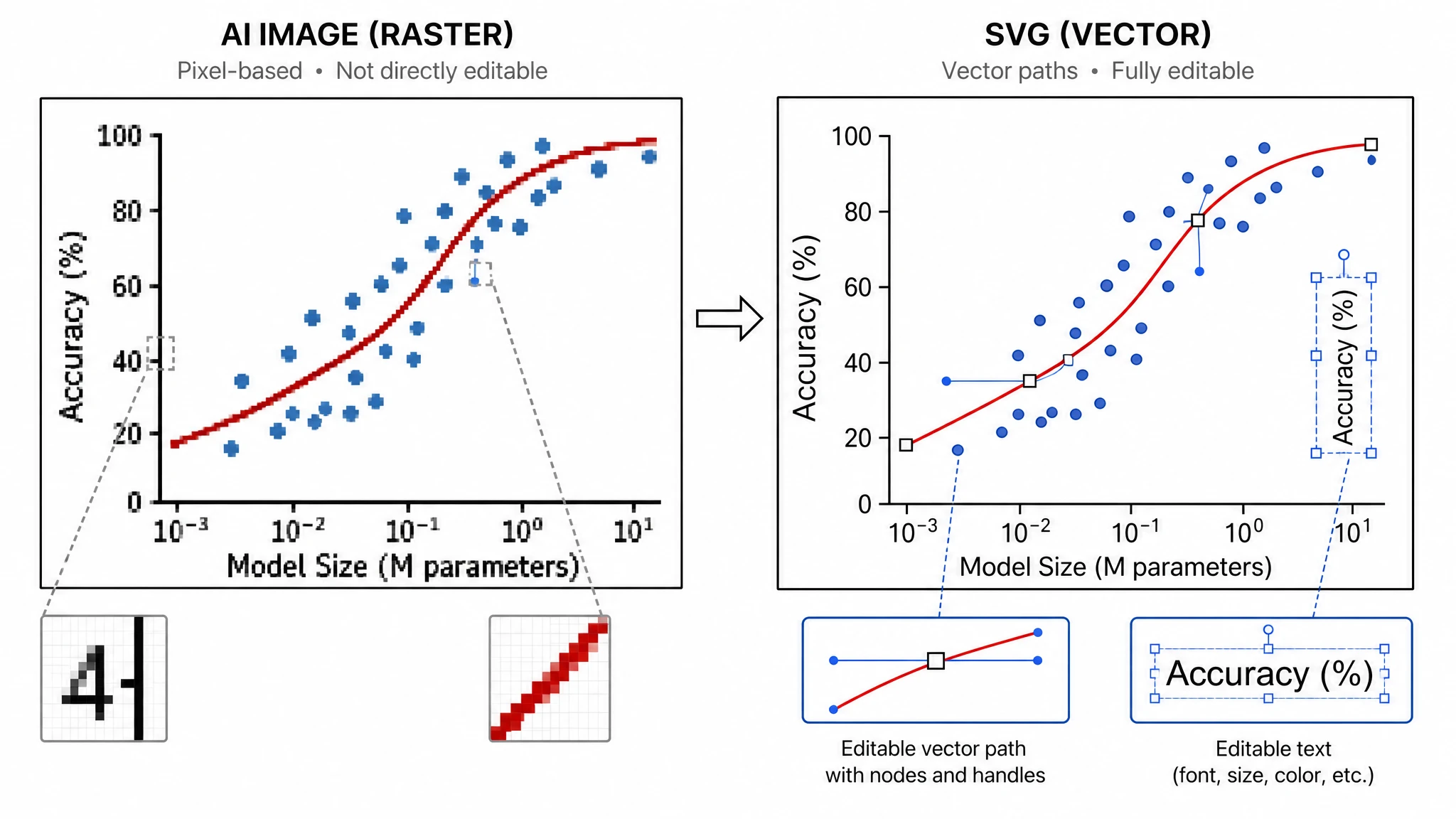
    Export again from the source file at the minimum pixel size shown, or reduce the printed width. If the source of a schematic or diagram is lost, Figure Enhancer can redraw a cleaner version to upscale.

Image DPI Calculator Uses in Research

These checks come up whenever a figure moves from a screen to a printed page.

Bar chart of the effective DPI of one 2400 × 1600 px figure: 1016 DPI at 60 mm, 717 at 85 mm, 535 at 114 mm, 350 at 174 mm and 244 at 250 mm print width

Check figures before journal submission

Measure each figure at the column width it will occupy and compare the result with the DPI for publication given in the author guidelines. Finding a 180 DPI panel before submission saves a round of replacing files after the technical check.

Explore this example
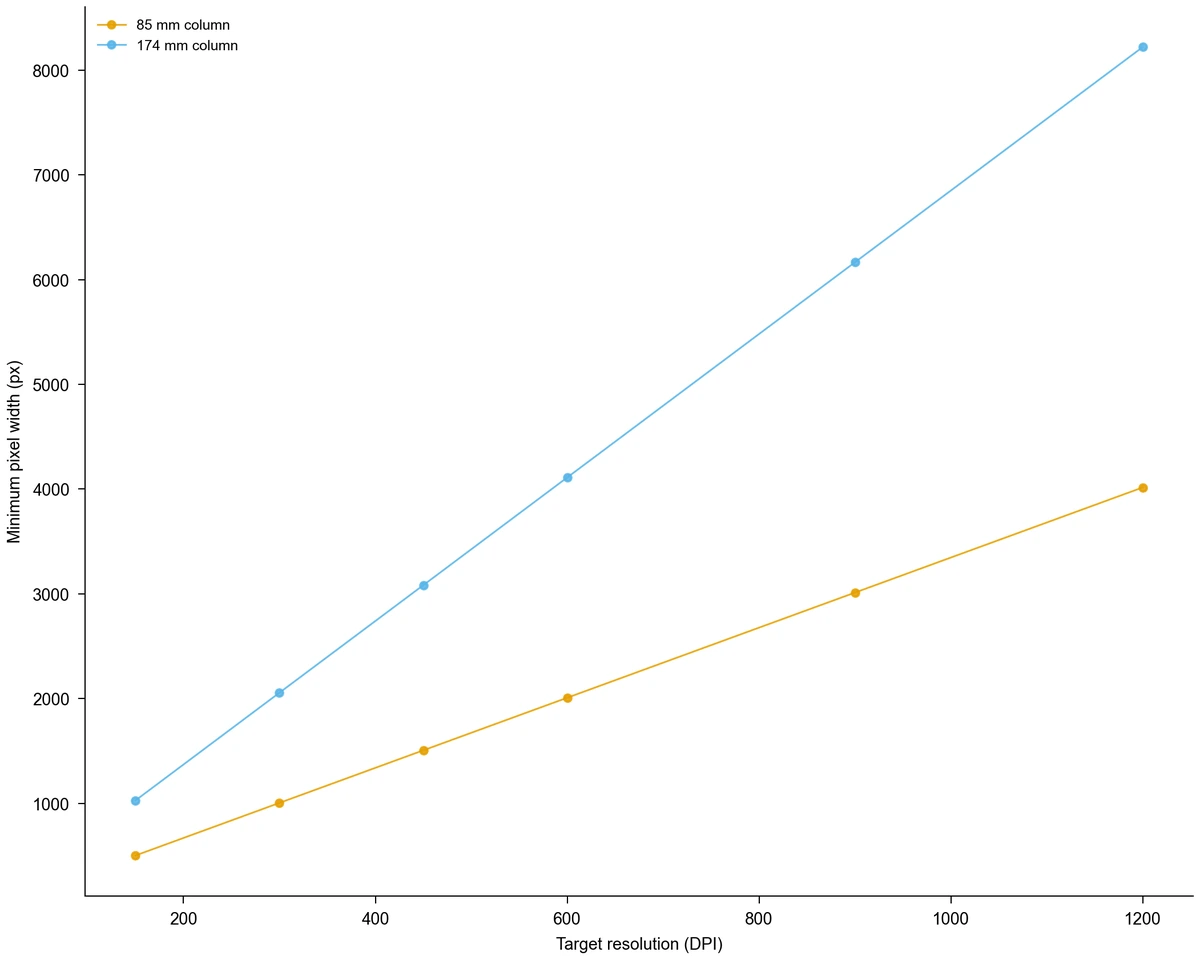
Line chart of the minimum pixel width needed for 150 to 1200 DPI at 85 mm and 174 mm column widths, rising from 502 px to 8221 px

Choose the export size in plotting software

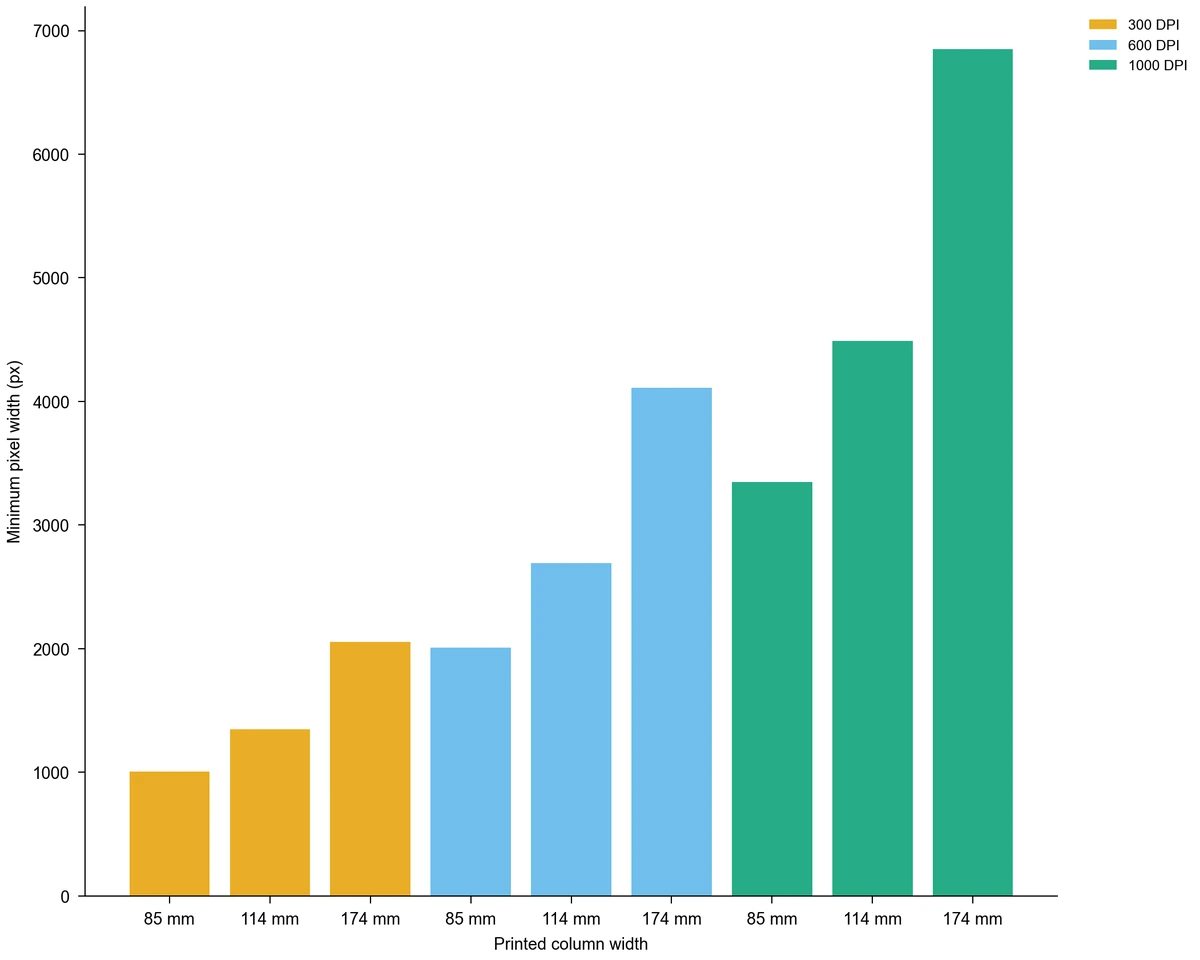
Work backwards from the target: the minimum pixel width for 300 DPI in a 174 mm double column is 2056 px. Set that size when you export from Python or R, or when you download a chart from a tool such as the bar chart generator.

Explore this example
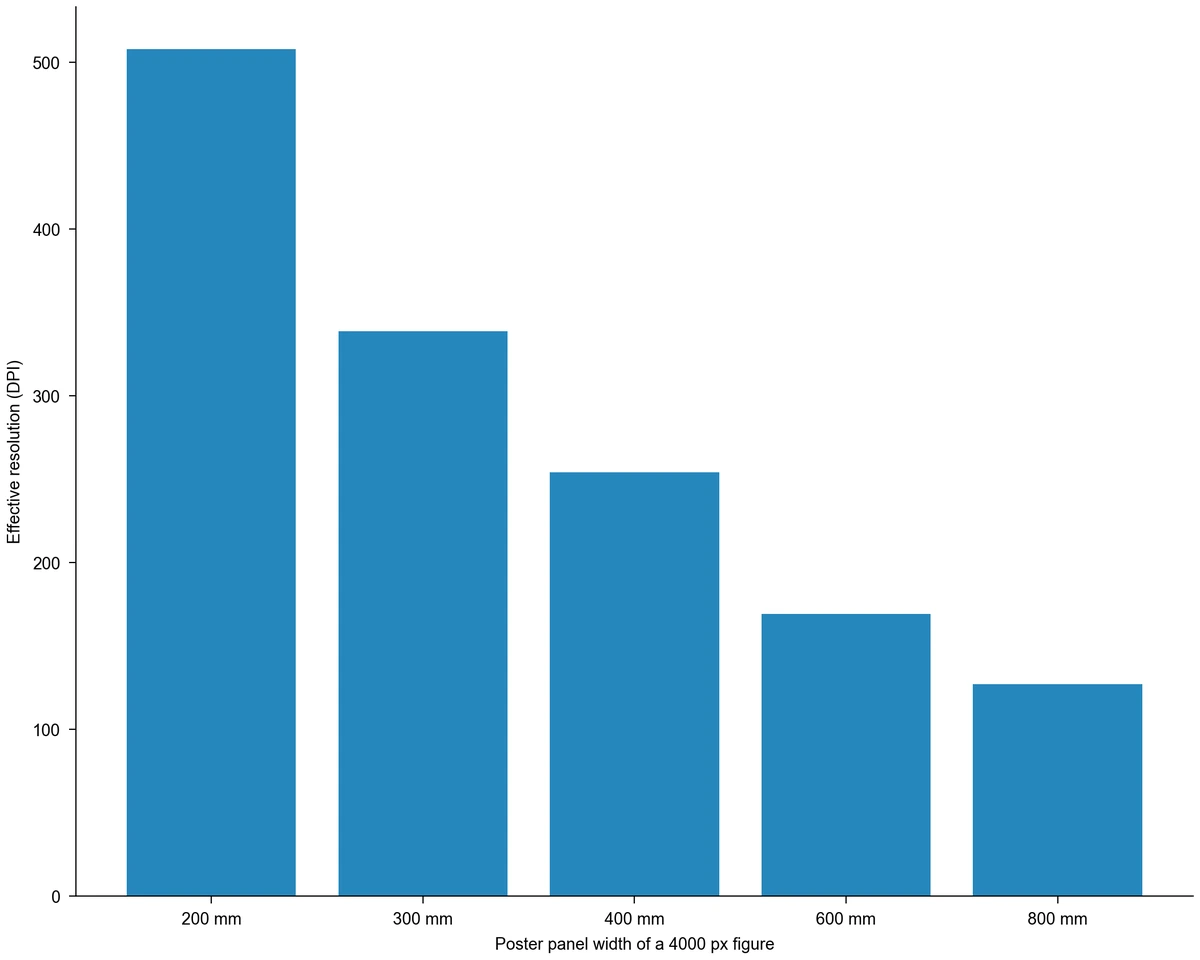
Bar chart of the effective DPI of a 4000 px wide figure on poster panels: 508 DPI at 200 mm, 339 at 300 mm, 254 at 400 mm, 169 at 600 mm and 127 at 800 mm

Size panels for a conference poster

Poster panels print much wider than journal figures, so a 4000 px image falls from 508 DPI at 200 mm to 127 DPI at 800 mm. Posters are viewed from further away, so print shops often accept a lower target than journals; use the calculator as a print size calculator for each panel and follow their numbers. Start the layout from a scientific poster template.

Explore this example
Bar chart of minimum pixel width at 85, 114 and 174 mm column widths for 300, 600 and 1000 DPI, from 1004 px up to 6851 px

Plan line art and combination figures

Diagrams with thin lines and small labels usually need a higher target than photographs. Set 600 or 1000 DPI to see how many pixels a schematic needs at its printed width, or keep it as vector artwork, where resolution does not apply until the figure is rasterised.

Explore this example
Line chart of the minimum pixel width needed for 150 to 1200 DPI at 85 mm and 174 mm column widths, rising from 502 px to 8221 px

Rescue a screenshot or an older schematic

A screenshot or a diagram copied from an old slide often has too few pixels for print. If the source of a schematic is gone, Figure Enhancer can redraw a cleaner version to upscale and check again.

Explore this example
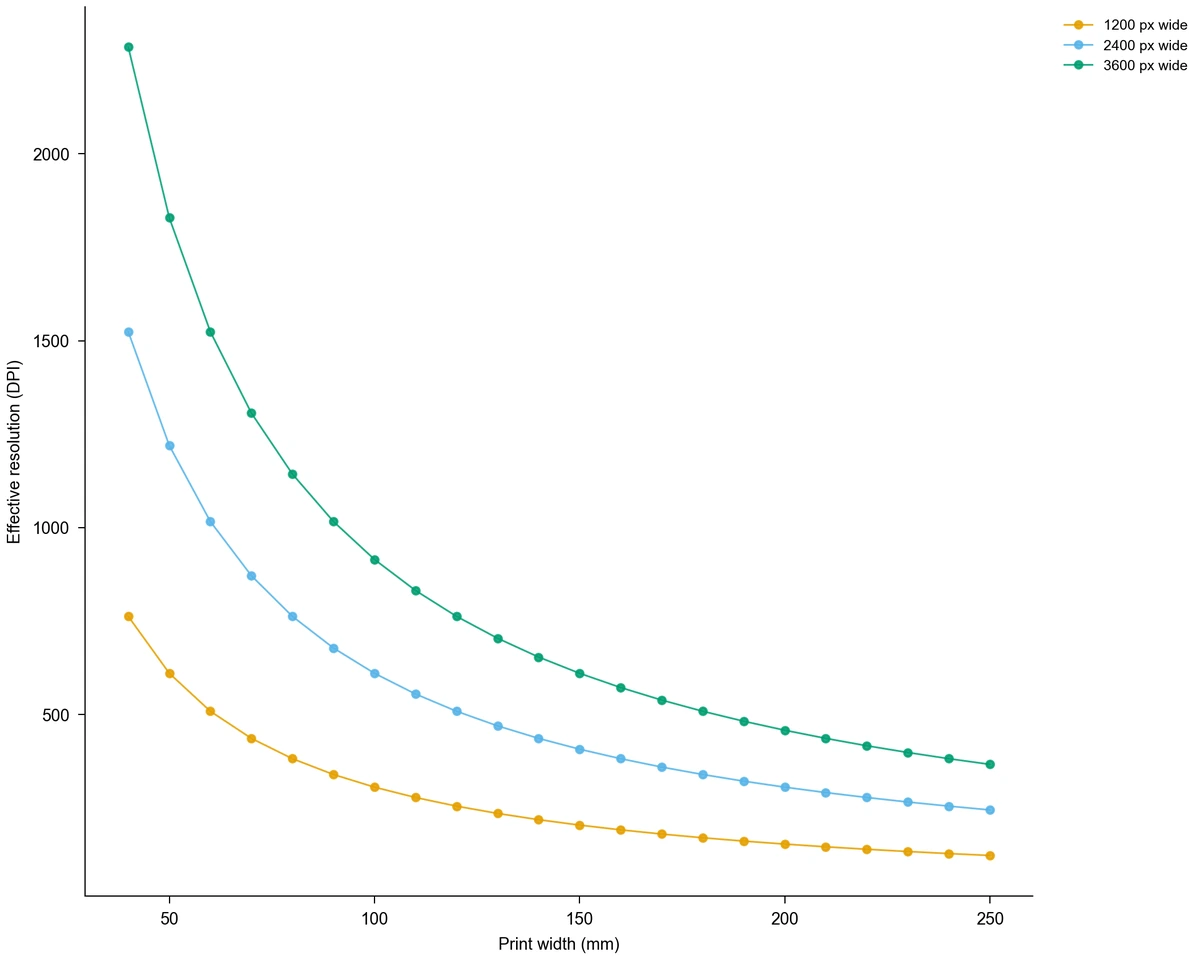
Line chart of effective DPI against print width from 40 to 250 mm for exports 1200, 2400 and 3600 px wide; every curve falls as the print width grows

Compare several exports of one figure

Read two or three exported files in turn to see which one meets the DPI for publication at the planned width. The curves for exports 1200, 2400 and 3600 px wide show how quickly the effective DPI falls as the printed width grows.

Explore this example
Image DPI Calculator Scenarios for Researchers

Examples of checking a figure's resolution for a particular page or print job.

Before submitting I would enter each figure at the 85 mm column width from the author guidelines. A microscopy panel at 210 DPI stands out at once, so I re-export it from the original image file instead of waiting for the journal's technical check.
Hannah W.

Cell biology postdoc

These are illustrative use scenarios with fictional names, not verified customer reviews.

Free tools

A tool for every scientific figure

90 focused generators for the scientific figure you need — each opens in the right workspace with a matching example.

Image DPI Calculator Questions before You Print

1.

2.

3.

4.

5.

6.

Call to action background

Know before you print

Image DPI Calculator: Check Your Figure Now

Check a figure

Free to start · No credit card required · Built for researchers