
Free Bohr Model Maker
Create clear, publication-ready Bohr model diagrams showing the nucleus, concentric electron shells, and valence electrons for any element in the periodic table.
Start with up to 150 free credits|No credit card required
Get up to 250 free credits on day one when you join through an invite.
Updated
Free Bohr Model Maker— templates & examples
Everything you need to create accurate Bohr model diagrams
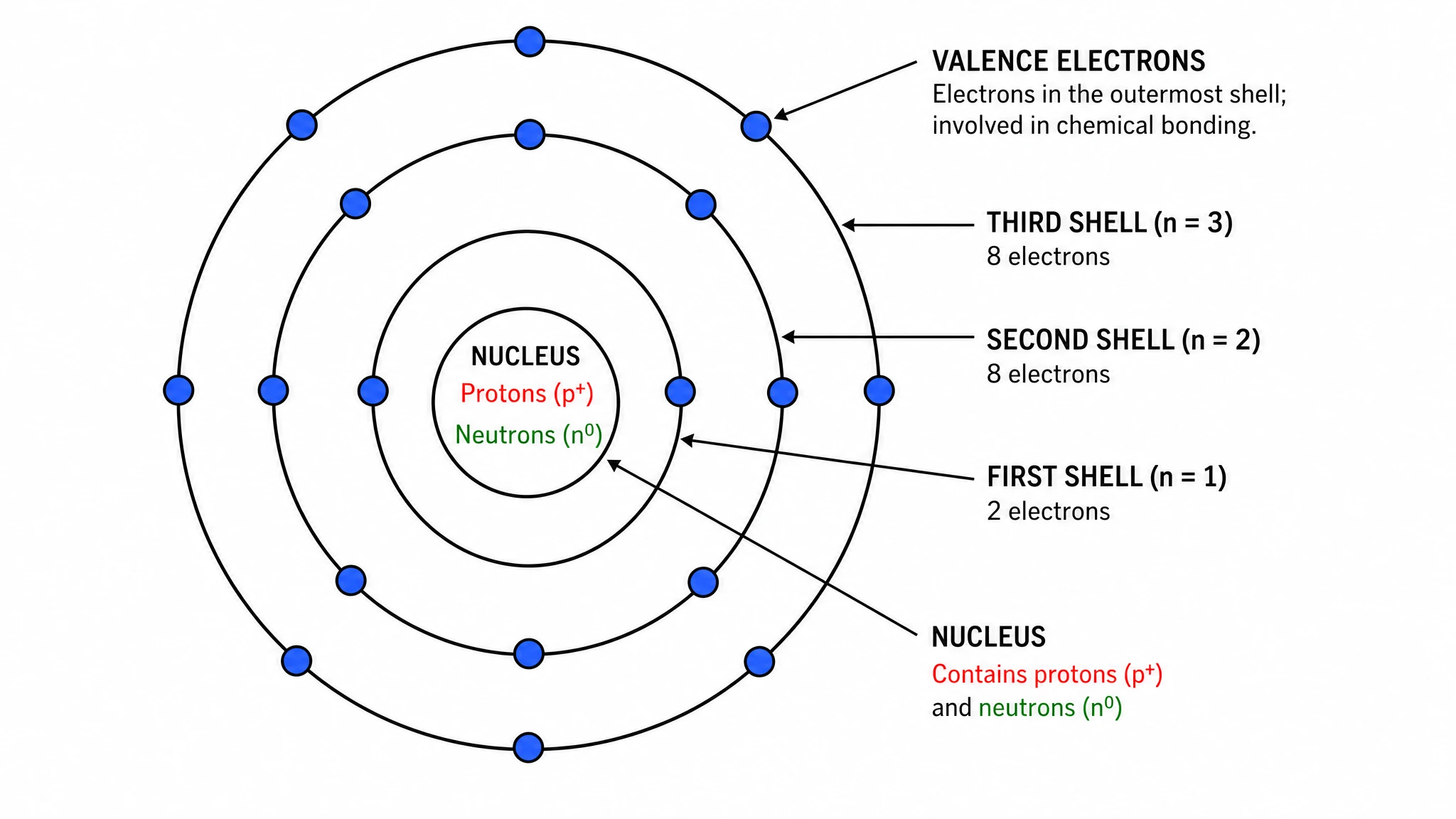
Accurate nucleus and electron shell placement
A correct Bohr model starts with a clearly labeled nucleus showing proton and neutron counts, followed by concentric electron shells filled in the right order. SciFig's bohr model maker automatically applies the 2-8-8 filling rule, places the exact number of electrons per energy level, and highlights the valence electrons in the outermost shell — so every atom diagram is chemically accurate and ready for a textbook, assignment, or publication figure.
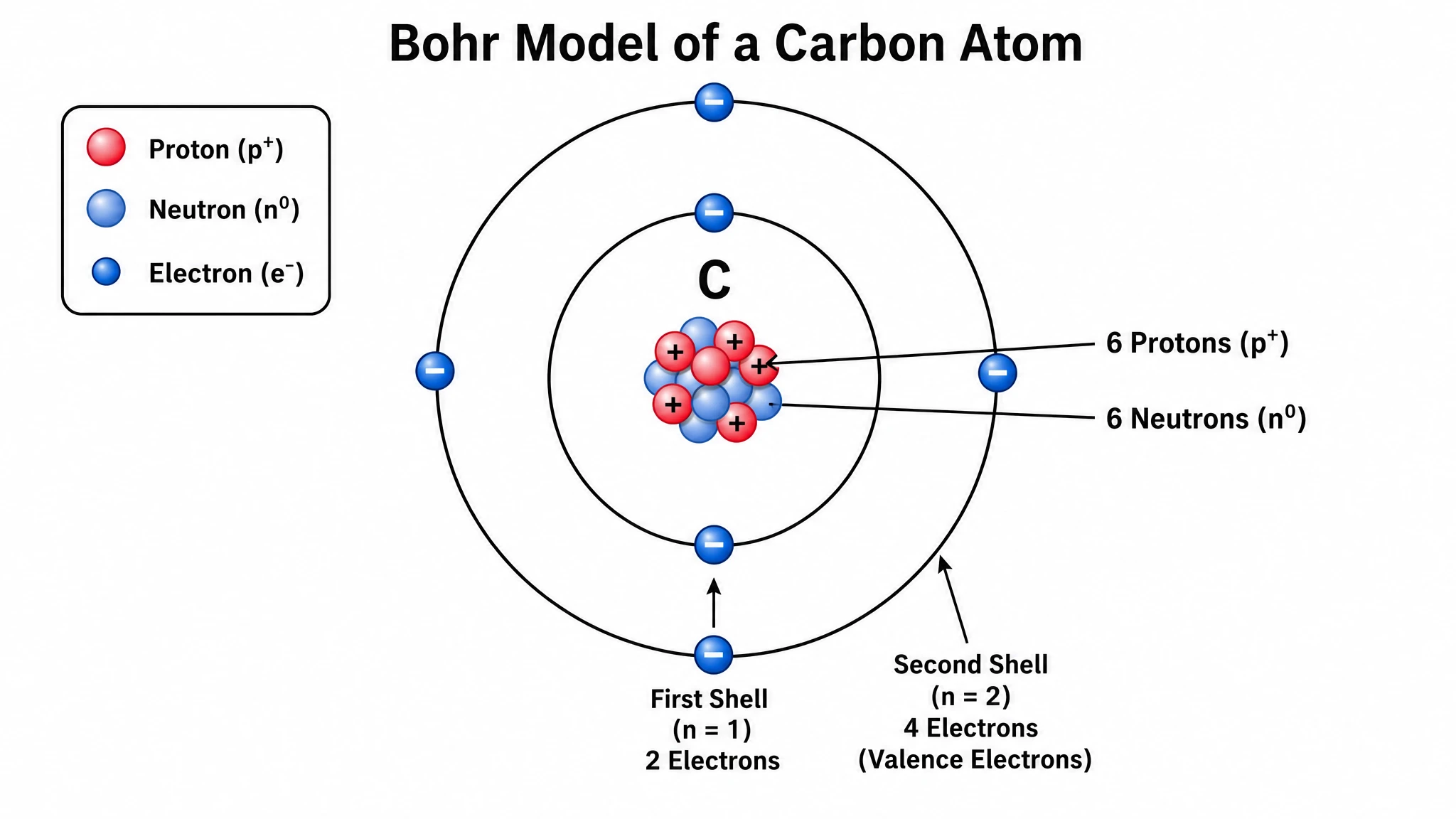
Generate Bohr models for any element instantly
Whether you need hydrogen, carbon, oxygen, sodium, or chlorine, this bohr model generator produces a labeled electron shell diagram in seconds. Specify the element by name or atomic number, and SciFig draws the correct shell configuration, labels the nucleus with proton and neutron counts, and marks valence electrons clearly. Because every ring follows the 2-8-8 filling rule, the output doubles as an electron configuration diagram: students can read a shell population such as 2-8-1 straight off the figure. Use it as an electron shell model creator for an entire series of elements — ideal for periodic table study guides, chemistry worksheets, or comparative atomic structure figures.
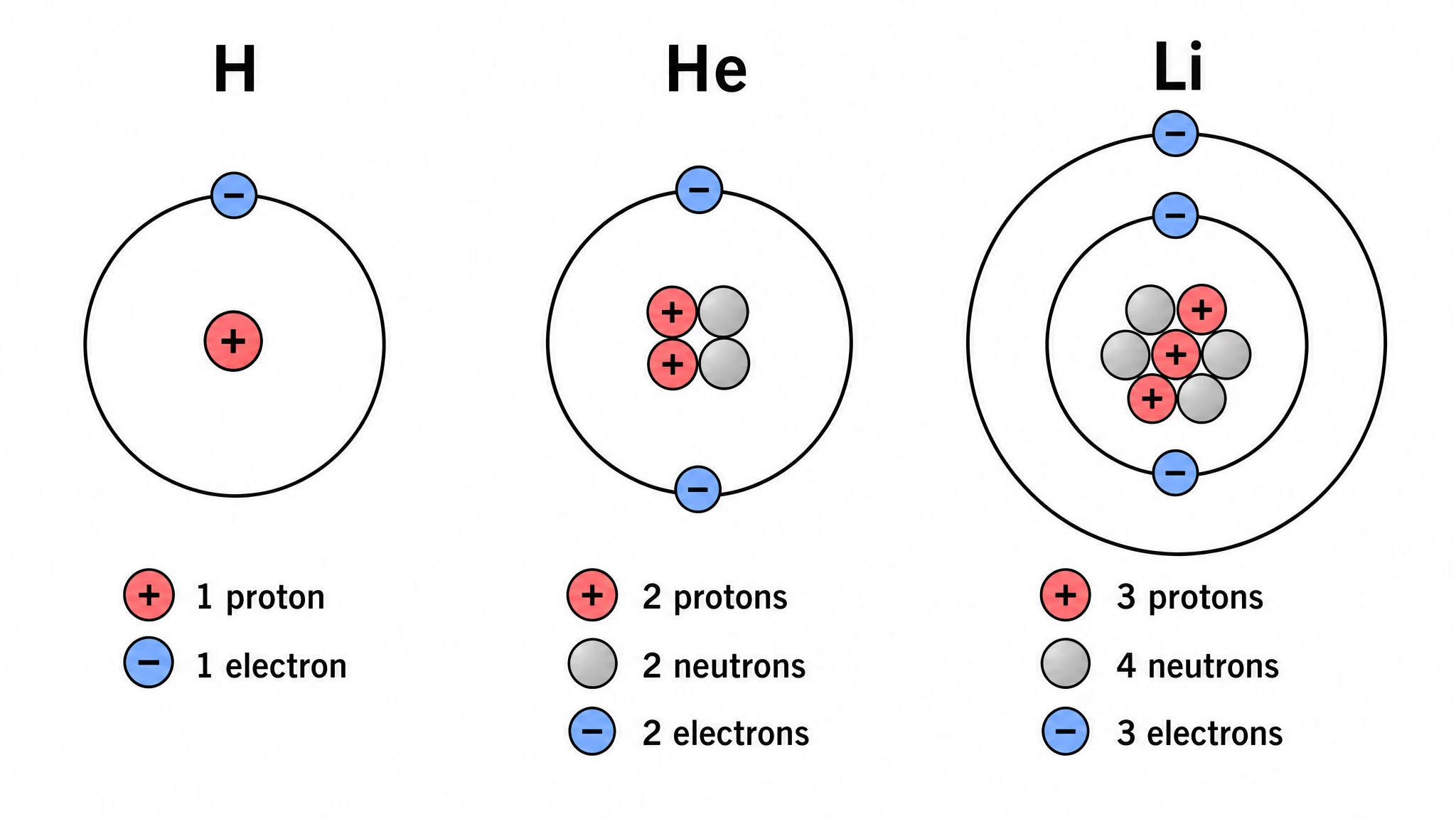
Export clean, print-ready atom diagrams
Every diagram from this atom diagram maker exports at publication resolution with a white background, crisp concentric rings, and clearly readable labels. Relabel the nucleus, adjust shell colors, or resize for poster, journal, or slide formats. SciFig's bohr model visualizer produces figures that match the clean chemistry-textbook style expected in academic papers, course materials, and scientific presentations — no manual drawing or vector editing required.
What is a Bohr model?
A Bohr model is an atomic diagram with a central nucleus of protons and neutrons surrounded by electrons in concentric shells, or energy levels. Proposed by Niels Bohr in 1913, it shows electrons in discrete orbits, each shell holding a maximum set by the 2-8-8 rule. SciFig's Bohr model maker lets you describe any element in plain language and generate a clean, labeled diagram of the nucleus, electron shells, and valence electrons — editable and export-ready for chemistry class or publication.
Why Bohr model diagrams matter in chemistry education
- Provides an intuitive visual model of atomic structure for introductory chemistry and physics
- Shows clearly how electron shells and energy levels are filled outward from the nucleus
- Reveals the number of valence electrons, which directly predicts bonding behavior and reactivity
- Connects atomic number directly to shell configuration, reinforcing periodic table trends
- Required in chemistry assignments, textbook figures, and lab reports at high school and university level
- Helps students and researchers compare electron configurations across elements side by side
- Bridges the gap between abstract atomic theory and concrete, labeled scientific diagrams
Key components of a Bohr model diagram
- Central nucleus — labeled with the number of protons (atomic number) and neutrons (mass number minus atomic number)
- First electron shell (n=1) — holds a maximum of 2 electrons at the lowest energy level
- Second electron shell (n=2) — holds a maximum of 8 electrons; filled before the third shell
- Third electron shell (n=3) — holds a maximum of 8 electrons for the first 20 elements in the 2-8-8 filling model
- Valence electrons — the electrons in the outermost occupied shell that determine chemical bonding
- Concentric ring layout — each ring represents one energy level, drawn at increasing radii from the nucleus
- Element label — the element symbol, name, or atomic number placed near the nucleus for identification
Where Bohr model diagrams are used
- Introductory chemistry and physics courses covering atomic structure and electron configuration
- Chemistry assignments, worksheets, and lab reports requiring hand-drawn or printed atom diagrams
- Periodic table study guides comparing electron shell configurations of multiple elements
- Textbooks, lecture slides, and educational posters explaining atomic structure concepts
- Scientific publications and supplementary figures illustrating element properties
- Lewis structure and chemical bonding lessons that rely on valence electron counts from Bohr models
- Science fair projects, tutoring materials, and online courses built around a Bohr atomic model diagram
How to make a Bohr model
Describe your Bohr model
Tell SciFig what to draw in plain language — no design tools required.
Generate with SciFig
Get a clean, publication-ready figure that matches your description in seconds.
Edit & export
Vectorize it into editable SVG, relabel everything, and export for your paper, poster, or slides.
Free Bohr Model Maker — Frequently Asked Questions
Common questions about Free Bohr Model Maker.
More tools

Circuit Diagram Maker
Draw electronic circuit schematics

Free Body Diagram Generator
Show forces acting on an object

Graphical Abstract Maker
Summarize your study in one panel
SciFig
Free AI Scientific Figure Generator for Illustrations, Images, Charts and Flowcharts
Models
Default to GPT Image 2 for journal papers; switch to Nano Banana Pro for slides and posters; pick Nano Banana 2.1 for routine figure work
Tutorials
Seven short walkthroughs of the AI scientific figure generator
Blog
Tutorials, tool comparisons, and publication tips for researchers.
Inspiration
Explore publication-ready illustrations, charts and flowcharts. Copy a prompt or open any template as the starting point for your own figure.
Pricing
View pricing

Ready to publish?
Make your own Bohr model in minutes.
Start for freeFree to start · No credit card required · Built for researchers