SciFig

Free Plasmid Map Maker with Editable Features

Enter the plasmid length and feature coordinates. Draw a scaled circular map with directional features, labels and bp ticks, then export SVG or PNG.

Describe what you need in the box above.

Start with up to 150 free credits|No credit card required

Get up to 350 free credits on day one when you join through an invite.

3 figure engines · 500+ templatesEvery label editable · 60+ color schemesEditable PPTX · Layered SVG · 8K PNG / JPG

Free Plasmid Map Maker with Editable Features— templates & examples

Updated

Free scientific tools

Free Plasmid Map Maker with Editable Features

Enter the plasmid length and feature coordinates. Draw a scaled circular map with directional features, labels and bp ticks, then export SVG or PNG.

A plasmid map is a circular diagram that locates named features along a DNA construct using base-pair coordinates and strand direction. Enter the plasmid length and feature coordinates. Draw a scaled circular map with directional features, labels and bp ticks, then export SVG or PNG.

Scaled circular plasmid map with named directional features and bp ticks
  • Place features at bp coordinates
  • Show strand direction
  • Draw across the origin
  • Edit labels and export the construct

Plasmid Map Maker with Editable Features Features

Use SciFig to work with the specific inputs, labels and exported outputs described below.

Place features at bp coordinates

SciFig’s plasmid map maker positions each feature on a circular scale using the total construct length. Enter the feature start and end, its name and strand to define the map. Coordinate-based placement keeps a short marker separate from a longer insert instead of giving every feature the same decorative arc.

  • Set total plasmid length
  • Enter feature start and end
  • Use a scaled circular backbone
Place features at bp coordinates

Show strand direction

Choose the strand for each feature and use its directional arc to show orientation around the construct. Keep a promoter or coding feature aligned with the convention used in the accompanying construct description. Directional features help explain organization without presenting the schematic as automatic sequence annotation.

  • Choose feature strands
  • Show directional arcs
  • Retain bp scale ticks
Show strand direction

Draw across the origin

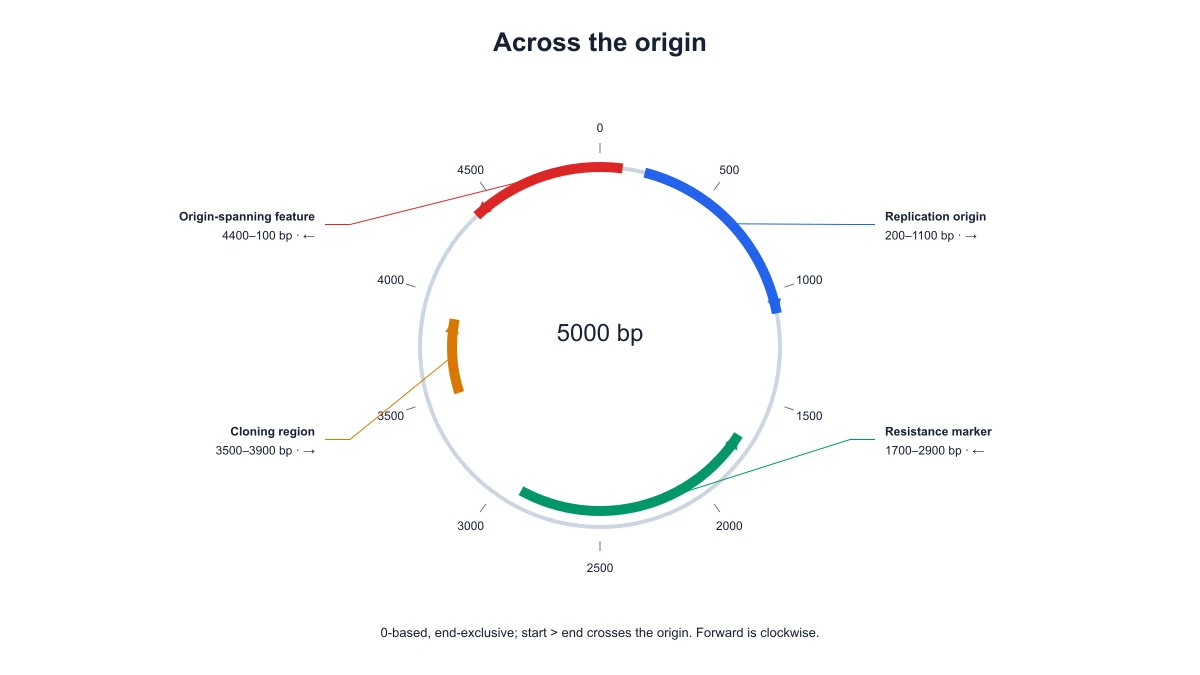
A circular construct can contain a feature that crosses the origin of the coordinate scale. SciFig handles that wrapped feature as one continuous region around the end and beginning of the circle. The map remains circular rather than splitting the feature into unrelated labels.

  • Support origin-crossing features
  • Keep wrapped regions together
  • State the coordinate convention
Draw across the origin

Edit labels and export the construct

Give the map a title, edit feature names and choose colors that distinguish the regions used in your explanation. Download SVG for a scalable construct panel or PNG for a presentation. Save JSON settings to preserve the plasmid length, coordinates and orientation for another revision.

  • Edit feature names and colors
  • Export SVG or PNG
  • Save coordinates in JSON
Edit labels and export the construct

How to Create the Diagram

Follow the local controls to prepare the plasmid map maker from your input.

  1. Set the construct length

    Enter the total length in base pairs. This defines the circular scale used by every feature. Use the same length as the construct you are illustrating, and keep that value visible when you compare maps from related constructs.

  2. Add named features

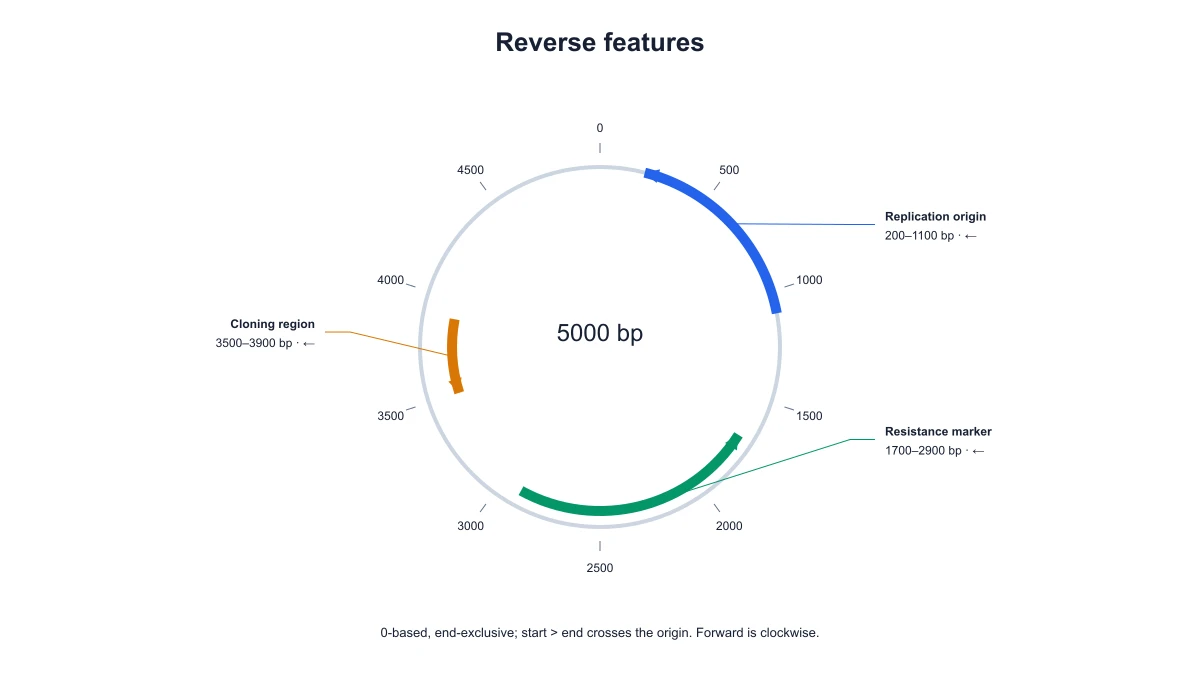
    Enter each feature’s coordinates and strand. Use the coordinate convention shown by the editor. A feature crossing the origin remains one wrapped feature, while ordinary features follow the entered interval around the circular backbone.

  3. Choose the map presentation

    Adjust the title, feature labels and colors to emphasize the construct elements in your explanation. Keep orientation cues and scale ticks readable so that the audience can distinguish the insert, backbone and selected markers.

  4. Save and export the map

    Download the scaled map as SVG or PNG. Save JSON settings to reopen the construct without re-entering the coordinates. Revise a feature name or orientation in the saved map when preparing another figure version.

Ways to Use the Diagram

Choose a focused figure for the question and document you are preparing.

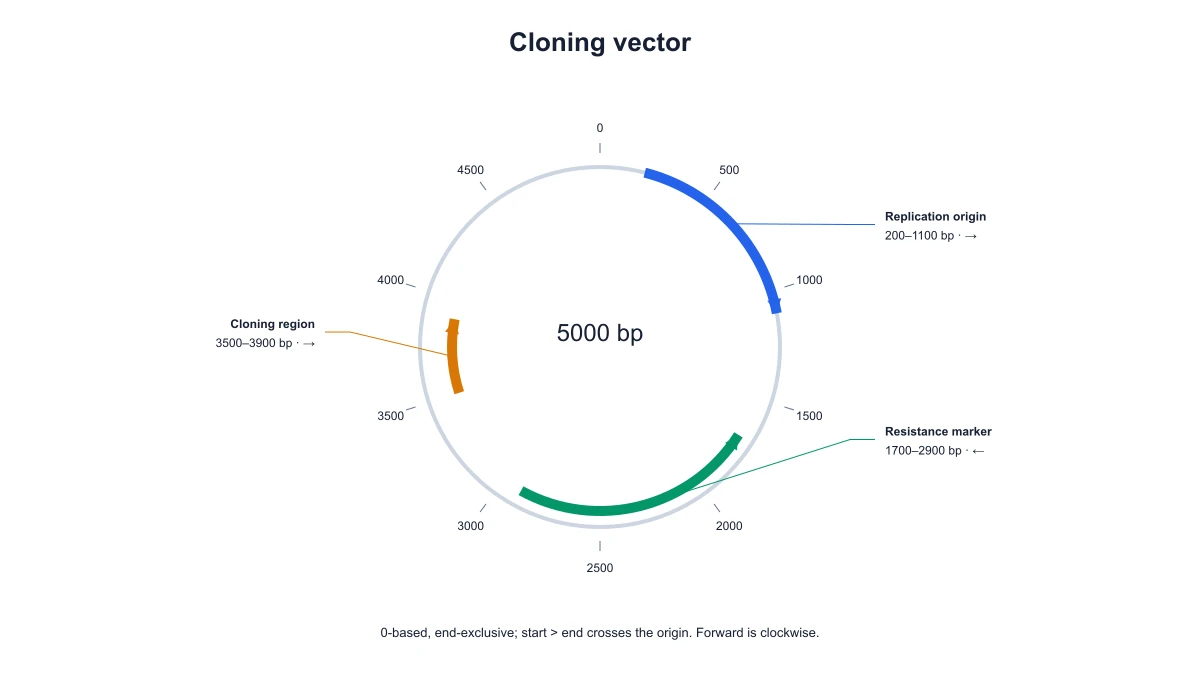
Cloning vector map with annotated features on a circular backbone

Explain a cloning construct

Place the insert, promoter and selected markers on a circular backbone. The map gives a seminar audience a coordinate reference for the construct being discussed. Use your actual construct coordinates to position each annotated region.

Explore this example
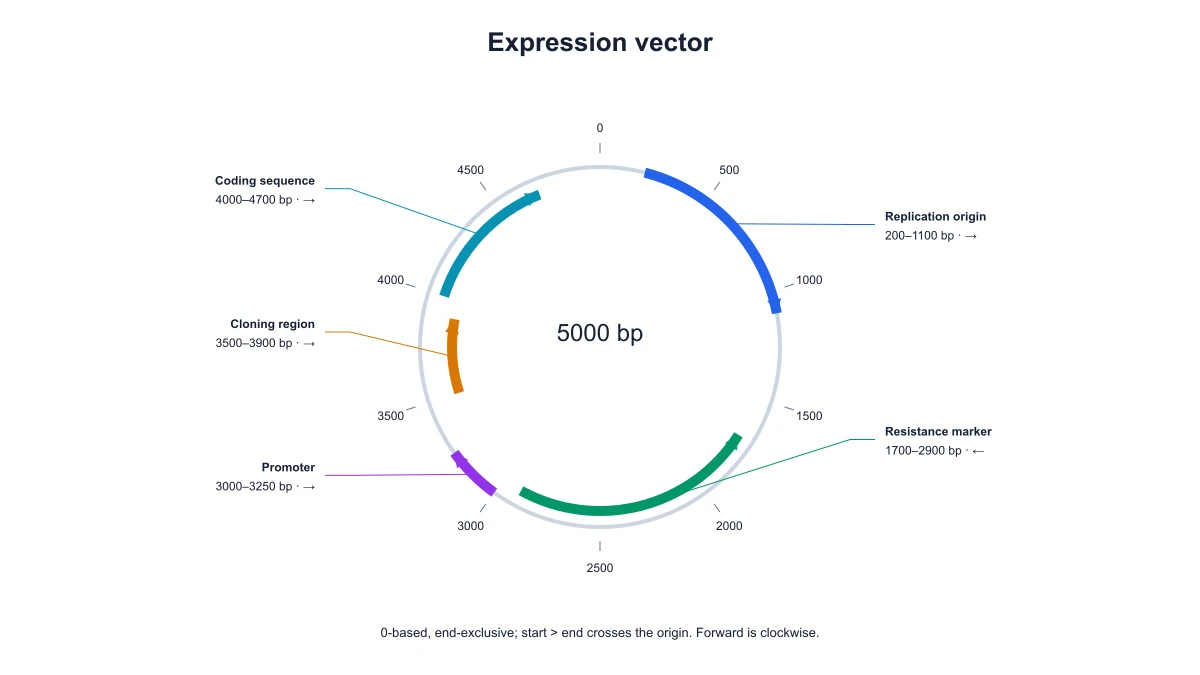
Expression plasmid map with directional feature arcs

Compare construct versions

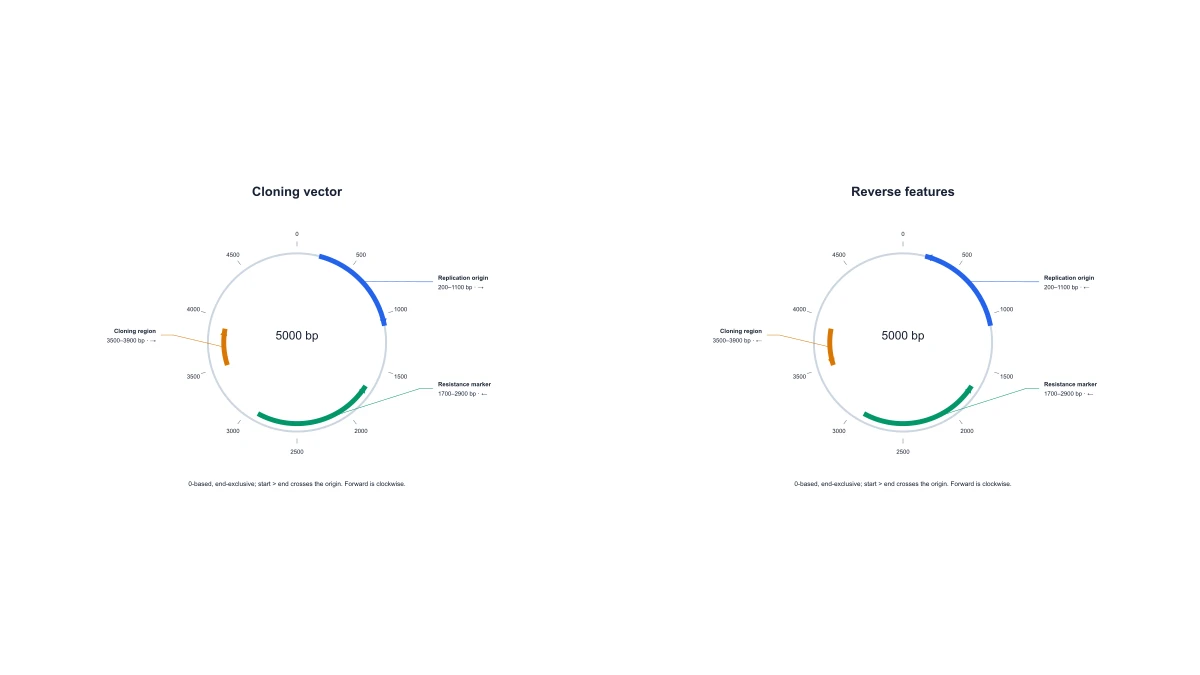
Create separate maps from related coordinate sets and export them at a common size. Consistent feature names and colors help a reader follow the changes between versions while the bp ticks retain each construct’s scale.

Explore this example
Plasmid map containing reverse-strand features

Prepare a lab presentation

Use a labeled plasmid map before describing an experiment involving the construct. The circular arrangement connects feature names with their relative locations. An SVG export remains clear when the panel is resized for a slide.

Explore this example
Circular plasmid feature crossing the coordinate origin

Teach circular coordinates

Use an origin-crossing feature to explain why circular maps need a coordinate convention. Students can compare the wrapped arc with a standard interval and see how both are positioned on the same plasmid scale.

Explore this example
Scaled circular plasmid map with named directional features and bp ticks

Hand off figure settings

Save the map settings with the exported panel. A colleague can reopen the feature coordinates, change a label and produce a revised figure without tracing the original image. The settings retain the construct length and selected strands.

Explore this example
Cloning vector map with annotated features on a circular backbone

Arrange a molecular figure panel

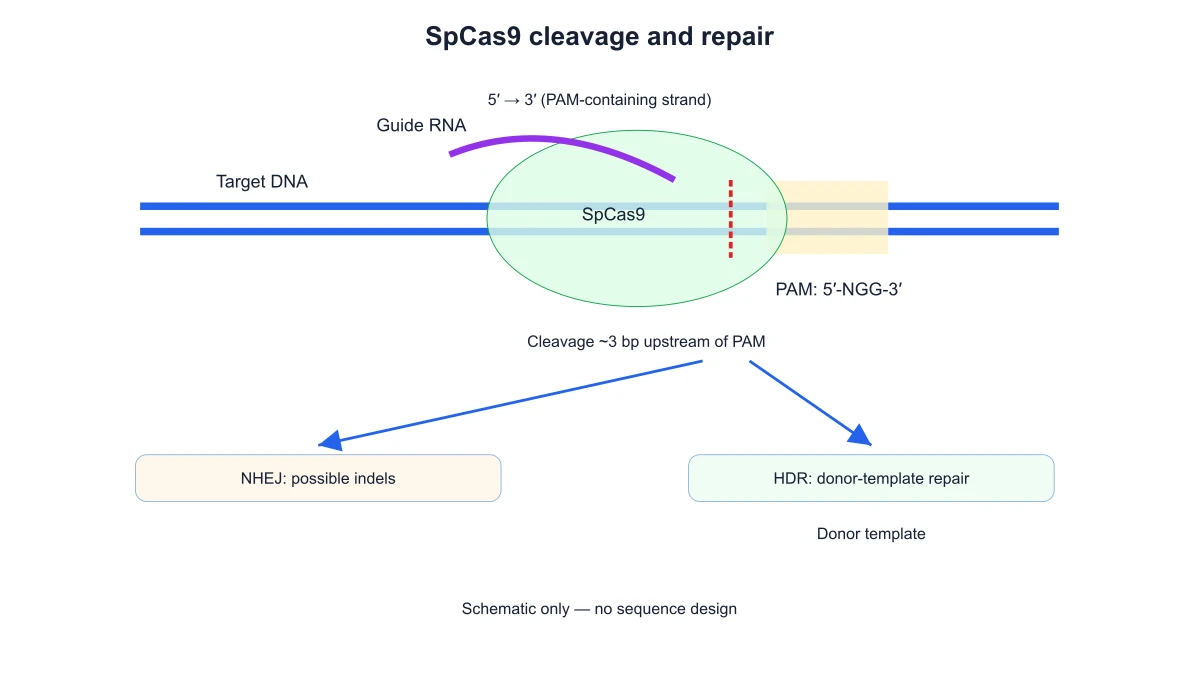
Export the plasmid map as SVG when it will sit beside a CRISPR or DNA structure schematic. Keep the construct map focused on feature locations, and use the companion diagram to explain the separate molecular mechanism.

Explore this example
How Researchers Use SciFig

The cloning-vector slide needed feature positions rather than a decorative circle. I entered the total length and our annotation coordinates into the plasmid map maker, then set the feature directions. The SVG gave me a scaled ring with ticks, while the saved JSON kept the coordinate choices available for the next lab meeting.

Oliver Reed

Synthetic Biology Doctoral Researcher · University of Warwick

Free tools

A tool for every scientific figure

130 focused generators for the scientific figure you need — each opens in the right workspace with a matching example.

Illustrations, structures and concept diagrams

68 tools
Chemistry Structure Generator example figureChemistry Structure GeneratorGraphical Abstract Maker example figureGraphical Abstract MakerFree Body Diagram Generator example figureFree Body Diagram GeneratorCircuit Diagram Maker example figureCircuit Diagram MakerAI Scientific Image Generator example figureAI Scientific Image GeneratorEditable 96-Well Plate example figureEditable 96-Well PlateLewis Dot Structure Generator example figureLewis Dot Structure GeneratorDNA Structure Diagram Generator example figureDNA Structure Diagram GeneratorWiring Diagram Maker example figureWiring Diagram MakerP&ID Diagram Generator example figureP&ID Diagram GeneratorScientific Poster Generator example figureScientific Poster GeneratorCladogram Maker example figureCladogram MakerFood Web Maker example figureFood Web MakerMedical Illustration Generator example figureMedical Illustration GeneratorPCR Diagram Generator example figurePCR Diagram GeneratorPPT Text to Visual Converter example figurePPT Text to Visual ConverterMitosis Diagram Generator example figureMitosis Diagram GeneratorAI Infographic Generator example figureAI Infographic GeneratorAnatomical Drawing Generator example figureAnatomical Drawing GeneratorAnimal and Plant Cell Comparison example figureAnimal and Plant Cell ComparisonAnimal Cell Diagram Generator example figureAnimal Cell Diagram GeneratorAntibody Structure Diagram Generator example figureAntibody Structure Diagram GeneratorApoptosis Diagram Generator example figureApoptosis Diagram GeneratorAutophagy Diagram Generator example figureAutophagy Diagram GeneratorBacteria Diagram Generator example figureBacteria Diagram GeneratorBlueprint Maker example figureBlueprint MakerBohr Model Maker example figureBohr Model MakerCalvin Cycle Diagram Generator example figureCalvin Cycle Diagram GeneratorCarbon Cycle Diagram Generator example figureCarbon Cycle Diagram GeneratorCell Cycle Diagram Generator example figureCell Cycle Diagram GeneratorCellular Respiration Diagram Generator example figureCellular Respiration Diagram GeneratorComplement System Diagram Generator example figureComplement System Diagram GeneratorCRISPR-Cas9 Diagram Generator example figureCRISPR-Cas9 Diagram GeneratorDNA Replication Diagram Generator example figureDNA Replication Diagram GeneratorElectron Configuration Diagram Generator example figureElectron Configuration Diagram GeneratorElectron Transport Chain Diagram Generator example figureElectron Transport Chain Diagram GeneratorELISA Diagram Generator example figureELISA Diagram GeneratorGel Electrophoresis Diagram Generator example figureGel Electrophoresis Diagram GeneratorGene Regulation Diagram Generator example figureGene Regulation Diagram GeneratorGlycolysis Diagram Generator example figureGlycolysis Diagram GeneratorImage to Editable SVG Converter example figureImage to Editable SVG ConverterImmune Checkpoint Diagram Generator example figureImmune Checkpoint Diagram GeneratorImmune Response Diagram Generator example figureImmune Response Diagram GeneratorInflammasome Diagram Generator example figureInflammasome Diagram GeneratorKrebs Cycle Diagram Generator example figureKrebs Cycle Diagram GeneratorLab Diagram Maker example figureLab Diagram MakerMeiosis Diagram Generator example figureMeiosis Diagram GeneratorMetabolic Pathway Diagram Generator example figureMetabolic Pathway Diagram GeneratorMolecular Orbital Diagram Generator example figureMolecular Orbital Diagram GeneratorNitrogen Cycle Diagram Generator example figureNitrogen Cycle Diagram GeneratorPedigree Chart Maker example figurePedigree Chart MakerPhospholipid Diagram Generator example figurePhospholipid Diagram GeneratorPhosphorus Cycle Diagram Generator example figurePhosphorus Cycle Diagram GeneratorPhotosynthesis Diagram Generator example figurePhotosynthesis Diagram GeneratorPhylogenetic Tree Maker example figurePhylogenetic Tree MakerPhysics Vector Diagram Maker example figurePhysics Vector Diagram MakerPlant Cell Diagram Generator example figurePlant Cell Diagram GeneratorPlasmid Map Maker example figurePlasmid Map MakerProtein Synthesis Diagram Generator example figureProtein Synthesis Diagram GeneratorPunnett Square Maker example figurePunnett Square MakerRay Diagram Maker example figureRay Diagram MakerRNA Structure Diagram Generator example figureRNA Structure Diagram GeneratorScientific Color Palette Generator example figureScientific Color Palette GeneratorSignaling Pathway Diagram Generator example figureSignaling Pathway Diagram GeneratorSingle Line Diagram Generator example figureSingle Line Diagram GeneratorT-Cell Activation Diagram Generator example figureT-Cell Activation Diagram GeneratorWater Cycle Diagram Generator example figureWater Cycle Diagram GeneratorWestern Blot Diagram Generator example figureWestern Blot Diagram Generator
Plasmid Map Maker with Editable Features Questions

1.

2.

3.

4.

5.

6.

Call to action background

Create with SciFig

Free Plasmid Map Maker with Editable Features

Open the free tool

Free to start · No credit card required · Built for researchers