SciFig

Free Physics Vector Diagram Maker

Turn vector components into clear arrows. Compare head-to-tail addition with a common-origin view, read the resultant and download the diagram.

Describe what you need in the box above.

Start with up to 150 free credits|No credit card required

Get up to 350 free credits on day one when you join through an invite.

3 figure engines · 500+ templatesEvery label editable · 60+ color schemesEditable PPTX · Layered SVG · 8K PNG / JPG

Draw physics vectors and their resultant

Enter x and y components for two to six vectors. Compare a common-origin diagram with head-to-tail addition, then download the figure or save its settings.

Use the same unit and physical quantity for every vector. Enter signed x and y components; the tool keeps the unit label and does not convert between units.

Vector 1
Vector 2
Arrow arrangement
Resultant: (3, 4) N · Magnitude: 5 N · Angle from +x: 53.13°

Free Physics Vector Diagram Maker— templates & examples

Updated

Vectors, components and resultants

Free Physics Vector Diagram Maker

Keep the vector inputs, diagram and resultant together in an example you can revise and download.

SciFig’s physics vector diagram maker turns two to six sets of x and y components into labeled arrows. Arrange the vectors from a common origin or place them head to tail, show component guides and read the resultant’s components, magnitude and direction. Use a common unit for the vectors you are adding. Download SVG or PNG and save the settings when you want to reopen the same example later.

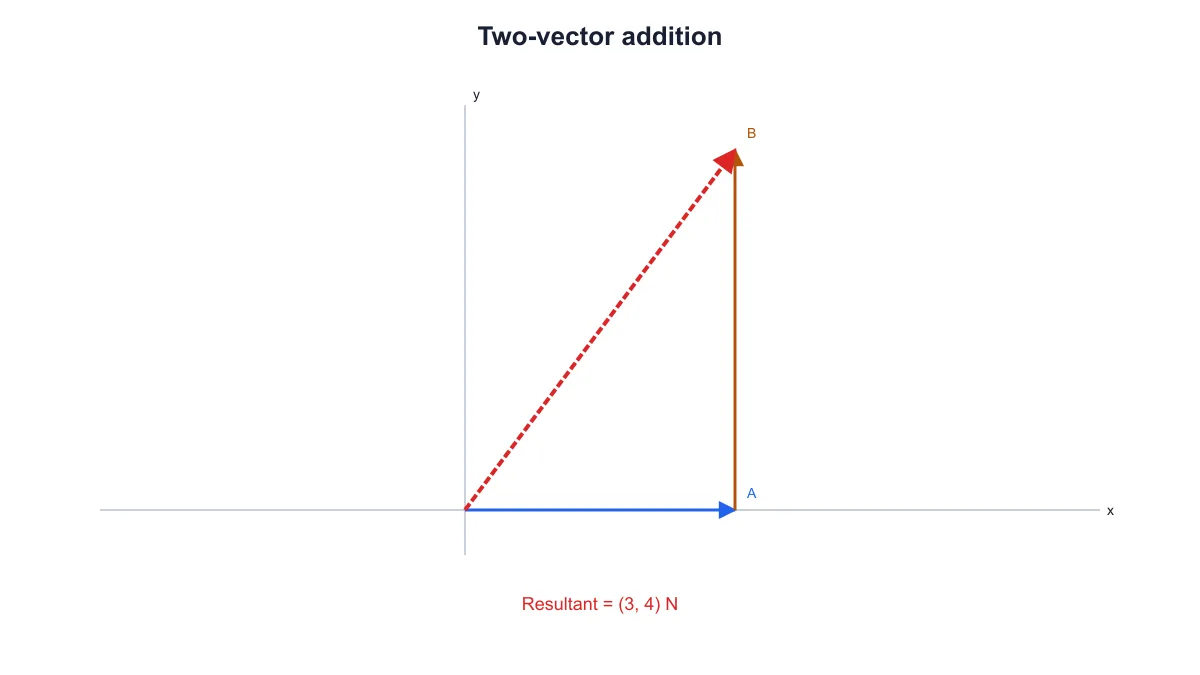
Head-to-tail vectors A three units along x and B four units along y with resultant three comma four
  • Enter signed x and y components
  • Compare common-origin and head-to-tail views
  • Read the resultant magnitude and direction
  • Download SVG, PNG and saved settings

Physics Vector Diagram Features

Show the arrows and numerical result that support your vector explanation.

Enter vectors as signed components

Give each vector a unique label and enter its x and y components. Positive and negative values set the direction along the axes. SciFig’s physics vector diagram maker uses one common unit for the vectors being added, so the components and resultant remain part of the same physical quantity. Add up to six vectors for your example.

  • Use signed Cartesian components
  • Name each vector separately
  • Keep one common unit
Try this in SciFig

Compare two arrow arrangements

Choose a common origin to compare vectors from one point, or use head-to-tail addition to place each arrow after the previous one. The component values stay the same when you switch arrangements. The resultant runs from the overall origin to the combined endpoint, helping you relate the numerical sum to the geometry of the diagram.

  • Start all arrows at the origin
  • Arrange arrows head to tail
  • Keep the same resultant in either view
Try this in SciFig

Read the resultant and its direction

The tool adds the x components and y components separately, then reports the resultant’s magnitude and angle measured counterclockwise from the positive x-axis. A red resultant distinguishes the sum from the input arrows. When the components cancel to zero, the result has no defined direction, and the diagram marks the zero resultant at the origin.

  • Read the summed x and y components
  • Check magnitude and angle from the positive x-axis
  • Recognize a zero resultant
Try this in SciFig

Download examples and reopen the inputs

Export SVG for further vector editing or PNG for a document or slide. Save JSON settings to retain the labels, components, unit, arrangement and component-guide choice. Reopen those settings when you want to revise the example, make a comparison or prepare a matching diagram for another part of the lesson.

  • Export SVG or PNG
  • Retain the vector inputs in a settings file
  • Reopen and revise the same example
Try this in SciFig

How to Make a Physics Vector Diagram

Enter the components, choose an arrangement and check the combined vector.

  1. Set the title and common unit

    Name the diagram for your lesson or problem and enter the unit shared by all the vectors. Use the same physical quantity throughout the example, such as forces in newtons or displacements in kilometers.

  2. Enter the vector components

    Give each vector a unique label and enter its signed x and y components. Use negative values for components pointing along the negative axes. Add or remove entries to keep between two and six vectors in the example.

  3. Choose the arrangement and inspect the result

    Compare the common-origin and head-to-tail views, and show the component guides when they help your explanation. Read the summed components, magnitude and angle below the controls. A zero resultant has no defined angle.

  4. Download and save the diagram

    Export SVG or PNG for your notes, worksheet or presentation. Save the JSON settings beside that material to reopen the same vectors, unit, arrangement and title later. Revise the inputs when you need a related example.

Physics Vector Diagrams for Lessons and Reports

Prepare vector diagram examples that connect numerical components with a visible construction.

Head-to-tail vectors A three units along x and B four units along y with resultant three comma four

Explain head-to-tail vector addition

Start with two perpendicular vectors to show how the combined endpoint defines the resultant. The physics vector diagram maker keeps the entered components and red resultant together. Export the construction for a lesson slide or a handout about adding vectors.

Explore this example
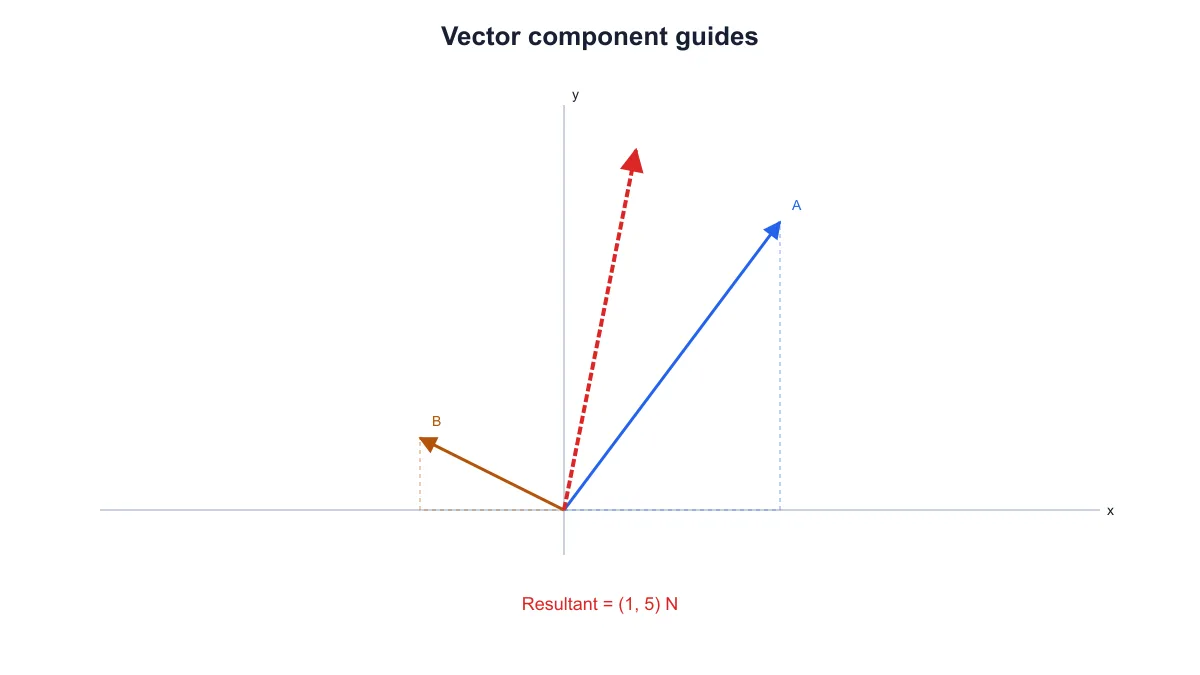
Two arrows from the origin with dashed horizontal and vertical component guides

Resolve arrows into components

Turn on the dashed component guides to show horizontal and vertical parts of the entered vectors. Use signed values to discuss directions in different quadrants. Place the exported physics vector diagram beside the equations in your notes so readers can connect each component with the geometry.

Explore this example

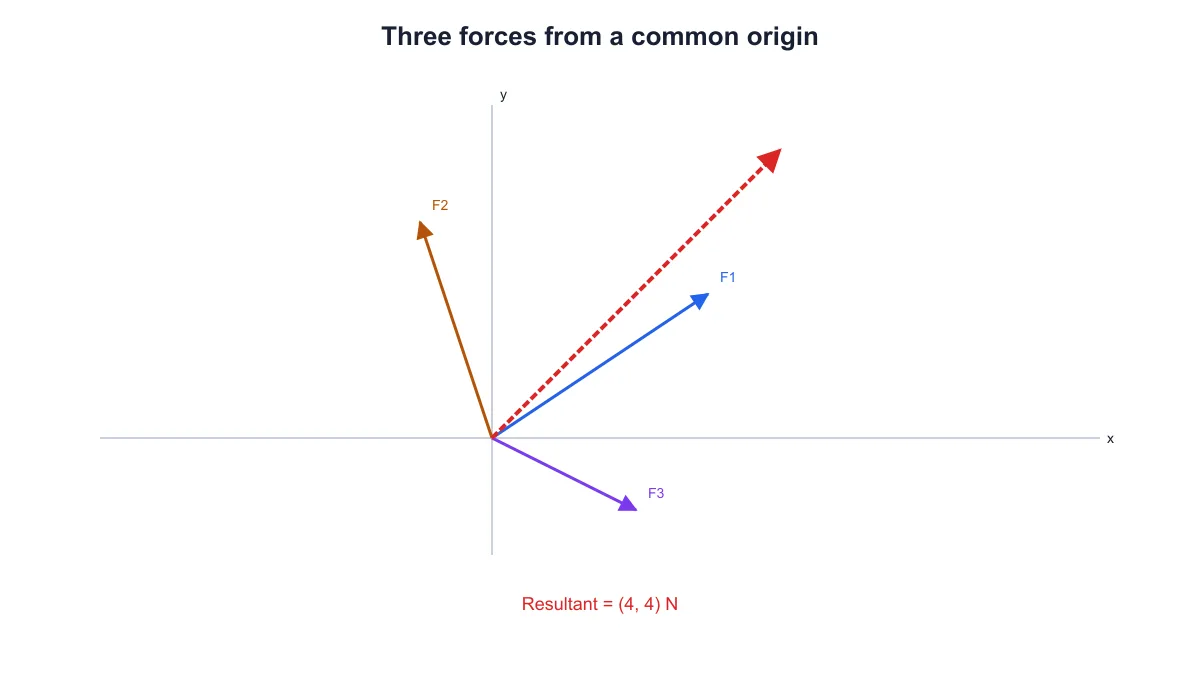
Three labeled force vectors from a common origin with a red resultant of four comma four newtons

Show a resultant force

Use a common-origin arrangement for force vectors whose components you already know. Keep all values in the same unit and read the resultant below the controls. For a diagram focused on identifying the external forces on one object, continue to SciFig’s free-body diagram tool.

Explore this example

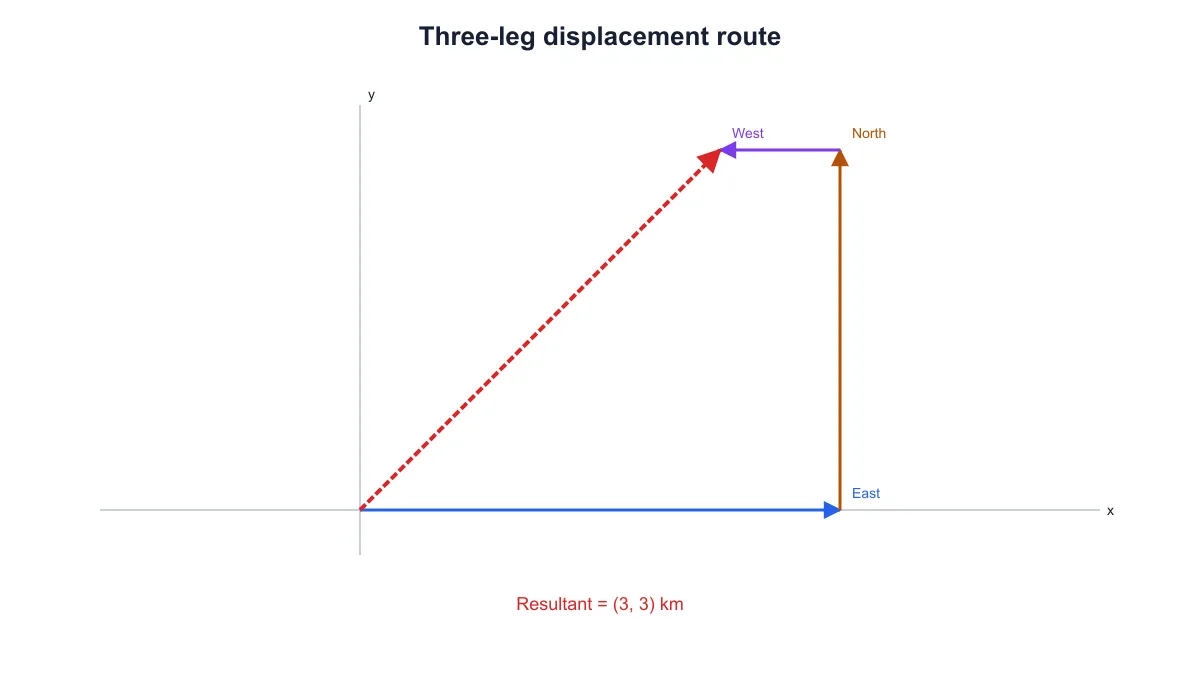
East, north and west displacement legs arranged head to tail with a three comma three kilometer resultant

Illustrate a displacement route

Enter each leg of a route as x and y components in a common distance unit, then use head-to-tail addition. The red resultant shows the net displacement from the starting point. Keep the route settings when you want to revise a leg for another example.

Explore this example
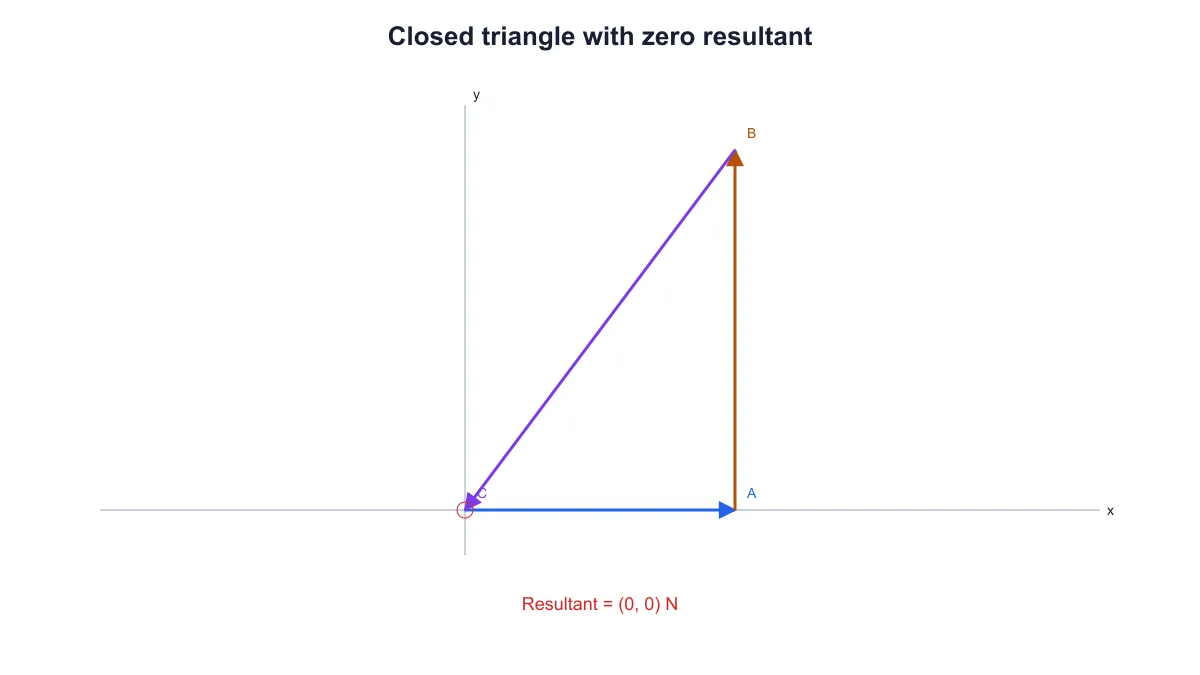
Three head-to-tail vectors forming a closed triangle with a marked zero resultant

Discuss vectors that cancel

Prepare a closed triangle whose vector components add to zero. The tool marks the zero resultant and reports its direction as undefined. Use this example when explaining that nonzero vectors can add to a resultant with zero magnitude and no defined direction.

Explore this example
Head-to-tail vectors A three units along x and B four units along y with resultant three comma four

Prepare figures for a document

Give the diagram a short topic-specific title and download SVG or PNG for a report, worksheet or presentation. Save the settings with the document so you can update the components or arrow arrangement later. Use the same view across related vector diagram examples for a consistent explanation.

Explore this example
How Researchers Use SciFig

I needed a head-to-tail example beside the component equations in a tutorial handout. The physics vector diagram maker let me enter the two vectors and check the resultant before exporting the figure. I saved the settings with the worksheet so I could reuse the same construction when I revised the questions.


Hannah R.

Physics teaching assistant, University of Nottingham

Free tools

A tool for every scientific figure

110 focused generators for the scientific figure you need — each opens in the right workspace with a matching example.

Physics Vector Diagram Questions

1.

2.

3.

4.

5.

6.

Call to action background

Vectors, components and resultants

Turn vector components into a clear diagram

Create a physics vector diagram

Free to start · No credit card required · Built for researchers