SciFig

Free Chemical Process Flow Diagram Maker

Arrange tanks, pumps, heat exchangers and separators. Connect named material streams, add your own labels and export a chemical process flow diagram.

Describe what you need in the box above.

Start with up to 150 free credits|No credit card required

Get up to 350 free credits on day one when you join through an invite.

3 figure engines · 500+ templatesEvery label editable · 60+ color schemesEditable PPTX · Layered SVG · 8K PNG / JPG

Free Chemical Process Flow Diagram Maker— templates & examples

Updated

Free scientific tools

Free Chemical Process Flow Diagram Maker

Arrange tanks, pumps, heat exchangers and separators. Connect named material streams, add your own labels and export a chemical process flow diagram.

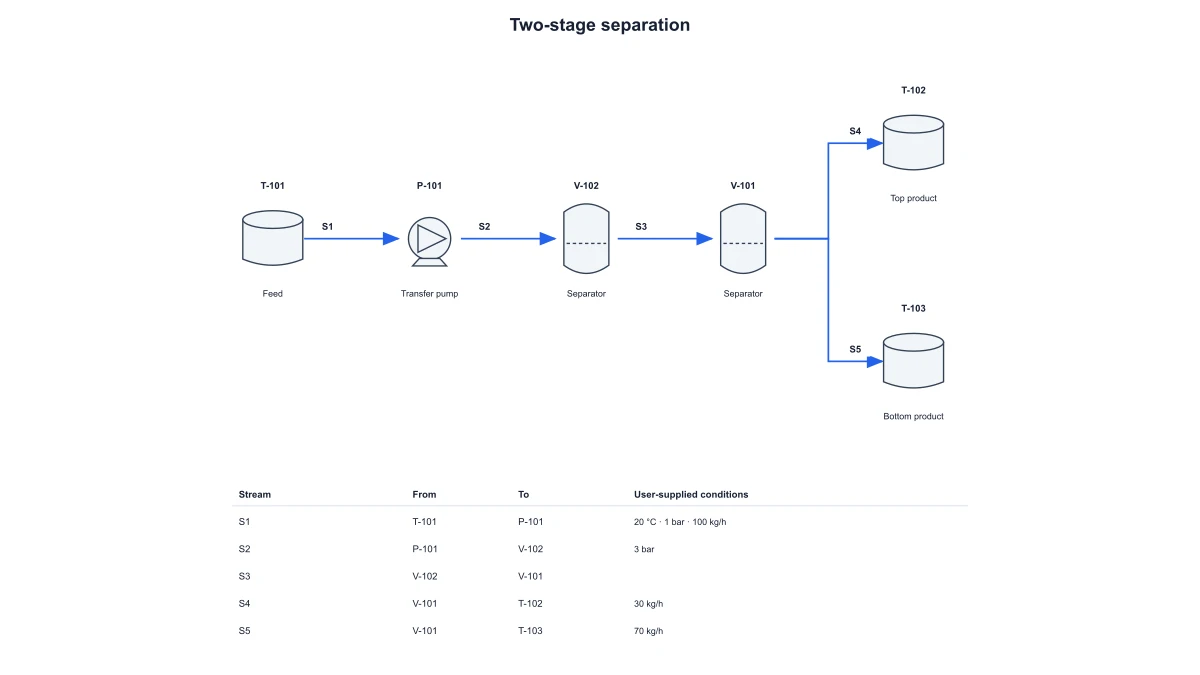
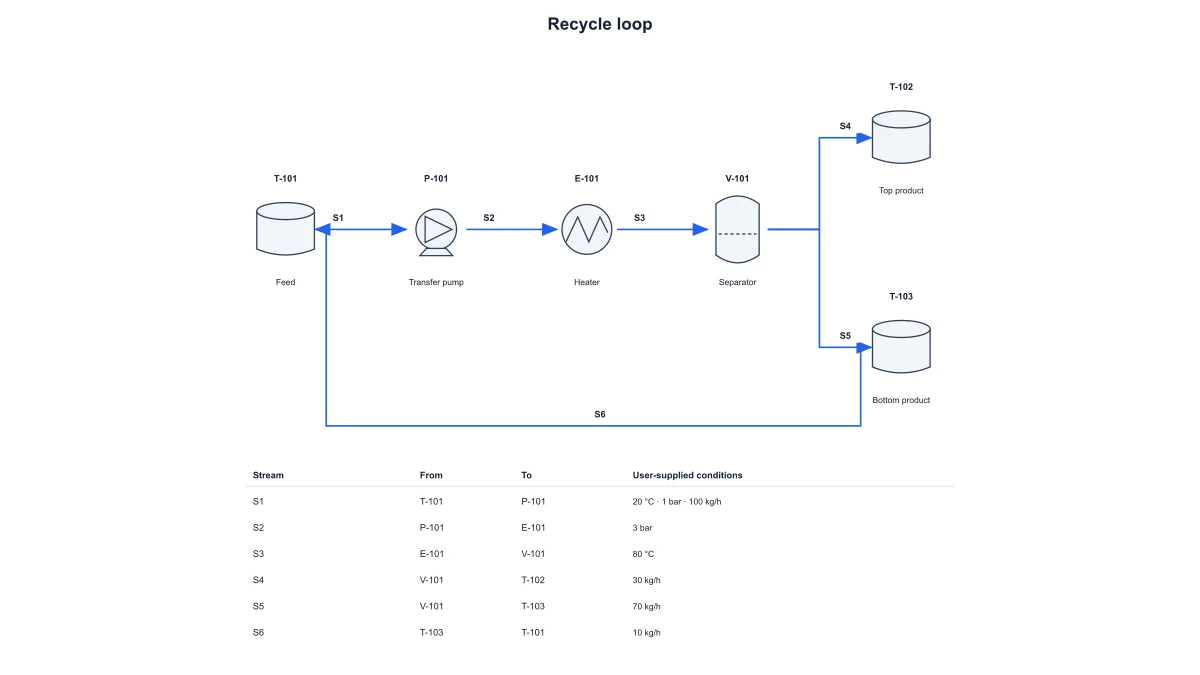
A chemical process flow diagram shows major equipment and directed material streams, with equipment identifiers and stream labels describing the process connections. Arrange tanks, pumps, heat exchangers and separators. Connect named material streams, add your own labels and export a chemical process flow diagram.

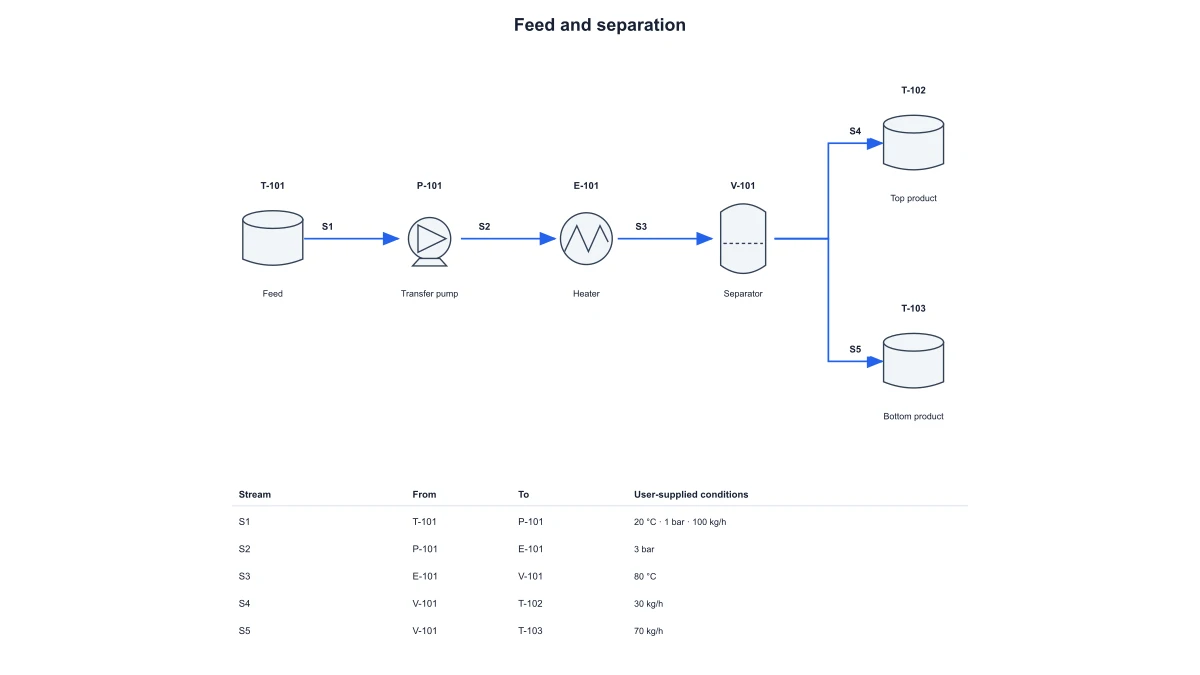
Chemical process flow diagram with equipment IDs, directed material streams and connection table
  • Use equipment-specific symbols
  • Connect material streams
  • Keep stream details beside the drawing
  • Export a process overview

Chemical Process Flow Diagram Maker Features

Use SciFig to work with the specific inputs, labels and exported outputs described below.

Use equipment-specific symbols

SciFig’s chemical process flow diagram uses distinct symbols for tanks, pumps, heat exchangers and separators. Assign equipment identifiers to connect the drawing with the process description. A compact equipment view is easier to follow when each unit keeps its own recognizable role rather than appearing as an identical business-process box.

  • Choose supported equipment
  • Assign equipment identifiers
  • Keep unit roles visible
Use equipment-specific symbols

Connect material streams

Create directed connections from a source unit to a target unit and give each material stream an identifier. Stream arrows show the path through the equipment. A recycle connection can return material to an earlier unit while remaining distinct from the main forward path.

  • Choose source and destination
  • Name material streams
  • Show a recycle connection
Connect material streams

Keep stream details beside the drawing

Add your own stream-value labels to the schematic and read the corresponding connection table. The table identifies which equipment each stream connects, making the exported panel easier to discuss alongside written process notes. Values remain the user’s entered annotations rather than an automatically solved material balance.

  • Add entered stream labels
  • Read the connection table
  • Match IDs with equipment
Keep stream details beside the drawing

Export a process overview

Change equipment names, stream labels and colors, then download SVG or PNG. Save JSON settings to reopen the same process arrangement. SciFig’s local process flow diagram maker supports an editable equipment-and-stream overview for explanation and planning discussions.

  • Edit equipment and stream names
  • Export SVG or PNG
  • Save reusable settings
Export a process overview

How to Create the Diagram

Follow the local controls to prepare the chemical process flow diagram from your input.

  1. Choose a process arrangement

    Start with a supported equipment preset. Select the tank, pump, heat exchanger and separator arrangement that best fits the process being explained. Keep the scope at the major-equipment and material-stream level.

  2. Name the equipment and streams

    Assign readable equipment identifiers and stream IDs. Use the same names in the diagram and accompanying process notes. Enter temperature in °C, pressure in bar and mass flow in kg/h, matching the units shown by the local controls and the exported connection table.

  3. Connect source and destination units

    Create directed streams between the supported units. Follow the arrows through the preview and use the connection table to read each source and destination. Include a return connection when illustrating a recycle loop.

  4. Save and export the PFD

    Download SVG for a scalable process panel or PNG for a report. Save JSON settings to retain the unit arrangement, stream endpoints and entered labels. Reopen the settings when the process explanation needs another revision.

Ways to Use the Diagram

Choose a focused figure for the question and document you are preparing.

Feed tank, pump and separator linked by numbered streams

Explain a unit-operation sequence

Show how material moves through a tank, pump, heat exchanger and separator. Equipment-specific symbols and directed streams let the audience follow the sequence before reading the more detailed process description.

Explore this example
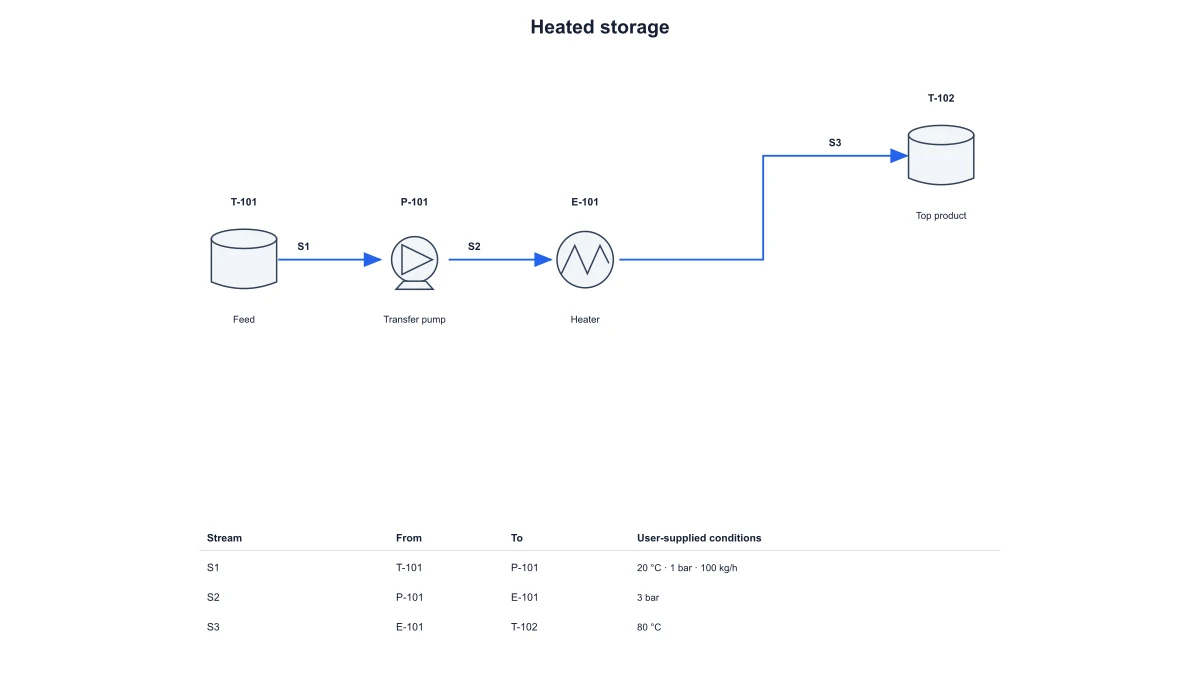
Heated-storage process using a heat-exchanger symbol

Teach PFD conventions

Use equipment IDs and stream labels to introduce the main elements of a chemical process flow diagram. A connection table provides a textual reference for the same source and destination relationships visible in the drawing.

Explore this example
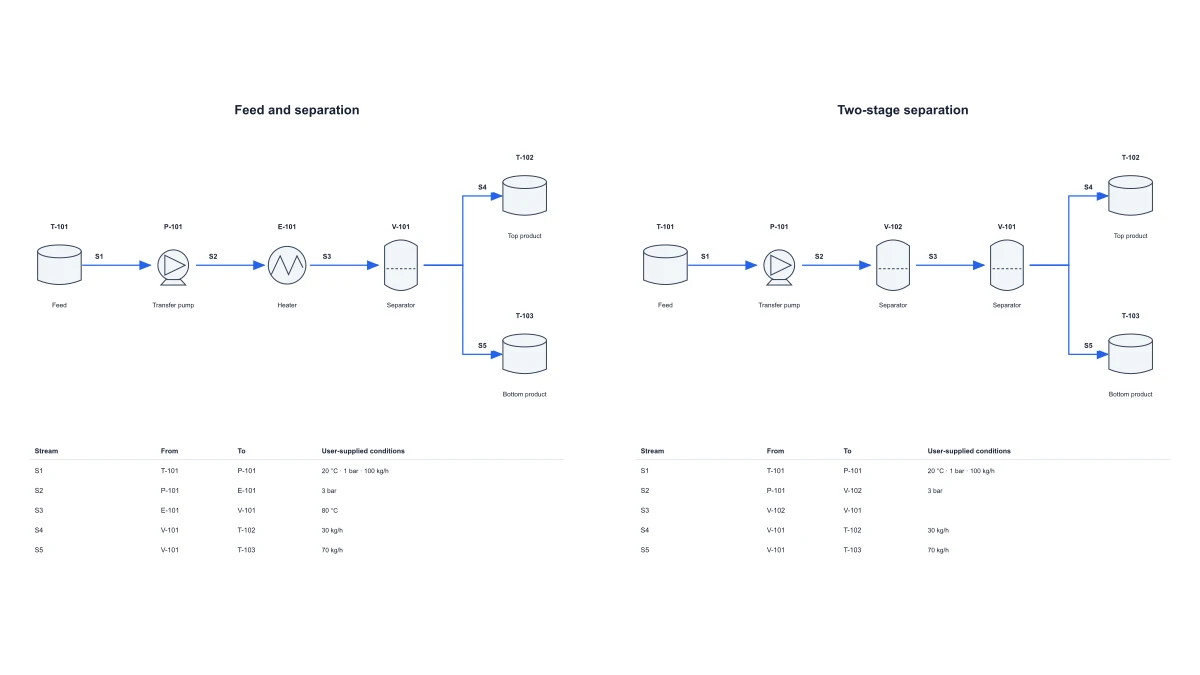
Chemical process flow diagram with a directed recycle stream

Describe a recycle loop

Add a return stream to an earlier unit and keep its identifier distinct from the forward streams. The diagram makes the loop visible without implying that the tool has solved a recycle mass balance.

Explore this example
Two-stage separation process with identified equipment

Prepare a process presentation

Export the equipment-and-stream overview for a report or slide. Use the entered annotations to connect the panel with the process discussion. Clear identifiers make it possible to refer to a unit or stream unambiguously.

Explore this example
Chemical process flow diagram with equipment IDs, directed material streams and connection table

Coordinate process-document edits

Save the process settings when several people are revising a diagram. A collaborator can reopen the equipment and stream configuration, change a label and produce another export without rebuilding the connections.

Explore this example
Feed tank, pump and separator linked by numbered streams

Separate PFD and P&ID detail

Use the PFD for major units and material paths. Link to a dedicated P&ID diagram when the explanation turns to instrumentation, valves or control loops, keeping the two drawing levels distinct.

Explore this example
How Researchers Use SciFig

My separation-process tutorial needed a chemical process flow diagram with numbered streams and recognizable equipment. I used the feed-and-separation preset, changed the equipment names and checked the stream endpoints. The SVG and its connection table gave students a consistent schematic to discuss before they attempted any material-balance calculations outside the editor.

Adrian Foster

Chemical Engineering Lecturer · University of Sheffield

Free tools

A tool for every scientific figure

130 focused generators for the scientific figure you need — each opens in the right workspace with a matching example.

Illustrations, structures and concept diagrams

68 tools
Chemistry Structure Generator example figureChemistry Structure GeneratorGraphical Abstract Maker example figureGraphical Abstract MakerFree Body Diagram Generator example figureFree Body Diagram GeneratorCircuit Diagram Maker example figureCircuit Diagram MakerAI Scientific Image Generator example figureAI Scientific Image GeneratorEditable 96-Well Plate example figureEditable 96-Well PlateLewis Dot Structure Generator example figureLewis Dot Structure GeneratorDNA Structure Diagram Generator example figureDNA Structure Diagram GeneratorWiring Diagram Maker example figureWiring Diagram MakerP&ID Diagram Generator example figureP&ID Diagram GeneratorScientific Poster Generator example figureScientific Poster GeneratorCladogram Maker example figureCladogram MakerFood Web Maker example figureFood Web MakerMedical Illustration Generator example figureMedical Illustration GeneratorPCR Diagram Generator example figurePCR Diagram GeneratorPPT Text to Visual Converter example figurePPT Text to Visual ConverterMitosis Diagram Generator example figureMitosis Diagram GeneratorAI Infographic Generator example figureAI Infographic GeneratorAnatomical Drawing Generator example figureAnatomical Drawing GeneratorAnimal and Plant Cell Comparison example figureAnimal and Plant Cell ComparisonAnimal Cell Diagram Generator example figureAnimal Cell Diagram GeneratorAntibody Structure Diagram Generator example figureAntibody Structure Diagram GeneratorApoptosis Diagram Generator example figureApoptosis Diagram GeneratorAutophagy Diagram Generator example figureAutophagy Diagram GeneratorBacteria Diagram Generator example figureBacteria Diagram GeneratorBlueprint Maker example figureBlueprint MakerBohr Model Maker example figureBohr Model MakerCalvin Cycle Diagram Generator example figureCalvin Cycle Diagram GeneratorCarbon Cycle Diagram Generator example figureCarbon Cycle Diagram GeneratorCell Cycle Diagram Generator example figureCell Cycle Diagram GeneratorCellular Respiration Diagram Generator example figureCellular Respiration Diagram GeneratorComplement System Diagram Generator example figureComplement System Diagram GeneratorCRISPR-Cas9 Diagram Generator example figureCRISPR-Cas9 Diagram GeneratorDNA Replication Diagram Generator example figureDNA Replication Diagram GeneratorElectron Configuration Diagram Generator example figureElectron Configuration Diagram GeneratorElectron Transport Chain Diagram Generator example figureElectron Transport Chain Diagram GeneratorELISA Diagram Generator example figureELISA Diagram GeneratorGel Electrophoresis Diagram Generator example figureGel Electrophoresis Diagram GeneratorGene Regulation Diagram Generator example figureGene Regulation Diagram GeneratorGlycolysis Diagram Generator example figureGlycolysis Diagram GeneratorImage to Editable SVG Converter example figureImage to Editable SVG ConverterImmune Checkpoint Diagram Generator example figureImmune Checkpoint Diagram GeneratorImmune Response Diagram Generator example figureImmune Response Diagram GeneratorInflammasome Diagram Generator example figureInflammasome Diagram GeneratorKrebs Cycle Diagram Generator example figureKrebs Cycle Diagram GeneratorLab Diagram Maker example figureLab Diagram MakerMeiosis Diagram Generator example figureMeiosis Diagram GeneratorMetabolic Pathway Diagram Generator example figureMetabolic Pathway Diagram GeneratorMolecular Orbital Diagram Generator example figureMolecular Orbital Diagram GeneratorNitrogen Cycle Diagram Generator example figureNitrogen Cycle Diagram GeneratorPedigree Chart Maker example figurePedigree Chart MakerPhospholipid Diagram Generator example figurePhospholipid Diagram GeneratorPhosphorus Cycle Diagram Generator example figurePhosphorus Cycle Diagram GeneratorPhotosynthesis Diagram Generator example figurePhotosynthesis Diagram GeneratorPhylogenetic Tree Maker example figurePhylogenetic Tree MakerPhysics Vector Diagram Maker example figurePhysics Vector Diagram MakerPlant Cell Diagram Generator example figurePlant Cell Diagram GeneratorPlasmid Map Maker example figurePlasmid Map MakerProtein Synthesis Diagram Generator example figureProtein Synthesis Diagram GeneratorPunnett Square Maker example figurePunnett Square MakerRay Diagram Maker example figureRay Diagram MakerRNA Structure Diagram Generator example figureRNA Structure Diagram GeneratorScientific Color Palette Generator example figureScientific Color Palette GeneratorSignaling Pathway Diagram Generator example figureSignaling Pathway Diagram GeneratorSingle Line Diagram Generator example figureSingle Line Diagram GeneratorT-Cell Activation Diagram Generator example figureT-Cell Activation Diagram GeneratorWater Cycle Diagram Generator example figureWater Cycle Diagram GeneratorWestern Blot Diagram Generator example figureWestern Blot Diagram Generator
Chemical Process Flow Diagram Maker Questions

1.

2.

3.

4.

5.

6.

Call to action background

Create with SciFig

Free Chemical Process Flow Diagram Maker

Open the free tool

Free to start · No credit card required · Built for researchers