
Scientific E-Poster Template
E-poster templates in three shapes: a 16:9 screen canvas, and A0 portrait and landscape single-page versions.
Reviewed by SciFig TeamUpdated
Each preview below is a separate PowerPoint file — click one to jump straight to its download.
What is a Scientific E-Poster Template?
A scientific e-poster template is a poster laid out for a screen rather than a printed board.
Conferences differ on what they mean by it, so this e-poster page ships three shapes: a 16:9 canvas for meetings that play posters full-screen, and A0 portrait and landscape single-page versions for meetings that display the same file they would have printed. Nine conferences we track require one of these three.
How to build an e-poster from a template
Download an e-poster template in the shape and color you want, then fill in the sections it already has.
Download the e-poster template in the shape your congress asks for — a 16:9 screen canvas, or A0 portrait or landscape for a single-page upload — in any of six colors, and the canvas arrives already sized and typed. Write your study into the sections that are there: Introduction, Methods, Results, Discussion, Conclusions, References and Acknowledgements. Then fill the six image placeholders.
Text first
every gray prompt is a hint, not content. Click it and start typing; it disappears on its own and never prints.
Then the figures
six image placeholders are already sized and placed. An e-poster is scaled down to a screen and often scrolled past, so a figure does more work than a paragraph: it is what people stop on and screenshot. Need a graphical abstract, an infographic or a mechanism diagram you do not have yet? Describe it to the Scientific Figure Generator and drop the result straight into the box.
On a screen the reader is one scroll away from leaving. 18 scientific poster examples shows what the good ones share, and it is all subtractive: one hero figure, 300–800 words, color that means something.
E poster template downloads for PowerPoint
Three shapes, each a single ready-to-use .pptx in all six colors.
Pick the one that matches how your conference displays scientific posters.
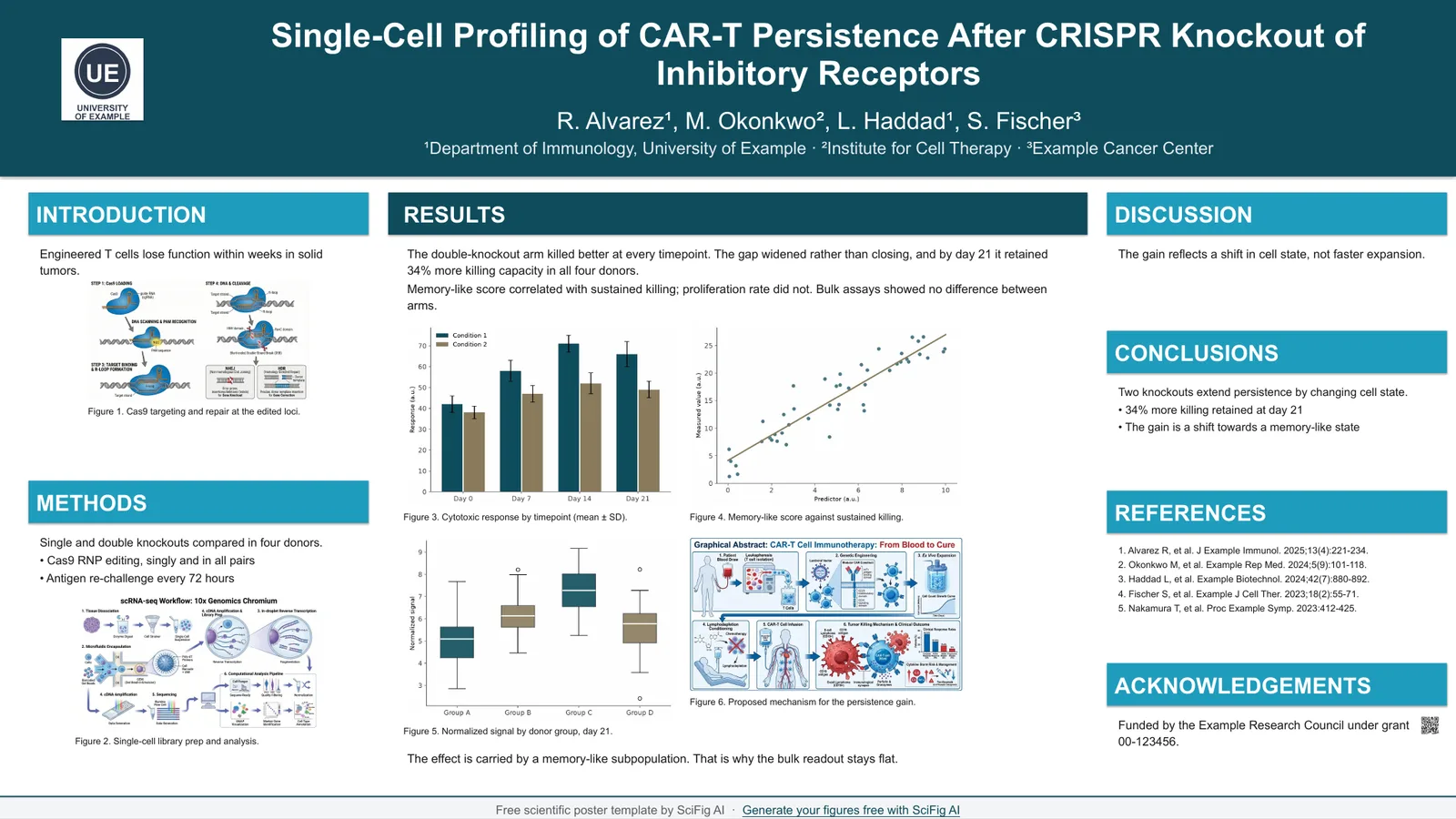
16:9 screen e-poster — Classic
40 x 22.5 in · exports 7680 x 4320 at 192 dpi
four-column grid arranged 1 : 2 : 1
6 colors, same layout. Click any one to download the PowerPoint template or open it in Google Slides.
- Navy — 16:9 e-poster template
- Forest — 16:9 e-poster template
- Crimson — 16:9 e-poster template
- Teal — 16:9 e-poster template
- Plum — 16:9 e-poster template
- Graphite — 16:9 e-poster template
See all six color schemes — and how to swap in your lab or university colors →
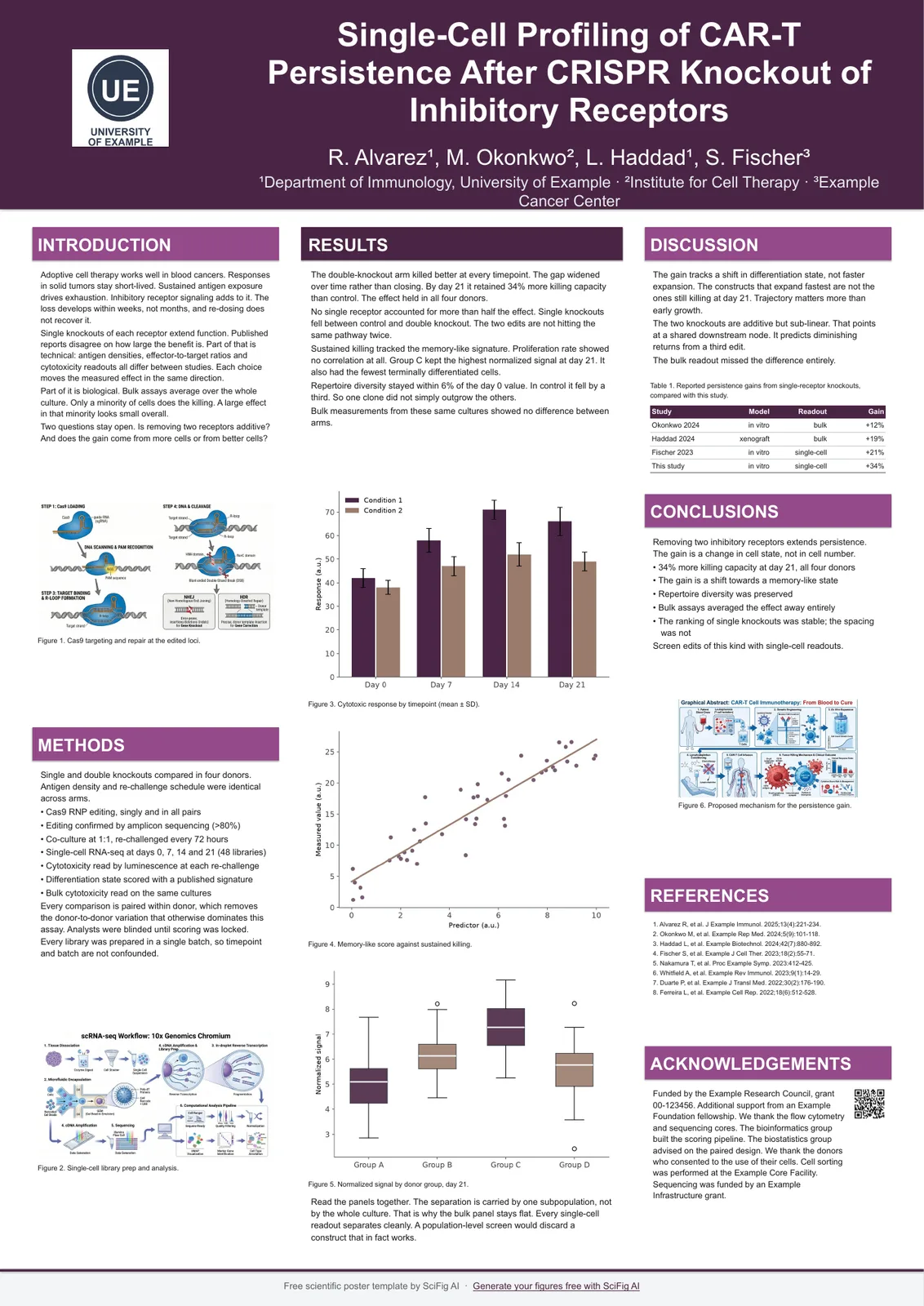
A0 portrait single page — Classic
A0 · 841 x 1189 mm
three columns arranged 1.2 : 1.6 : 1.2
6 colors, same layout. Click any one to download the PowerPoint template or open it in Google Slides.
- Navy — A0 portrait e-poster template
- Forest — A0 portrait e-poster template
- Crimson — A0 portrait e-poster template
- Teal — A0 portrait e-poster template
- Plum — A0 portrait e-poster template
- Graphite — A0 portrait e-poster template
See all six color schemes — and how to swap in your lab or university colors →
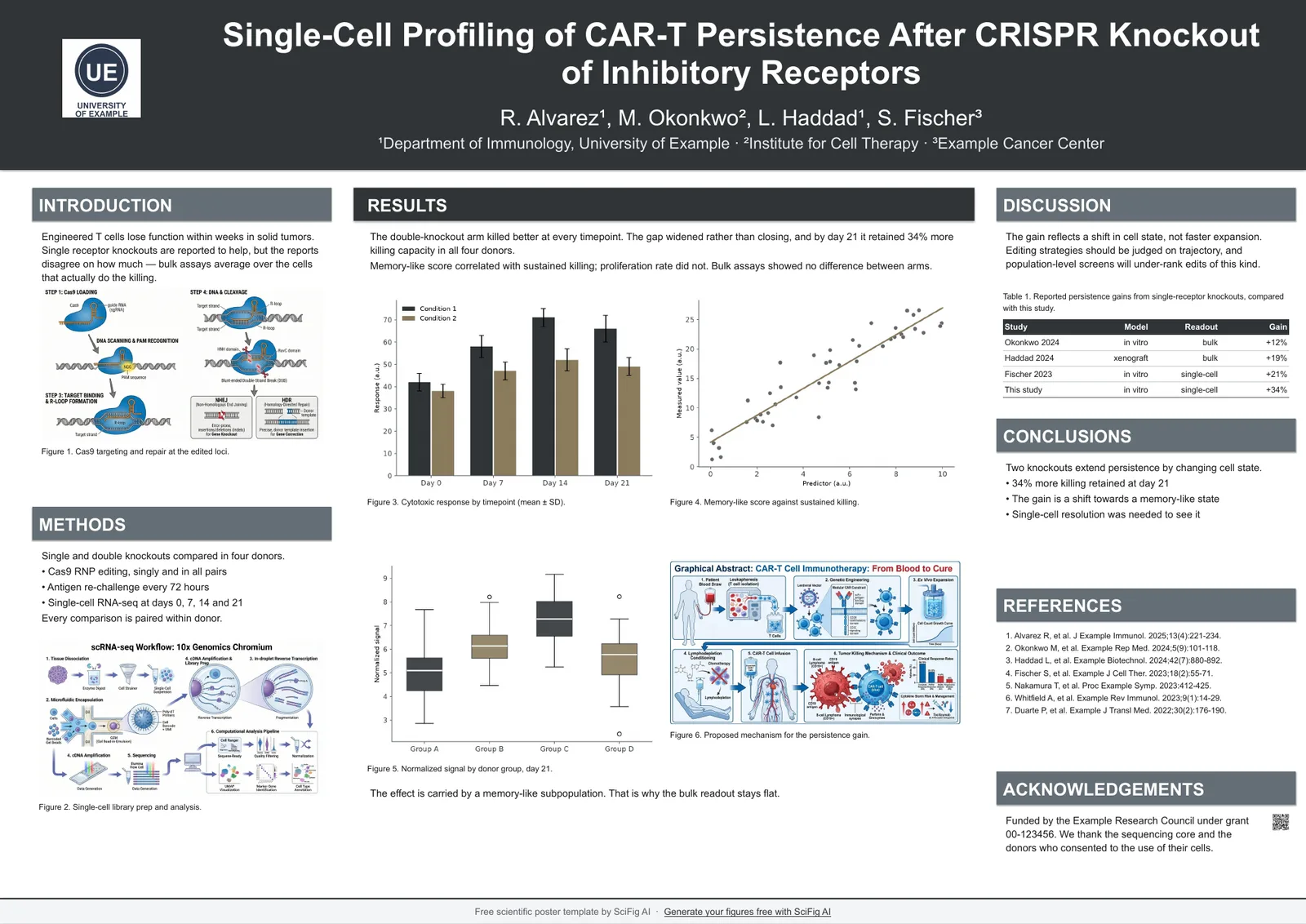
A0 landscape single page — Classic
A0 · 1189 x 841 mm
four-column grid arranged 1 : 2 : 1
6 colors, same layout. Click any one to download the PowerPoint template or open it in Google Slides.
- Navy — A0 landscape e-poster template
- Forest — A0 landscape e-poster template
- Crimson — A0 landscape e-poster template
- Teal — A0 landscape e-poster template
- Plum — A0 landscape e-poster template
- Graphite — A0 landscape e-poster template
See all six color schemes — and how to swap in your lab or university colors →
E poster size — which shape does your conference want
Use a 16:9 canvas for screen display and A0 portrait when the instruction asks for a single-page upload.
| The instruction says | Use | Why |
|---|---|---|
| Full-screen or monitor display | 16:9 canvas | Fills the screen without letterboxing |
| Minimum pixel dimensions | 16:9 canvas | 40 x 22.5 in at 192 dpi clears 7680 x 4320 |
| Submit your poster as a PDF | A0 portrait | Same dimensions the board would have been |
| Digital copy of a printed poster | A0 portrait or landscape | Matches what you printed |
| Nothing specified | 16:9 canvas | Safer default for screen display |
E poster resolution and export settings
Export the e poster to PDF at full size unless the instruction asks for an image, and keep text as live text.
- Export to PDF for submission unless the instruction explicitly asks for an image.
- When an image is required, set the export dpi explicitly rather than accepting the default.
- At 192 dpi the 16:9 canvas produces 7680 x 4320 — check this against the stated minimum before uploading.
- The default 96 dpi gives 3840 x 2160, which some systems reject without a clear error message.
- Keep figures as vectors for as long as possible; rasterizing early caps the effective resolution regardless of export settings.
Conferences and departments write this size in different ways — you may also see it listed as: e poster template · e poster template powerpoint · digital poster template · electronic poster template · e poster template 16 9 · scientific e poster template · e poster presentation format · e poster examples
Related pages
All Poster Templates
Browse every poster template page in SciFig's library.
Text-to-Figure
Describe a figure in words and generate it with AI
PDF-to-Figure
Draft diagrams from the content of a paper PDF
Scientific 36x48 Poster Template
36 x 48 in poster templates, plus the 48 x 36 in landscape version — the size most North American conferences hang.
Scientific A0 Poster Template
A0 poster templates sized 841 x 1189 mm, in portrait and landscape, with the type scale already set for print.
Scientific A1 Poster Template
A1 poster templates sized 594 x 841 mm, portrait and landscape, with a type scale recomputed for the smaller board.
A2 Academic Poster Template
A2 poster templates at 420 x 594 mm, portrait and landscape, with a type scale recomputed for a close-read board.
Scientific Poster Color Schemes
Six academic color schemes that stay readable in print, with hex values and a poster template in each one.
Scientific Conference Poster Template
Conference poster templates in every board size conferences actually hang, with the print type scale already applied.
Frequently Asked Questions
Common questions about Scientific E-Poster Template.

Ready to publish?
Make your own Scientific E-Poster Template in minutes.
Start for freeFree to start · No credit card required · Built for researchers