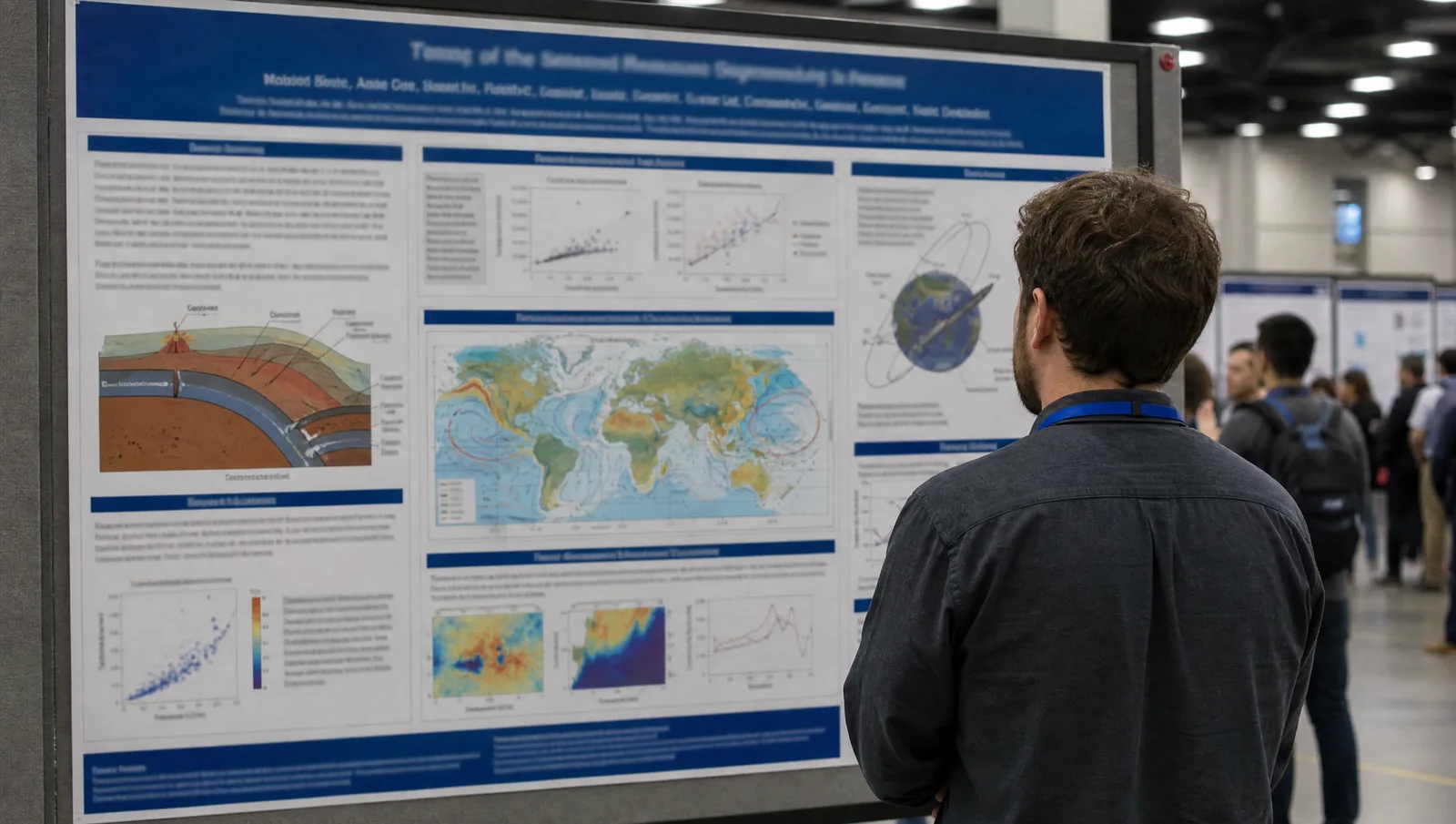
Official AVS 72 2026 poster guidelines: the 46-inch square poster board, the September 14 late news abstract deadline, 15-minute talks, and 16:9 slides.
SciFig Team
SciFig editorial team
AVS 72 runs November 8–13, 2026 at the David L. Lawrence Convention Center in Pittsburgh, Pennsylvania.
This is a practical guide to the official poster and presentation rules for the AVS 72nd International Symposium & Exhibition: the unusual 46-inch square poster board, the September 14 late news abstract deadline, and 15-minute contributed talks in 16:9.
It also covers the one-page PDF you are allowed to attach to your abstract and where accepted abstracts end up. Every date and specification below links to official AVS materials.
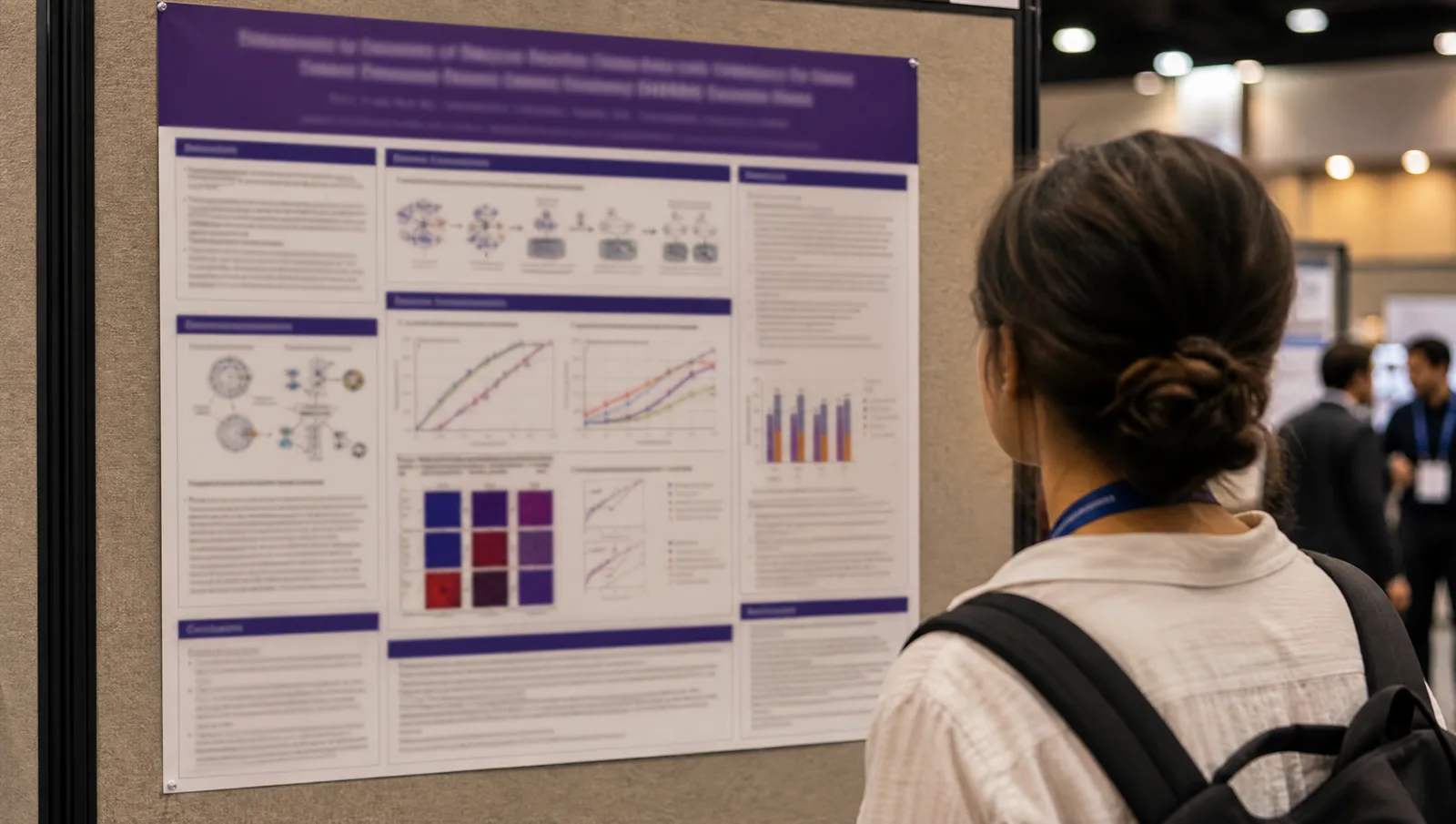
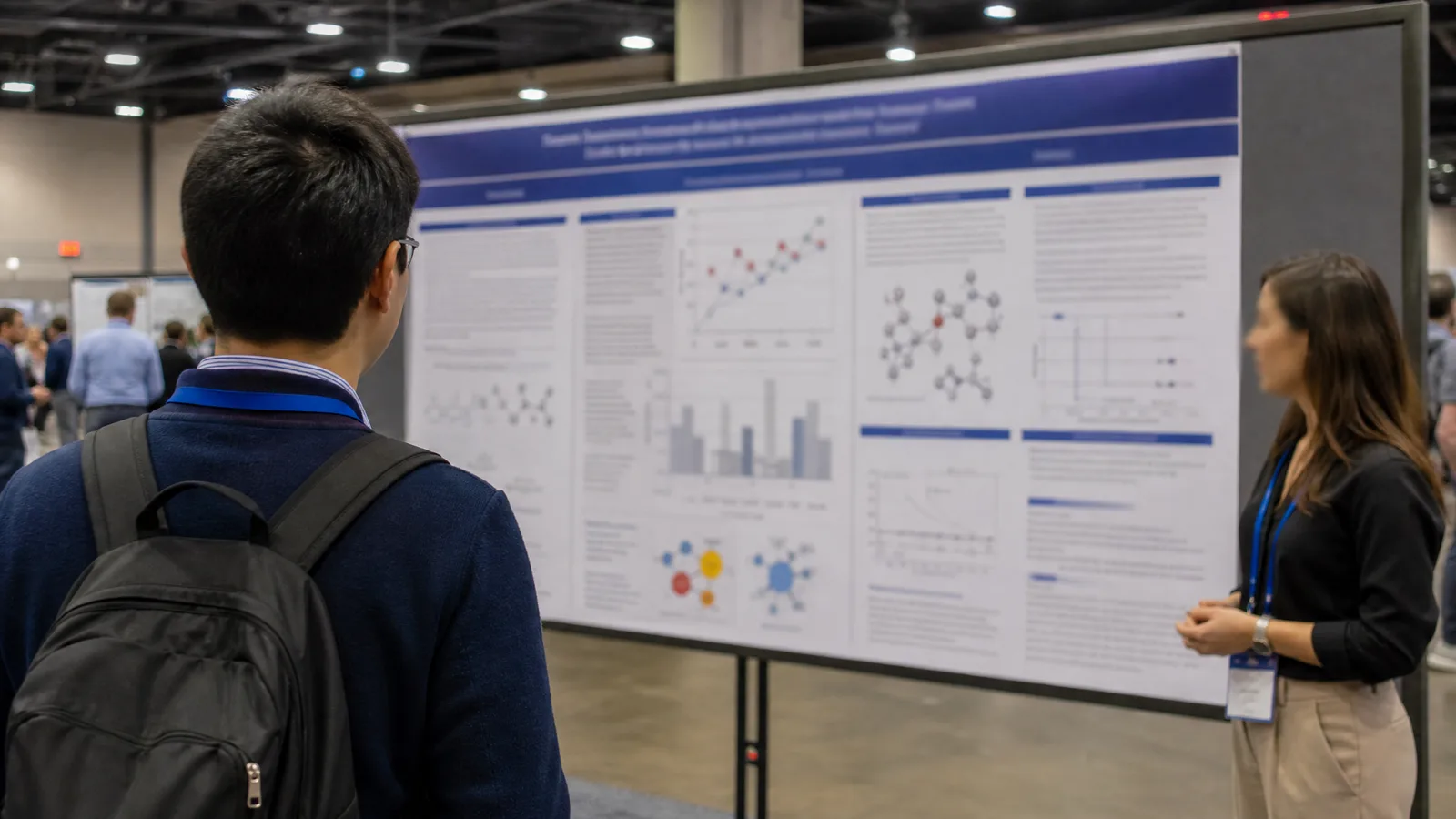
AVS 72 2026 poster session: an over-the-shoulder view of a square printed conference poster mounted on a cork board in the convention center hall (Figure generated with SciFig)
Transparency note: Illustrations in this article were generated with SciFig AI and reviewed by the author for scientific accuracy. Factual claims about dates and specifications link to official AVS 72 materials.
1. AVS 72 2026 at a Glance: Dates, Venue, and the September 14 Late News Abstract Deadline
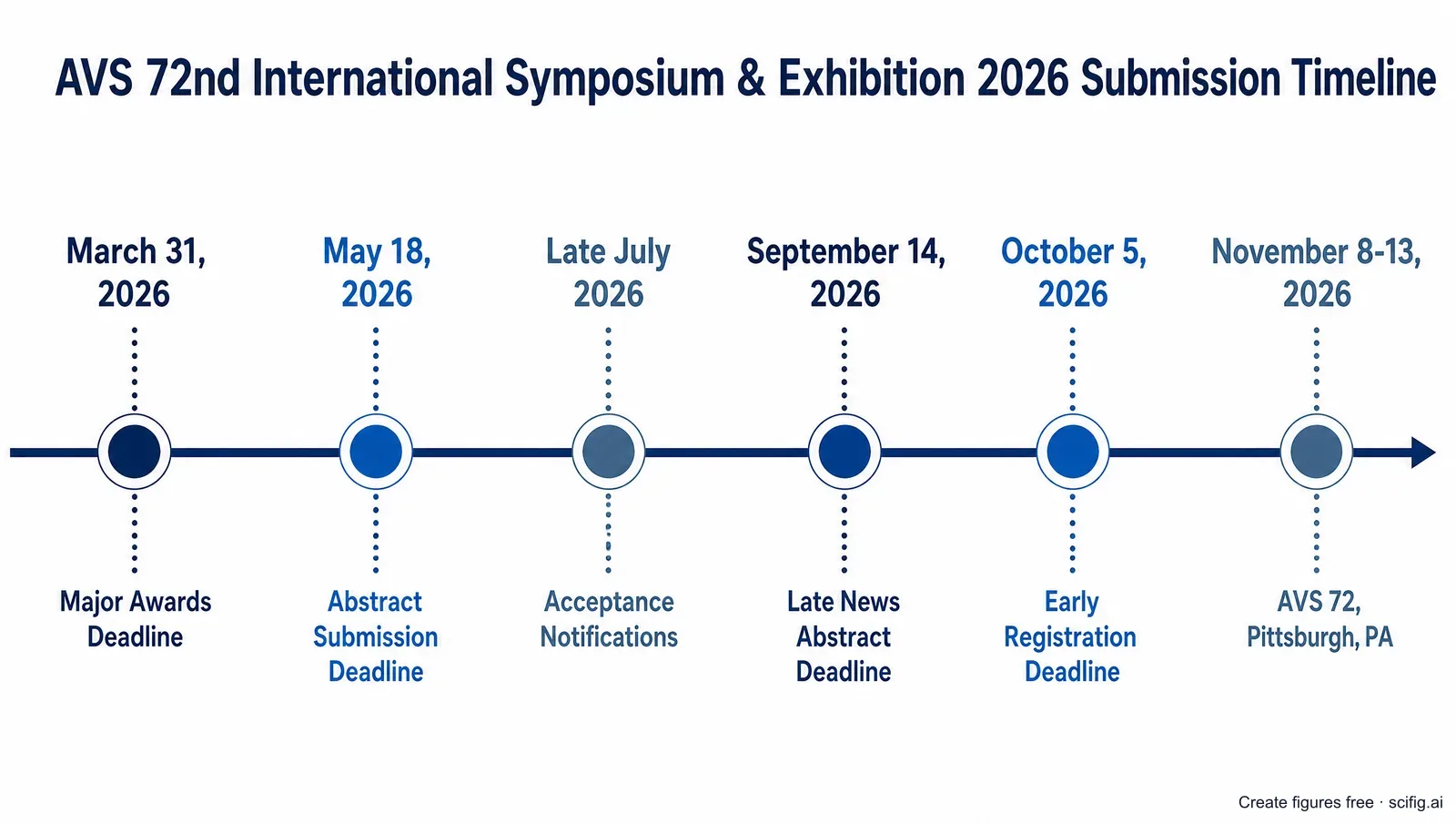
AVS 72 runs November 8–13, 2026 at the David L. Lawrence Convention Center in Pittsburgh, and while the regular abstract deadline closed on May 18, 2026, the late news call is still open — submissions are accepted through September 14, 2026 at 11:59 p.m. ET. That gives anyone with new results a second route onto the program. Regular-round acceptance and scheduling notices went out in late July, and the official guidance is that late news decisions follow "by late September." One constraint shapes how you plan: a presenter may give one oral and one poster at the symposium, and the two must be different abstracts.
AVS 72 2026 submission timeline: abstract deadline May 18, late news deadline September 14, early registration October 5, symposium November 8-13 in Pittsburgh (Figure generated with SciFig)
Regular-round acceptance letters, with detailed poster instructions
14 September 2026
Late news abstract deadline (11:59 p.m. ET)
Late September 2026
Late news acceptance and scheduling notices
30 September 2026
Hotel deadline
5 October 2026
Early registration deadline
8–13 November 2026
AVS 72, David L. Lawrence Convention Center, Pittsburgh
When you submit, you pick a session topic rather than a generic track. AVS organizes its program into Divisions and Groups (Surface Science, Thin Film, Plasma Science and Technology, Vacuum Technology, 2D Materials, Applied Surface Science, Electronic Materials and Photonics, Biomaterial Interfaces, and more), Focus Topics (Advances in EUV Lithography, Quantum Science and Technology, Materials and Innovations for Fusion Energy, Chemical Analysis and Imaging of Interfaces, and others), and Mini-Symposia (Atomic Scale Processing, Advanced Microelectronic Materials and Devices, Advances in Battery Engineering, Interface Design, and Characterization). Each topic runs its own oral sessions and its own poster session, and the poster sessions all carry a -ThP code in the program — Thursday posters. Choosing the right topic early matters, because it determines the audience standing in front of your board.
2. AVS 72 2026 Poster Size and Format: The 46-Inch Square Poster Board
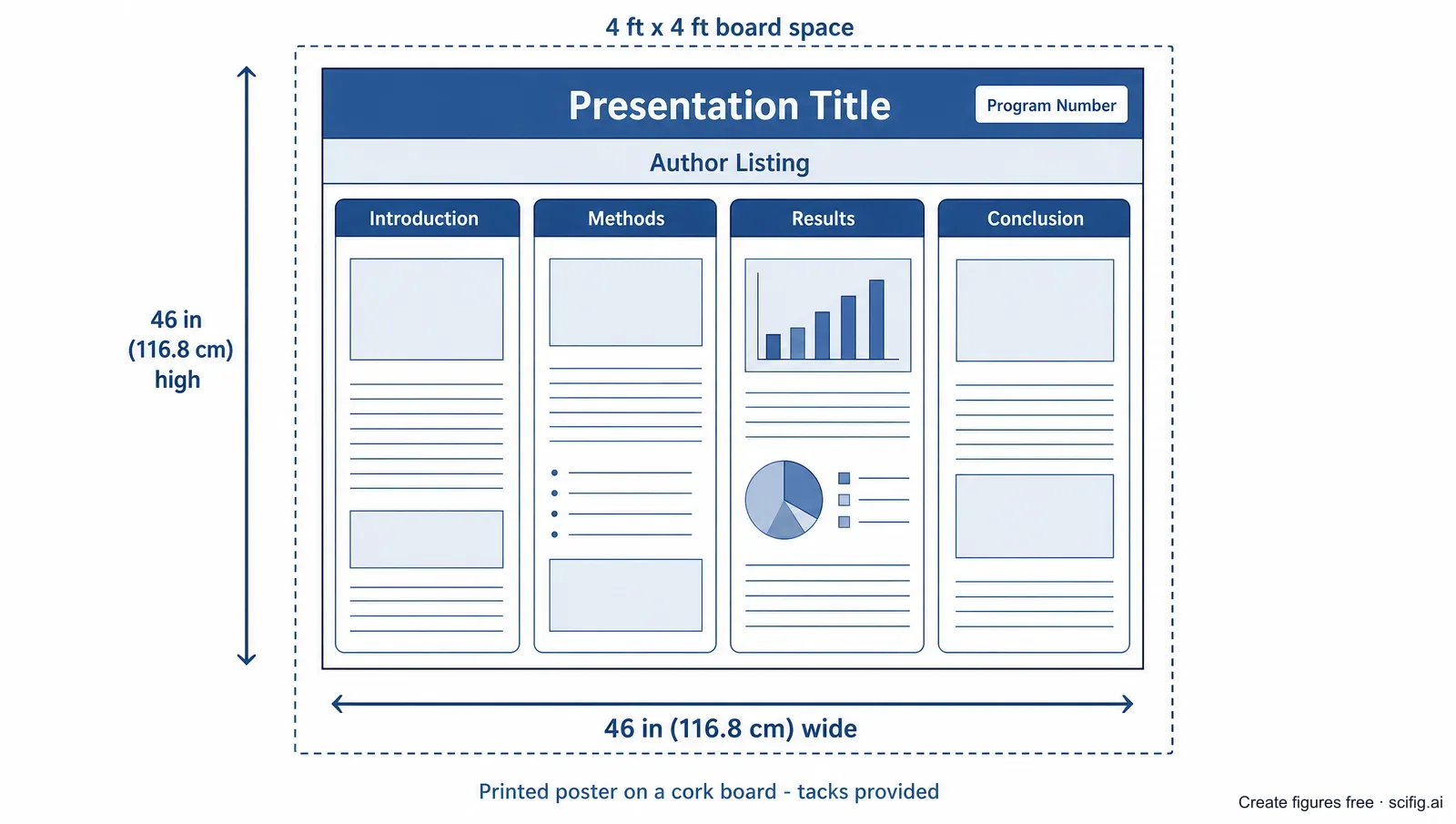
An AVS 72 poster must be no larger than 46 inches wide by 46 inches high — roughly 116.8 × 116.8 cm — because each presenter is allotted a 4 ft × 4 ft board space. That makes AVS a square-format meeting, not the landscape or portrait rectangle most conferences use, and this is a printed-poster symposium: the official presenter guidelines do not describe any e-poster or virtual poster component. The boards are cork and tacks are provided on site, so you do not need to bring mounting hardware. Your poster must carry the presentation title, the author listing, and your program number; a sign showing that program number and the presenter's name marks the spot where you display your work.
These AVS 72 poster size and format rules come from the official AVS 72 presentation guidelines. A few points change how you build the sheet:
Design square from the first draft. A 46-inch square is close to the area of an A0 sheet but a completely different shape, so a portrait A0 template will not simply scale down — columns that work at A0 become stubby and wide when forced into a square. Lay out three balanced columns, or a two-by-two block grid around one dominant figure.
There is no official AVS poster template to download. The guidelines specify the size and the required elements but do not publish a poster file or a presenter slide template, so you build the sheet yourself from the specification above. (The "AVS 72 PowerPoint Template" listed on the site's promotional page is a set of banner slides for advertising the meeting, not a poster or presentation template.)
Mount early, then stand by it. Posters can go up as early as Tuesday for extra viewing time, but presenters are expected to be next to the board for the whole Thursday evening session — unattended posters are removed.
Take it down that night. Everything must come off immediately after Thursday evening; AVS takes no responsibility for posters left up.
Print ahead. The official pages do not state whether on-site printing is available, so plan to print and bring your poster with you.
Because AVS publishes no poster file, the square sheet is yours to build — and as the point above says, a portrait A0 layout will not scale into it. Our conference poster templates ship the 46 × 46 in board as its own file rather than a rescaled rectangle: editable PowerPoint, balanced columns sized for a square, with the print type scale already set.
AVS 72 2026 poster size diagram: a 46 by 46 inch square poster layout with title bar, author listing, and program number inside a 4 by 4 ft board space (Figure generated with SciFig)
A square sheet is unforgiving: with no long axis to lead the eye, the layout has to be carried by one strong central figure rather than a left-to-right narrative. The process schematics, deposition cycles, and system diagrams that do that work are the slowest part of the poster to produce well — and you can generate publication-grade versions online for free and drop them straight into the composition.
Need the hero figure for your 46-inch AVS poster?
Start from a process schematic, deposition cycle, or vacuum system diagram before you lay out the square sheet.
A contributed AVS 72 oral presentation runs 15 minutes including 4 minutes of questions, an invited talk runs 30 minutes including 6 minutes of questions, and slides should be built in 16:9 — PowerPoint is the recommended software, and while 4:3 is supported it may display black bars. With many parallel sessions running, moderators adhere strictly to the schedule, so the talk has to be planned to finish inside its slot.
Every session room is equipped with a Windows laptop, projector, screen, microphone, and an HDMI connection. AVS strongly encourages presenters to use the conference computer and to test the file in the Presenter Preview Room, preferably the day before. If you use the room computer, load your presentation at least five minutes before your session or during a break. If you bring your own laptop, bring the adapters it needs plus a backup copy on a USB flash drive, and resolve any compatibility problems before you are due to speak.
That budget is tight. A contributed AVS 72 presentation gives you about 11 minutes of actual talking time, which in practice means a handful of slides — so nearly every slide needs one clear figure carrying the argument rather than a dense block of bullet text.
With about 11 minutes of talking time and no official AVS slide template to start from, the deck is a handful of slides that each have to earn their place. Our scientific presentation templates are 16:9 — the ratio AVS asks for — and already ordered the way a contributed talk runs: background, methods, results, discussion, conclusion.
4. What Figures Do You Need for an AVS 72 Poster, Slides, and Abstract?
AVS is one of the relatively few meetings where figures matter at all three stages — poster, slides, and the abstract itself: alongside the 2,700-character abstract text, the official submission guidance states you may also submit a supplemental one-page PDF containing any graphs, charts, or pictures you wish to include. That makes a single well-built schematic useful three times over, so it is worth producing it properly once rather than three times badly.
In your abstract submission, the abstract body is capped at 2,700 characters including grammar and spacing, and the optional one-page PDF attachment is where a graph, chart, or picture goes (AVS 72 abstract submission). Because that page is the only visual the program committee sees while reviewing, a clean process schematic usually earns its place over a dense data panel.
On your poster and slides, the figures that carry an AVS presentation across its divisions and focus topics are:
Process or reaction-cycle schematic — an ALD or ALE cycle, a plasma etch sequence, or a deposition process broken into its steps, with the surface chemistry made explicit.
System or chamber diagram — the vacuum system, pumping stack, source geometry, or sputtering configuration your measurements depend on, drawn so a reader can see what was actually connected to what.
Structure or interface schematic — a film stack, a device cross-section, a 2D-material heterostructure, or the adsorption geometry on a specific crystal facet.
Characterization schematic — how the technique works on your sample: the excitation and emission geometry for XPS or ellipsometry, or the probe geometry for a scanning-probe measurement.
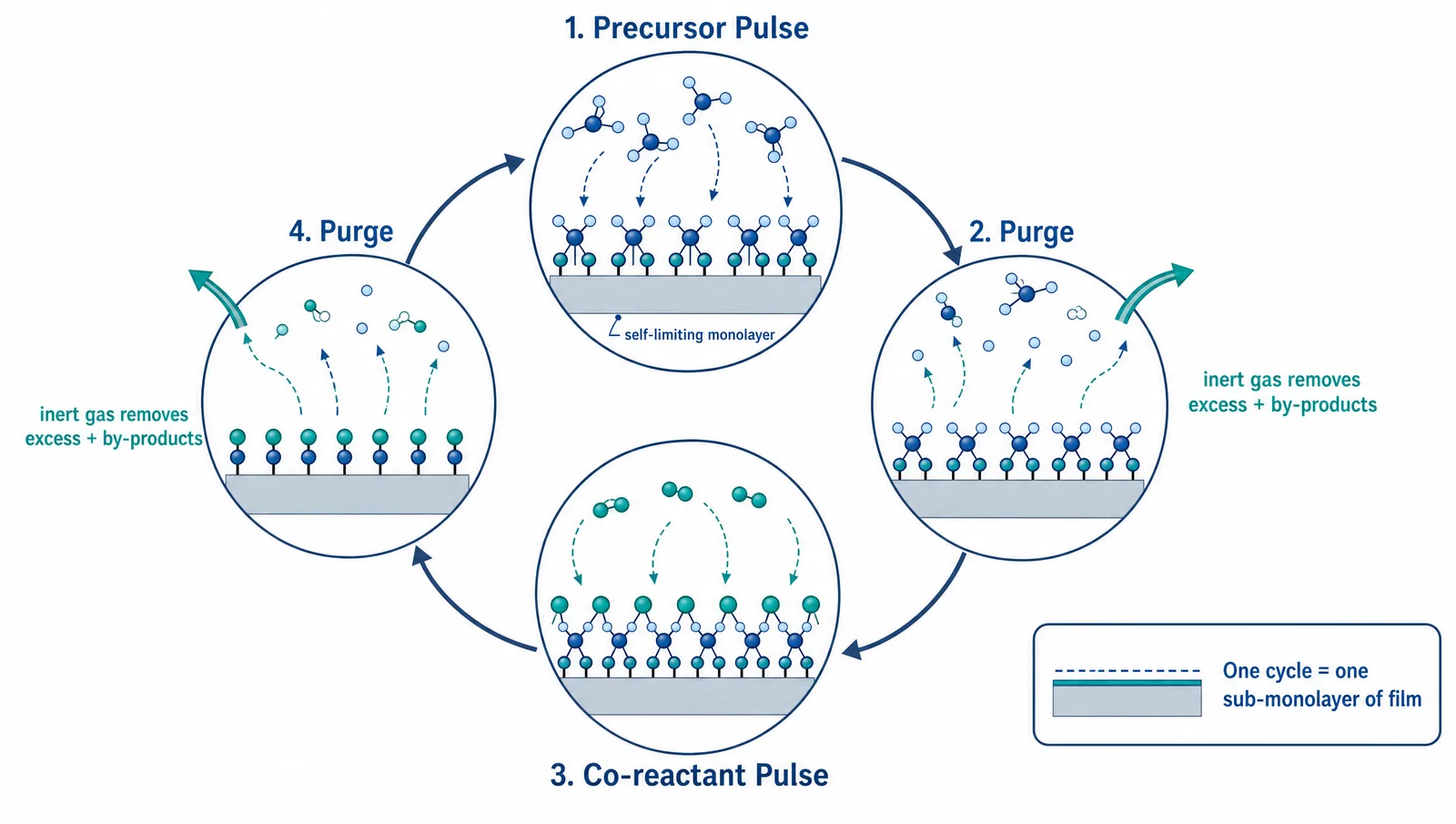
AVS 72 2026 poster figure: an atomic layer deposition cycle schematic with precursor pulse, purge, co-reactant pulse and purge as self-limiting steps (Figure generated with SciFig)
5. Designing a Winning AVS 72 Poster: Accuracy a Surface Science Audience Will Check
A winning AVS 72 poster passes two tests: a passerby grasps the story in three seconds, and the process physics is exact enough to survive the person standing in front of it — who, at AVS, very likely runs the same tool you do. On a square sheet the first test is won by one dominant hero figure at the visual center, usually the process schematic or the system diagram with the key result beside it. The second test is harder, and it is where scientific figures live or die.
This is also where general-purpose AI image generators fall short. A tool like Nano Banana Pro or GPT Image will give you something that looks about 99% right — but on a vacuum or thin-film schematic, 99% right is effectively 0% right. A missing purge step, a pump on the wrong side of a valve, or a reversed arrow does not read as a small blemish to this audience; it reads as evidence that the author does not run the process. And because that output is a flat raster image, there is no way to fix the one percent that is wrong: you re-roll and hope the next version breaks somewhere else.
This is the core difference with SciFig. Every figure comes out as a layered, fully editable SVG whose elements — chamber outlines, gas-flow arrows, cycle steps, axis labels — you can modify individually, so you, the person who actually knows the tool, can adjust every element until the science is exactly right. Every element stays editable, so the author decides exactly what the final figure shows. Three details matter on every AVS figure — and in an editable SVG you can set each one exactly — because they map onto the three divisions most likely to be reading:
The self-limiting nature of an ALD cycle. One cycle is precursor pulse → purge → co-reactant pulse → purge, with the two half-reactions separated in time. Generic models routinely draw precursor and co-reactant flowing simultaneously — which is CVD, not ALD — or drop the purge steps entirely, erasing exactly the property that makes the process self-limiting.
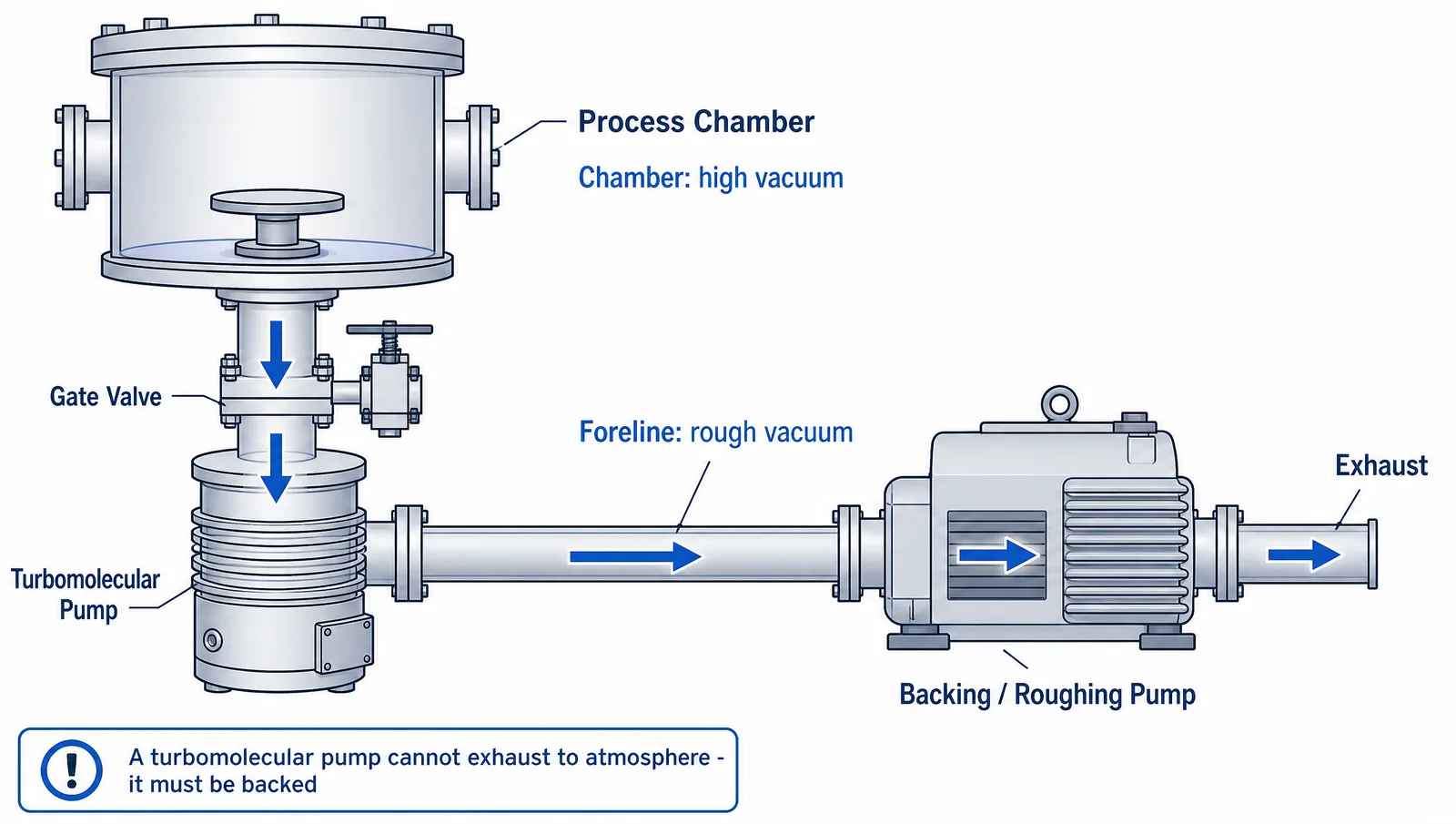
Pump order and gas-flow direction. A turbomolecular pump cannot exhaust to atmosphere; it must be backed, so flow runs chamber → turbomolecular pump → backing pump → exhaust. Generic output frequently puts the roughing pump on the chamber side, vents the turbo directly, or reverses the arrows — describing a system that could never reach high vacuum.
Excitation and emission geometry in XPS. X-rays go in, photoelectrons come out, and the direction is one-way; binding energy and kinetic energy are not interchangeable axis labels. Generic models often draw electrons being absorbed rather than emitted, or invert the energy axis — and a surface-analysis audience reads spectra by binding energy, so a flipped axis inverts the conclusion.
AVS 72 2026 poster figure: a high vacuum system schematic with chamber, turbomolecular pump and backing pump in correct order with gas flow direction (Figure generated with SciFig)
Getting these right is not a nice-to-have at a symposium built around atomic-scale processing and characterization. An editable AI figure workflow compresses days of drafting into hours without giving up that control — and it lets you fix the one detail a reviewer would have caught, instead of redrawing the whole panel.
6. Create Your AVS 72 2026 Figures with AI: The SciFig Workflow
You already have the two things that matter for your AVS 72 poster and slide figures: your accepted abstract and a working knowledge of the process you study — use both to generate the figures online for free, then edit them until they are exactly right. Here is the SciFig workflow for an AVS 72 presenter, starting in SciFig AI Illustration (AI scientific illustration):
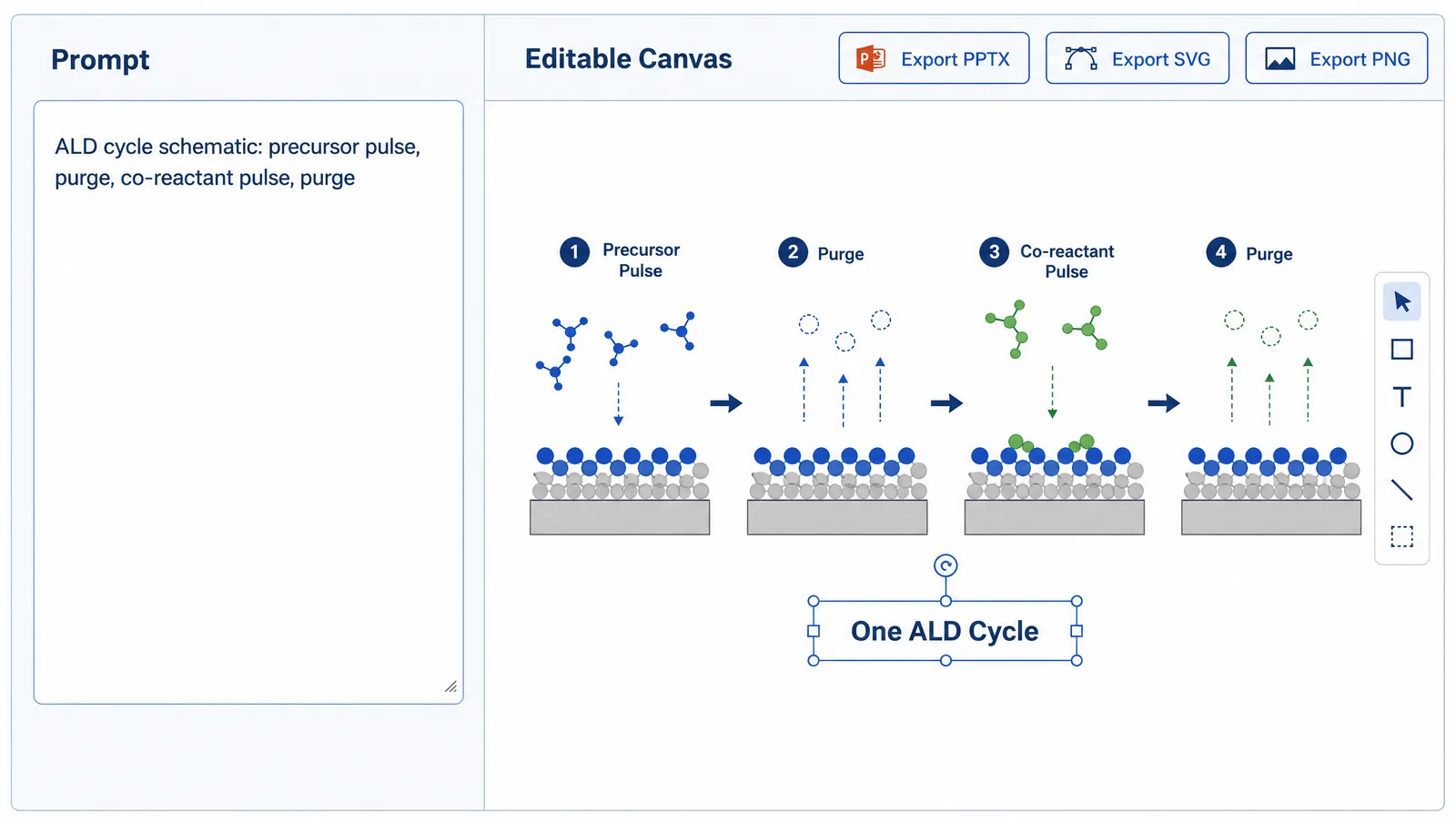
Path 1 — Upload your abstract PDF. Drop it into PDF-to-Figure. It parses your method and results description and returns a process or system schematic in one click — every element stays editable, so you can adjust it to your data and poster layout instead of starting from a blank canvas.
Path 2 — Write a structured prompt. For a process cycle or chamber diagram, Text-to-Figure gives more control. Copy this and adjust it to your chemistry:
Atomic layer deposition cycle schematic in four sequential steps:
precursor pulse forming a self-limiting chemisorbed monolayer, inert
gas purge removing excess precursor and by-products, co-reactant
pulse completing the film unit, and a second purge — with the two
half-reactions clearly separated in time.
Path 3 — Sketch and scan. If you drew your chamber layout or film stack on paper, photograph it and drop it into Sketch-to-Figure to get a publication-style version that keeps your original arrangement.
AVS 72 2026 poster and slide figure workflow: a text prompt on the left generating an editable ALD cycle diagram on the right, with PPTX and SVG export (Figure generated with SciFig)
From any path you edit individual elements in the vector canvas — labels, arrow directions, step order, chamber geometry — and export to editable PPTX or layered SVG, at a resolution that holds up across a 46-inch print as well as a 16:9 slide. Start free, no card required: 150 credits on day one (3 figures), plus daily check-in credits that grow with your streak (up to 150 a day) — up to about 44 figures in your first month, so most authors work through a full set of poster figures over their first few days. For companion guides in this conference series, see the Graphene Week 2026 poster guide and the E-MRS Fall 2026 poster guide.
Optional — disclose your AI use. Some journals and meetings now ask authors to disclose AI assistance and to remain responsible for the accuracy of their work. The AVS 72 presenter materials do not describe an AI use policy, but if you build and review a figure in SciFig you can add one line to its caption — for example: Figure created by the authors using SciFig and reviewed for scientific accuracy (scifig.ai).
Start your AVS 72 figure from a prompt, PDF, or sketch
Use whichever input you already have, then edit every element until the process physics is exact.
7. AVS 72 Photo Policy and Copyright Rules for Posters and Slides
AVS maintains a No-Photo policy, and AVS 72 asks every presenter to state their own photo preference explicitly — on the first slide of the presentation and verbally at the start of the talk. Because moderators cannot police social sharing across many parallel sessions, and because plenty of presenters actively invite it (QR codes and all), the official guidance is to make your position unmistakable. AVS provides two icons for this purpose, a "no photos" mark and a "photos allowed" mark, linked from the presentation guidelines. It is a small design decision with a real consequence: reserve a corner of your first slide, and of your poster, for it. The AVS Meetings Code of Conduct reinforces the point by listing photography without permission among the behaviors it treats as harassment.
Copyright works in the presenter's favor here. Under the AVS 72 Copyright License Release Form, which you accept by submitting an abstract and agreeing to participate, you retain all copyrights and intellectual property rights in your materials; what you grant AVS is a perpetual, royalty-free, non-exclusive licence to post electronic copies of your presentation and abstract to the AVS 72 website, mobile app, online scheduler, and the AVS Technical Library. The form also notes there are currently no plans for audio or video recording, with the language included as a precaution.
One clause is worth reading closely before you assemble the sheet: you certify that you have obtained the appropriate releases for any previously copyrighted material included in your presentation. Reusing a figure from a published paper — even your own, if the journal holds the copyright — is exactly the case that clause covers. Building your own figures is the simplest way to avoid the question entirely.
Tip
Decide your photo policy before you design, not the morning of your session. Putting the AVS icon on the first slide and in a corner of the poster takes two minutes at layout time and saves an awkward conversation at the board.
8. Where AVS 72 2026 Abstracts and Papers Are Published
Accepted AVS 72 abstracts are published in the official AVS 72 Abstract Book and Technical Program — both released as PDFs — and distributed through the online scheduler and the meeting mobile app; they are not published in a journal. That distinction matters, because AVS also publishes several journals and the two paths are easy to confuse. The Technical Program and Abstract Book went live in July 2026, and the online scheduler carries the same content in searchable form.
Separately, AVS encourages authors to submit a full manuscript based on their AVS 72 presentation to one of the society's journals — Journal of Vacuum Science & Technology A or B, Biointerphases, Surface Science Spectra, or AVS Quantum Science — each of which hosts an AVS 72 Special Topic Collection you can select during submission (AVS 72 manuscripts). This is optional and has no deadline tied to the meeting: you can submit at any time. Manuscripts are peer-reviewed in the normal way, carry no length limit, and are indexed as articles or letters rather than as proceedings papers.
Practically, that means the figures on your poster get a second life. A schematic built properly for a 46-inch square board is already at the resolution and clarity a journal figure needs, so the manuscript that follows your talk starts from artwork you have already checked.
Frequently Asked Questions
An AVS 72 poster must be no larger than 46 inches wide by 46 inches high (about 116.8 × 116.8 cm), fitting a 4 ft × 4 ft board space. The boards are cork and tacks are provided. See §2 Poster Size and Format.
Neither — AVS 72 is a square-format meeting. The 4 ft × 4 ft board means your poster should be designed as a square of up to 46 × 46 inches, so a standard portrait A0 layout will not fit properly. Design for equal width and height from the first draft.
Late news abstracts are accepted through September 14, 2026 at 11:59 p.m. ET. The regular abstract deadline closed May 18, 2026; late news acceptance and scheduling notices follow by late September. See §1 At a Glance.
No — the official presenter guidelines do not describe any e-poster or virtual poster component. AVS 72 is a printed-poster symposium: you bring a physical square poster and mount it on an assigned cork board. See §2 Poster Size and Format.
Yes — alongside the 2,700-character abstract text you may submit a supplemental one-page PDF containing graphs, charts, or pictures. It is the only visual the committee sees at review, so a clean schematic is usually worth more than a dense data panel. See §4 What Figures Do You Need.
A contributed talk is 15 minutes including 4 minutes of questions; an invited talk is 30 minutes including 6 minutes of questions. Slides should be 16:9, with PowerPoint recommended. See §3 Oral Presentation Guidelines.
No — AVS publishes the poster specification but not a downloadable poster or slide template. Build your square sheet from the official size and required elements: title, author listing, and program number. See §2 Poster Size and Format.
In the official AVS 72 Abstract Book and Technical Program PDFs, plus the online scheduler and mobile app — not in a journal. AVS separately encourages full manuscripts in its journals' AVS 72 Special Topic Collections. See §8 Where Abstracts Are Published.
References
All specifications and dates above are drawn from official AVS materials, accessed August 4, 2026:
AVS. AVS 72nd International Symposium & Exhibition — Home and Key Dates. avs72.avs.org. Accessed August 4, 2026. https://avs72.avs.org/
Disclaimer: This article is educational content about scientific figure design for AVS 72 posters and presentations. Dates, specifications, and policies are summarized from the official AVS materials linked above and were accurate at the time of writing; always confirm current details on the official AVS 72 website before printing or submitting. SciFig is an AI scientific figure platform covering illustrations (SciFig AI Illustration), data-driven charts (SciFig DataChart), and flowcharts (SciFig FlowChart), not an official AVS resource.
Keep going
Recommended resources
Templates, tools, and further reading for your research