Official AGU 2026 poster and presentation guidelines: printed posters and iPosters, GeoBurst's 10 auto-advancing slides, and when poster sizes land.
SciFig Team
SciFig editorial team
AGU 2026 runs 7–11 December 2026 at the Moscone Center, San Francisco.
This is a practical guide to the official poster and presentation rules for the American Geophysical Union's annual meeting: the abstract specifications including the one figure you are allowed to attach, and the new GeoBurst format that replaces eLightning.
It also covers the oral presentation rules for in-person and online presenters, what is and is not yet published about poster size, and where accepted abstracts end up. Every date and specification below links to official AGU materials.
Need the file, not just the specs? Download our conference poster templates — 24 editable PowerPoint layouts, sized for both printed boards and e-posters.
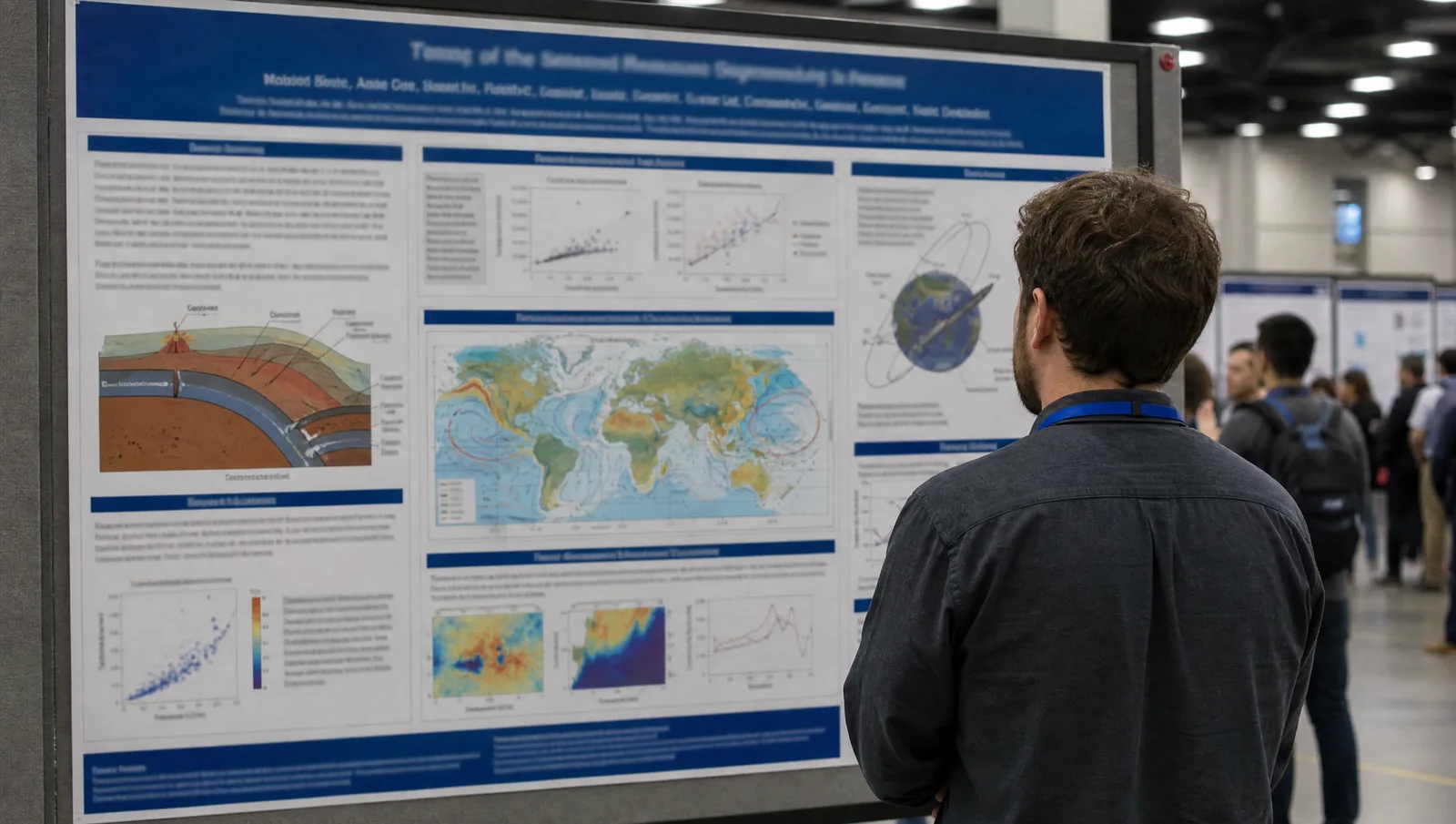
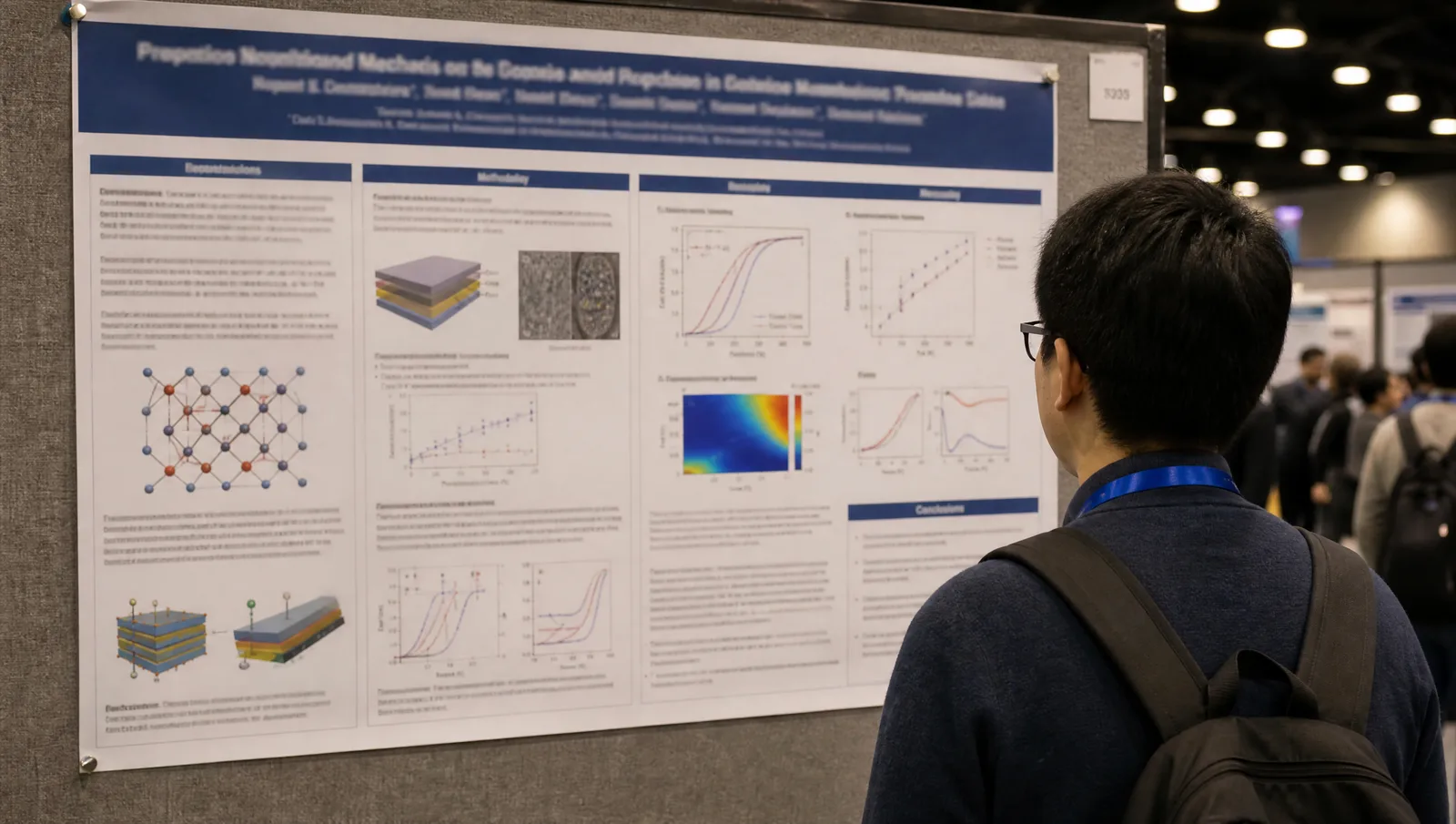
AGU 2026 poster hall: an attendee reading a printed conference poster on a display board, seen over the shoulder, with rows of poster boards behind (Figure generated with SciFig)
Transparency note: Illustrations in this article were generated with SciFig AI and reviewed by the author for scientific accuracy. Factual claims about dates and specifications link to official AGU materials.
1. AGU 2026 at a Glance: Key Dates, Venue, and Submission Milestones
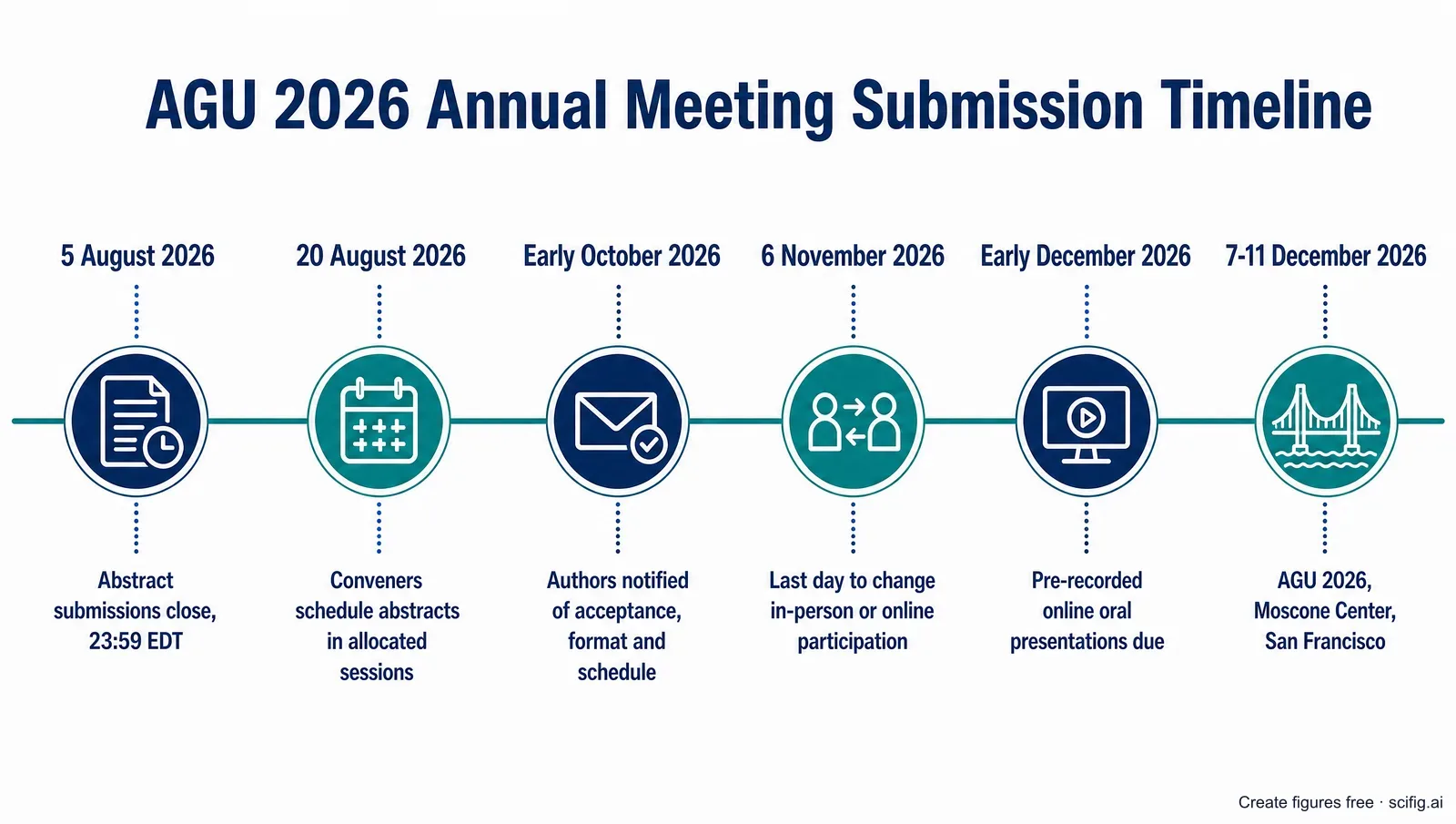
AGU 2026 runs 7–11 December 2026 at the Moscone Center in San Francisco, and authors are notified of acceptance, presentation format, and schedule in early October 2026 — which is also when AGU releases the format-specific templates and detailed presenter instructions. The submission milestones that lead up to that notification are listed in the timeline below. Membership matters here: first authors, including invited authors, must be current AGU members or members of an affiliated society, and the abstract processing fee is $80 for a regular submission and $45 for a student submission, waived for authors affiliated in low-income and lower-middle-income countries (agu.org).
One thing worth internalising before you plan anything: you cannot request an oral presentation at AGU 2026. When you submit, you choose either "consider me for oral, GeoBurst, or poster" or "poster only" — the session conveners and the AGU 2026 Program Committee decide the rest (AGU 2026 Abstract Guidelines). In practice this means every accepted author should plan for a poster, because every accepted session includes at minimum a poster component.
AGU 2026 submission timeline: abstract deadline 5 August, acceptance notifications in early October, and the 7–11 December meeting dates (Figure generated with SciFig)
Date
Milestone
5 August 2026
Abstract submissions close, 23:59 EDT / 03:59 UTC
10 August 2026
Program committee allocates and finalises session formats
Mid-August 2026
Attendee registration and housing open
20 August 2026
Conveners review and schedule abstracts in allocated sessions
Early September 2026
Program committee meets to build the scientific program
Early October 2026
Authors notified of acceptance, format, and schedule; Scientific Program goes live
5 November 2026
Last day for early-bird registration rates and 2026 AGU membership
6 November 2026
Last day to switch between in-person and online participation
Mid-November 2026
Last day to cancel registration for a full refund; AGU hotel block closes
Early December 2026
Pre-recorded online oral presentations due
7–11 December 2026
AGU 2026, Moscone Center, San Francisco
The full list of AGU 2026 dates and deadlines is maintained on the official dates and deadlines page. The meeting closes at 13:00 PST on Friday 11 December, so build your travel around a Friday afternoon departure rather than an evening one.
2. AGU 2026 Poster Format and Size: What Is Published and What Arrives in October
AGU 2026 poster presenters fall into two tracks — in-person presenters must print a paper poster and present it in the poster hall, while online presenters must build an interactive iPoster in AGU's online gallery — but the physical poster size, orientation, and board specification have not been published as of 4 August 2026. AGU states that format-specific templates and detailed instructions go to authors in October, alongside the acceptance notifications (AGU 2026 Abstract Guidelines). There is no AGU 2026 presenter-guidelines page live yet, so any AGU 2026 poster size figure you find quoted elsewhere right now is not coming from a current official source. Treat October as the moment the number becomes real, and design in the meantime for content rather than for a specific canvas.
Here is what the official AGU 2026 materials do specify about poster format today:
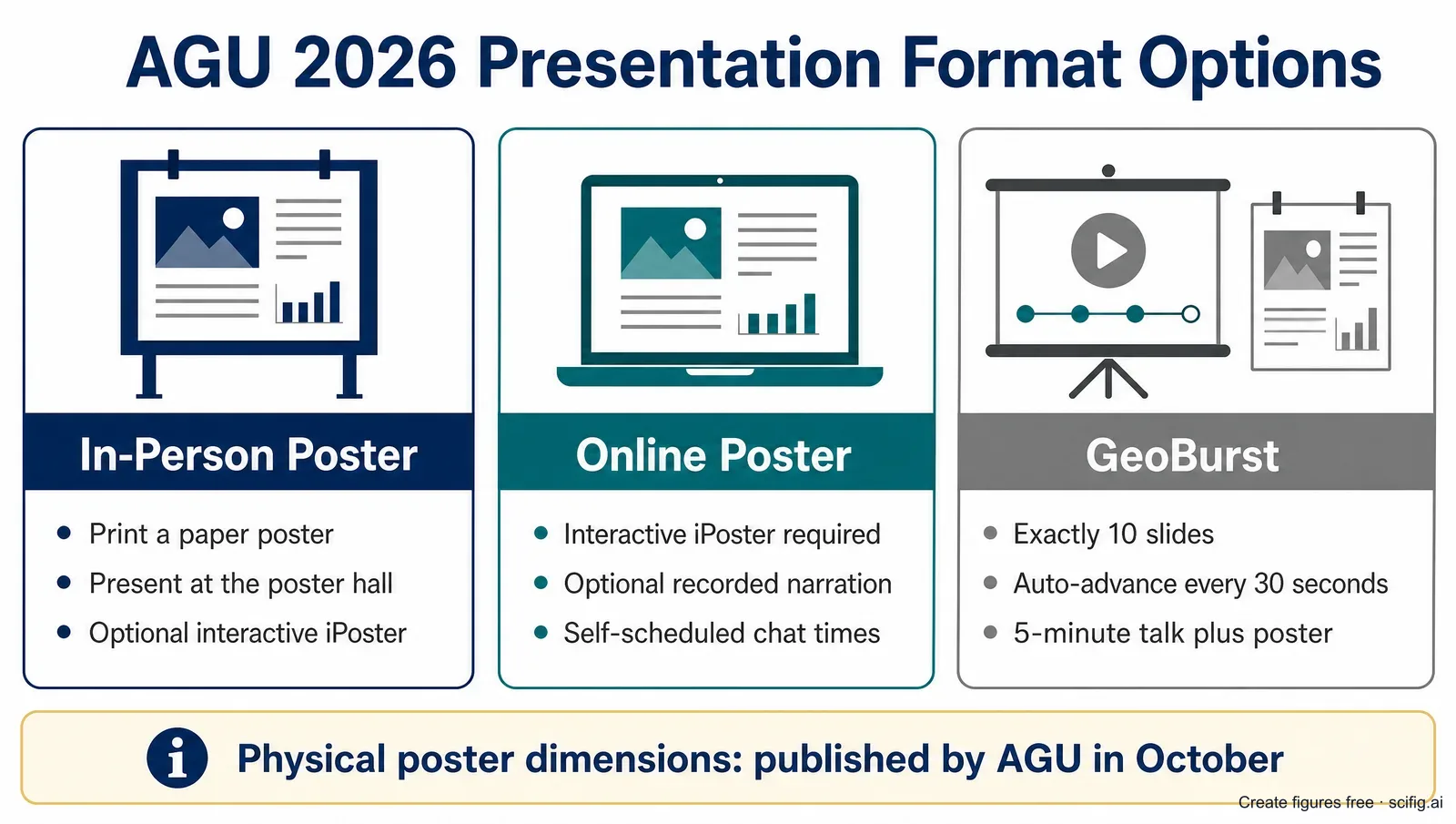
In-person posters — you print a paper poster and attend the poster hall on your assigned date. You may additionally create an interactive iPoster in the online gallery to extend the reach of your work.
Online posters — an interactive iPoster in the online gallery is mandatory, not optional. You set your own schedule during the meeting week, can add pre-recorded video or audio narration, and can hold self-scheduled video or chat times listed in the online program.
Every accepted session has a poster component — poster sessions are described by AGU as core to the meeting, and all accepted session proposals include at minimum a poster (session formats).
The poster hall runs in two daily blocks — morning sessions from 08:30 to 12:00 with the hall opening at 07:45, and afternoon sessions from 14:15 to 17:45, plus dedicated viewing windows at 10:00–10:30 and 15:45–16:15. On Friday the poster hall closes at 13:00 (schedule at a glance).
The official AGU 2026 pages do not state whether on-site printing is available in San Francisco, so plan to print in advance and travel with your poster.
AGU 2026 poster format options compared: in-person printed poster, online iPoster, and the 10-slide GeoBurst format (Figure generated with SciFig)
In our analysis, the unpublished dimensions are less of an obstacle than they look. The part of an AGU 2026 poster that takes the longest to produce well is not the layout — it is the cross-sections, circulation schematics, and process diagrams that carry your argument. Those are resolution-independent and format-independent: build them now, then drop them into whatever canvas AGU specifies in October. You can generate publication-grade, fully editable versions online for free and adjust any element while you wait.
Build your AGU poster figures before the specs land
Start from a cross-section, circulation schematic, or process diagram now, and drop it into the official canvas when October arrives.
Because the board specification does not arrive until October, the safe move is a layout you can rescale rather than rebuild. Our conference poster templates ship every common board size in editable PowerPoint, portrait and landscape, with the print type scale already applied — build the sheet now and switch to the matching size once AGU publishes the 2026 spec.
3. AGU 2026 GeoBurst Sessions: The 10-Slide Format That Replaces eLightning
GeoBurst replaces eLightning at AGU 2026: it is a 90-minute, in-person-only session in which each presenting author gives a 5-minute talk built from exactly 10 slides that auto-advance every 30 seconds, followed by a companion poster session in the poster hall. AGU's own wording is unambiguous — the format is listed as "GeoBurst quick talk (replacing the eLightning format this year)" (AGU 2026 Abstract Guidelines). If you presented an eLightning at a previous AGU meeting, do not assume your old iPoster-first workflow transfers: GeoBurst is a room-first format with a poster attached, not a poster-first format with a lightning talk attached.
The 30-second auto-advance is the design constraint that matters. You cannot linger on a slide, you cannot back up, and you cannot talk over a slide for a minute while you set up an argument. Practically, that means:
One idea per slide, and one visual per idea. Ten slides at 30 seconds is roughly 60 to 75 spoken words per slide. A dense multi-panel figure is unreadable at that pace.
No slide can depend on the previous slide still being visible. Each slide has to be self-contained, because the audience loses the previous one the moment it advances.
Your figures do the work your voice cannot. With half a minute per slide, a clean labelled schematic communicates a mechanism faster than any sentence you could say about it.
The companion poster is where the detail lives. Put the nuance, the caveats, and the supplementary panels on the poster in the hall, not in the ten slides.
AGU states that a template and detailed instructions will be provided to authors receiving the GeoBurst format in October, so the official slide dimensions and file requirements are not published as of 4 August 2026. What you can do now is decide which ten visuals carry your story.
4. AGU 2026 Oral Presentation Rules for In-Person and Online Presenters
AGU 2026 oral sessions run 90 minutes and are allocated by the program committee after abstract submission, and the rules differ sharply by participation mode: in-person presenters speak in the session room, while online presenters must upload a pre-recorded presentation and cannot participate live at all. AGU is explicit that oral sessions will not be live streamed in real time and are recorded for on-demand viewing only; online presenting authors and chairs will not join via Zoom or any other platform and will have no live Q&A, though asynchronous Q&A chat is available (session formats).
Two consequences are worth planning around. First, the deadline for pre-recorded online oral presentations falls in early December 2026, which is only weeks after the early-October acceptance notice — if you select online participation, your slides need to be finished well before the meeting, not the night before your session. Second, the individual talk length and the slide aspect ratio for an AGU 2026 presentation are not published as of 4 August 2026; the 90 minutes is a session length, not a speaking slot. Those specifications arrive with the October presenter instructions.
Note also that your participation mode is not a soft choice. You declare in-person or online at submission, and 6 November 2026 is the last day to change it (agu.org).
5. What Figures Do You Need for an AGU 2026 Abstract, Poster, and Slides?
AGU 2026 is one of the meetings where a figure can travel with your abstract: the submission form accepts one high-resolution image as an optional attachment, alongside a 300-character title and 2,000 characters of abstract text. That single optional image is a genuine advantage over meetings that keep abstracts strictly text-only, and it is worth using well — it is the first and sometimes the only visual a convener sees while deciding formats. The character limit counts punctuation but excludes spaces, and AGU asks for plain ASCII only, so no em dashes and no curly quotes (AGU 2026 Abstract Guidelines).
Across AGU's Earth and space science sections, the figure types that carry a poster or a slide deck recur in a fairly small set:
Cross-sections and depth profiles — subduction zones, sedimentary basins, ice-sheet profiles, planetary interiors. These carry structure and depth relationships that no amount of text replaces.
Process and circulation schematics — atmospheric cells, ocean overturning, the hydrologic cycle, magnetospheric coupling. These carry direction, sequence, and feedback.
Instrument, mission, or field-site schematics — how the measurement was actually made, which is the question a specialist audience asks second.
Context maps — the geographic and geologic setting a reader needs before your data means anything.
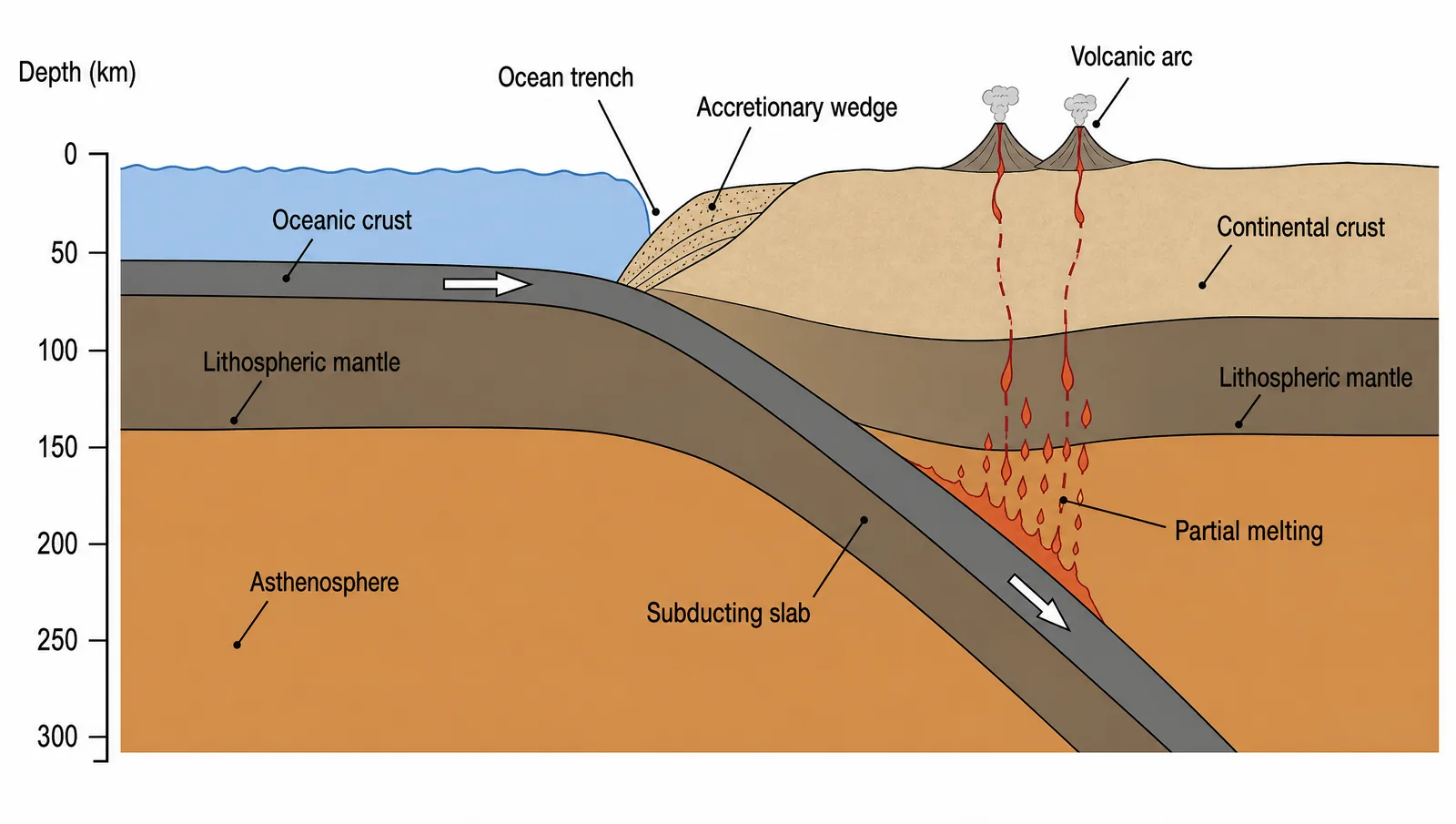
AGU 2026 subduction zone cross-section figure for an Earth science poster: trench, descending slab, and volcanic arc on the overriding plate (Figure generated with SciFig)
Turn your abstract text into the one image AGU lets you attach
Paste your study description and generate a clean cross-section, circulation schematic, or process diagram you can edit for the abstract, poster, and slides.
6. Designing a Winning AGU 2026 Poster: Accuracy a Specialist Cannot Fault
A winning AGU 2026 poster passes two tests: a passer-by grasps the story in three seconds, and the science survives scrutiny from someone who studies the same subduction zone, the same basin, or the same planetary body that you do. AGU is large — approximately 20,000 people attended the 2025 meeting (AGU FAQs) — but the person standing in front of your board during your two-block poster session is rarely a generalist. That is the audience your figures have to satisfy.
The second test is where scientific figures live or die, and where general-purpose AI image generators fall short. A tool like Nano Banana Pro or GPT Image can produce something that looks about 99% right, but on an Earth science figure 99% right is effectively 0% right: one reversed arrow and the diagram now argues against the conclusion printed beside it. A flat raster image also leaves you no way to fix that last one percent — you re-roll the whole figure and gamble that the next version is wrong somewhere else instead.
This is the core difference with SciFig. Every figure comes back as a fully editable, layered SVG whose elements — slab outlines, deflection arrows, cell boundaries, unit labels — you can modify one at a time, so the author who actually knows the field area can adjust every detail until the science is exactly right, then export an editable PPTX or a layered SVG for the poster composition. Three details are worth setting exactly in the editable canvas, because reviewers spot all three instantly:
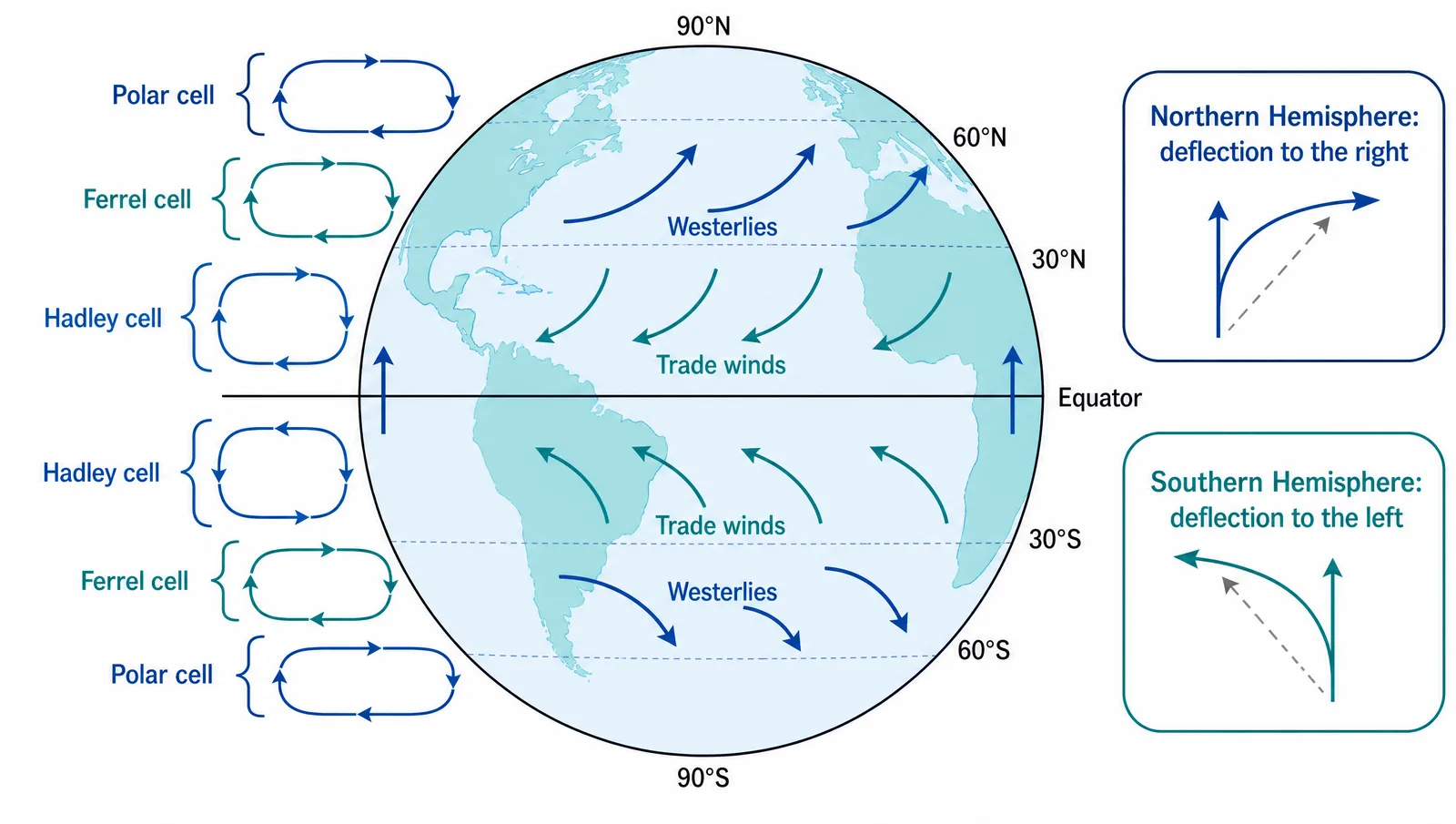
Coriolis deflection drawn the same way in both hemispheres. It is well-established that moving air and water are deflected to the right of their direction of travel in the Northern Hemisphere and to the left in the Southern Hemisphere. Generic models routinely draw both hemispheres identically or invert the pair, which breaks every wind-belt, gyre, and cyclone figure built on top of it.
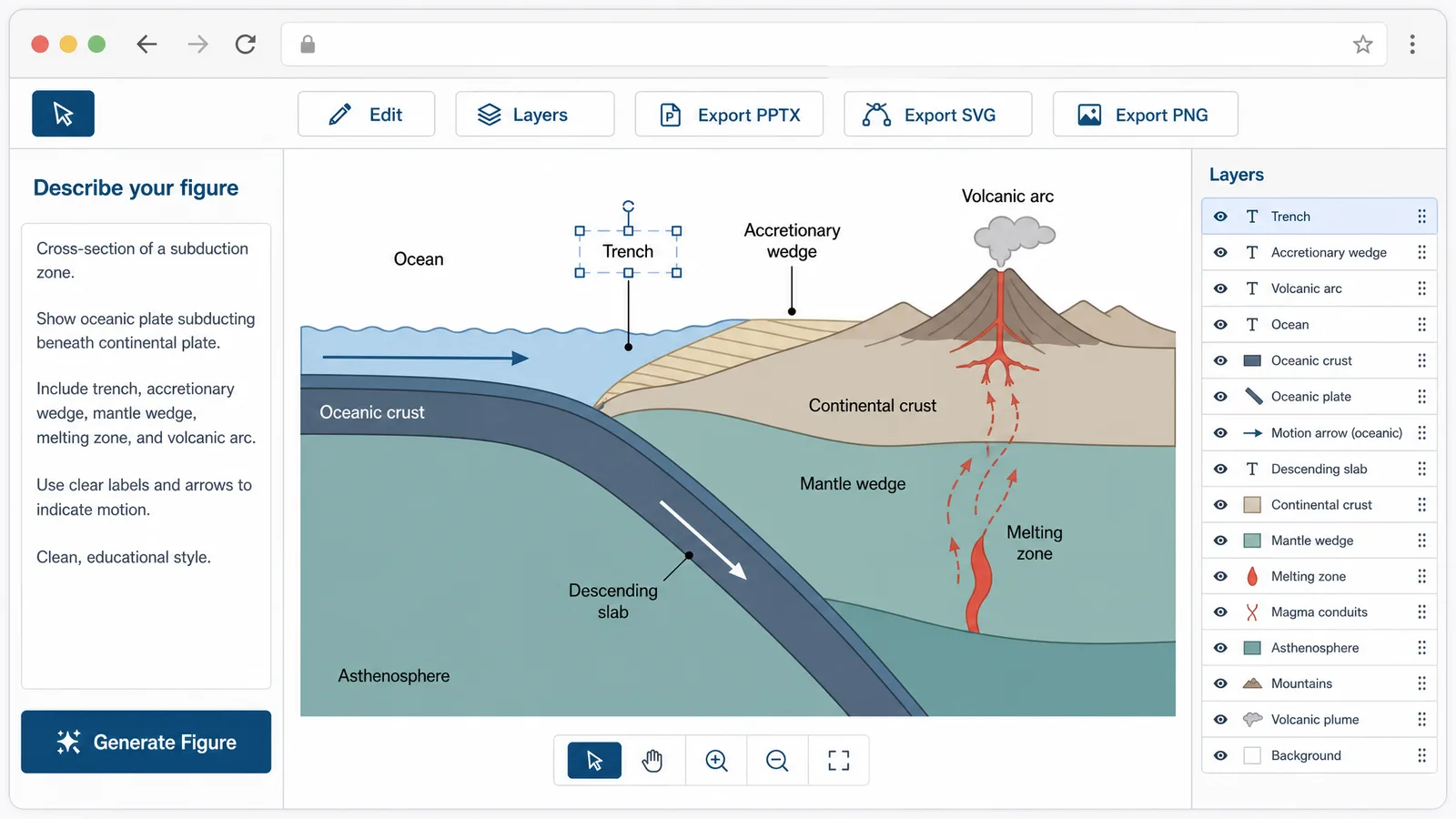
Subduction polarity reversed. It is well-established that the slab descends from the trench beneath the overriding plate, with the volcanic arc sitting on that overriding plate. Generic output frequently dips the slab away from the trench or places the arc on the subducting plate, which quietly invalidates the whole tectonic interpretation the cross-section is meant to support.
Seismic waves drawn through layers they cannot cross. It is well-established that S-waves do not propagate through the liquid outer core, and that P-waves refract at the core-mantle boundary to produce a shadow zone. Generic models often run S-waves straight through the outer core — an error that contradicts the very observation used to infer Earth's layered interior.
AGU 2026 atmospheric circulation figure for a geoscience poster: Coriolis deflection to the right in the Northern Hemisphere and to the left in the Southern Hemisphere (Figure generated with SciFig)
None of this is an argument against using AI to create figures. It is an argument for a workflow where generation is fast and every element stays editable — which is exactly what an editable vector canvas gives you.
7. Create Your AGU 2026 Figures with AI: The SciFig Workflow
You do not need the October poster specifications to start creating your AGU 2026 figures: a cross-section or a circulation schematic is format-independent, so you can build it and edit every element until the science is exactly right now, then compose the sheet once AGU publishes the dimensions. That ordering also protects the part of the job that actually takes judgement. Laying out a poster is an afternoon; getting a subduction geometry or a deflection direction right is the thing a specialist will check first. There are three entry points into SciFig AI Illustration (AI scientific illustration), and which one you pick depends only on what you already have in hand — an abstract, a clear description, or a sketch on paper.
Path 1 — Start from your submitted abstract. Drop the PDF into PDF-to-Figure. It parses your setting, methods, and findings and returns a cross-section or process diagram in one click — every element stays editable, so you can adjust it to your data and poster layout instead of starting from a blank canvas.
Path 2 — Write a structured prompt. For a cross-section or circulation schematic, Text-to-Figure gives more control. Copy and adapt:
Cross-section of a subduction zone: an oceanic plate bending downward at a
trench and descending beneath a continental plate, with an accretionary
wedge at the trench, a volcanic arc on the overriding continental plate,
and dashed magma ascent paths from the slab-top melting region. Label the
oceanic crust, continental crust, lithospheric mantle, and asthenosphere.
Path 3 — Photograph a field sketch. If your cross-section started on paper, photograph it and drop it into Sketch-to-Figure to get a publication-style version that preserves your original layout and annotations.
AGU 2026 SciFig workflow for poster figures: a text prompt on the left generating an editable subduction zone diagram, with PPTX and SVG export buttons (Figure generated with SciFig)
From any path you edit individual elements in the vector canvas — labels, colours, layer boundaries, arrow directions — and export to editable PPTX or layered SVG for the poster composition, at a resolution that holds up at large print sizes. Start free, no card required: 150 credits on day one (3 figures), plus daily check-in credits that grow with your streak (up to 150 a day) — up to about 44 figures in your first month, so most authors work through a full set of poster figures over their first few days.
Optional — disclose your AI use. AGU states that AI tools such as ChatGPT are not permitted as authors, since they cannot take responsibility for submitted work, and that their use should be fully transparent (agu.org). If you build and review a figure with an AI tool, one line in the caption covers it — for example: Figure created by the authors using SciFig and reviewed for scientific accuracy (scifig.ai).
Start your AGU figure from a prompt, a PDF, or a field sketch
Use whichever path matches what you already have, then edit every arrow and label until the geophysics is exact.
8. AGU 2026 Photography and Social Media Rules for Posters and Slides
Photography of your AGU 2026 poster and slides is permitted by default — attendees may photograph sessions, lectures, town halls, and posters for personal and social media use unless you have opted out — while audio and video recording is prohibited at all sessions, lectures, town halls, and plenaries. If you do not want your work photographed, AGU provides a digital "No Photo" image that you can display on your poster or on your slides, and AGU says it will support and enforce a presenter's stated preference. Anyone sharing a photograph of a presenter, their slides, or their poster must identify the presenter by name (AGU meeting policies).
This matters more than it sounds if any panel on your poster shows unpublished data or an embargoed result. Because attendees come and go throughout a session, AGU recommends that presenters affix the "no photos" image to all slides rather than relying on a verbal request at the start (photography and social media guidelines). Decide before you send the file to print which panels are shareable, and reserve the mark for the ones that are not.
Tip
The single highest-leverage decision in your preparation window is which figure becomes the hero. Pick the one a passer-by should still remember an hour later — usually the cross-section or the process schematic with your key result beside it — and design the rest of the sheet around it once AGU publishes the dimensions in October.
9. Where AGU 2026 Abstracts Are Published and How to Cite Them
AGU does not automatically publish your abstract to Google Scholar, to an archive, or with a DOI — accepted AGU 2026 abstracts appear in the online scientific program and are cited by their final paper number. AGU's official citation format is: Author(s) (2026), Title, Abstract (Final paper number, ex: AE14B-1234) presented at AGU26, 07-11 Dec (agu.org). Abstracts from past AGU meetings are searchable through the AGU Abstract Browser, which is where an AGU 2026 abstract will eventually be discoverable rather than in a printed abstract book.
If you want a citable DOI, AGU points authors to ESS Open Archive — but with an important condition: submissions must include the entire presentation or paper alongside the abstract, because ESS Open Archive does not host abstracts on their own. In practice that means the poster or slide deck itself becomes the deposited object, which is a further reason to treat your figures as publication-grade artefacts rather than disposable conference graphics.
Frequently Asked Questions
AGU had not published the AGU 2026 poster size, orientation, or board specification as of 4 August 2026. AGU releases format-specific templates and detailed presenter instructions in October, alongside acceptance notifications. See §2 Poster Format and Size.
GeoBurst replaces eLightning at AGU 2026. It is a 90-minute, in-person-only session where each author gives a 5-minute talk of exactly 10 slides that auto-advance every 30 seconds, followed by a companion poster session. See §3 GeoBurst Sessions.
Only online presenters must create an interactive iPoster; in-person presenters print a paper poster and may add an iPoster optionally. Every accepted AGU 2026 session includes at least a poster component. See §2 Poster Format and Size.
Yes — the AGU 2026 abstract form accepts one high-resolution image as an optional attachment. The title is limited to 300 characters and the abstract text to 2,000 characters excluding spaces. See §5 What Figures Do You Need.
AGU states that AI tools cannot be listed as authors because they cannot take responsibility for submitted work, and that their use should be fully transparent. SciFig generates your cross-sections and schematics as fully editable SVGs, so you can adjust any element yourself, and you can disclose AI use with a one-line caption credit, using AGU's transparency guidance as a reference. See §7 The SciFig Workflow.
Yes by default — photography for personal and social media use is permitted unless you opt out, though audio and video recording is prohibited in all sessions. AGU provides a "No Photo" image you can display on your poster or slides. See §8 Photography and Social Media Rules.
AGU does not automatically assign a DOI or deposit abstracts in an archive; they appear in the online scientific program and are cited by final paper number. Past AGU abstracts are searchable via the AGU Abstract Browser. See §9 Where Abstracts Are Published.
References
All specifications and dates above are drawn from official AGU materials, accessed August 4, 2026:
ESS Open Archive. ESS Open Archive. essopenarchive.org. Accessed August 4, 2026. https://essopenarchive.org/
Disclaimer: This article is educational content about scientific figure design for AGU posters and presentations. Dates, fees, and specifications are summarised from the official AGU materials linked above and were accurate at the time of writing; several presenter specifications, including poster dimensions, had not been published when this guide went live and are expected in October 2026. Always confirm current details on the official AGU annual meeting website before printing or submitting. SciFig is an AI scientific figure platform covering illustrations (SciFig AI Illustration), data-driven charts (SciFig DataChart), and flowcharts (SciFig FlowChart), not an official AGU resource.
Keep going
Recommended resources
Templates, tools, and further reading for your research