Official GSA Connects 2026 poster guidelines: the 8x4 ft landscape board, the Aug 6 abstract deadline, 15-min oral slots, and Abstracts with Programs.
SciFig Team
SciFig editorial team
GSA Connects 2026 runs 11–14 October 2026 at the Colorado Convention Center in Denver, Colorado.
This is a practical guide to the official poster and presentation rules for the Geological Society of America's annual meeting: the 8 × 4 ft landscape poster board, and the August 6 abstract deadline.
It also covers 15-minute oral time slots and where accepted abstracts are published. Every date and specification below links to official GSA Connects materials.
Need the file, not just the specs? Download our conference poster templates — 24 editable PowerPoint layouts, sized for both printed boards and e-posters.
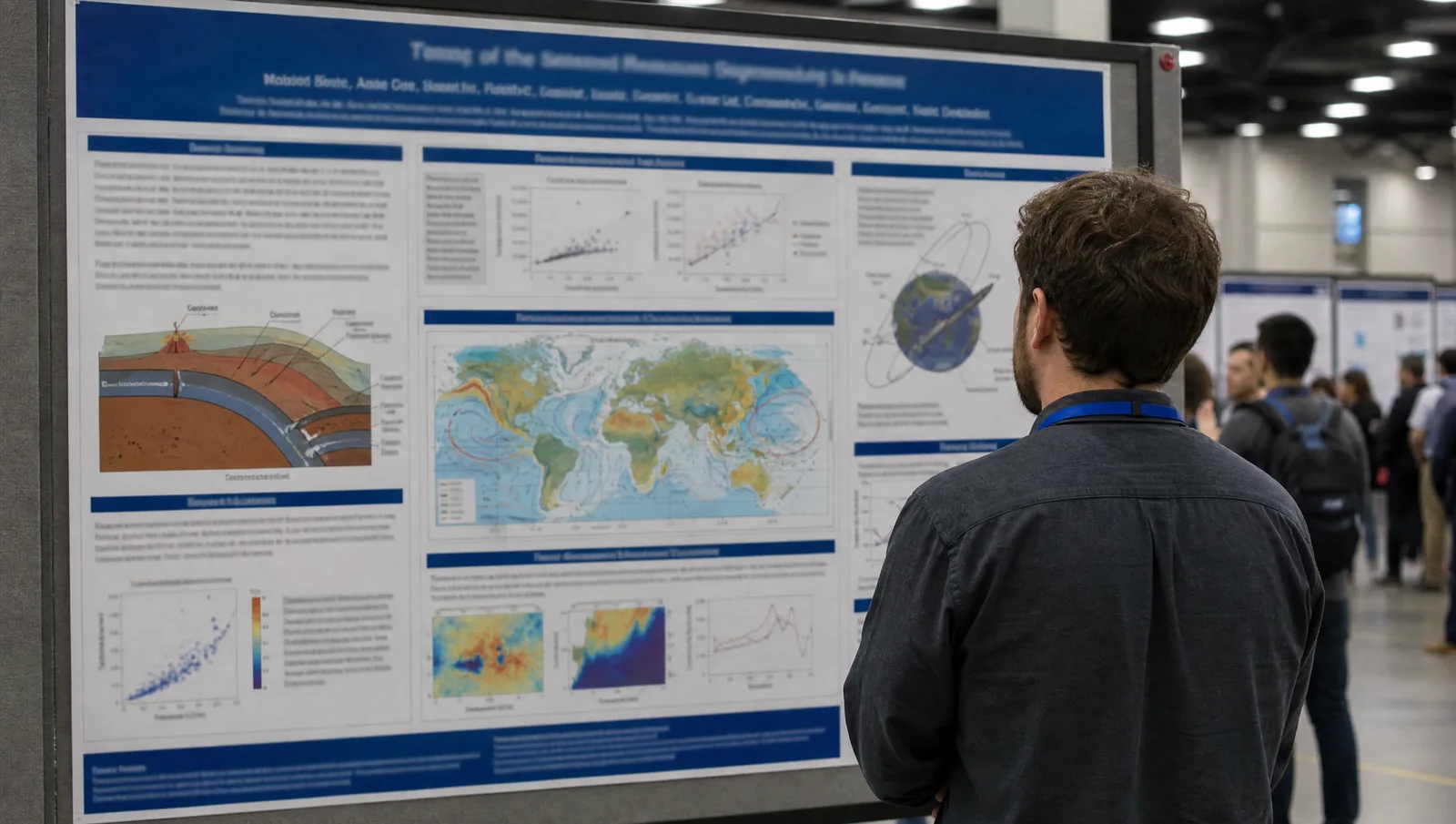
GSA Connects 2026 poster hall: a wide-angle view of rows of 8x4 ft landscape poster boards along a convention hall aisle with presenters and attendees (Figure generated with SciFig)
Transparency note: Illustrations in this article were generated with SciFig AI and reviewed by the author for scientific accuracy. Factual claims about dates and specifications link to official GSA Connects materials.
1. GSA Connects 2026 at a Glance: Dates, Venue, and Abstract Deadlines
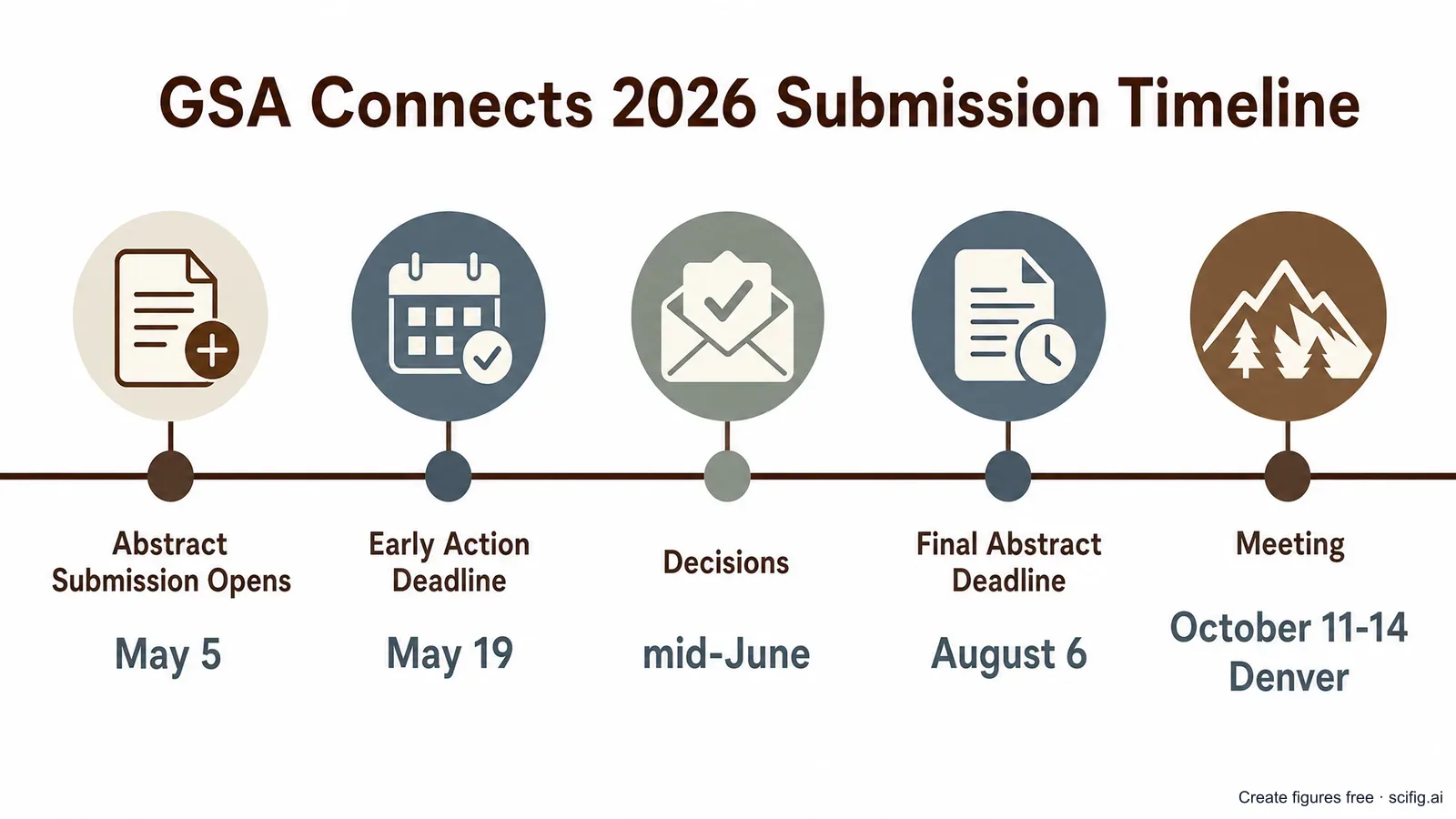
GSA Connects 2026 runs 11–14 October 2026 at the Colorado Convention Center in Denver, Colorado, and abstract submission is already open — the final deadline is August 6, 2026. Submission opened May 5, 2026, with an Early Action deadline of May 19, 2026 (after which no further edits are permitted; decisions follow in mid-June). As a presenting author, you may submit up to two abstracts under GSA's "Two Abstract Rule" — one oral and one poster, or two posters — with exceptions for invited speakers and Spanish-language presentations.
GSA Connects 2026 submission timeline: abstract submission opens May 5, Early Action deadline May 19, final deadline Aug 6, meeting Oct 11-14 in Denver (Figure generated with SciFig)
Date
Milestone
5 May 2026
Abstract submission opens
19 May 2026
Early Action deadline (no edits permitted after this date)
Mid-June 2026
Early Action decisions issued
6 August 2026
Final abstract submission deadline
11–14 October 2026
GSA Connects 2026, Colorado Convention Center, Denver
Abstract fees are non-refundable: GSA members pay $60 (professional) or $25 (student); non-members pay $80 (professional) or $50 (student). Nearly 200 specialized technical sessions are open for submission, so the earlier you settle on a session and your figures, the more time you have to iterate before the August deadline.
2. GSA Connects 2026 Poster Size and Format: The 8×4 ft Landscape Board
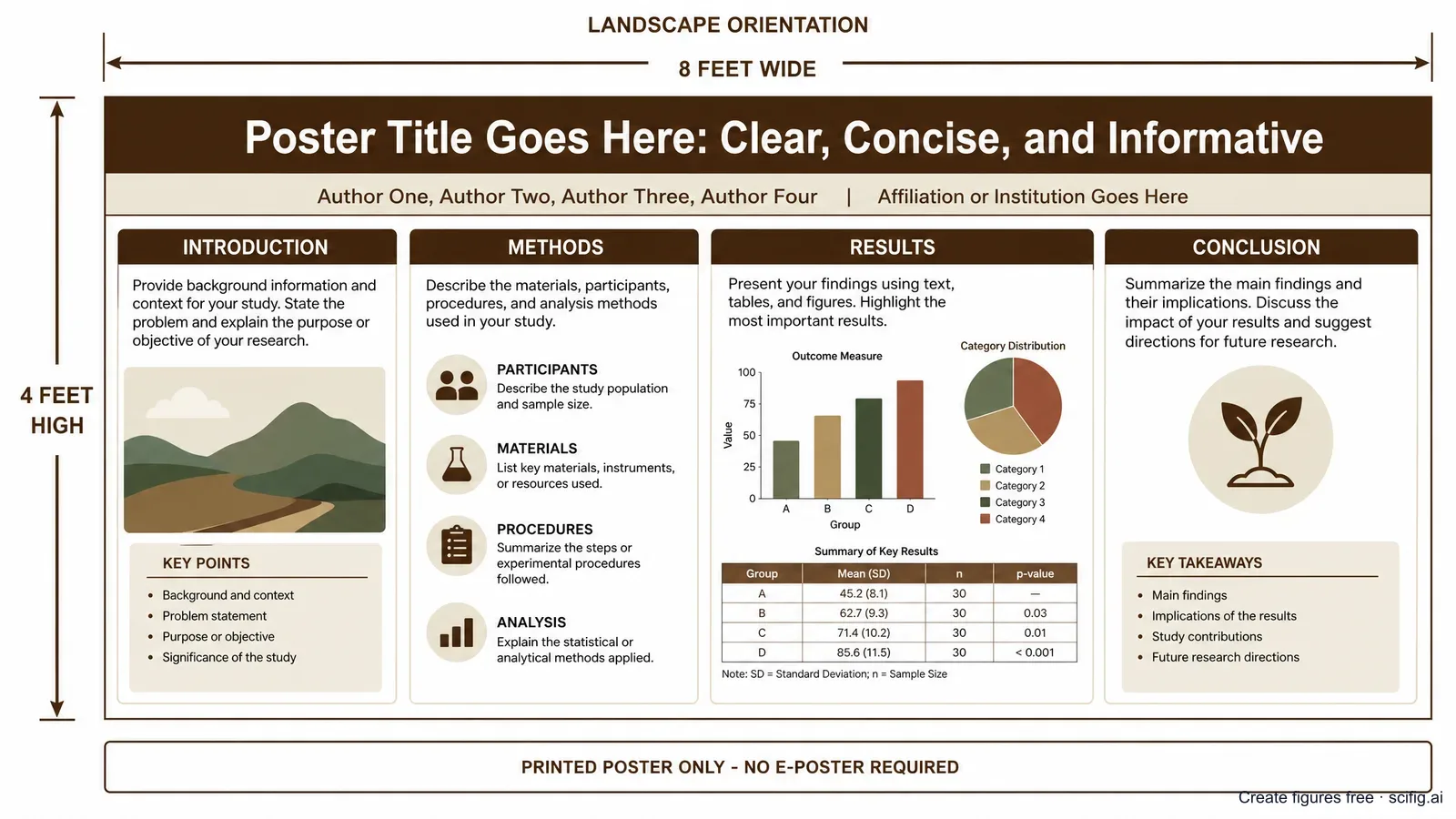
A GSA Connects 2026 poster must fit an 8-ft-wide by 4-ft-high free-standing display board in landscape orientation — up to 4 × 8 ft (about 122 × 244 cm) — and this is a printed-poster meeting: the official presenter guidelines do not mention any e-poster or virtual poster upload requirement. Push pins and Velcro are provided at the board, and poster sessions run all day from 8 a.m. to 5:30 p.m., with each presenting author assigned a specific window — either 9–11 a.m. or 3:30–5:30 p.m. — during which they must stand by the poster. Posters must be taken down at the end of the session day, so plan your teardown alongside your session schedule.
These GSA Connects 2026 poster size and format rules come from the official GSA Connects 2026 presenter information. A few points shape how you build the sheet:
Landscape only, up to 8 × 4 ft — design for a wide layout from the start; there is no portrait option.
No e-poster component — GSA Connects 2026 is a printed-poster meeting; the presenter guidelines do not describe any digital upload or virtual poster platform. (The official pages do not state whether on-site printing is available, so print and bring your poster with you.)
Fixed presenting window — you are only required to stand at your board for a 2-hour block, not the full day, so use the rest of the session to visit other posters in your track.
Take it down same-day — posters left up past your session are removed, so build teardown into your schedule.
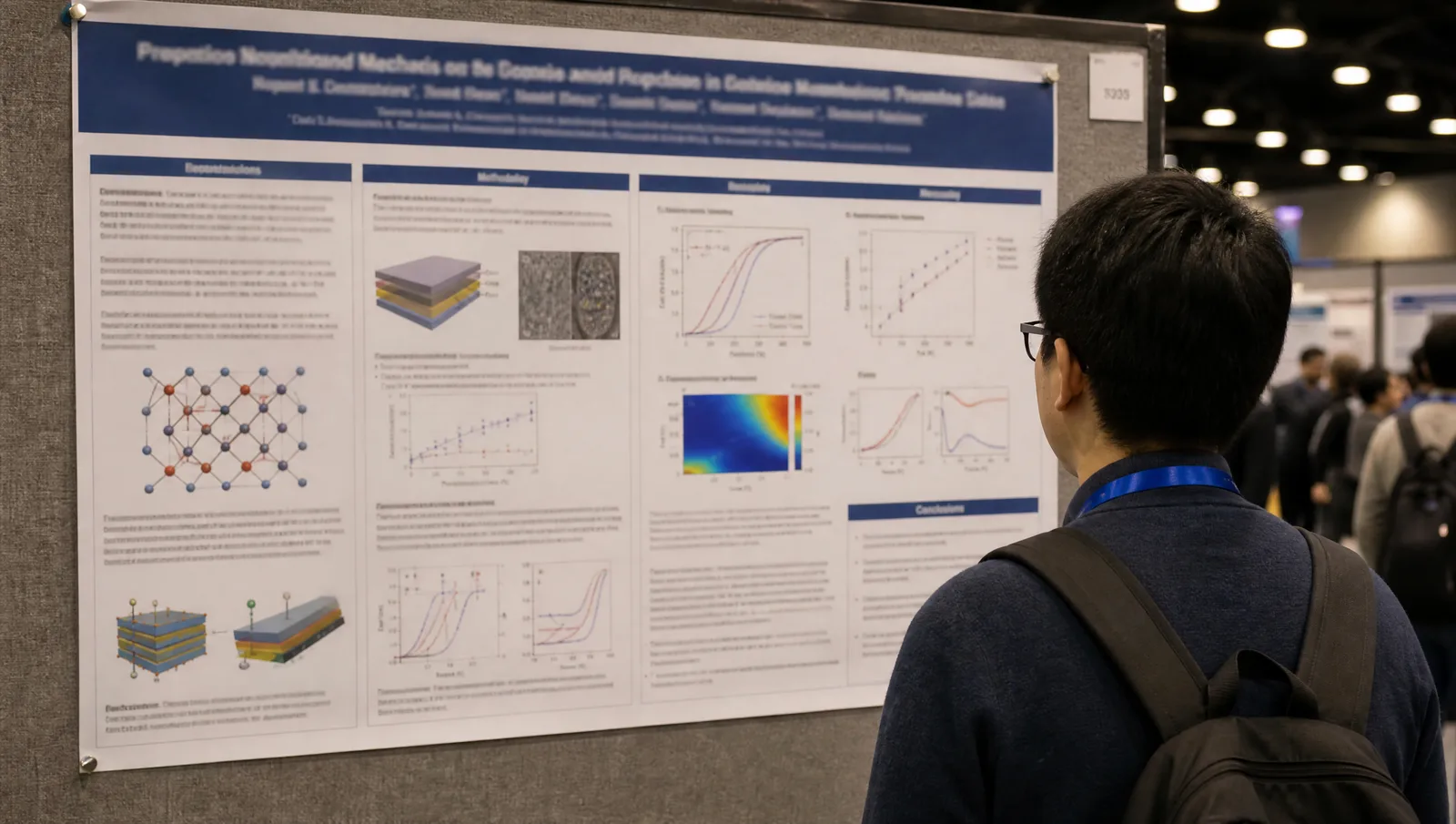
GSA Connects 2026 poster size: an 8-ft-wide by 4-ft-high landscape board layout with a title bar, author row, and methods, results and conclusions panels (Figure generated with SciFig)
The cross-sections, stratigraphic columns, and structural schematics that fill a geoscience poster are the slowest part of that layout to produce well. You can generate publication-grade versions online for free and drop them straight into your poster composition.
Need a hero figure for your GSA Connects poster?
Start from a stratigraphic column, structural cross-section, or process schematic before you open your poster template.
GSA publishes no poster template, and an 8 ft board is wider than the standard academic sizes. Our conference poster templates give you an unbranded landscape layout in editable PowerPoint with the column structure and print type scale already set — resize the canvas to 8 × 4 ft and drop your figures in.
A GSA Connects 2026 oral presentation runs 15 minutes total — 12 minutes to present plus 3 minutes for questions — and slides should be built in 16:9 widescreen ratio. The meeting room computers run PC with MS Office 2016, and both PowerPoint and PDF files are accepted; an official slide template is available but not required. GSA recommends visiting the Speaker Ready Room at least 24 hours before your scheduled talk to test your file, though it has no internet access, so bring your presentation on a drive; you can also upload directly in the session room at least 30 minutes before your start time. Mac users should test a Mac-produced deck on a Windows machine beforehand, since font and animation rendering can shift between platforms.
With only 12 minutes of talk time, a GSA Connects oral session leaves room for a handful of slides — which means nearly every slide needs one clear figure, whether that is a stratigraphic column, a cross-section, or a process diagram, carrying the argument instead of a dense block of text.
4. What Figures Do You Need? Poster, Presentation, and Abstract Figures in Geoscience
Whether you are building a poster, oral slides, or the abstract text itself, GSA Connects' geoscience audience expects the same recurring figure types — and the slowest ones to produce by hand can now be generated online for free in minutes. The exact figure mix depends on your discipline (sedimentary geology, structural geology, geomorphology, petrology, and so on), but two jobs recur across almost every track.
On your poster and slides, the figures that carry a geoscience presentation are:
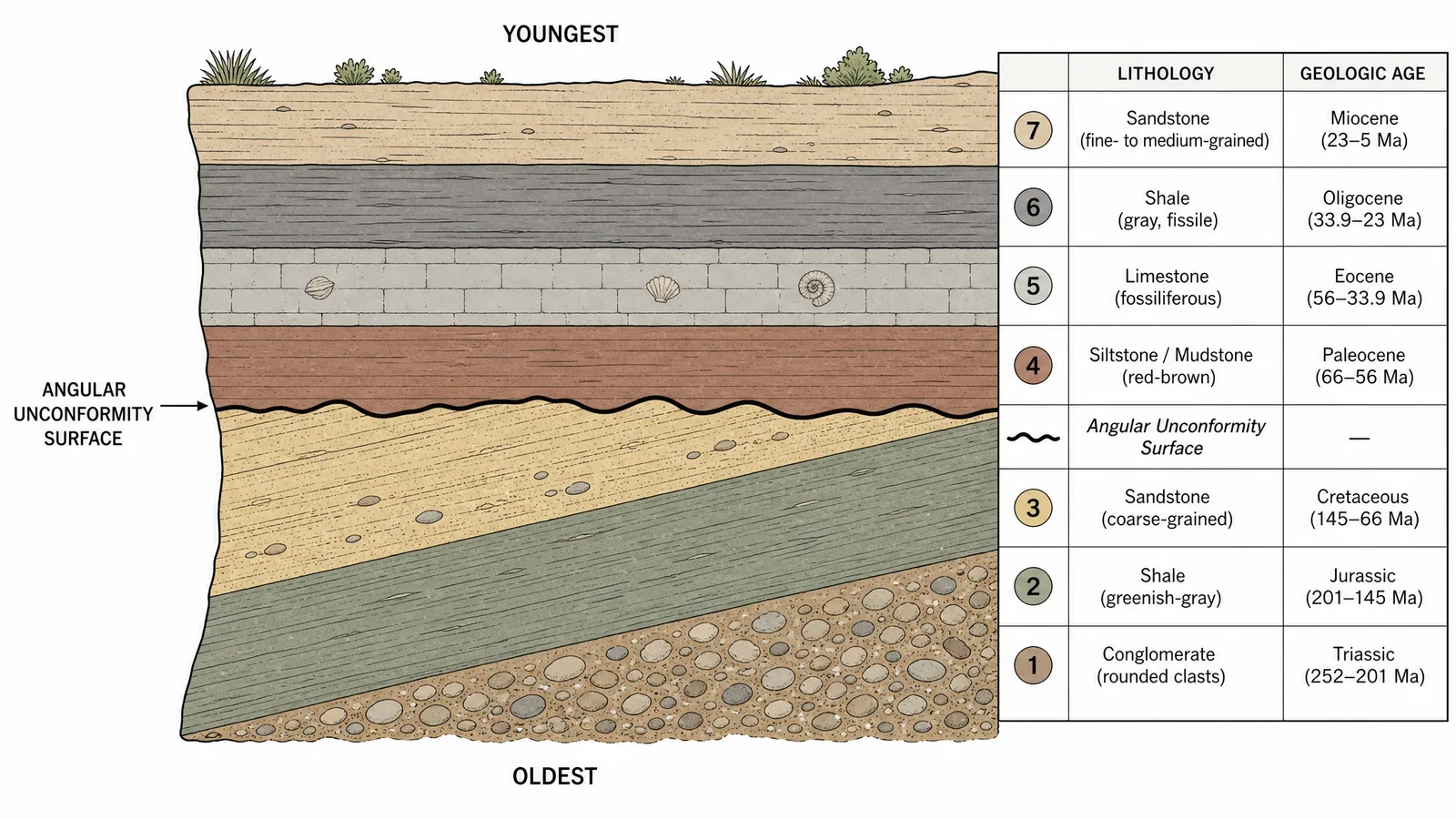
Stratigraphic column or cross-section — the rock units in correct age order (Steno's Law of Superposition: oldest at the base, youngest at the top in an undisturbed sequence), with contacts, unconformities, and lithology labeled.
Structural or tectonic process schematic — fault geometry, fold structure, or a broader process like a subduction zone or the rock cycle, showing the mechanism your study addresses.
Site or field map — the geographic and geologic context readers need before they can evaluate your data.
GSA Connects 2026 stratigraphic column figure: sedimentary rock layers in correct superposition order from oldest at the base to youngest at the top (Figure generated with SciFig)
In your abstract itself, GSA Connects 2026 limits abstract text to 2,000 characters (not counting spaces), and the official submission guidance does not describe any option to embed a figure or image in the abstract text — unlike some meetings, the abstract stays text-only. That makes your poster and slides the first place your figures actually reach a reader, so it is worth treating them as part of the argument rather than an afterthought.
5. Designing a Winning GSA Connects Poster: Accuracy That Survives Peer Scrutiny
A winning GSA Connects poster passes two tests: a passerby grasps the story in three seconds, and the geology is exact enough to survive scrutiny from a specialist standing in front of it. The best layouts build around one dominant hero figure — usually the stratigraphic column or the structural cross-section with the key result nearby — with supporting panels arranged around it. A landscape 8 × 4 ft sheet with one strong figure beats a dense grid of small panels every time — and student presenters have extra reason to care, since several GSA Sections and Divisions run their own student poster awards judged on-site at the meeting.
The second test is where scientific figures live or die — and where general-purpose AI image generators fall short. A tool like Nano Banana Pro or GPT Image can produce something that looks about 99% right, but on a geologic figure 99% right is effectively 0% right: a reversed stratigraphic order, a backward fault motion arrow, or a mislabeled fold turns a compelling poster into one that misleads a reviewer. A flat, raster AI image also gives you no way to fix that last one percent.
This is the core difference with SciFig. Every figure is a fully editable SVG whose elements — layers, arrows, labels, fault blocks — you can correct individually, so you (the author who actually knows the field area) can adjust any element until the figure matches your science. The geoscience figures that reward this care are exactly the ones reviewers scrutinize:
Stratigraphic superposition — put the oldest unit at the base and the youngest at the top in an undisturbed sequence (a commonly reversed order in generic AI output), and label unconformities correctly rather than implying continuous deposition.
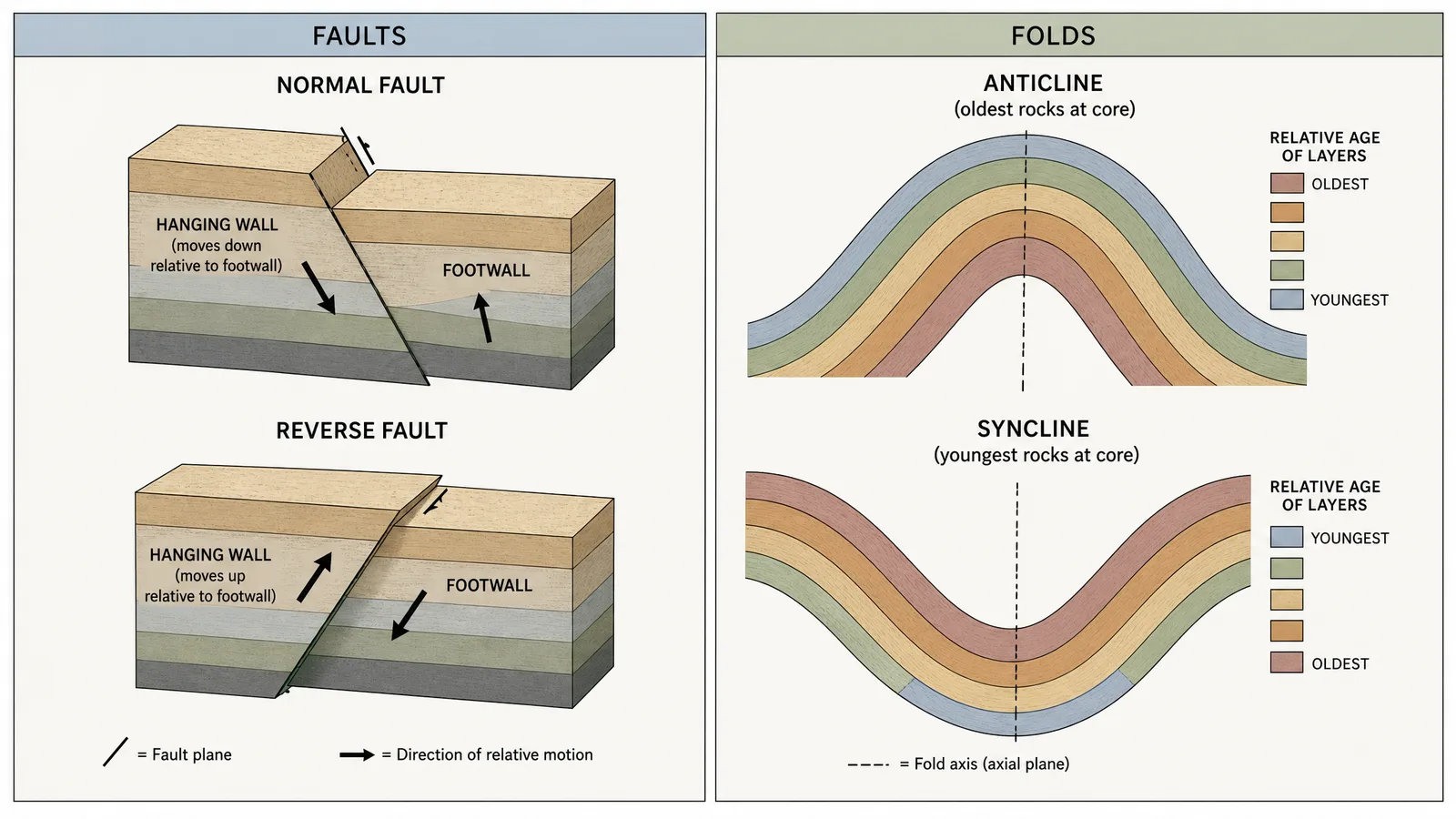
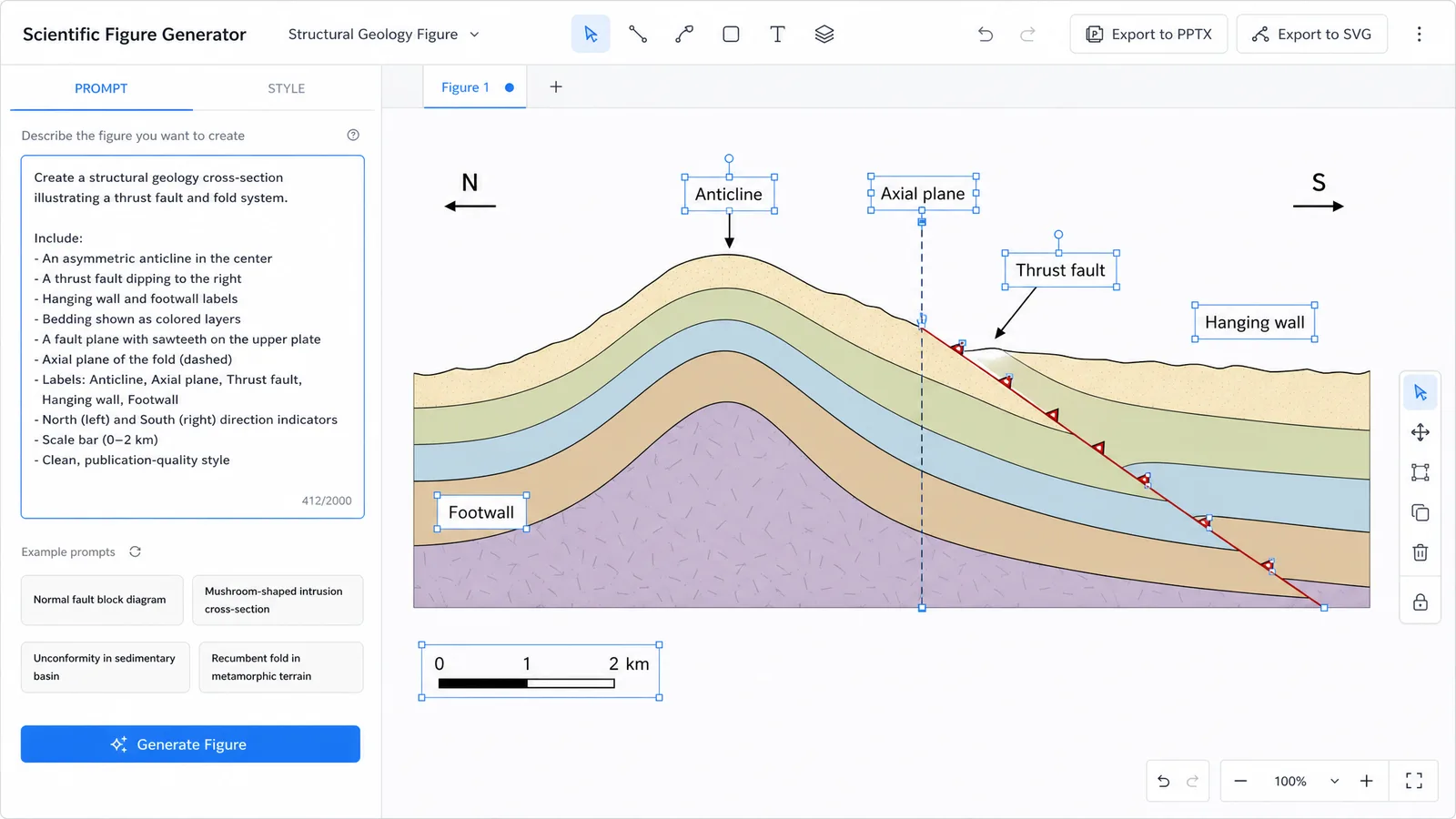
Fault motion direction — get the hanging wall and footwall relative motion right for a normal versus a reverse fault; a reversed arrow is the detail a structural reviewer notices first.
Fold core age relationships — an anticline's core holds the oldest rocks and a syncline's core holds the youngest; generic models frequently invert or randomize this relationship.
GSA Connects 2026 structural geology figure: normal and reverse fault hanging wall motion beside an anticline-syncline fold pair with correct relative rock ages (Figure generated with SciFig)
Whether your GSA Connects 2026 poster earns its attention comes down to whether these figures are accurate, clear, and legible — which is exactly where an editable AI figure workflow compresses days of drafting into hours without giving up geologic control.
6. Create Your GSA Connects 2026 Figures with AI: The SciFig Workflow
You already have two things most colleagues do not: your accepted abstract and a clear understanding of your section, structure, or process — use both to generate your figures online for free, then edit them until they are exactly right. Here is the SciFig workflow for a GSA Connects presenter:
Path 1 — Upload your accepted abstract PDF. Drop it into PDF-to-Figure. It parses your description of the section, methods, and findings and returns a cross-section or process diagram in one click. SciFig generates the figure, and every element stays editable so you can adjust it to your data and poster layout — no blank canvas.
Path 2 — Copy a structured prompt. For a stratigraphic or structural figure, Text-to-Figure gives more control. Copy and adjust to your field area:
Stratigraphic cross-section of a sedimentary sequence: a lower unit of
interbedded sandstone and shale, an angular unconformity, and an upper
unit of horizontally bedded limestone, labeled from oldest at the base
to youngest at the top with the unconformity clearly marked.
Path 3 — Sketch and scan. If you sketched your cross-section or field map on paper, photograph it and drop it into Sketch-to-Figure to get a publication-style version that preserves your original layout.
GSA Connects 2026 SciFig workflow: a text prompt left generating an editable stratigraphic cross-section diagram right, with PPTX and SVG export buttons (Figure generated with SciFig)
From any path, you edit individual elements in the vector canvas — adjust labels, colors, layer boundaries, fault-block placement — and export to editable PPTX or layered SVG for final composition, at high resolution for the 8 × 4 ft print without artifacting. Start free: 150 credits on day one, plus daily check-in credits. For the companion guides in this conference series, see the RSNA 2026 poster guide and the SABCS 2026 poster guide.
Optional — disclose your AI use. Some journals and meetings now ask authors to disclose AI assistance and to remain responsible for the accuracy of their work. If you build and review a figure in SciFig, you can add one line to its caption — for example: Figure created by the authors using SciFig and reviewed for scientific accuracy (scifig.ai).
Start your GSA Connects figure from prompt, PDF, or sketch
Use the path that matches what you already have, then edit every element until the geology is exact.
7. GSA Connects 2026 Presenter Registration and Code of Conduct
Every GSA Connects 2026 presenter must register for the meeting themselves — presenting an abstract does not waive the registration fee — and all presenters must follow GSA's Abstract Conduct and Code of Conduct. Presentations may be recorded or photographed by attendees unless you display a "No Recording" notice at your poster or on your slides, so plan for that if your data is unpublished or sensitive.
Handle registration early, since it is separate from abstract submission and is required regardless of whether you present a poster or give a talk. For the exact requirements, check the official GSA Connects 2026 presenter information, and once that is settled, the geology on the sheet — the figures — is where your remaining preparation time is best spent.
Tip
The single highest-leverage decision in your preparation window is which figure becomes the hero. Pick the one your passersby need to remember an hour later — usually the stratigraphic column or the structural cross-section with the key result nearby — and design the rest of the 8 × 4 ft sheet around it.
8. Where GSA Connects 2026 Abstracts Are Published (Abstracts with Programs)
Accepted GSA Connects 2026 abstracts are published in Abstracts with Programs, the Geological Society of America's standing abstract publication for its annual meetings. This is the format GSA has used to publish meeting abstracts for decades, and it remains the citable record for GSA Connects presentations; a meeting-specific 2026 publication page had not gone live as of this writing, so check the GSA past meeting abstracts page as the meeting approaches for the direct link.
Because your abstract becomes part of this citable record, it is worth making sure the figure story on your poster and slides matches what your abstract text describes — even though the abstract itself stays text-only.
Frequently Asked Questions
A GSA Connects 2026 poster must fit an 8-ft-wide by 4-ft-high free-standing board, landscape orientation, up to 4 × 8 ft (about 122 × 244 cm). Push pins and Velcro are provided. See §2 Poster Size and Format for the full official specification.
GSA Connects 2026 posters are landscape (horizontal) only — up to 8 × 4 ft. There is no portrait option, so design your panels for a wide format from the start, with one dominant hero figure such as a stratigraphic column or structural cross-section.
No — the official presenter guidelines do not describe any e-poster or virtual poster upload requirement. GSA Connects 2026 is a printed-poster meeting: you bring a physical 8 × 4 ft landscape poster to the assigned board. See §2 Poster Size and Format.
The final GSA Connects 2026 abstract deadline is August 6, 2026. Submission opened May 5, 2026, with an Early Action deadline of May 19, 2026 (no edits permitted after that date). See §1 At a Glance for the full timeline.
No — GSA Connects 2026 abstracts are limited to 2,000 characters of text (not counting spaces), and the official submission guidance does not describe an option to embed images or figures in the abstract. Your poster and slides are the first place your figures reach a reader.
A GSA Connects 2026 oral presentation runs 15 minutes total — 12 minutes to present plus 3 minutes for questions — with slides built in 16:9 widescreen ratio. See §3 Oral Presentation for equipment and upload details.
Yes — every presenter must register for the meeting themselves; submitting or presenting an abstract does not waive the registration fee. Presenters must also follow GSA's Abstract Conduct and Code of Conduct. See §7 Presenter Registration and Code of Conduct.
Accepted GSA Connects 2026 abstracts are published in Abstracts with Programs, GSA's standing abstract publication for its annual meetings, which serves as the citable record of your presentation. See §8 Where Abstracts Are Published.
References
All specifications and dates above are drawn from official GSA Connects materials, accessed July 21, 2026:
Geological Society of America. GSA Connects 2026 — Home. connects.geosociety.org. Accessed July 21, 2026. https://connects.geosociety.org/
Geological Society of America. Abstract Submission Help — Character Limits and Formatting. gsa.confex.com. Accessed July 21, 2026. https://gsa.confex.com/gsa/help3.htm
Disclaimer: This article is educational content about scientific figure design for GSA Connects posters and presentations. Dates, fees, and specifications are summarized from official GSA materials linked above and were accurate at the time of writing; see the official GSA Connects website for current details before printing or submitting. SciFig is a scientific figure platform covering AI illustrations (SciFig AI Illustration), data charts (SciFig DataChart), and flowcharts (SciFig FlowChart), not an official GSA resource.
Keep going
Recommended resources
Templates, tools, and further reading for your research