Prezi alternatives for academic talks and lectures, compared on free options, export formats, figure quality, and fit for conference presentations.
SciFig Team
SciFig editorial team
The best Prezi alternative depends on whether you need motion or reliability.
Prezi's zooming canvas is genuinely good at showing how parts relate to a whole, which is why it caught on for teaching. It is less good at the things academic and classroom presenting actually demand: working offline in a lecture theatre with no wifi, exporting to a format a conference AV desk accepts, and not making an audience motion-sick during a 45-minute session.
Cost is the other reason researchers replace Prezi. A talk you give twice a year rarely justifies another subscription, so each of the alternatives to Prezi below is also compared on whether there is a free option.
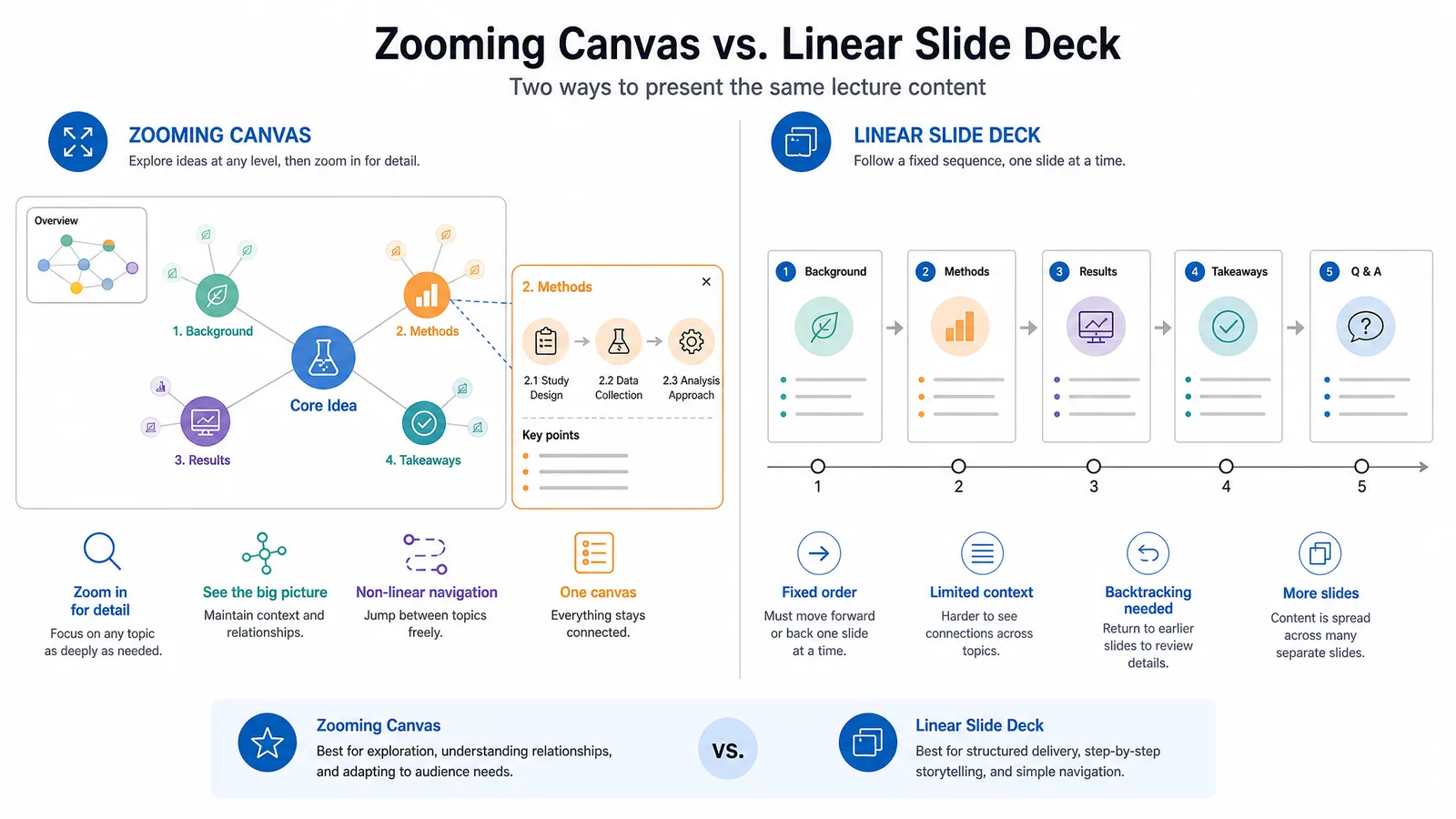
A comparison of a zooming canvas layout against a linear slide deck for the same lecture content (Figure generated with SciFig)
What Actually Matters for Academic Presenting
Before comparing tools, be clear about the constraints that break presentations in practice:
Cost. Students and lecturers often need a free option, or one that is already included in software they have.
Export format. Conference AV desks overwhelmingly accept PDF and PowerPoint. Anything else means presenting from your own laptop, which is not always allowed.
Figure fidelity. Scientific figures must stay sharp when projected. Tools that rasterize on export degrade axis labels and thin lines.
Motion discipline. Zooming transitions that delight for three minutes fatigue an audience over forty.
The Alternatives Compared
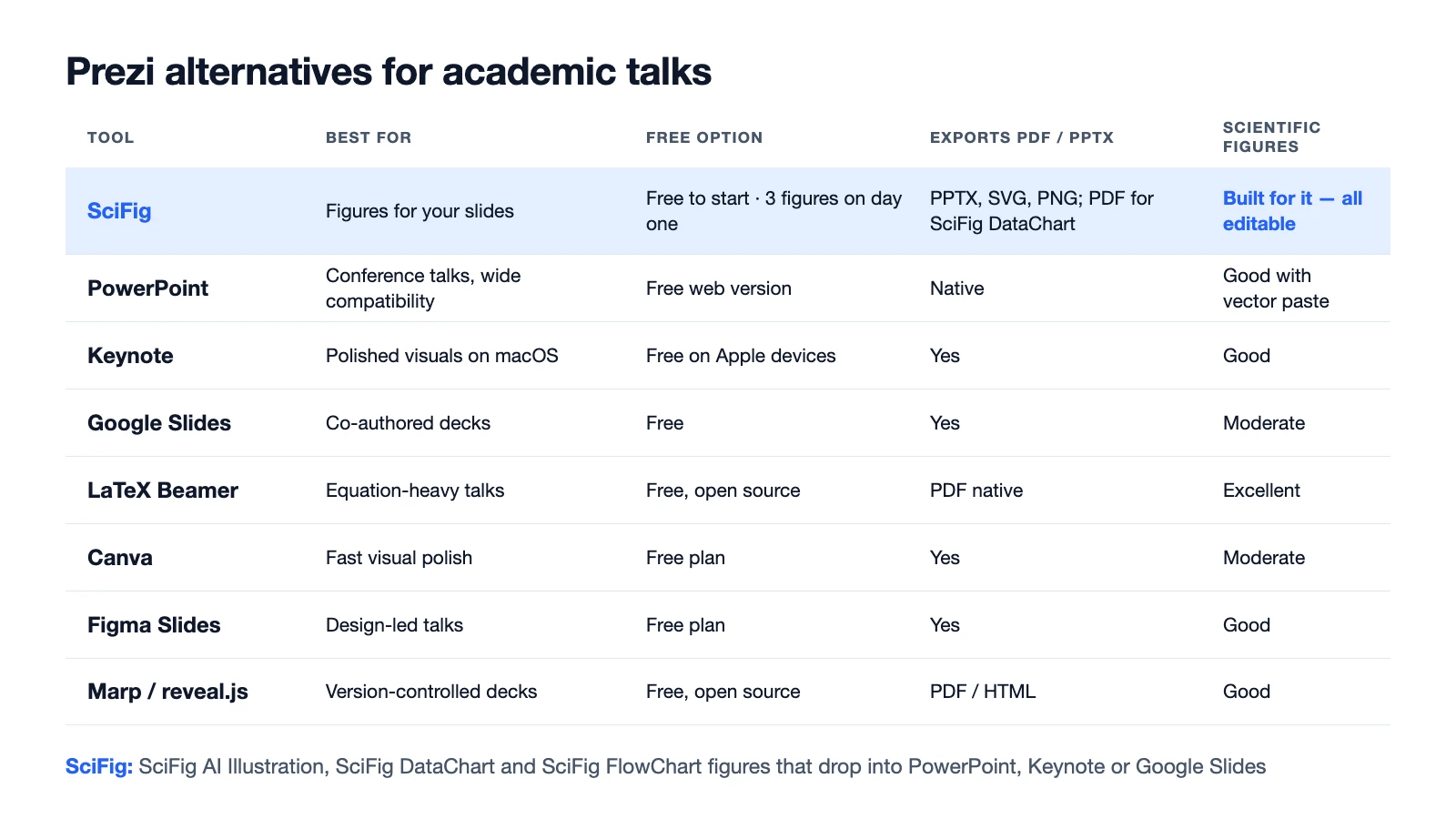
Tool
Best for
Free option
Exports PDF / PPTX
Fit for scientific figures
PowerPoint
Conference talks, wide compatibility
Free web version
Native
Good with vector paste
SciFig
Figures for your slides
Free to start · 3 figures on day one · up to ~44 in your first month
PPTX, SVG, PDF, EPS, TIFF, PNG
Built for it — SciFig AI Illustration, SciFig DataChart and SciFig FlowChart, all editable
Keynote
Polished visuals on macOS
Free on Apple devices; AI features need an Apple Creator Studio subscription
Yes
Good
Google Slides
Co-authored decks
Free
Yes
Moderate
LaTeX Beamer
Equation-heavy talks
Free, open source
PDF native
Excellent
Canva
Fast visual polish
Free plan
Yes
Moderate
Figma Slides
Design-led talks
Free plan
Yes
Good
Marp / reveal.js
Version-controlled decks
Free, open source
PDF / HTML
Good
See AI Scientific Figure Generation in Action
Watch how researchers create publication-ready scientific figures from text descriptions.
Still the default for a reason: every AV desk accepts it, it works offline, and it handles vector paste from most figure tools without rasterizing. Its animation tools are enough for progressive disclosure, which is the only motion most talks need. If you present at conferences, this is the safe answer.
SciFig
SciFig (scifig.ai) is not a slide app; it is an AI scientific figure platform for the part of a talk that slide software cannot make for you — the figures. A deck lives or dies on whether the mechanism, the data and the methods are readable from the back row. SciFig AI Illustration (AI scientific illustration) generates mechanism, apparatus and concept figures from a description, such as the setup for a physics lecture or a signalling pathway for a biology seminar, and converts them into editable SVG. SciFig DataChart (data-driven charts) plots your results precisely from CSV or Excel data. SciFig FlowChart (flowcharts and diagrams) turns a methods description into a native editable SVG diagram with the text to diagram generator.
Illustrations and flowcharts export as PPTX, SVG, PNG or JPG, so they drop into PowerPoint, Keynote or Google Slides with labels you can still edit for the room; data charts export as PNG, PDF, EPS or TIFF. Exports carry no watermark, and a free publication license PDF covers publication and commercial use.
Start free, no card required: 150 credits on day one (3 figures), daily check-in credits that grow with your streak (up to 150 a day) — up to about 44 figures in your first month. Invite a friend and you both get 100 more credits. SciFig also offers paid plans for higher output and more advanced editing and AI capabilities, with paid credits that never expire and annual Starter at $100/year (about $8.33/month); see the pricing page.
Keynote
Better typography and smoother built-in transitions than PowerPoint, and Magic Move gets you Prezi-like continuity between slides without the disorientation of a zooming canvas. Restricted to Apple hardware, and exports to PowerPoint occasionally shift layouts, so check before you travel.
LaTeX Beamer
If your talk is equation-heavy, Beamer removes an entire class of problems: equations render identically to your paper, the output is PDF, and the deck is plain text under version control. The cost is that visual layout is laborious, so it suits mathematical and theoretical talks better than image-led ones.
Google Slides
The strongest option when several co-authors edit the same deck simultaneously. Offline support exists but is fragile enough that you should export a PDF backup before travelling.
Marp and reveal.js
Markdown or HTML decks that live in your repository alongside the analysis code. Excellent for reproducibility and diffing, and both export to PDF. Worth the setup only if you already work in that ecosystem.
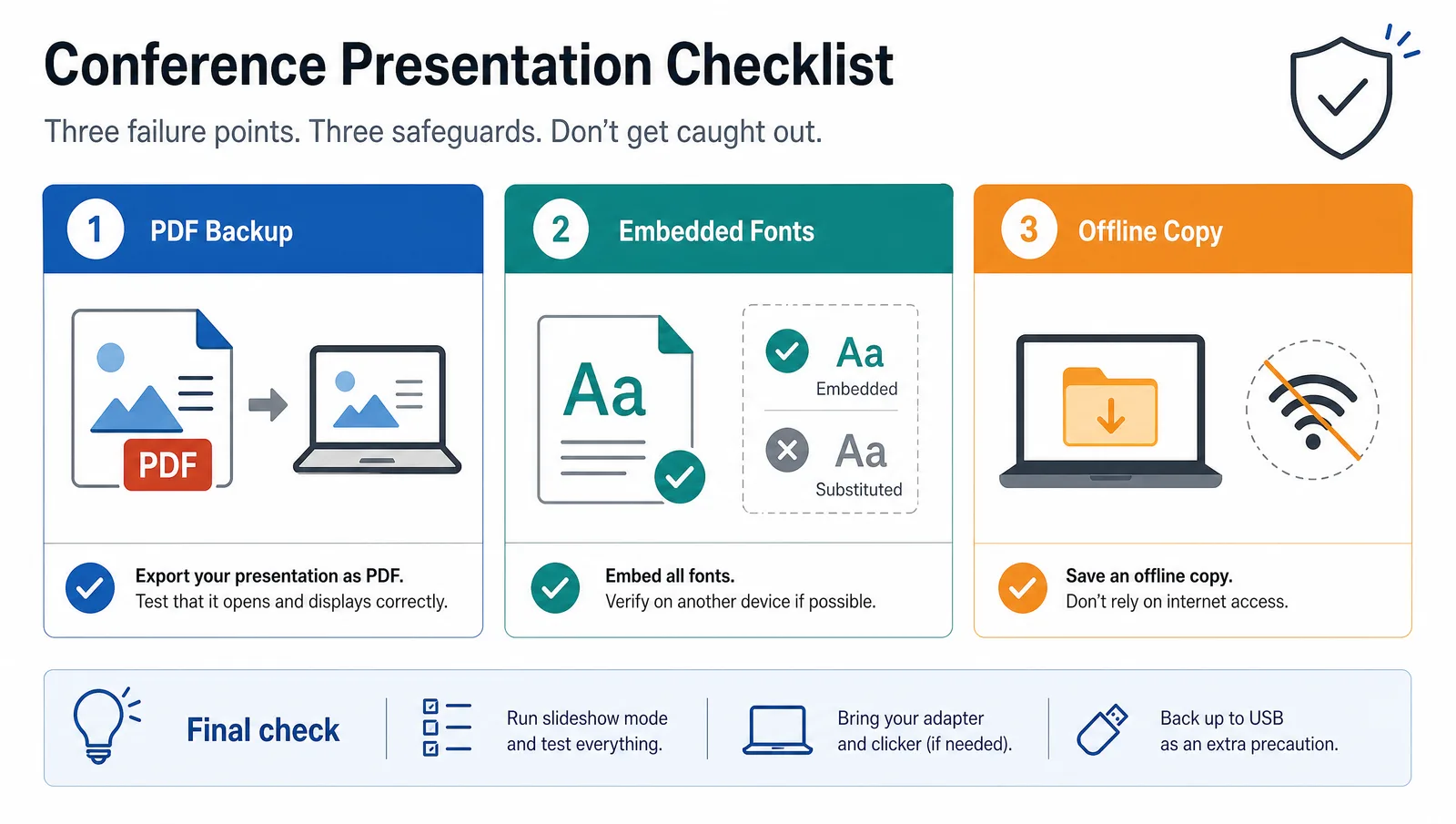
A conference presentation checklist showing PDF backup, embedded fonts, and offline copy as the three failure points (Figure generated with SciFig)
A table of eight Prezi alternatives by best use, free option, PDF or PPTX export, and fit for scientific figures (Figure generated with SciFig)
Where the Figures Come From
Presentation software is a layout tool, not a figure tool. The quality of a scientific talk is set by the figures you place into it, and pasting a low-resolution screenshot into an otherwise polished deck is the most common way a good talk looks amateur.
Two practical rules. Paste vector where possible, so labels stay sharp when projected at scale. And rebuild figures for the room rather than reusing paper figures directly — a figure designed for a printed column is usually too dense to read from the back of a lecture hall.
Tip
Always carry a PDF export on a USB stick, with fonts embedded. It costs two minutes and it is the single most effective insurance against AV problems, whichever tool you choose.
Create Scientific Figures Now
Describe your scientific figure in natural language — get publication-ready illustrations in minutes.
For the figures themselves, the SciFig PPT text-to-visual converter turns dense bullet slides into diagrams, SciFig DataChart builds charts precisely from your data, and SciFig AI Illustration (text to figure) produces presentation-scale figures you can export as PPTX or editable SVG. If you are also weighing figure-creation tools more broadly, our BioRender alternatives comparison covers that side.
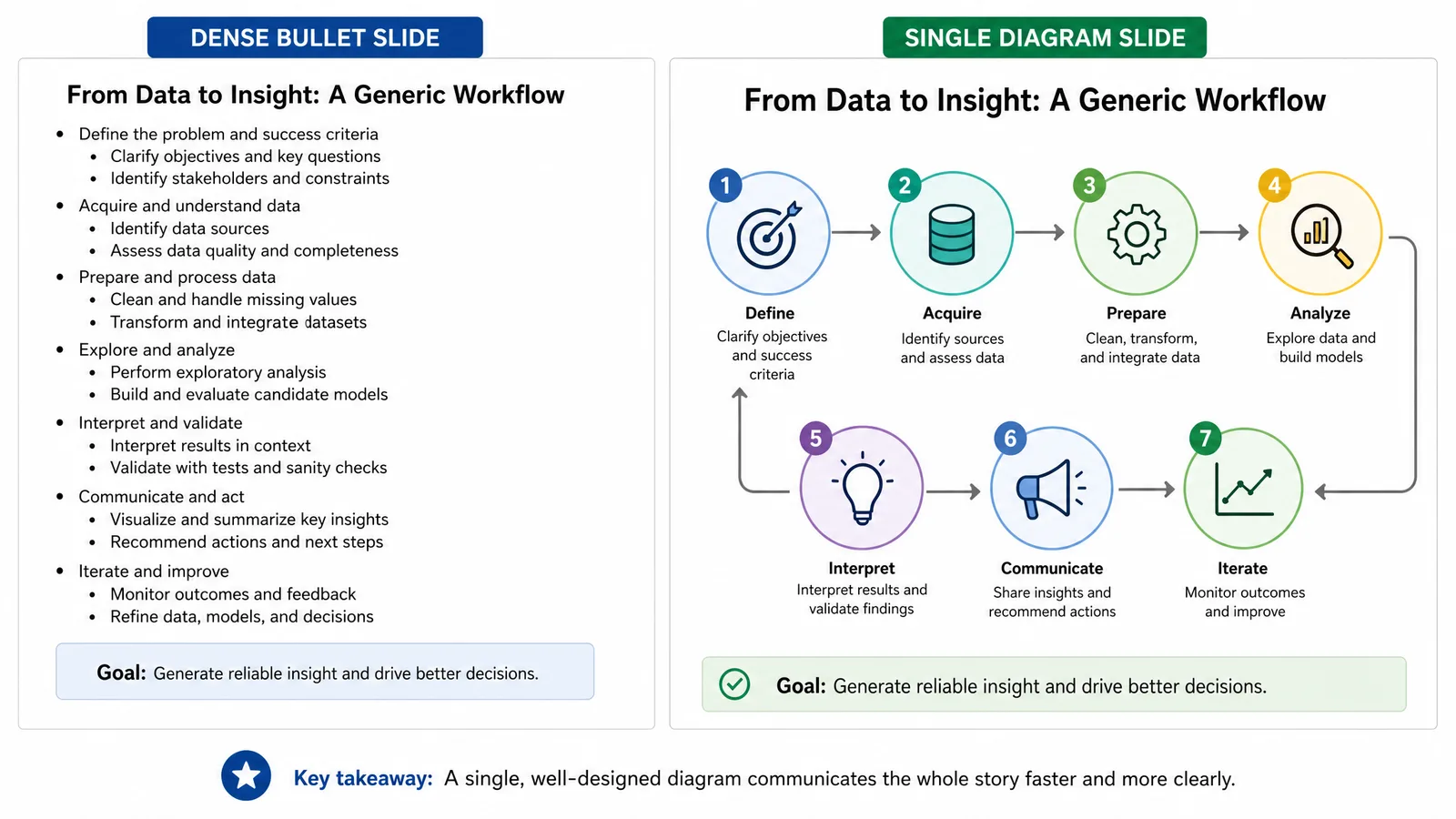
The same talk content shown as a dense bullet slide and as a single diagram, illustrating readable slide density (Figure generated with SciFig)
PowerPoint remains the safest choice for conference talks because it works offline and every AV desk accepts it. Keynote is a better option for visual polish on Apple hardware, and LaTeX Beamer suits equation-heavy talks. For the figures inside the deck, SciFig generates editable scientific illustrations, data charts and flowcharts, with illustrations and flowcharts exported as PPTX or SVG.
Prezi has a free plan alongside its paid tiers; plan contents change, so check Prezi's own plan page for what the free tier currently includes. Free Prezi alternatives include PowerPoint for the web, Google Slides, Keynote on Apple devices, LaTeX Beamer and Marp, and SciFig is free to start for the figures that go into any of them.
SciFig is built for scientific presentation figures: SciFig AI Illustration generates mechanism and concept figures from a description, SciFig DataChart plots your data precisely, and SciFig FlowChart produces methods diagrams as native editable SVG. Illustrations and flowcharts export as PPTX or SVG and data charts as PNG, PDF, EPS or TIFF, all without a watermark.
Not inherently, but its zooming transitions tire audiences over long sessions and its browser-first design is a risk in rooms with unreliable wifi. For short, structured talks it can work well.
Only with a tool that has genuine offline support such as PowerPoint, Keynote, or a PDF export from Beamer. Browser-based tools with offline modes are unreliable enough that a PDF backup is essential.
PDF and PowerPoint are accepted almost universally. Bring both, with fonts embedded, since some venues require you to load your talk onto a shared machine rather than presenting from your own laptop.
Usually not directly. Figures designed for a printed column are too dense to read from the back of a room. Simplify them, enlarge the labels, and remove panels the talk does not discuss.
Paste vector formats such as PDF, SVG, or EMF rather than screenshots. Vector artwork scales without degrading, so axis labels and thin lines stay legible at projection size.
Keep going
Recommended resources
Templates, tools, and further reading for your research