Free ChemDraw Alternatives: 7 Tools Compared for 2026
Free ChemDraw alternatives compared on SMILES and MOL support, stereochemistry, reaction schemes, and publication vector export — and which to pick.
SciFig Team
SciFig editorial team
A free ChemDraw alternative has to handle chemical semantics, not just draw lines.
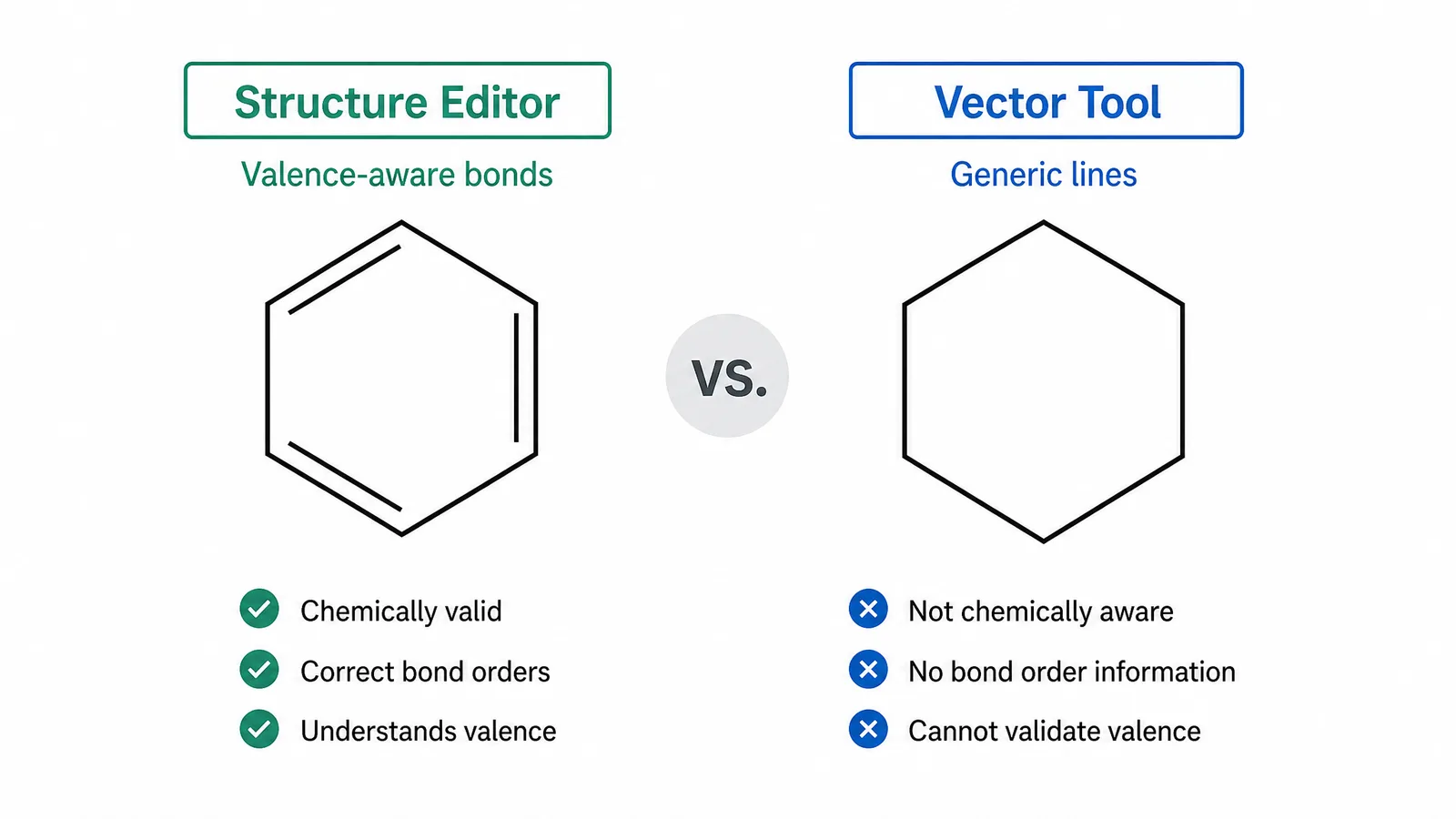
That is what separates a real ChemDraw alternative from a general vector tool. A structure editor knows a carbon has four bonds, understands stereochemistry, and can round-trip through SMILES, InChI, and MOL. A general drawing tool produces something that merely looks like a molecule — and reviewers and cheminformatics pipelines can tell the difference.
A benzene ring drawn in a structure editor with valence-aware bonds beside a visually similar shape drawn in a generic vector tool (Figure generated with SciFig)
Round-trip standard formats. SMILES, InChI, MOL, and SDF import and export.
Represent stereochemistry with wedge and hash bonds that survive export.
Draw reaction schemes with arrows, conditions, and multi-step layouts.
Export publication vector at journal specification.
Any tool missing the first two is a drawing program, not a chemistry tool. Use that as your filter before comparing anything else — interface polish and price are secondary to whether the output is chemically valid.
But that filter only covers half the job. Drawing the molecule is not the same as producing the figure it sits in, and most people need both. So the ChemDraw alternatives below are organised by which job you are doing, not by feature count.
The Alternatives Compared
Two jobs, two kinds of tool. Read the Job column first: it tells you whether an entry is competing for your structure or for your figure. Most of the list is free chemical drawing software that does the first; one entry does the second.
Tool
Job
Licence
SMILES / MOL
Reaction schemes
Vector export
Best for
MarvinSketch
Draw the structure
Academic discount; 14-day trial (Marvin Cloud)
Yes
Yes
Yes
Hand-drawing structures, heavy use, institutional licence
SciFig
Produce the figure
Free to start, no install
No
Generated, not drawn
Layered SVG / PPTX / 8K PNG
Getting a publication-ready figure out fast, with element-level editing available when you need it
ChemDoodle
Draw the structure
Paid, perpetual option
Yes
Yes
Yes
Institutional purchase where ChemDraw lost on price
KingDraw
Draw the structure
Free
Yes
Yes
Yes
Occasional structures, no affiliation to claim
RDKit
Generate structures
Open source, library
Yes
Limited
SVG
Rendering dozens of compounds from a data table
Open Babel
Convert formats
Open source, converter
Yes
No
Via toolkit
Format conversion at the edges of a pipeline
Inkscape + templates
Draw anything
Open source
No
Manual
Yes
Annotating an already-exported structure
🔬 On the SMILES column: round-tripping machine-readable formats is a structure-editor capability. SciFig handles figure creation, and the Best for column is where it earns its row.
See AI Scientific Figure Generation in Action
Watch how researchers create publication-ready scientific figures from text descriptions.
Long the most common recommendation for chemists leaving ChemDraw. Academic pricing is now discounted rather than free (free individual academic licences ended July 2026), so it fits best where your institution already holds a licence. Full format support including InChI, good stereochemistry handling, and competent reaction schemes. Java-based, which shows in the interface, but capability is close to ChemDraw for typical publication work. It runs on Windows, macOS and Linux, which also makes it a common ChemDraw alternative on a Mac.
SciFig
The other job. Where a structure editor asks you to place every bond yourself, chemistry structure generator takes a written description and returns a skeletal formula, an organic compound structure, or a line-bond figure in seconds — no stroke-by-stroke drawing.
What matters scientifically is the next step: the output opens in a browser vector canvas where every element is editable — bonds, labels, arrows, panel letters — with scientific typography built in. Adjust any bond, label or arrow in place and export layered SVG or editable PPTX. A fast first result, with full element-level control whenever a reviewer asks for a change. It is a combination that neither a blank canvas nor a fixed template gives you.
🔴 The figure workflow: SciFig is the ChemDraw alternative for the figure. If the structure itself is your result, draw it in MarvinSketch or KingDraw and keep the machine-readable string. Use SciFig for the figure that structure lives in: SciFig AI Illustration (AI scientific illustration) for mechanism and pathway panels, SciFig DataChart (data-driven charts) for charts generated accurately from your assay data, and SciFig FlowChart (flowcharts and diagrams) for synthesis routes and workflows as native SVG.
ChemDoodle
The closest commercial equivalent to ChemDraw in feel and output quality. Available as a perpetual licence rather than subscription only, which suits groups that dislike recurring ChemDraw subscription costs. Its web component is also useful for embedding structures in teaching material.
KingDraw
Free with no academic affiliation check, notably fast, and available on desktop and mobile. Format support is solid. Worth trying first if cost is the binding constraint — it is the ChemDraw alternative with the lowest barrier to starting — with the caveat that you should verify export quality against your journal's requirements before committing a whole manuscript to it.
RDKit
Not an interactive editor but a cheminformatics library, and the right ChemDraw alternative when structures are generated rather than drawn. If you are producing figures for a hundred compounds from a data table, scripting with RDKit is both faster and less error-prone than drawing each one, and it renders SVG directly.
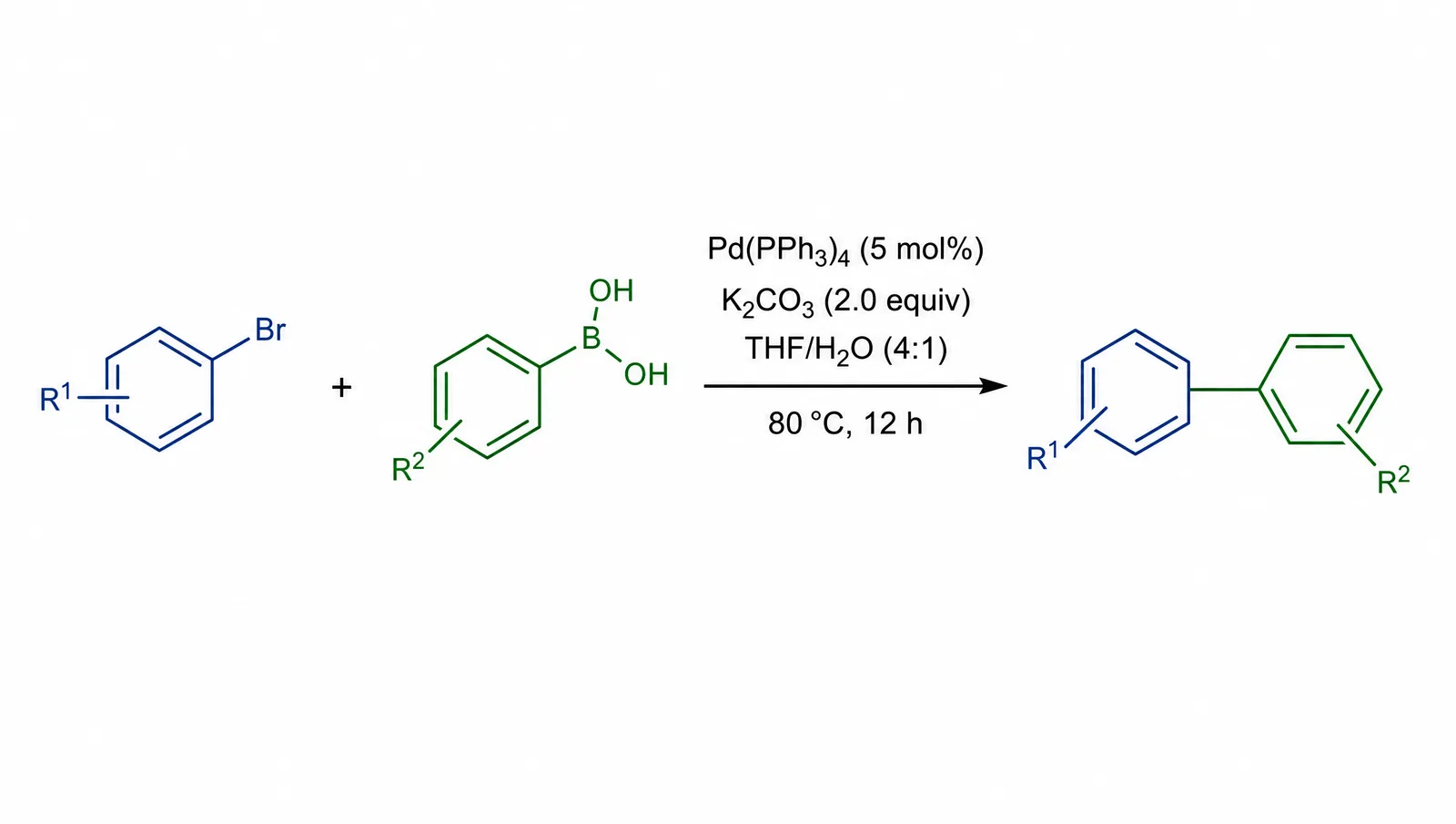
A reaction scheme with conditions above the arrow, drawn to publication conventions with consistent bond lengths and angles (Figure generated with SciFig)
Which Free ChemDraw Alternative Should You Pick?
The honest answer depends on one question: are you drawing structures by hand, or generating them from data?
Drawing by hand, occasional use. KingDraw is the free ChemDraw alternative to try first. It is free without an academic affiliation check, it starts fast, and for a handful of structures in a manuscript it does everything ChemDraw does that you will actually notice.
Drawing by hand, heavy use, institutional licence. MarvinSketch, if your institution has a licence or an academic discount. The reaction scheme editor and the format coverage are close to ChemDraw. Without a licence, stay with KingDraw for desktop drawing or Ketcher in the browser.
Generating from data. RDKit, with Open Babel for format conversion at the edges. Once you are past roughly twenty compounds, scripting wins on both speed and consistency.
You need the figure, not just the molecule. SciFig — describe the mechanism panel or pathway instead of drawing it bond by bond, then edit any element on the vector canvas.
Institutional purchase, ChemDraw ruled out on price. ChemDoodle is the alternative that survives procurement. The perpetual licence changes the budgeting conversation, and output quality is not a compromise.
No ChemDraw alternative here is a strict superset of ChemDraw — each is sufficient for the overwhelming majority of published chemistry figures, which is a more useful claim than feature parity.
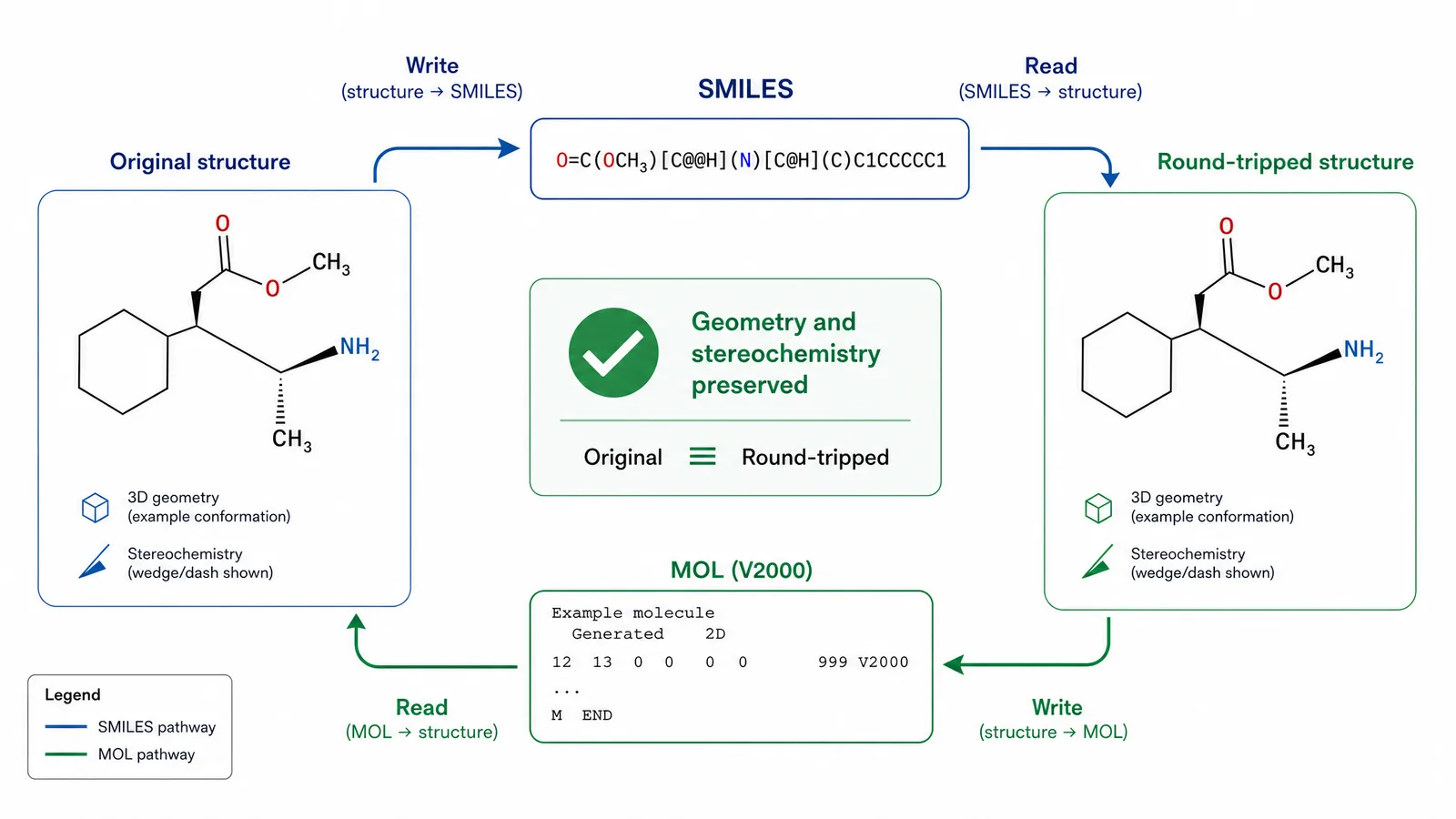
A structure round-tripping through SMILES and MOL formats, showing that geometry and stereochemistry survive (Figure generated with SciFig)
Browser-Based Options: ChemDraw Online and Ketcher
Two names come up constantly and deserve separating.
ChemDraw online is not a free tier. It is the browser delivery of the licensed product through a subscription, so it solves an installation problem rather than a cost problem. If your institution already has a site licence, it is convenient; if you are looking for a ChemDraw alternative because of price, it is not one.
Ketcher is a genuinely free and open-source ChemDraw alternative, developed by EPAM, that runs entirely in the browser. It handles SMILES and MOL, draws reaction schemes, and embeds cleanly into web applications — which is where most people meet it, as the editor inside some other chemistry platform. As a standalone daily editor it is thinner than MarvinSketch or KingDraw, with less polish around templates and publication export. Treat it as the best embeddable structure editor rather than the best desktop ChemDraw alternative.
ChemSketch is often named alongside these, but it is a desktop program rather than a ChemSketch online editor, and ACD/Labs has stopped distributing its free Freeware edition; existing Freeware installs stay under their original licence. If what you actually need is to rotate and inspect a molecule in 3D, that is a job for a molecular viewer rather than a 2D structure editor.
Same check for any other browser-based ChemDraw alternative: confirm the export is real vector at journal specification before committing a figure to it.
Do Not Draw Structures in a Vector Editor
Reaching for Illustrator instead of a ChemDraw alternative is tempting when you only need one molecule, and it causes three problems.
First, correctness: hand-drawn structures accumulate wrong bond angles, missing hydrogens, and inconsistent bond lengths that a chemist reviewer will notice. Second, machine readability: a drawn structure carries no SMILES, so it cannot be verified, indexed, or reused. Third, consistency: structures drawn across several scientific figures drift in style, and the drift is visible when panels sit side by side.
To annotate a structure, export it from a structure editor as SVG first and annotate on top, leaving the geometry untouched.
Tip
Record the SMILES string for every structure in your figures, in the caption or supplementary information. It makes the figure verifiable, lets readers reuse the compound without drawing it again, and takes seconds if you are already using a proper structure editor.
Create Scientific Figures Now
Describe your scientific figure in natural language — get publication-ready illustrations in minutes.
A structure editor gets you the molecule. It does not get you the figure — the mechanism panel, the pathway context, the assay schematic that the structure sits inside. That second half is where most of the time goes, and it is not what any of the tools above are built for.
This is where text to figure picks up. Describe the panel you need, get an editable figure, and compose it with what your structure editor exported: keep the valence-checked structure as SVG, place it into the wider layout, and keep both layers editable so a reviewer comment costs you minutes rather than a redraw.
Each half stays in its lane: the structure editor guarantees the chemistry, the figure tool gets you from a correct molecule to a finished panel.
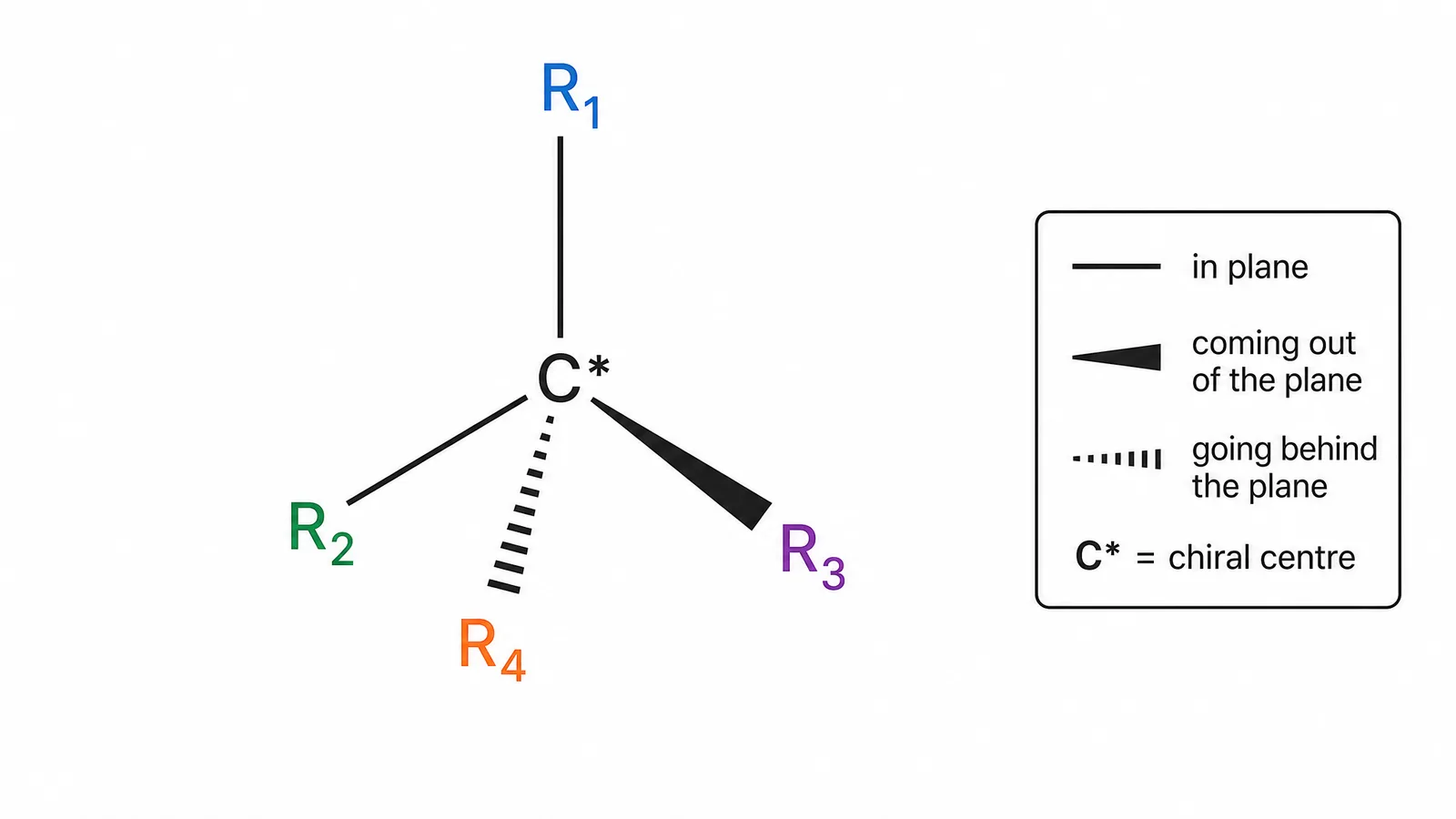
Wedge and hash bond notation on a chiral centre, drawn to publication convention (Figure generated with SciFig)
KingDraw and Ketcher are the strongest free ChemDraw alternatives: KingDraw is free without an academic affiliation check and covers desktop and mobile drawing, and Ketcher is free, open source and runs in the browser. MarvinSketch covers SMILES, InChI, MOL, stereochemistry, and reaction schemes, and is the stronger pick when your institution has a licence or an academic discount. If what you need is the finished figure around the structure, SciFig is free to start and generates editable mechanism and pathway panels you export as layered SVG or PPTX.
No. ChemDraw online is the browser version of the licensed product and requires a subscription or an institutional site licence. If cost is your reason for looking, it is not a free ChemDraw alternative — Ketcher and KingDraw are.
You can, but you should not. Vector editors do not enforce valence, produce no SMILES, and encourage inconsistent geometry. Draw in a structure editor and annotate the exported SVG if you need extra labels.
RDKit, because it is a library rather than an editor — the one ChemDraw alternative on this list that scales past manual drawing. Scripting structure rendering from a data table is faster and less error-prone than drawing each compound, and it outputs SVG directly.
Most require vector figures and many request machine-readable structures such as SMILES or MOL in the supplementary information. Your target journal's author guidelines list the exact requirements, and chemistry journals tend to be stricter about this than most fields.
Not any more for individuals: Chemaxon/Certara ended free individual academic licences on July 31, 2026. Institutions can get academic discounts, and Marvin Cloud has a 14-day trial. For a free route, use KingDraw or Ketcher.
Yes. Recording SMILES in the caption or supplementary information makes structures verifiable and reusable, and it costs almost nothing if you drew them in a proper structure editor.
Keep going
Recommended resources
Templates, tools, and further reading for your research