SciFigSciFig
  • Tools

    Tools

    All SciFig figure generators and the vector editor in one place.

    Figure Tools

    Text-to-Figure

    Generate a figure from a plain-language description

    Figure Enhancer

    Upscale, recolor, inpaint, or relabel an existing figure

    Sketch-to-Figure

    Turn a hand-drawn sketch into a clean vector figure

    Reference-to-Figure

    Redraw a reference image in SciFig’s publication style

    PDF-to-Figure

    Extract and regenerate any figure inside a PDF

    Photo-to-Figure

    Convert a lab photo into a labeled schematic

    Vector Canvas

    Edit AI figures as layered, fully editable SVG

    By figure type

    Conceptual Framework Generator

    Map variables and their relationships

    PRISMA Flow Diagram Generator

    Chart your systematic review screening

    Bell Curve Generator

    Plot a normal distribution curve

    Free Body Diagram Generator

    Show forces acting on an object

    Graphical Abstract Maker

    Summarize your study in one panel

    Syntactic Tree Generator

    Build phrase-structure parse trees

    View all tools

    Browse every SciFig figure generator and maker

  • Models

    Models

    Default to GPT Image 2 for journal papers, Nano Banana Pro for slides and posters, Nano Banana 2 for routine figure work.

    Start here

    Models Overview

    Default to GPT Image 2 for journal papers; switch to Nano Banana Pro for slides and posters; pick Nano Banana 2 for routine figure work

    Model pages

    GPT Image 2

    Recommended default — best for journal submission: chemistry, math, dense labels

    Nano Banana Pro

    Editorial-style specialist — best for slides, posters, and BioRender-style figures

    Nano Banana 2

    Balanced everyday model — practical speed-quality balance for routine figure work

  • Library

    Library

    Browse scientific figure templates and icons by discipline.

    Browse by type

    Templates

    Complete figures & diagrams, browse by discipline

    Icons

    Single structures & elements, browse by discipline

  • Inspiration
  • Tutorials
  • Blog
  • Pricing
Get Started Free
English
Get Started Free
  1. Home
  2. /
  3. Blog
  4. /
  5. Guides
  6. /
  7. Best Research Poster Templates & Makers (2026)
Guides·2026-07-02·11 min read

Best Research Poster Templates & Makers (2026)

Best research poster templates and scientific poster maker workflows for 2026, with PhD poster examples, format choices, and a fast publishable path.

SciFig Team

SciFig Team

Scientific Illustration Experts

On this page

  • What a Good Research Poster Template Actually Does
  • Four Poster Template Patterns That Work
  • What a Research Poster Usually Needs to Include
  • When a Scientific Poster Maker Beats a Static Template
  • Static Template vs Poster Maker vs Slide-Deck Workflow
  • A Fast Poster Workflow with SciFig
  • What PhD Poster Examples Really Teach
  • A Checklist Before You Commit to a Template
  • Common Mistakes When Choosing a Poster Template
  • How to Build the Poster Around One Figure
  • Frequently Asked Questions
Walk through enough conference halls and the pattern becomes obvious: the posters that attract a crowd are rarely the ones with the most data. They are the ones built on the right structure. A strong research poster template does not just give you boxes to fill; it gives your claim, figure hierarchy, and reading order a shape that survives distance, fatigue, and time pressure.
This guide is for researchers who do not just want pretty layouts. It is for people choosing between a static template, a scientific poster maker, and a workflow that gets from draft data to a publishable poster faster. The goal is simple: learn what poster templates actually help, what PhD poster examples teach, and when a guided poster maker is the better choice.
If your poster also needs to carry a clean scientific figure rather than just text blocks, that decision matters even more. The right template does not compete with the figure. It gives the figure enough authority to become the thing the audience remembers.
A conference poster hall with rows of scientific research posters, attendees stopping at the ones with clear visual hierarchy (Figure generated with SciFig)

What a Good Research Poster Template Actually Does

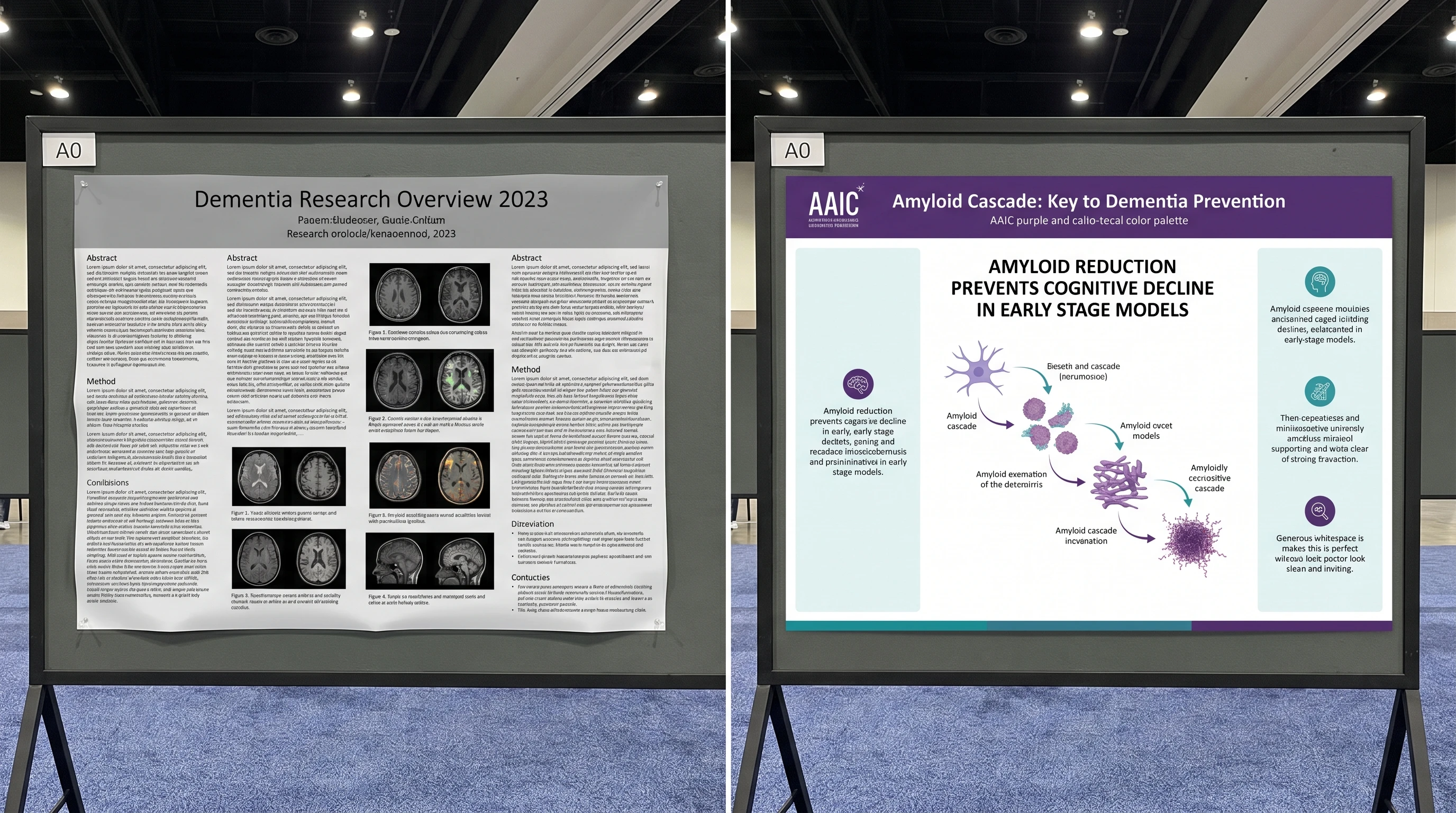
A useful research poster template does three jobs at once. First, it enforces visual hierarchy so the key result dominates instead of dissolving into an equal-weight wall of panels. Second, it reserves enough whitespace that the poster can be scanned from one to three meters away. Third, it gives you a story arc — question, method, result, conclusion — instead of a pile of sections competing for attention.

Bad templates fail on exactly those three points. They give you too many boxes, too much text area, and no opinion about what the reader should see first. That is why the best templates are usually simpler than researchers expect: fewer regions, one hero figure, one headline result, and just enough support material to make the claim credible.

Four Poster Template Patterns That Work

The most reusable poster structures fall into four patterns.

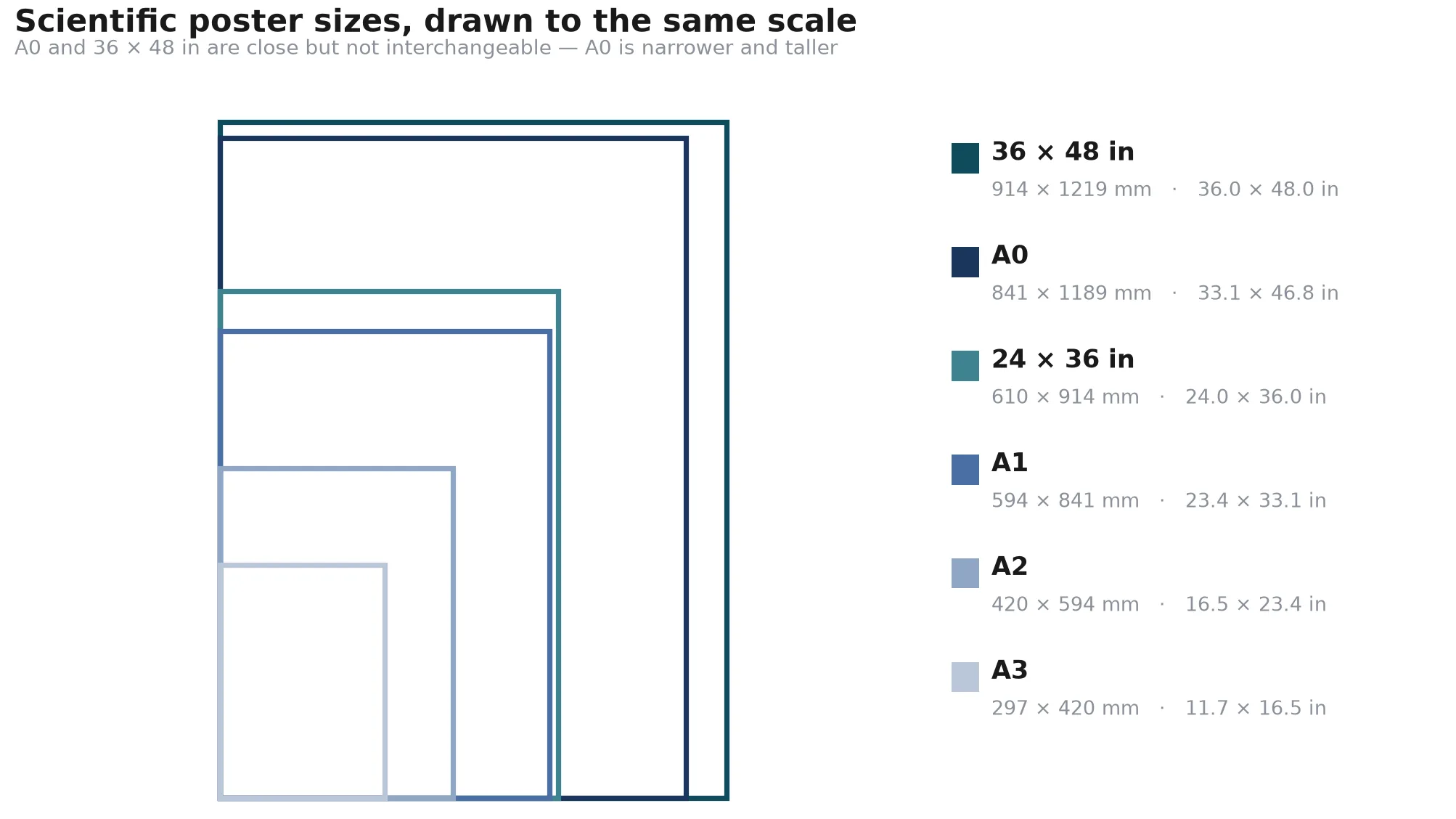
  • Portrait academic poster: the classic conference format, useful when the venue still expects an A0 or 36×48 board.
  • Landscape poster: best when your results are best explained left to right rather than top to bottom.
  • Single-screen digital ePoster: ideal for hybrid or virtual meetings, where scrolling kills comprehension.
  • Thesis or PhD poster template: best when you need a slightly denser evidence structure but still want one dominant finding.

The right choice depends on the reading environment. A print board rewards chunking and distance legibility. A digital poster rewards compression and a stronger headline-to-hero-figure ratio. A PhD poster often needs more context than a short conference abstract, but it still cannot behave like a manuscript.
Four scientific poster formats compared: portrait A0, landscape, trifold, and 16:9 digital ePoster, each with hero figure placement annotated (Figure generated with SciFig)

What a Research Poster Usually Needs to Include

A strong poster usually includes six things: a clear title, one short framing question or claim, one dominant result figure, a compact method summary, a takeaway conclusion, and enough contact or attribution information that the viewer knows what to ask next. What it usually does not need is every supplementary panel, every caveat sentence, and every reference from the manuscript.

That distinction matters because many researchers choose templates by asking, “Where can I fit all my sections?” The better question is, “What structure helps one result survive first contact?” The moment you ask that second question, you naturally start preferring templates with fewer equal-weight boxes and more support for one hero panel. In other words, the best research poster template is usually the one that forces prioritization earliest.

When a Scientific Poster Maker Beats a Static Template

A static template helps when your poster structure is already obvious and you mostly need layout discipline. A scientific poster maker is better when the hard part is not moving text boxes but producing the actual visual center of the poster: the mechanism diagram, pathway figure, trial schema, or multi-step workflow that makes the rest of the board make sense.

That is why many researchers stall after downloading a template. The template gives them columns, but it does not give them the one figure the audience will remember. A poster maker closes that gap by helping generate or refine the hero visual first, then wrapping the rest of the poster around it.

Static Template vs Poster Maker vs Slide-Deck Workflow

Researchers usually end up choosing between three real workflows:

  • Static template: best when your structure and figures are already settled
  • Poster maker: best when you still need help building the visual center
  • Slide-deck workflow: best when your lab is deeply committed to PowerPoint or Keynote

The static template route is efficient only when the scientific narrative is already compressed. If you still do not know which result should dominate, the template only gives you the illusion of progress. A poster maker is more useful in that moment because it helps decide what the audience should see first. The slide-deck workflow remains common because everyone can open it, but it often inherits the weaknesses of presentation thinking: too much text, too many equal boxes, and weak hierarchy.

That is why poster making is less about software loyalty and more about choosing the stage where you need help. If your problem is layout, use the template. If your problem is focal structure, use the maker. If your problem is lab-wide compatibility, accept the slide deck but impose stricter poster rules.

A Fast Poster Workflow with SciFig
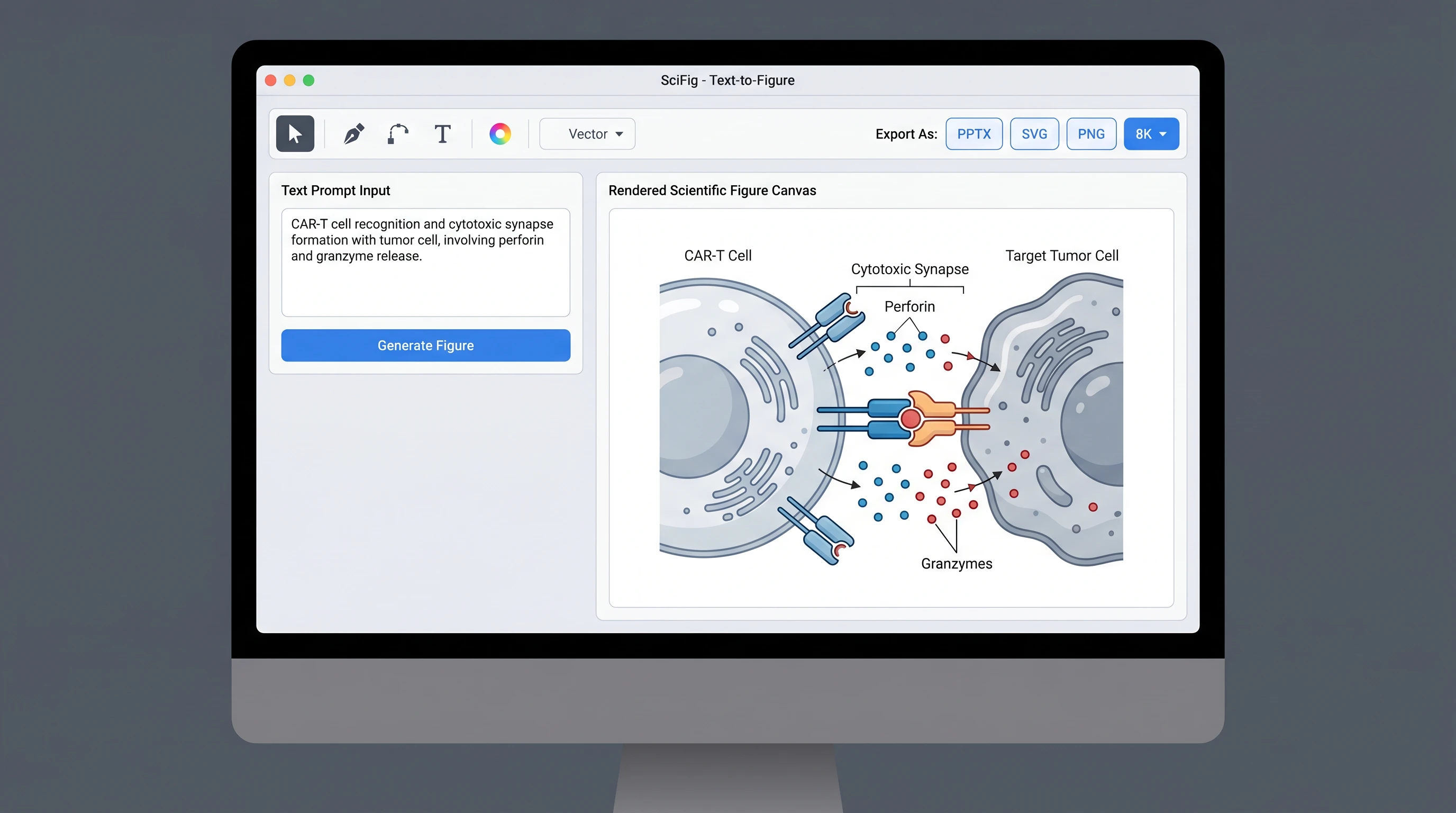
A practical workflow is: start with the claim, generate the hero figure, and only then choose the final template. With SciFig's scientific poster generator, you can set the poster format, describe the visual hierarchy you want, and build around a figure that already carries the science. If the key visual begins as a sketch or rough concept, you can also use text-to-figure or vector-canvas to get it into poster-ready shape before you finalize the board.
The reason this works is that posters fail more often from weak focal structure than from weak layout geometry. Once the central visual is strong, the template becomes a support system instead of the whole strategy.
SciFig Text-to-Figure workflow: prompt → hero figure → poster-ready layout and editing flow (Figure generated with SciFig)

See AI Scientific Figure Generation in Action

Watch how researchers create publication-ready scientific figures from text descriptions.

Explore the Tool

What PhD Poster Examples Really Teach

Good PhD poster examples teach discipline, not decoration. The strongest examples make one intellectual claim legible at a distance, use one large figure instead of many medium figures, and avoid the temptation to paste the manuscript onto the board. They also use headings as navigation rather than as miniature essay titles.

That last point matters. Researchers often copy the visible surface of a good poster — the color palette or section order — while missing the deeper lesson: the best posters have already decided what to delete. A useful poster example is therefore not one with the most information, but one with the clearest sacrifice.

A Checklist Before You Commit to a Template

Before locking a template, ask five questions:

  • Does the structure make one result more important than the rest?
  • Can the poster be understood in under 20 seconds from two meters away?
  • Is there an obvious place for one hero figure instead of four medium ones?
  • Does the format fit the actual venue: print board, screen, or hybrid session?
  • If you removed 30% of the text, would the template become stronger or collapse?

That last question is especially useful. Good templates get stronger when you simplify into them. Weak templates only function when they are overfilled. If your layout needs excess text to feel complete, it is usually compensating for a structural problem rather than solving one.

This is also why experienced presenters often sketch the poster in plain boxes before opening any software. If the information hierarchy is not convincing in grayscale, it will not be rescued by a prettier template later.

Common Mistakes When Choosing a Poster Template

The first mistake is choosing a template because it looks “full” rather than because it supports one message. The second is choosing a layout before you know what the hero figure is. The third is forcing a print-style template into a digital conference format or vice versa. The fourth is assuming a PhD poster needs more text when it usually needs better compression.

The fix is simple: start from the message, then the figure, then the format. If the template cannot support that order, it is the wrong template.

How to Build the Poster Around One Figure

The best conference posters are rarely “balanced” in the abstract sense. They are intentionally uneven. One figure carries most of the cognitive weight, and the rest of the board exists to support it. That means the main panel should usually be chosen before the surrounding text is finalized.

In practice, this changes how you build the poster. Instead of writing every section and then searching for spare space for graphics, you decide what the audience must remember, turn that into the visual center, and then write only the amount of text needed to make that center interpretable. This is also why a scientific poster maker can be valuable even if you later finish in PowerPoint: it helps establish the focal hierarchy before layout sprawl begins.
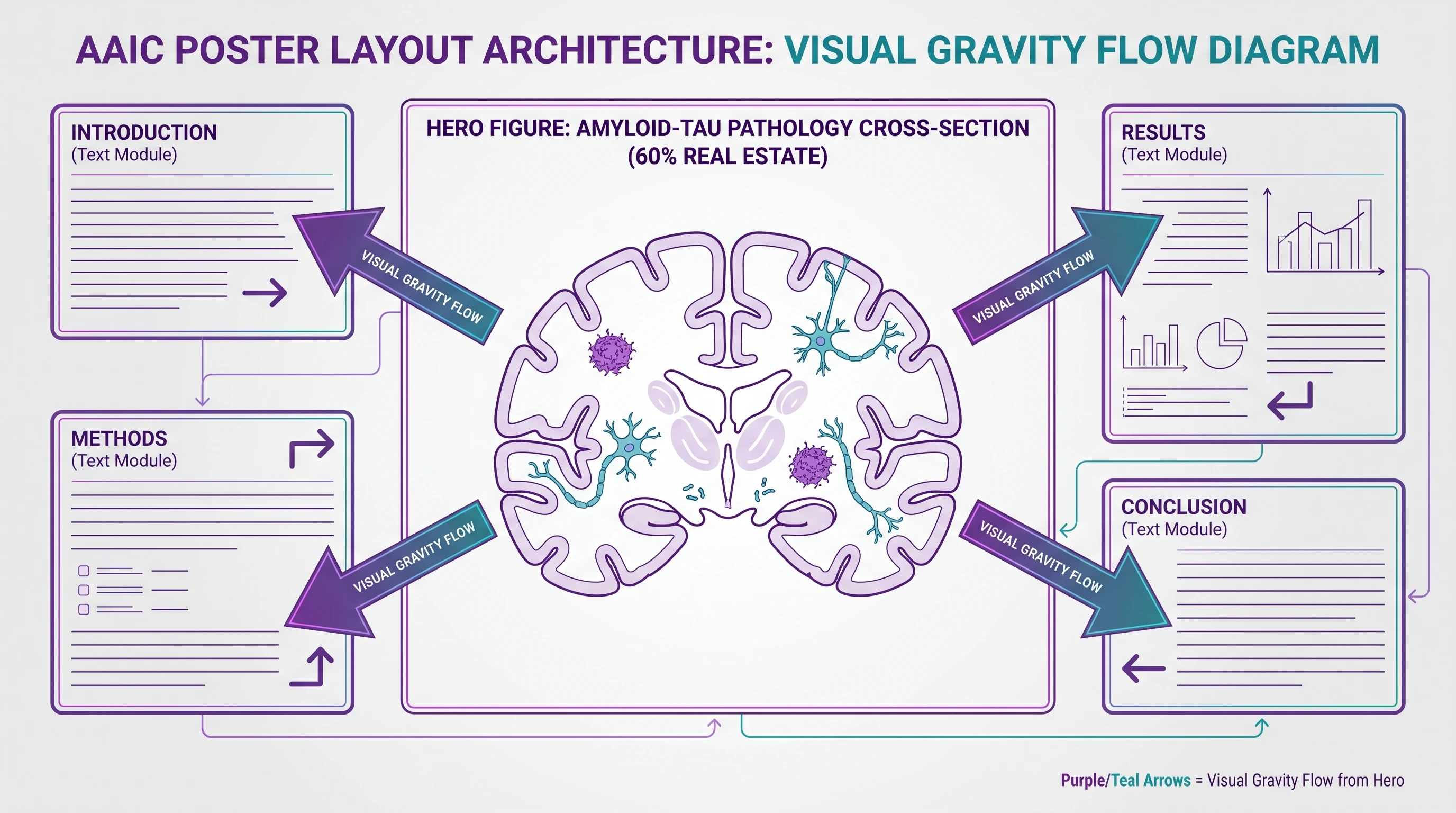
Poster hero-layout comparison showing one dominant result panel supported by smaller method and conclusion regions (Figure generated with SciFig)

Create Scientific Figures Now

Describe your scientific figure in natural language — get publication-ready illustrations in minutes.

Try Free

Frequently Asked Questions

A good research poster template creates a clear reading path, protects whitespace, and makes one figure or result visually dominant. It should help your audience understand what to look at first, not just give you more boxes to fill. The best templates reduce choices rather than multiplying them.

Useful PhD poster examples are the ones that show one clear claim, one dominant visual, and enough spacing to be readable at a distance. Study them for hierarchy and information compression rather than copying the exact design. The best examples teach what to remove as much as what to include.

A research poster usually needs a clear title, one central claim, one dominant figure, a compact method block, a concise result summary, and a short conclusion or contact cue. It does not need to reproduce the entire manuscript. The template should support focus, not completeness for its own sake.

Use a scientific poster maker when the hardest part of the job is the visual center of the poster — the mechanism, pathway, workflow, or result figure — rather than the box layout itself. Static templates are enough when your structure is already clear. A poster maker is stronger when you need help building the actual scientific focal point.

For hybrid and digital meetings, a 16:9 single-screen ePoster usually works best because it avoids scrolling and preserves hierarchy on monitors. Traditional portrait boards still work for in-person halls, but they often feel too dense on screen. The format should match the viewing environment, not conference habit alone.

Yes. Many researchers still finish the final board in PowerPoint or Keynote, but the actual poster logic can start elsewhere. With SciFig's scientific poster generator, plus text-to-figure or vector-canvas, you can define the structure and build the hero visual before you ever touch a slide deck.

Start with the tool that solves your current bottleneck. If your structure and figures already exist, PowerPoint or another template-based tool is fine. If you still need to create the core scientific visual or decide what should dominate the board, a poster maker is usually the better starting point.

SciFig Team

SciFig Team

Scientific Illustration Experts

Building AI-powered tools that help researchers create publication-quality scientific illustrations.

Try SciFig

Built for researchers

  • Text-to-Figure generation
  • Sketch-to-Figure conversion
  • Vector / SVG / PPT export
  • 200 free credits to start
Start FreeView pricing →

No credit card required

Continue Reading

18 Scientific Poster Examples to Learn From in 2026
Guides14 min read

18 Scientific Poster Examples to Learn From in 2026

18 scientific poster examples across biology, chemistry, medicine, and engineering — plus PhD examples, poster templates, and a poster-maker workflow.

SciFig TeamSciFig Team·2026-03-04
EHA 2026 Poster Guidelines and Template Guide
Guides17 min read

EHA 2026 Poster Guidelines and Template Guide

Your EHA 2026 abstract was accepted. Complete guide to EHA 2026 poster guidelines, four presentation tiers, and visuals that get you noticed in Stockholm.

SciFig TeamSciFig Team·2026-05-22
Scientific Fonts for Posters and Figures (2026)
Guides10 min read

Scientific Fonts for Posters and Figures (2026)

Scientific fonts for posters and figures in 2026 — how to choose readable typefaces, set poster font sizes, and avoid typography mistakes in research visuals.

SciFig TeamSciFig Team·2026-07-02
Call to action background

Ready to start?

Publication-ready scientific figures, in minutes

Start Creating Free

Free to start · No credit card required · Built for researchers

Text-to-FigureSketch-to-FigureReference-to-FigurePDF-to-FigurePhoto-to-Figure6 Publication StylesText-to-FigureSketch-to-FigureReference-to-FigurePDF-to-FigurePhoto-to-Figure6 Publication StylesText-to-FigureSketch-to-FigureReference-to-FigurePDF-to-FigurePhoto-to-Figure6 Publication Styles
Every Text EditablePrecision InpaintMultimodal Enhance8K UpscalingEditable PPTXLayered SVG8K PNG / JPGEvery Text EditablePrecision InpaintMultimodal Enhance8K UpscalingEditable PPTXLayered SVG8K PNG / JPGEvery Text EditablePrecision InpaintMultimodal Enhance8K UpscalingEditable PPTXLayered SVG8K PNG / JPG
SciFig

SciFig helps researchers turn ideas into publication-ready scientific figures with AI — export editable PPTX, SVG, PNG, and JPG for journals and presentations.

0.5% of purchases contributed to Stripe ClimateStripe Climate leaf icon

Tools

  • Text-to-Figure
  • Sketch-to-Figure
  • PDF-to-Figure
  • Reference-to-Figure
  • Photo-to-Figure
  • Figure Enhancer
  • Vector Canvas

By figure type

  • Conceptual Framework Generator
  • PRISMA Flow Diagram Generator
  • Bell Curve Generator
  • Free Body Diagram Generator
  • Graphical Abstract Maker
  • Syntactic Tree Generator
  • View all tools

Models

  • GPT Image 2
  • Nano Banana Pro
  • Nano Banana 2

Library

  • Templates
  • Icons

Resources

  • Inspiration
  • Tutorials
  • Blog

Company

  • Pricing
  • Contact

© 2026 SciFig. All rights reserved.

EN
  • Privacy Policy
  • Terms of Service
  • Cookie Policy