Explore the newer model families
For the latest model selection, explore Nano Banana 2.1 and GPT Image 2.5 alongside the new scientific task examples. The new guides connect panel layouts, labels and focused edits to the choice between model families and GPT versions.
- Nano Banana 2.1 vs GPT Image 2.5 for Scientific Figures
- GPT Image 2.5 Flare vs Sunburst for Scientific Figures
The Real Question Behind "Which Is Better"
Before the findings, the cheat sheet for what each flagship is built for:
| Aspect | GPT Image 2 | Nano Banana Pro |
|---|---|---|
| Parent | OpenAI | Google (Gemini 3) |
| Built for | Detail-heavy figures with strict specs | Editorial-style figures with composition focus |
| Wins on | Chemistry rigor, math formulas, abstract topology, long-prompt fidelity | Readability, aesthetic refinement, structural diagrams (CS / process / mechanism) |
| Loses on | Information density can clutter | Long-prompt fidelity drops 13 pt on complex specs; rare conceptual rendering errors |
| Default for | Journal submission | Slides / posters / web |
| In SciFig | /models/gpt-image-2 | /models/nano-banana-pro |
Three Decisive Findings (And Why They Probably Apply to You)
We extracted three findings from the 24-figure benchmark that should change which model you reach for by default. They are decisive in the sense that the score gap is large enough that a coin flip would be wrong.
Finding 1: Chemistry papers should use GPT Image 2 (not even close)
‡ symbol on the transition state, labeled the R and S stereochemical configurations on reactant and product, rendered the pentacoordinate carbon with three hydrogens flat in the trigonal plane, included a complete energy diagram inset with Ea activation energy labeled, and added a four-color legend identifying nucleophile / leaving group / carbon / hydrogen.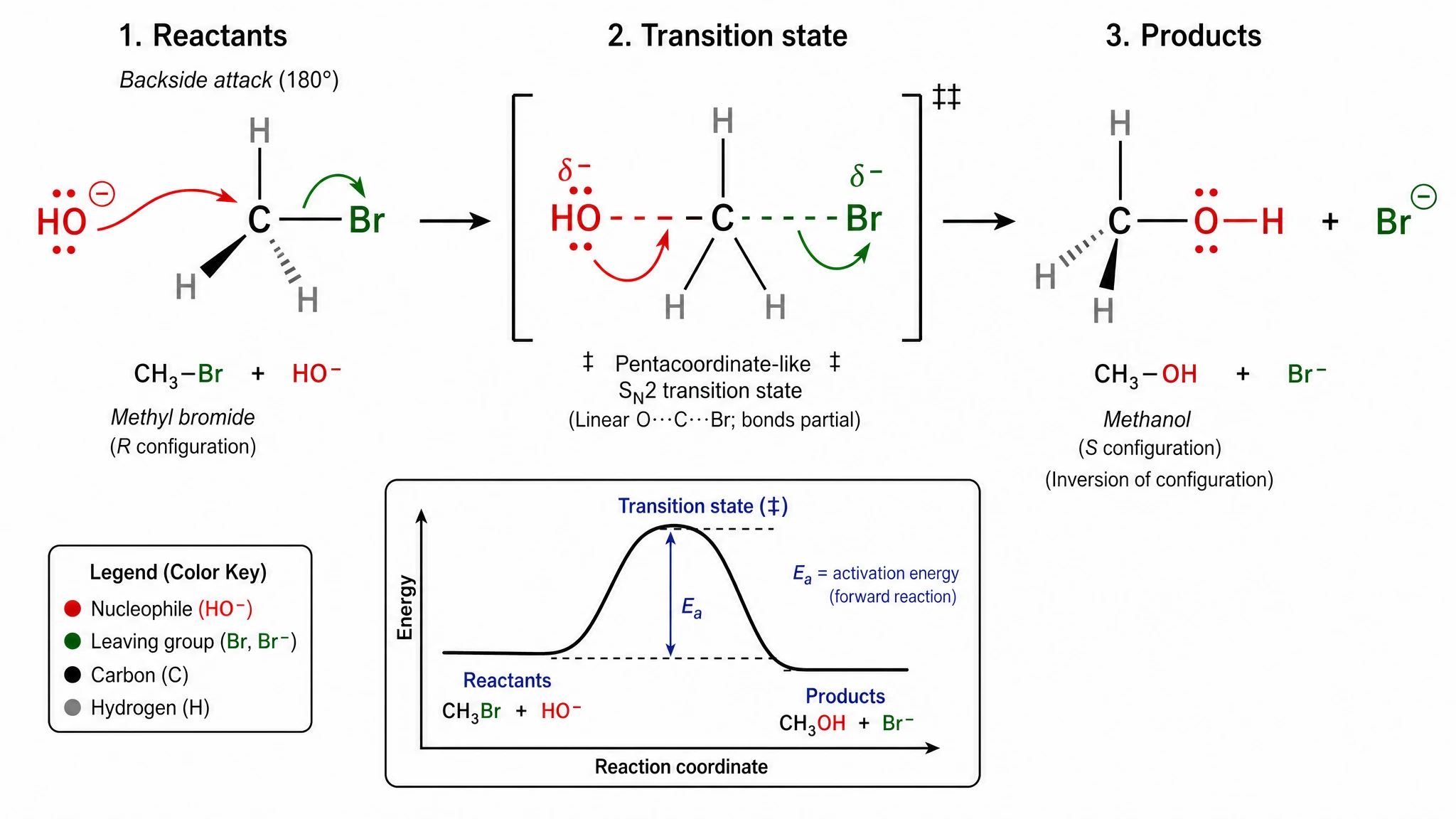
GPT Image 2 — every standard chemistry convention rendered. Score 20/20.
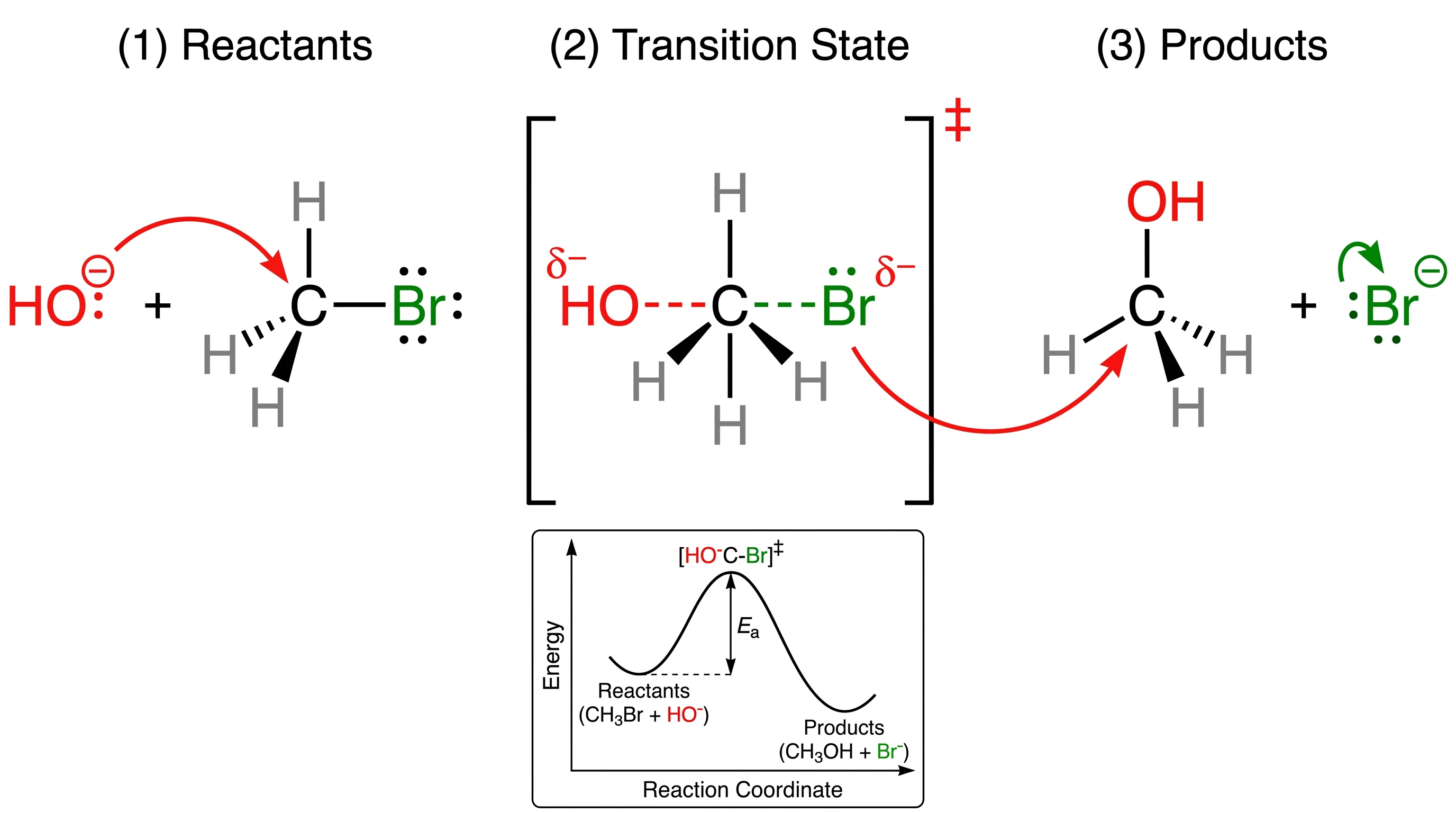
Nano Banana Pro — recognizable mechanism but the double-dagger, R/S stereochemistry, and element-color legend are all missing. Score 15/20 — our largest single-prompt gap.
Finding 2: Abstract 3D topology can break Nano Banana Pro
This was the most surprising single result of our benchmark. The prompt asked for a 3D-rendered Möbius strip with a half-twist, alongside a small inset comparing it to a regular orientable cylinder. GPT Image 2 delivered exactly that: a believable 3D Möbius strip on the main figure, a small cylinder in the corner labeled "orientable cylinder, two distinct edges, two-sided surface," plus the full parametric equation rendered as a math block.
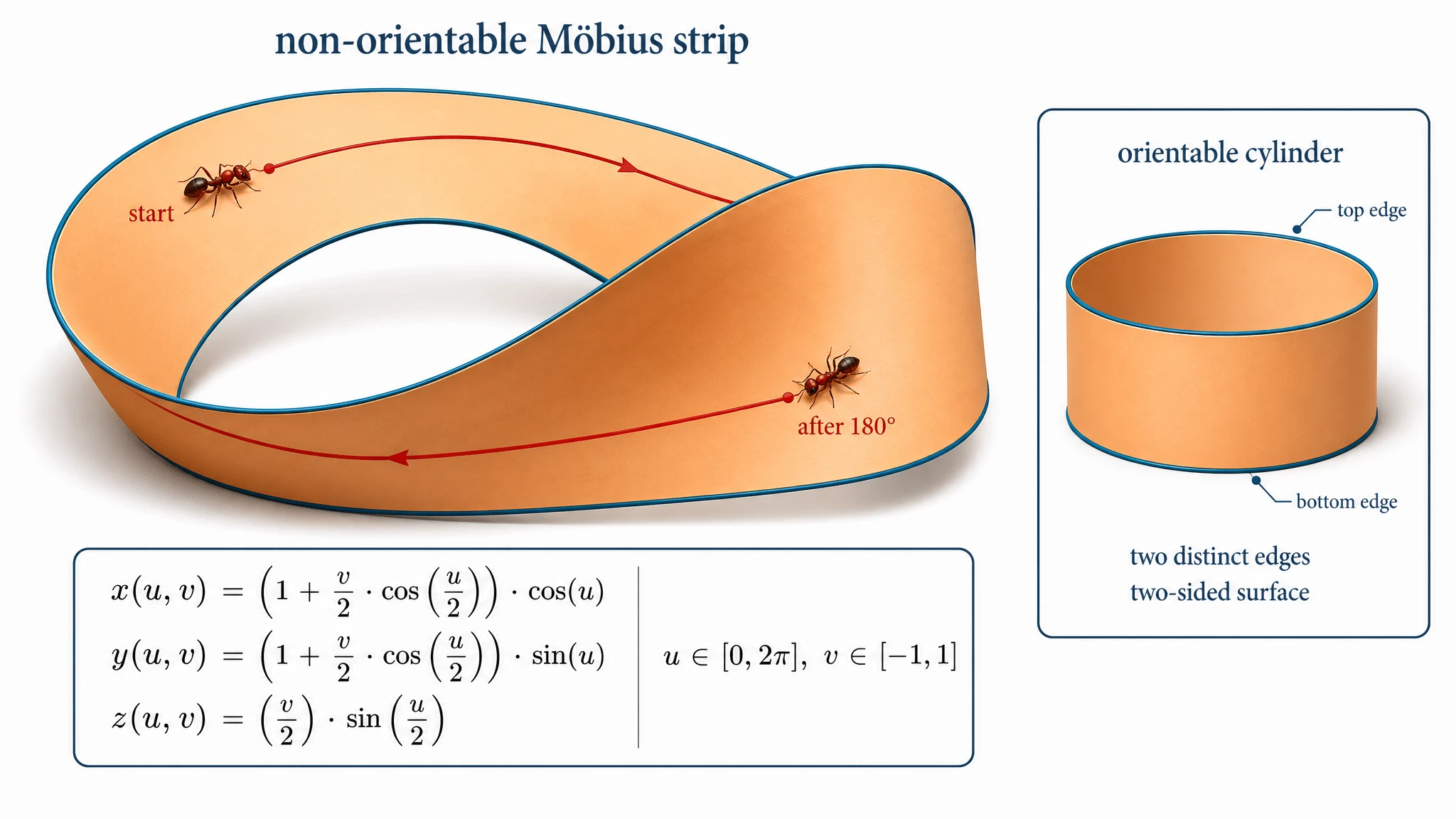
GPT Image 2 — believable 3D Möbius strip with the half-twist clearly visible. Cylinder is in the corner inset, exactly as the prompt asked.
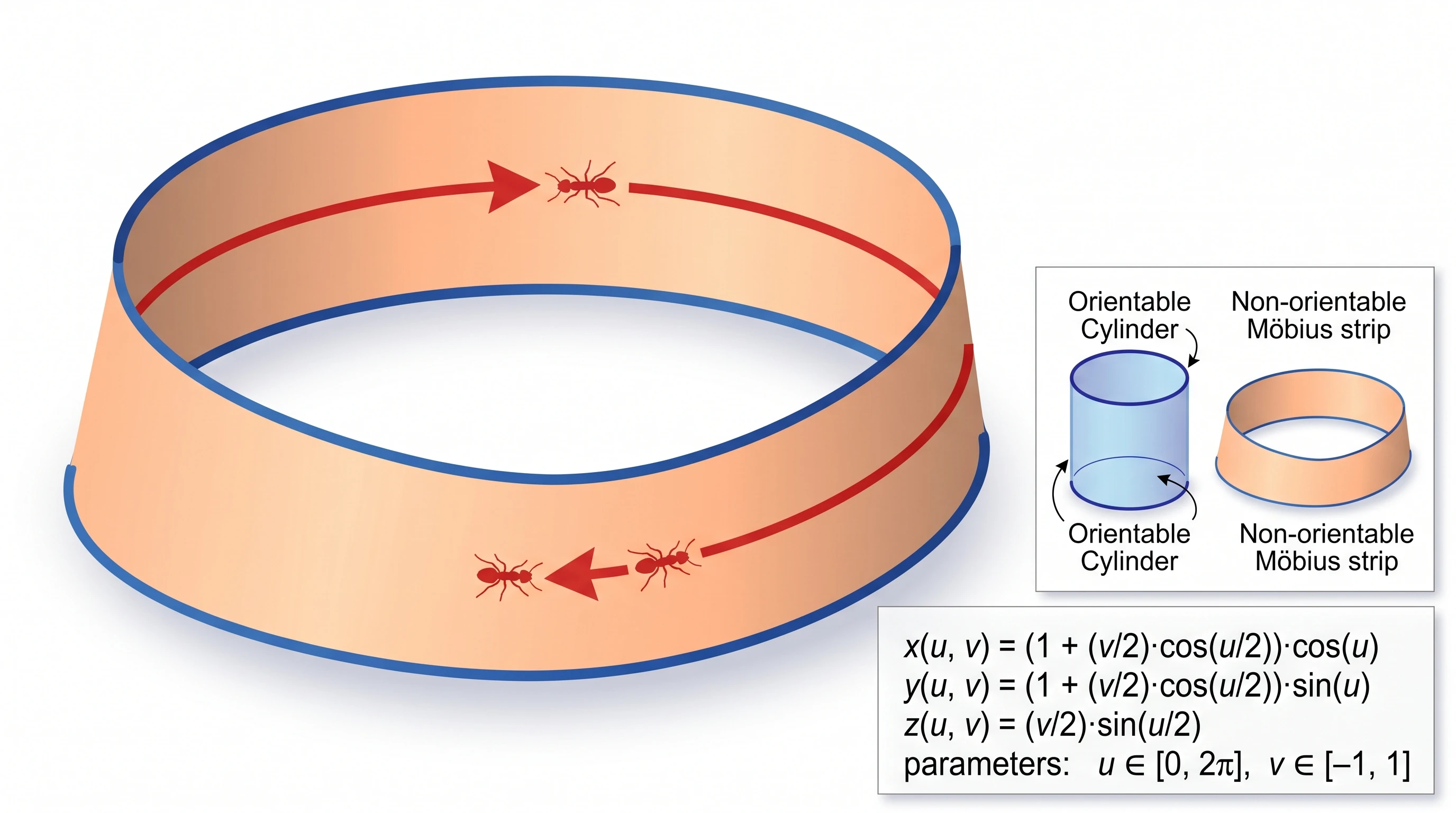
Nano Banana Pro — the main figure is a plain cylinder, not a Möbius strip. The actual Möbius strip is shrunken into a tiny corner inset. Conceptual rendering failure.
Finding 3: Conference slides and posters should default to Nano Banana Pro
The clearest case was the photolithography process figure: Nano Banana Pro made a creative composition choice we hadn't asked for, splitting each of the 6 process steps into a "detailed view" panel above and a "simplified cross-section" panel below — exactly the way IEEE textbooks present semiconductor processes. The result was the highest-scoring engineering figure in the benchmark (19/20).
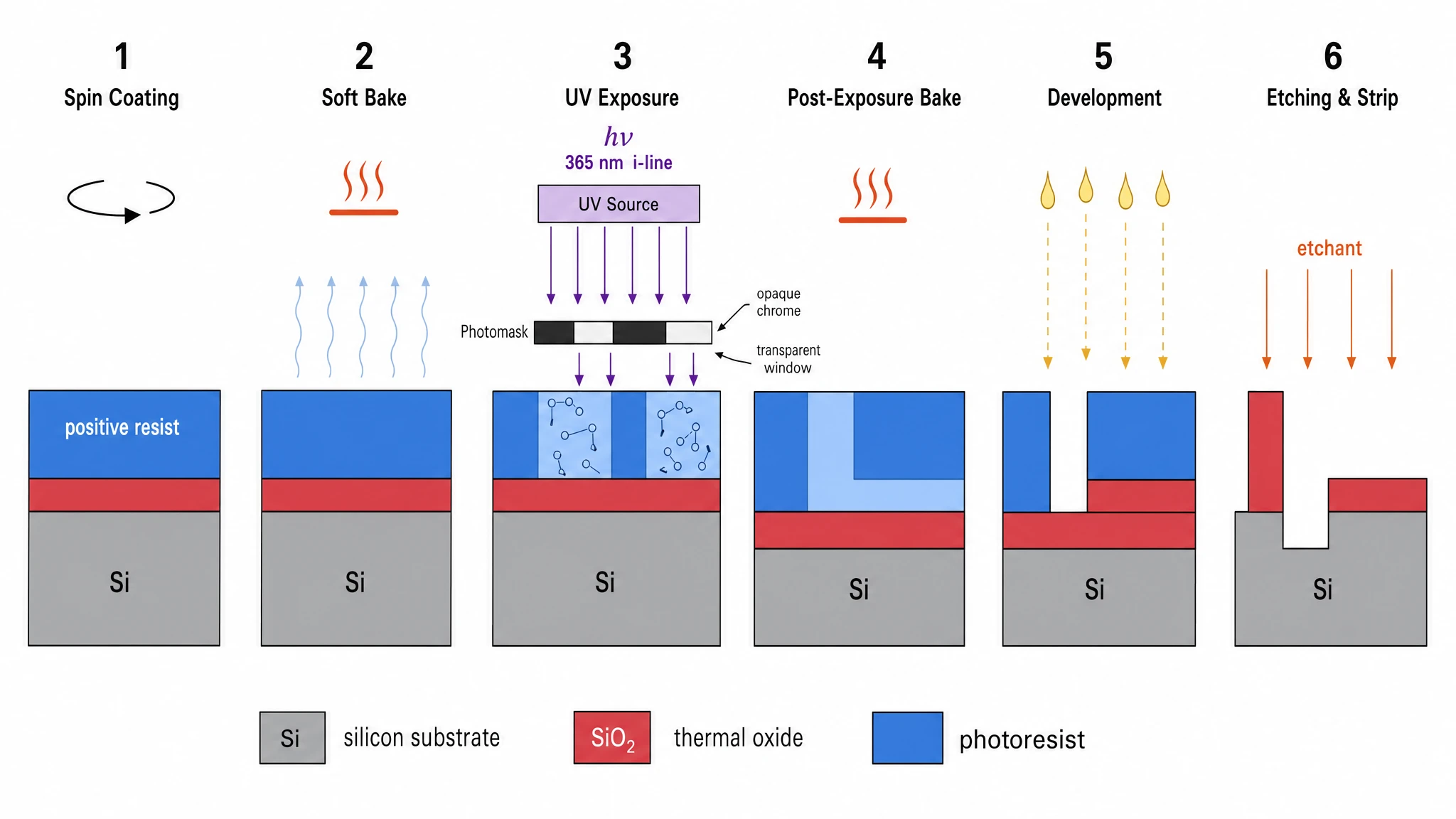
GPT Image 2 — single-row 6-panel sequence, compact and clear. Score 17/20.
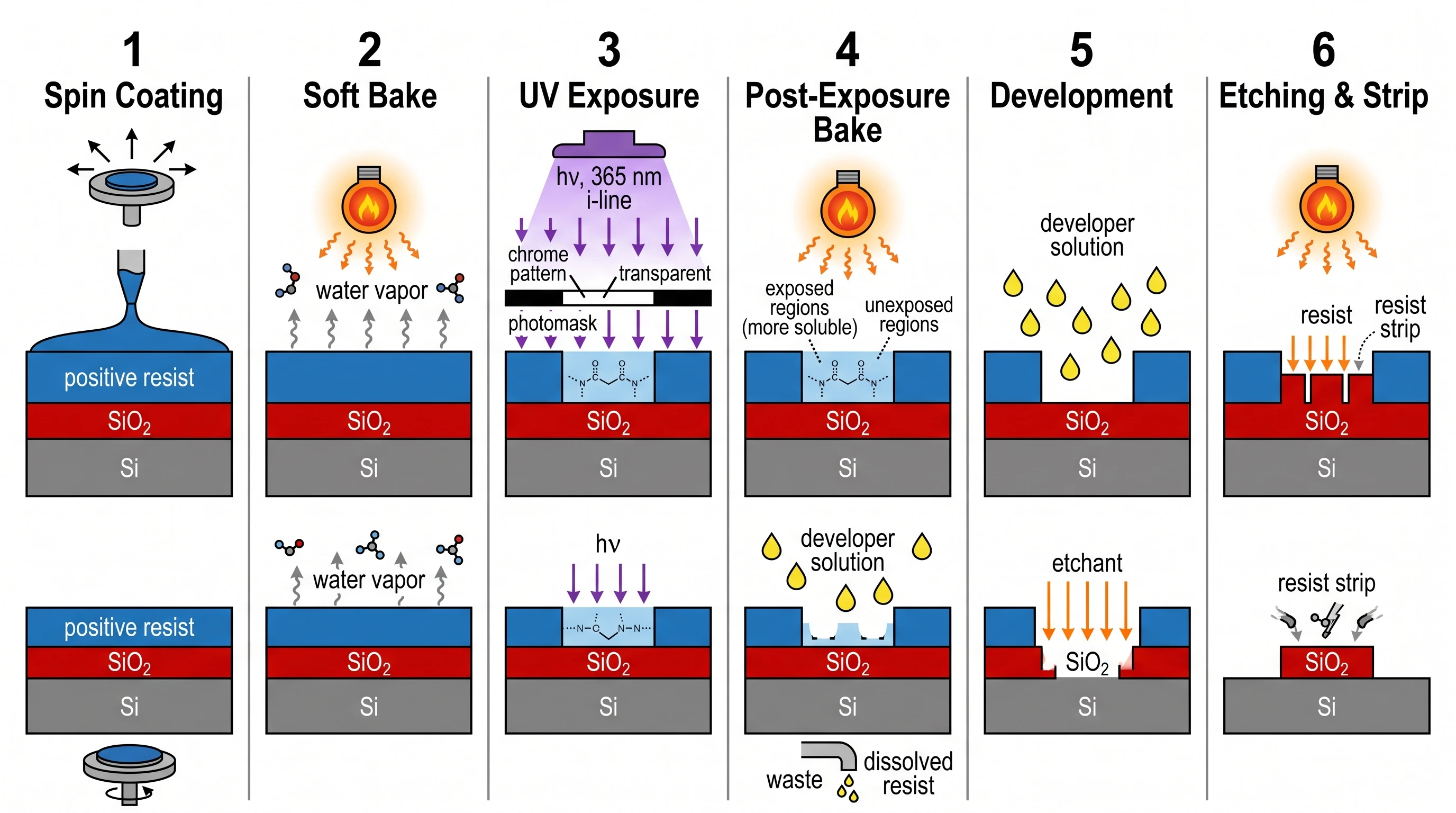
Nano Banana Pro — same 6 steps but each rendered as a dual panel: detailed view on top, simplified cross-section below. This is how IEEE textbooks actually present photolithography. Score 19/20 — our highest-scoring engineering figure.
See AI Scientific Figure Generation in Action
Watch how researchers create publication-ready scientific figures from text descriptions.
Explore the ToolA Decision Framework Tailored to Your Output
If your output is heading to a peer-reviewed journal
- Chemistry, biochemistry, organic chemistry papers → GPT Image 2 (decisive, see Finding 1)
- Physics or applied math with formulas, axes, scale bars → GPT Image 2 (long-prompt fidelity)
- Topology, manifolds, abstract geometry → GPT Image 2 (NBP can fail conceptually, see Finding 2)
- Cell biology, signaling pathways, molecular mechanisms → either, but NBP's BioRender-style is sometimes preferred by editors of Nature Methods and Cell Reports Methods
- Clinical / anatomy → either; check our examples gallery for comparable outputs and pick by visual fit
If your output is heading to a conference or talk
- Slide deck for a 10-minute talk → Nano Banana Pro (Finding 3)
- Conference poster (A0 / A1 size) → Nano Banana Pro unless the figure is detail-critical (in which case GPT Image 2 + element-level edits in SciFig's Vector Canvas)
- Lab meeting / journal club explainer → Nano Banana Pro for clarity, then iterate
If your output is going on the web
- Twitter / LinkedIn / blog post header → Nano Banana Pro (cleaner at small thumbnail sizes)
- University lab homepage → Nano Banana Pro
- Grant proposal cover image → GPT Image 2 if the agency reviewer is technical; Nano Banana Pro if reviewer is broader audience
If you're not sure
Create Scientific Figures Now
Describe your scientific figure in natural language — get publication-ready illustrations in minutes.
Try FreeFive Counterintuitive Discoveries
These are the findings from our benchmark that contradicted what we expected going in.
1. The newer-flashier model isn't automatically better
Going in, we expected GPT Image 2 to dominate everything because it's the newer release. It didn't. Nano Banana Pro won outright on three prompts (CRISPR-Cas9, Transformer architecture, photolithography) — and the wins weren't close. The lesson: don't assume the model with the louder marketing wins on the figure type you actually need.
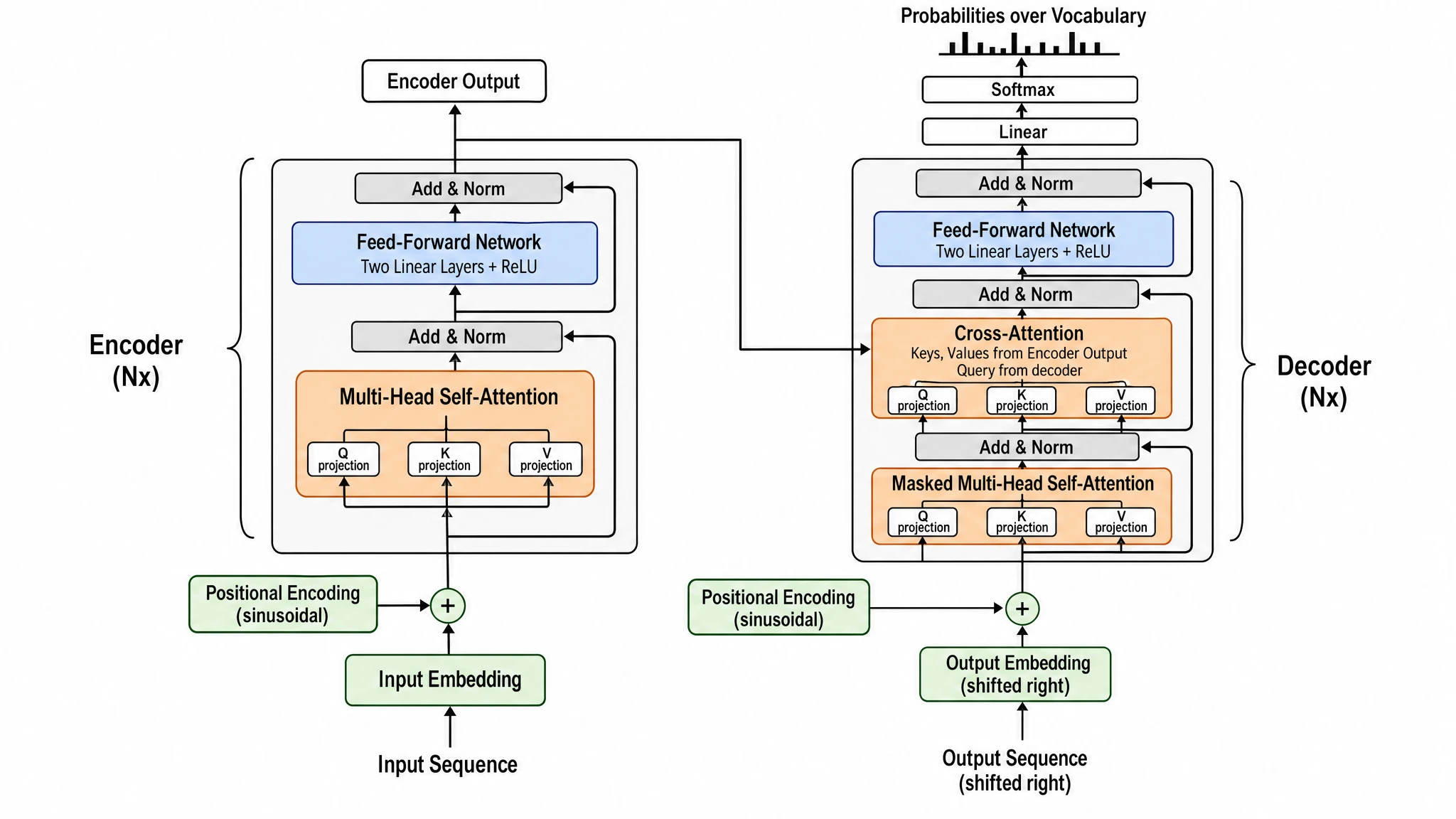
GPT Image 2 — every component labeled with high precision ("Two Linear Layers + ReLU", "Keys, Values from Encoder Output, Query from decoder", "sinusoidal" Positional Encoding). Flat 2D blocks. Score 16/20.
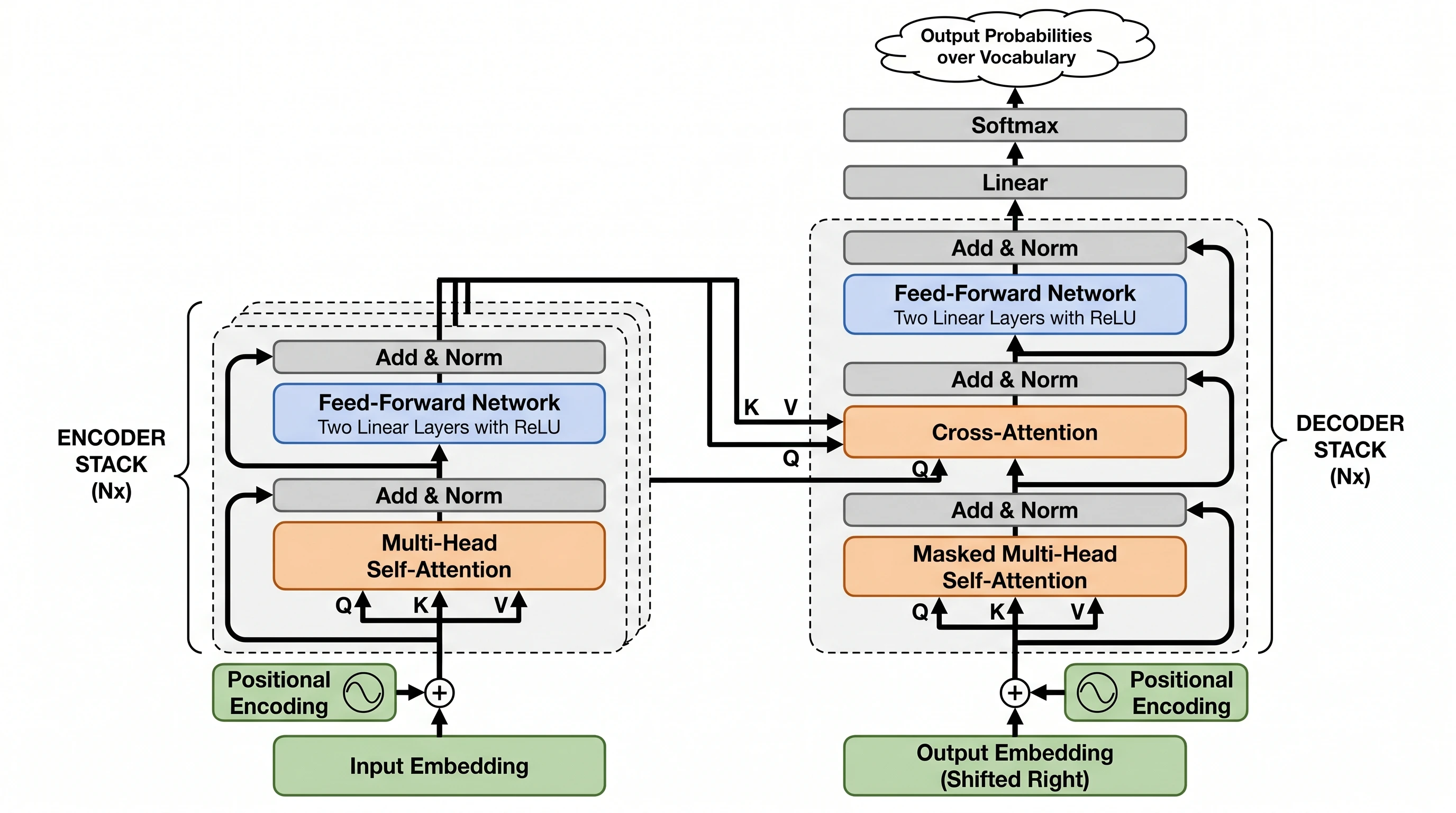
Nano Banana Pro — same components, but the encoder/decoder are rendered as visually-stacked layered blocks (the Nx stacking), the K/V/Q cross-attention arrows trace from encoder to decoder explicitly, and Position Encoding even gets a tiny waveform icon. Structural intuition wins here. Score 18/20.
2. Long-prompt fidelity is a 13-point gap, not a small one
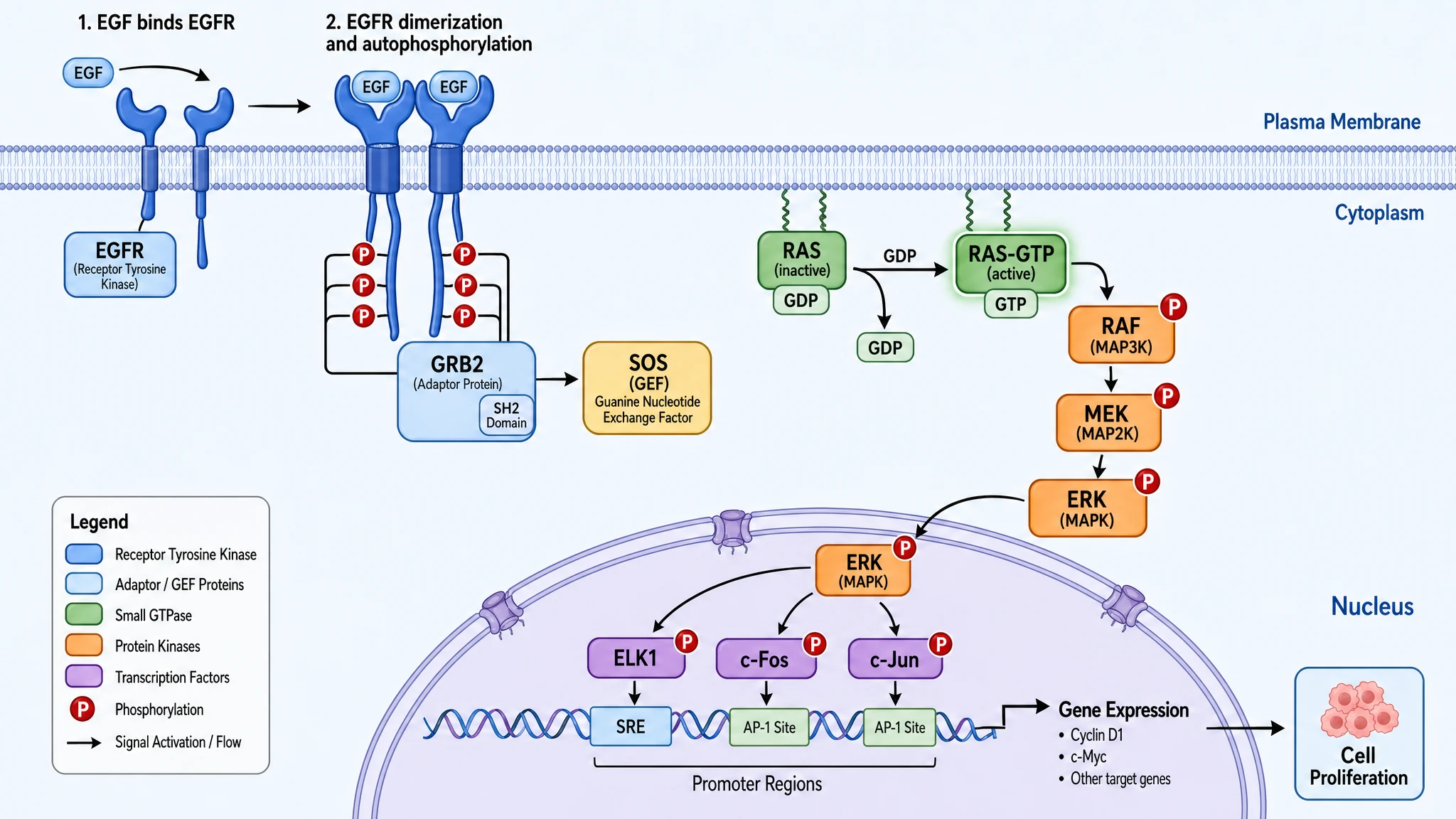
GPT Image 2 — full signaling cascade with explicit GDP→GTP exchange, two-step labeling (1: EGF binding, 2: dimerization + autophosphorylation), all three transcription factors (ELK1 / c-Fos / c-Jun), promoter regions (SRE / AP-1 Site), specific target genes (Cyclin D1, c-Myc), and a six-category color legend. 100% prompt fidelity.
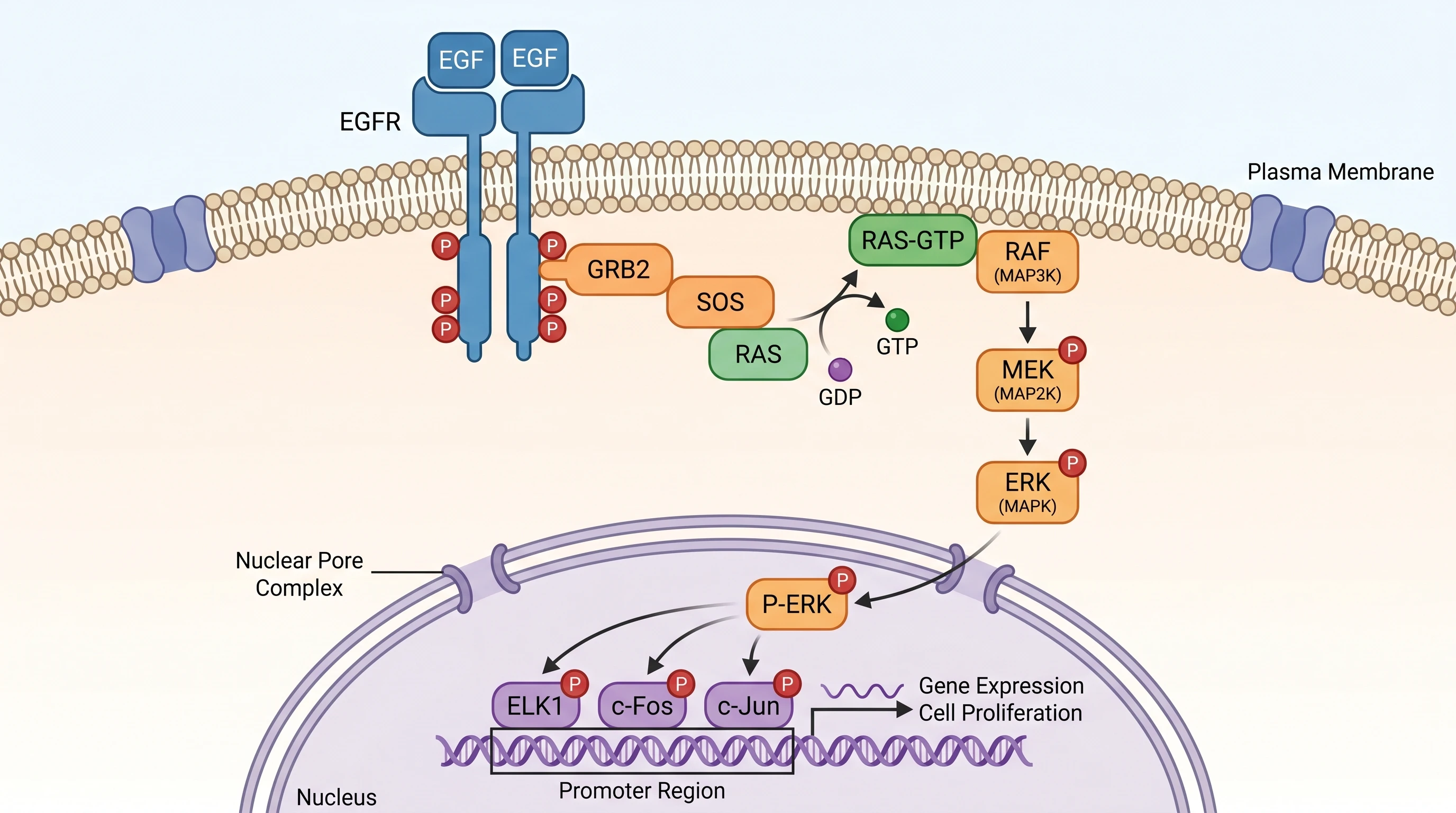
Nano Banana Pro — same scientific accuracy on the cascade, with a nice anatomical detail (Nuclear Pore Complex shown explicitly), but missing the color legend, the SRE/AP-1 Site promoter classification, the specific target genes (Cyclin D1, c-Myc), and the SH2 Domain annotation. 80% prompt fidelity. Same biology — fewer footnotes.
3. The model that "follows instructions better" is not necessarily the model that "looks better"
GPT Image 2's higher fidelity score does not translate into universally better-looking figures. Average aesthetic scores: 4.75 (GPT) vs 4.83 (NBP). Nano Banana Pro slightly edged GPT Image 2 on visual quality despite landing fewer of the requested elements — because what it did land was rendered with more care.
4. Nano Banana Pro can hallucinate the wrong concept entirely
5. Both models can produce Nature-cover-quality figures
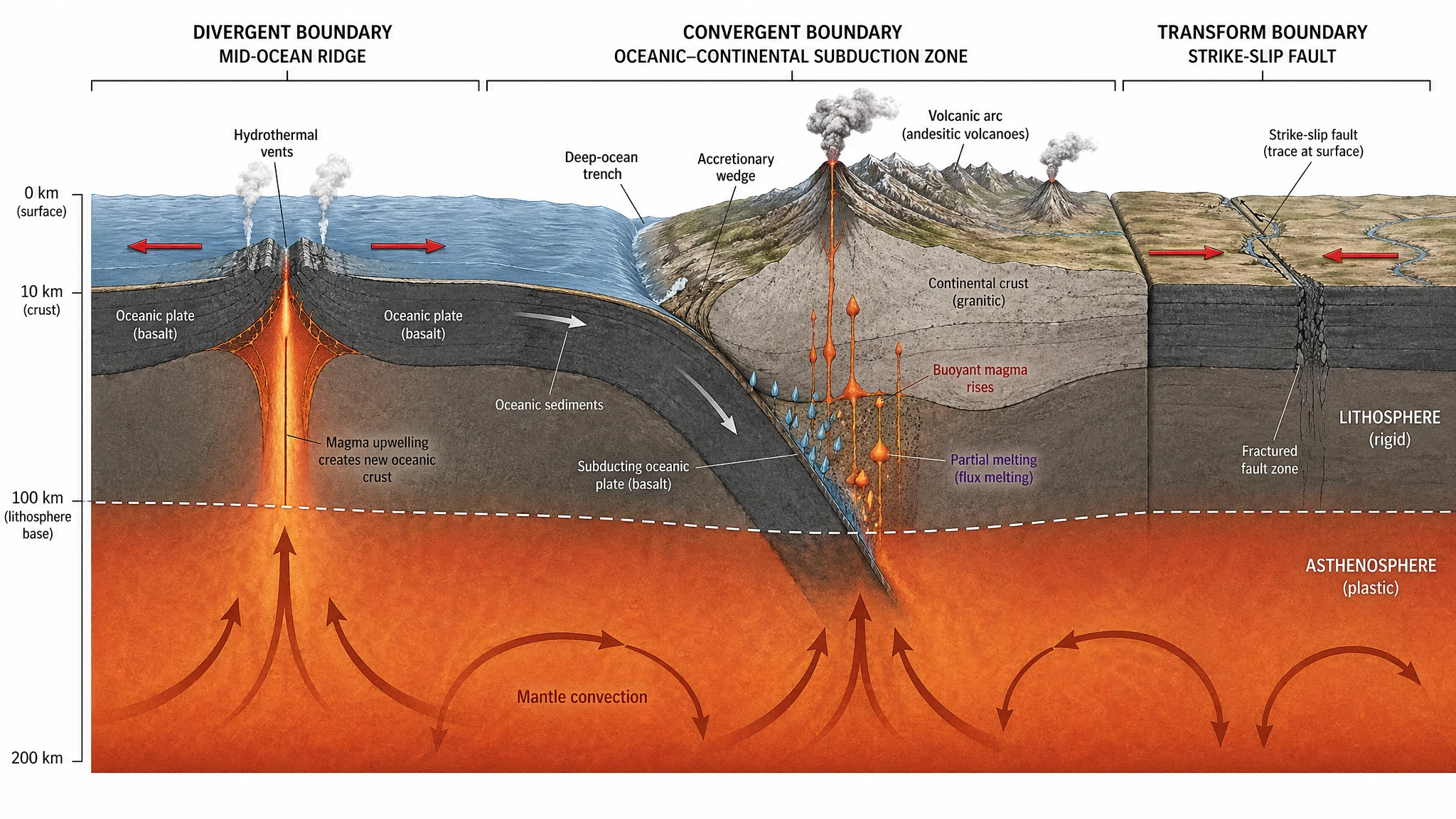
Our plate tectonics test scored 19/20 for both models. The geological cross-section diagrams that came out — three boundary types side by side, lithosphere/asthenosphere distinction, mantle convection cells, vertical depth scale — look like figures from National Geographic or USGS publications. The choice between the two for high-end editorial figures is more about aesthetic preference than capability gap. The black hole accretion disk test made the same point — both models hit cover-image quality on a hard astrophysics prompt.
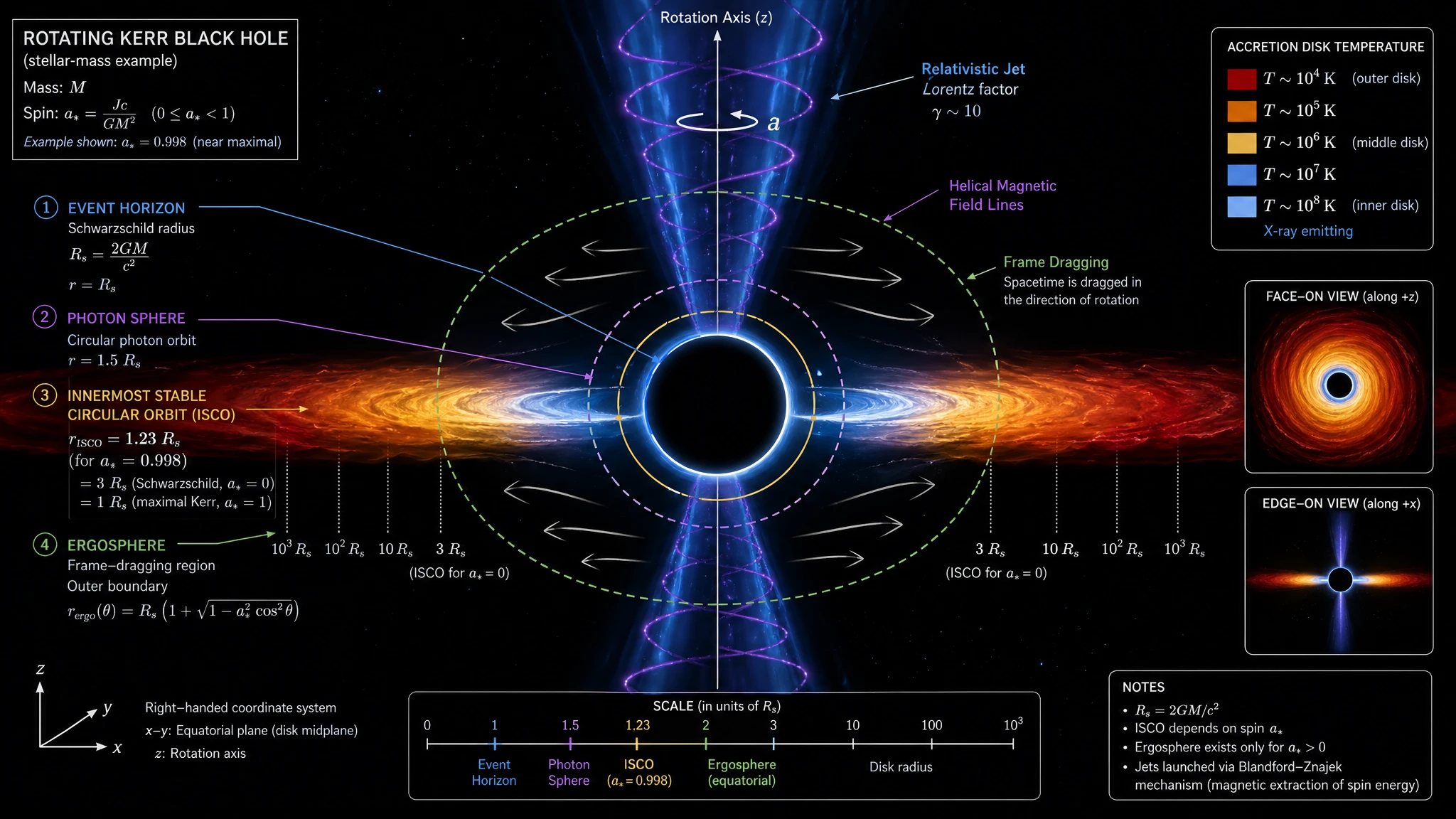
GPT Image 2 — astrophysics-journal level: titled "ROTATING KERR BLACK HOLE", four boundaries labeled (Event Horizon, Photon Sphere 1.5 Rs, ISCO, Ergosphere), accretion disk temperature gradient (10⁴ K → 10⁸ K) with a side legend, helical magnetic field lines threading the jet, frame-dragging arrows, right-handed coordinate axes, multi-view inset (face-on + edge-on), Notes box with Blandford-Znajek mechanism reference.
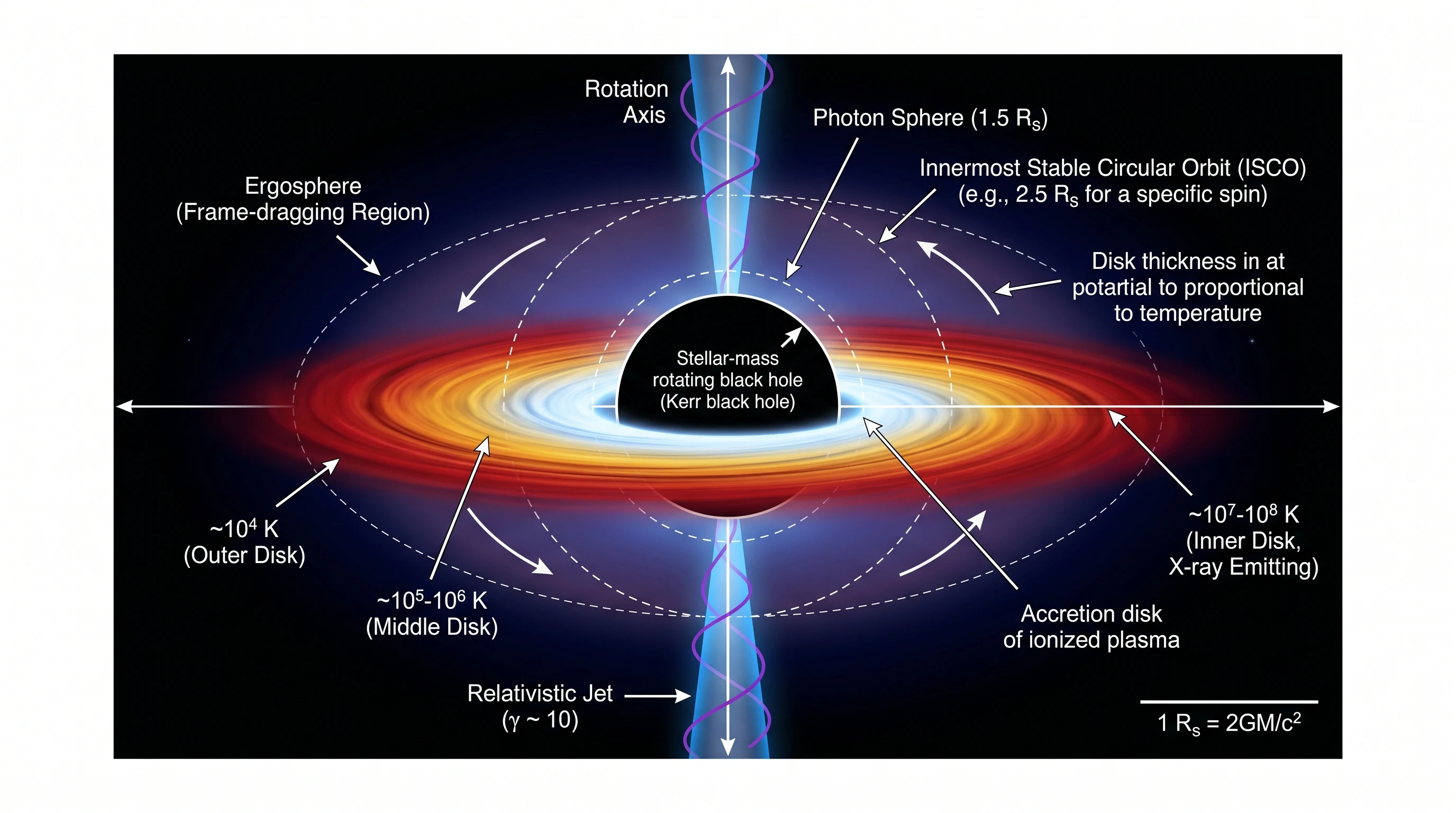
Nano Banana Pro — same scientific accuracy, same temperature gradient encoded by color, accretion disk thickness explicitly noted as proportional to temperature. Slightly fewer annotations (no coordinate system, no multi-view inset, no magnetic field labels), but visually striking enough to land on a magazine cover. Note the deliberate negative space surrounding the subject — Nano Banana Pro tends to leave the figure room to breathe in astrophysics prompts, in contrast with GPT Image 2's information-dense framing above. This itself is a composition philosophy difference worth seeing on the same screen.
When to Generate from Both
There are three situations where running both models on the same prompt is the right move:
- High-stakes figures. Paper Figure 1, grant proposal cover image, dissertation defense slide. Generating twice takes a couple of minutes; choosing the wrong model can cost days of revisions or a failed grant.
- Unfamiliar or abstract concepts. Anything in topology, advanced mathematics, fundamental physics, or a domain you're not sure either model has seen much training data for. Generating both and keeping the editable result gives you full control.
- Style A/B testing. When you genuinely don't know whether your audience prefers the dense GPT Image 2 style or the editorial Nano Banana Pro style. Generate both, show them to a colleague, pick by reaction.
For the routine 80% of figures — clear scientific specification, common subject, low ambiguity — pick a default model based on the framework above and generate with confidence. For the 20% where the cost of being wrong is high, run both.
Why We Trust This Verdict
This guide is grounded in a benchmark we ran specifically for it: 12 scientific prompts spanning 10 disciplines, generated through Kie.ai (the same API supplier SciFig uses in production), each scored on six dimensions with explicit rubrics and recorded reasoning. Both models were tested on the same day under identical parameters: 16:9 aspect ratio, 2K resolution.
/inspiration?model=gpt-image-2 and /inspiration?model=nano-banana-pro. The full scoring matrix is in the companion benchmark post. If you re-run any prompt and get a different result, that is useful information — please tell us. The transparency is intentional: marketing claims from OpenAI and Google are unverifiable; reproducible side-by-side testing is the only honest way to compare flagship models in 2026.Tip