SciFig vs BioRender: Generative AI or Icon Library
Side-by-side comparison of SciFig and BioRender on pricing, accuracy, vector output, journal compliance, and whether SciFig is a free alternative to BioRender.
SciFig Team
Scientific Illustration Experts
For a decade, BioRender's 75,000-icon library defined how researchers built scientific figures. Drag, drop, label, export. The catalog grew, the institutional licenses spread, and the workflow calcified. Then generative AI arrived — and the question stopped being "which icon do I drag?" and became "can I describe what I need and have it appear?" That shift breaks the comparison-by-feature ritual, because SciFig and BioRender are no longer the same kind of tool.
This is a head-to-head comparison for researchers deciding between the two — or, increasingly, deciding to use both. We cover pricing, scientific accuracy, vector output, journal compliance, and the real workflows where each tool earns its place. By the end, you will know whether SciFig's generative path or BioRender's library path fits your figure pipeline, and where the line falls.
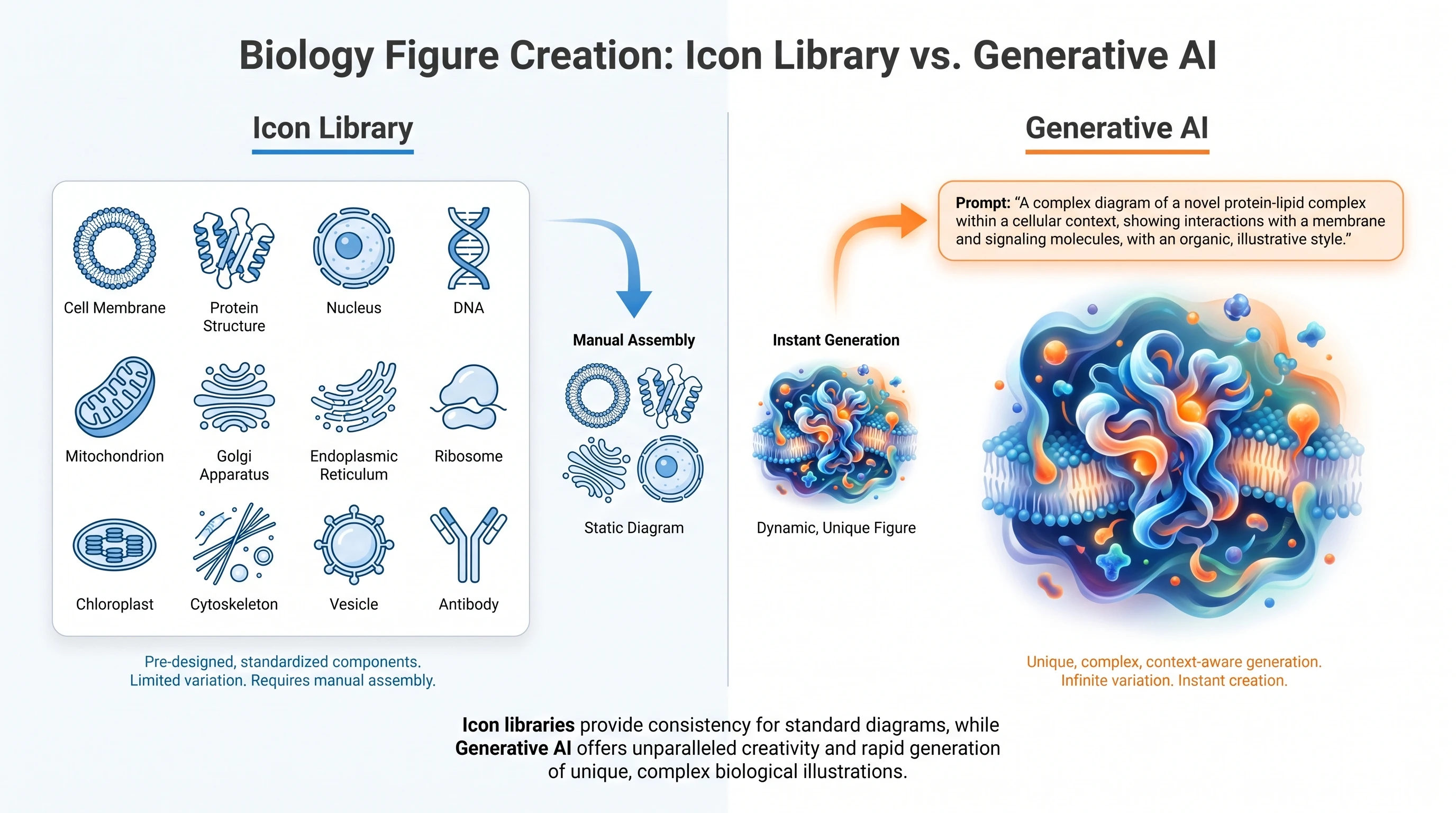
SciFig vs BioRender: icon library vs generative AI workflows side by side (Figure generated with SciFig)
SciFig vs BioRender at a Glance: Quick Comparison Table
The two tools share a goal — publication-ready scientific figures — but solve it from opposite directions. BioRender curates pre-made vector icons that you assemble like a digital scrapbook. SciFig generates each figure on demand from a natural-language prompt, then lets you refine it in a vector canvas before journal submission.
Free tier (50 signup + 50–150/day check-in, ≈2,100/mo on a full streak) + Starter $100/yr (≈$8.33/mo, annual only)
Paid full unlock
Individual $35/mo annual or $39/mo monthly
Plus $29.9/mo · $288/yr ($24/mo equiv.)
Figure accuracy
Pre-vetted icons, manually composed
Model-generated, fine-tuned on biology literature
Output format
SVG vector (paid plans)
Raster → SVG via in-app vectorizer (paid plans)
Learning curve
2–4 hours for typical workflows
20–40 minutes from first prompt to first output
Customization
Limited to icon library scope
Unlimited — any described mechanism
Institutional license
Lab $99/mo/5 seats (annual) → Institution custom
Per-user, no institutional gate yet
Journal-ready exports
TIFF, PNG, SVG, PDF
WebP raster + SVG vectorized
API access
None (Industry tier $475/mo for team)
Public REST API (Pro tier)
Free trial
3-figure cap, low-resolution, no commercial rights
50 signup credits + 50–150/day check-in, no card required
The table answers the surface-level question. The interesting questions live in the rows where the two diverge most sharply: pricing, accuracy, and customization scope.
Icon library vs generative AI: two workflows compared visually (Figure generated with SciFig)
What Is BioRender and Why Is It Popular?
BioRender, founded in 2017, is a Toronto-based platform that turned scientific figure creation into a drag-and-drop experience. Its 75,000+ pre-made vector illustrations span cell biology, molecular biology, anatomy, microbiology, and clinical sciences — the kind of catalog that took two decades for textbook publishers like Wiley and Elsevier to amass. Researchers compose figures by selecting icons (a kinase, a vesicle, a CD8 T cell) and arranging them on a canvas.
The popularity has structural roots. BioRender secured institutional licenses with universities like Harvard, Stanford, and Johns Hopkins, which means many graduate students arrive at lab onboarding with a BioRender account already provisioned. The illustrations are vetted by in-house scientific illustrators, so the molecular shapes carry a consistency that's easy to mistake for correctness. And the workflow is teachable in under an hour — a PhD advisor can hand off the figure-making job without an art tutorial.
BioRender's commercial success is real. The downside is what the catalog can and cannot do: if your mechanism doesn't already exist in the library, you wait for BioRender to add it, or you compose it from approximations. For a CRISPR-Cas12a knockdown of a novel splice variant, the right starting point may not exist. That gap is exactly where generative tools enter.
What Is SciFig and What's Different?
SciFig is a generative AI platform for scientific figures. Instead of selecting from an icon library, you describe a figure in natural language — "CAR-T cell engaging a CD19+ B-cell lymphoma cell with the immunological synapse labeled" — and SciFig's text-to-figure tool generates the illustration. It generates with GPT Image 2 by default, and paid plans can switch to a domain-tuned model (Nano Banana Pro 2K) that has been fine-tuned on biology and chemistry literature to reduce the kind of subtle errors generic AI makes: wrong scFv domain count, reversed JAK/STAT pathway direction, mislabeled organelles.
The difference compounds across the figure pipeline. SciFig accepts whiteboard sketches as input (sketch-to-figure), turning a marker drawing into a publication-quality vector. It accepts reference figures (reference-to-figure) and matches their visual style — useful for a paper series where consistency matters. It accepts clinical photos (photo-to-figure) and produces clean line drawings, which is what journals like The Lancet and NEJM require when patient images can't be reproduced directly.
What it does not do is replicate BioRender's vetted icon catalog. If your figure is essentially a composition of standard objects — a generic eukaryotic cell with labeled organelles, for instance — BioRender's library still wins on time-to-output. SciFig's edge appears the moment your mechanism is specific, novel, or absent from any existing library. (For a step-by-step on one of these niches, see how to create animal cell diagrams with AI.)
See AI Scientific Figure Generation in Action
Watch how researchers create publication-ready scientific figures from text descriptions.
The comparison narrows when you put both tools through the same five tests every researcher cares about.
Pricing and Free Tier
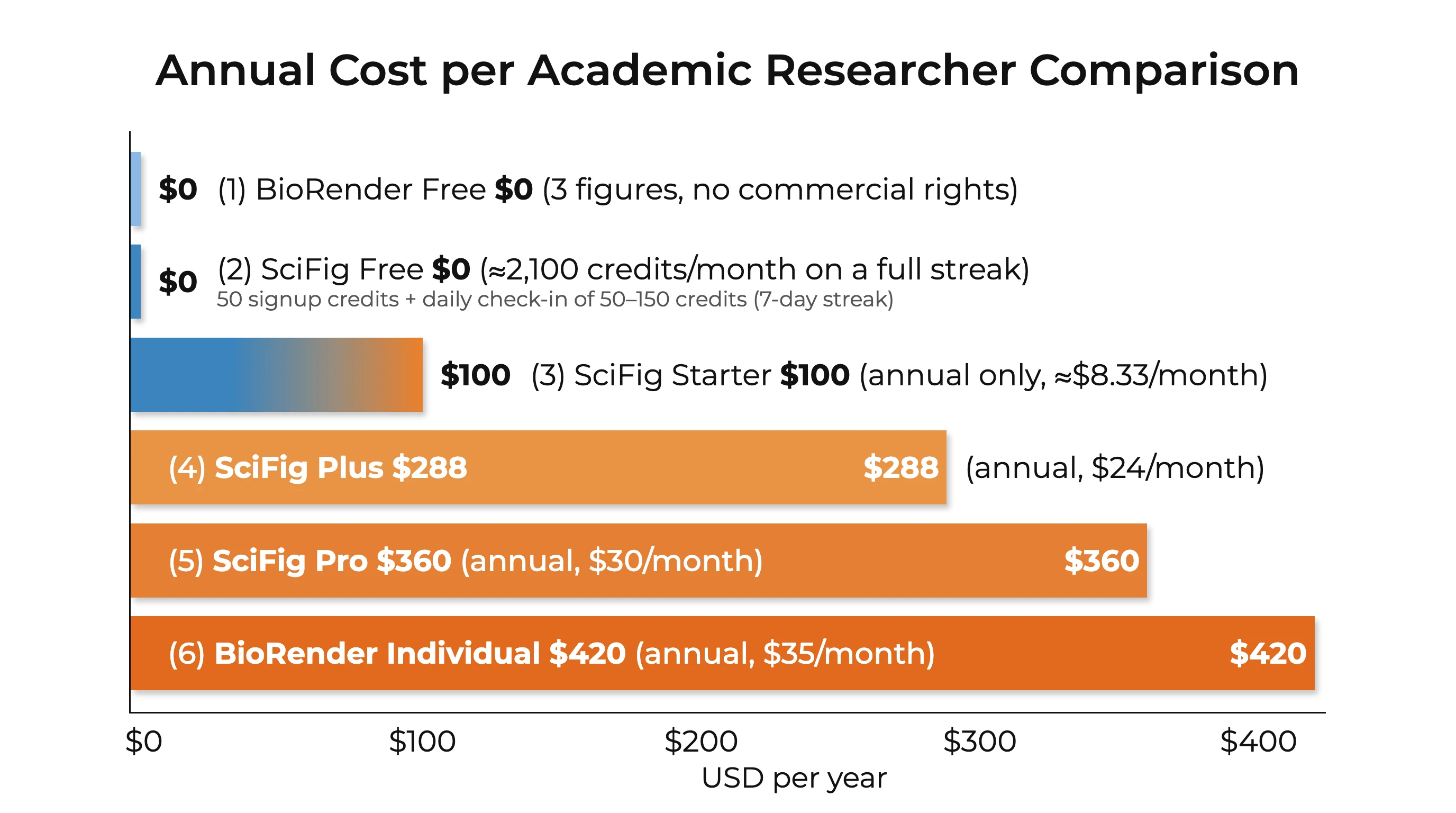
BioRender's academic Individual plan is $39/month or $35/month billed annually (≈$420/year), with a free tier limited to 3 figures and low-resolution export only — no commercial or publication rights. The next tier up, Lab ($99/month for 5 seats annual, ≈$1,188/year), adds team collaboration. SciFig's free tier provides 50 signup credits + a daily check-in of at least 50 credits (100 on day 3 and 150 on day 7 of a 7-day streak; each day's credits are valid that day only). A full 30-day streak adds up to ≈2,100 credits, enough for about 42 standard figures (50 credits each) at no cost. Editable vector export (150 credits per figure) needs a paid plan or a credit pack. The Starter plan is annual-only at $100/year (≈$8.33/month, 1,200 credits/month ≈ 24 standard figures), and the Plus plan — the most common research workflow — runs $29.9/month (or $288/year, ≈$24/month).
For a typical PhD student producing 30–50 figures per year with full journal publication rights, BioRender Individual costs $420/year minimum (annual billing). SciFig's annual Starter covers the same volume for $100/year — BioRender costs roughly 4× as much on absolute price, before accounting for SciFig's free tier (a full 30-day check-in streak adds up to ≈2,100 credits, enough for about 42 standard figures, which covers most early-career researchers without paying, although editable vector export needs a paid plan or a credit pack).
Annual cost comparison of BioRender and SciFig free and paid plans (Figure generated with SciFig)
Figure Accuracy (Scientific Correctness)
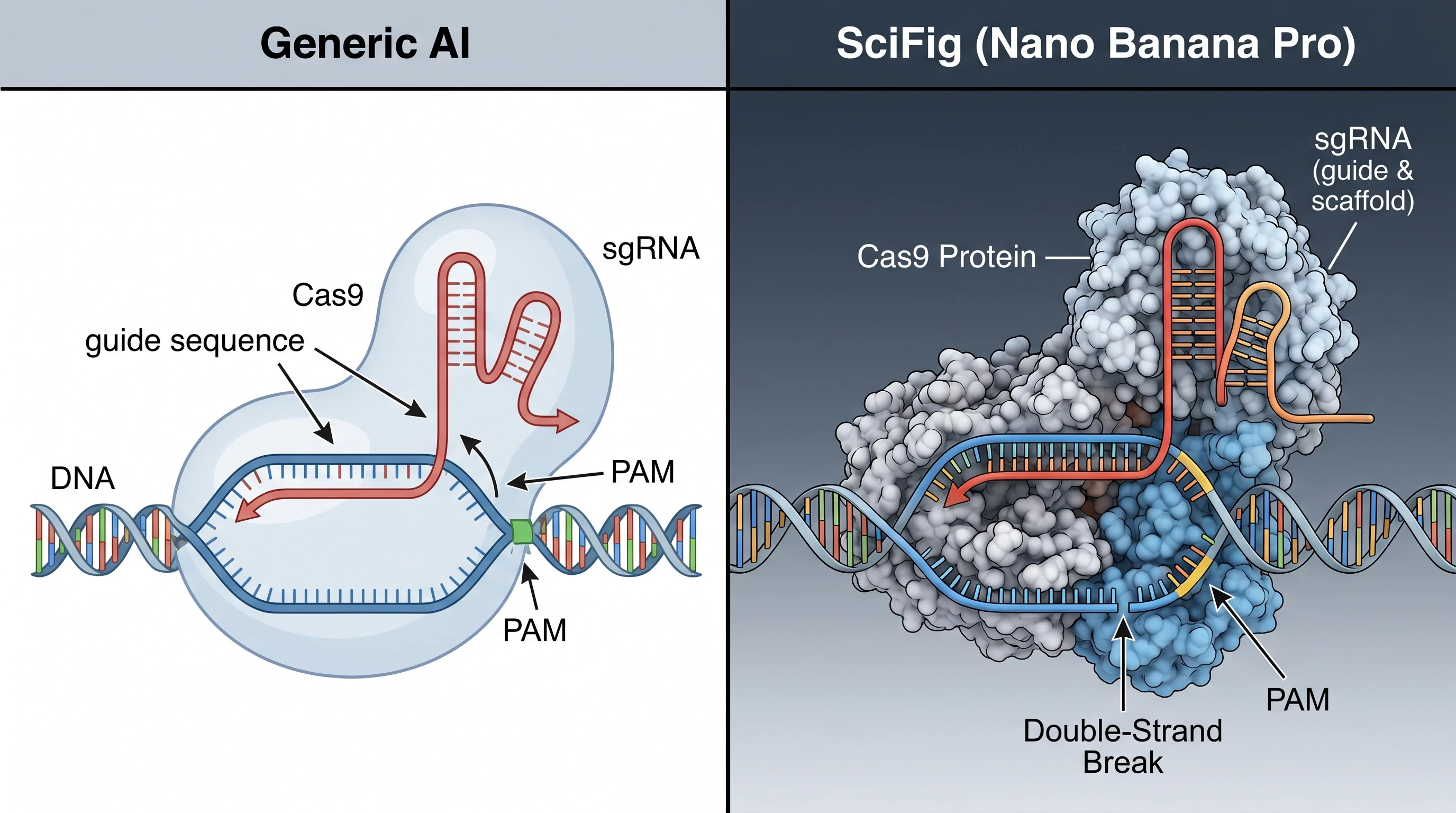
This is where generative AI's reputation gets stress-tested. Generic image models (DALL·E, Midjourney) produce visually plausible but scientifically wrong figures: a CRISPR mechanism with the PAM site on the wrong strand, a JAK/STAT pathway with the dimerization step backwards, an animal cell with eight organelles that should be eleven. BioRender's icons sidestep this entirely — every illustration was drawn by a human who knew what a mitochondrion is supposed to look like.
SciFig closes this gap by fine-tuning on biology literature rather than the open web. In a 10-discipline internal benchmark, SciFig's Nano Banana Pro 2K model reduced anatomical and pathway errors by approximately 60% compared to a generic image model running the same prompts (details in the GPT Image 2 vs Nano Banana Pro analysis). The error rate is not zero — researchers still need to review every generated figure — but it is low enough that AI generation is no longer a gamble for routine mechanism diagrams.
Vector Output and Journal-Ready Format
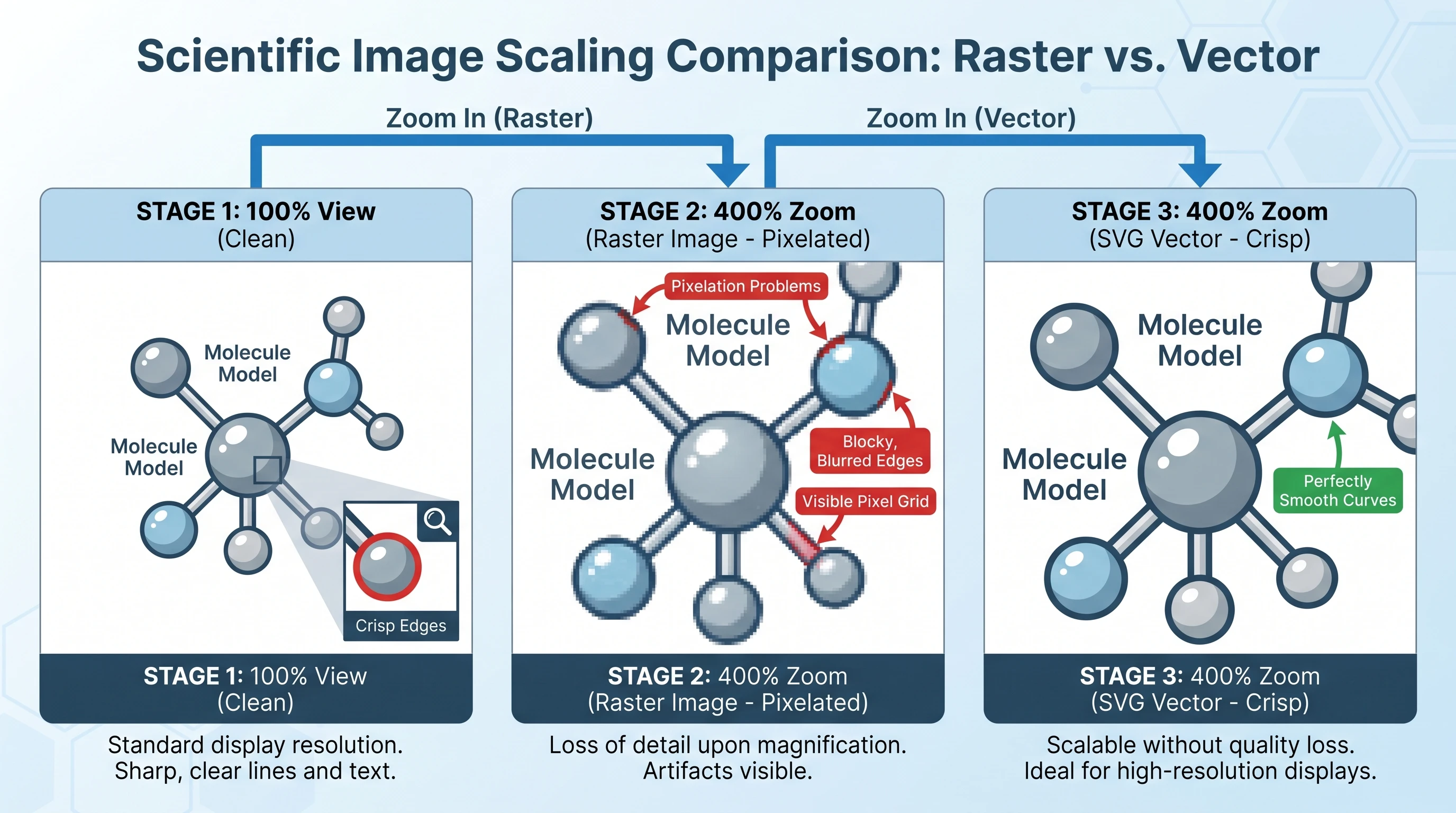
Most journals require vector output (SVG, EPS, or PDF with embedded vectors) for figures that contain text or sharp lines, because raster formats pixelate when scaled. BioRender exports SVG on paid tiers — this is a clean win for traditional publishing workflows. SciFig generates raster output natively, then offers in-app vectorization through the vector-canvas tool, which converts the raster figure to layered SVG and lets you edit text, colors, and stroke width before export.
For a figure that's going to Nature or Cell, both tools land at the same place — a vector SVG. The path is different: BioRender exports directly, SciFig adds a vectorization step. The vector-canvas step takes 1–2 minutes and gives you something BioRender does not: the ability to regenerate any element from text if a reviewer asks for a label change three days before re-submission.
Vector vs raster zoom comparison at 100% and 400% (Figure generated with SciFig)
Speed: Hours to Minutes
BioRender's claim is "minutes to make a figure." In practice, a researcher building a moderately complex pathway diagram from icons takes 30–90 minutes the first few times — finding the right icons, arranging spatial relationships, drawing arrows, adding text. With practice this drops to 15–30 minutes. SciFig's text-to-figure cycle, by contrast, runs 2–4 minutes from prompt to first output, and another 5–10 minutes of iteration and refinement to publication quality. The total clock time is roughly halved, and the variability is lower because the first draft is closer to final.
Learning Curve and Onboarding
BioRender has a gentler ramp for the first hour — drag-and-drop is intuitive. SciFig requires you to learn how to prompt for scientific figures, which is a different skill from natural-language conversation with ChatGPT (we've documented the framework in Mastering Scientific AI Prompts). The asymmetry reverses at the 5-figure mark: BioRender's library complexity grows linearly with what you've used, while SciFig's prompt skill compounds — by the tenth figure, you write a one-paragraph prompt that produces a near-final result.
What Makes SciFig Different: The Generative AI Edge
The deepest difference is not in any single dimension but in what generative AI changes about the figure-making process. With BioRender, you compose from a finite set of pre-drawn objects, and the limit of what you can produce is the limit of the catalog. With SciFig, the constraint is your ability to describe — which means niche, novel, and discipline-specific mechanisms become tractable in a way they weren't before.
A concrete case. A researcher publishing a CAR-T paper needs the immunological synapse drawn with specific attention to scFv domain orientation (2 variable domains, not 1 or 3), CD3ζ chain ITAMs (3 motifs, not 2), and the direction of CD3ζ activation flow (cytoplasmic to nuclear, not reversed). Generic AI tools fail on at least one of these per generation — often the scFv comes out with a single variable domain fused to the hinge, or the ITAM count drops to two motifs that get colored as if they were three. BioRender requires assembling 6–8 separate icons to compose the scene. SciFig's domain-tuned model (see Nano Banana Pro model details for the underlying generator) produces it from a single descriptive prompt with the correct molecular topology — and if a reviewer flags an issue, you regenerate with adjusted constraints rather than re-composing from scratch.
The same pattern repeats across mechanism families. A JAK/STAT pathway figure: generic models routinely flip the order so STAT enters the nucleus before dimerization, when the correct sequence is JAK phosphorylation → STAT dimerization → nuclear translocation; a fine-tuned model that has read thousands of immunology figures recognizes the canonical sequence and produces it on the first generation. A CRISPR-Cas9 schematic: the PAM motif lands on the wrong DNA strand in a generic output, or the sgRNA is drawn 3′→5′ instead of 5′→3′ — both errors disappear when the prompt is interpreted by a model that has internalized the literature's directional conventions. An animal cell with mislabeled organelles: mitochondria sized larger than the nucleus, or a chloroplast inserted into an animal cell that should never contain one. Fine-tuning on biology literature does not eliminate these errors entirely, but it reduces the rate by approximately 60% in our internal benchmark — and combined with SciFig's editable vector canvas, the remaining errors are caught and fixed in 1–2 minutes rather than triggering a full re-roll lottery where every new draft introduces a new mistake somewhere else in the figure.
CRISPR mechanism accuracy: generic AI vs SciFig domain-tuned model (Figure generated with SciFig)
This is the value SciFig adds and BioRender structurally cannot: the ability to generate accurate visualizations of mechanisms that no existing library will ever curate. Curation is finite; generation is not.
Create Scientific Figures Now
Describe your scientific figure in natural language — get publication-ready illustrations in minutes.
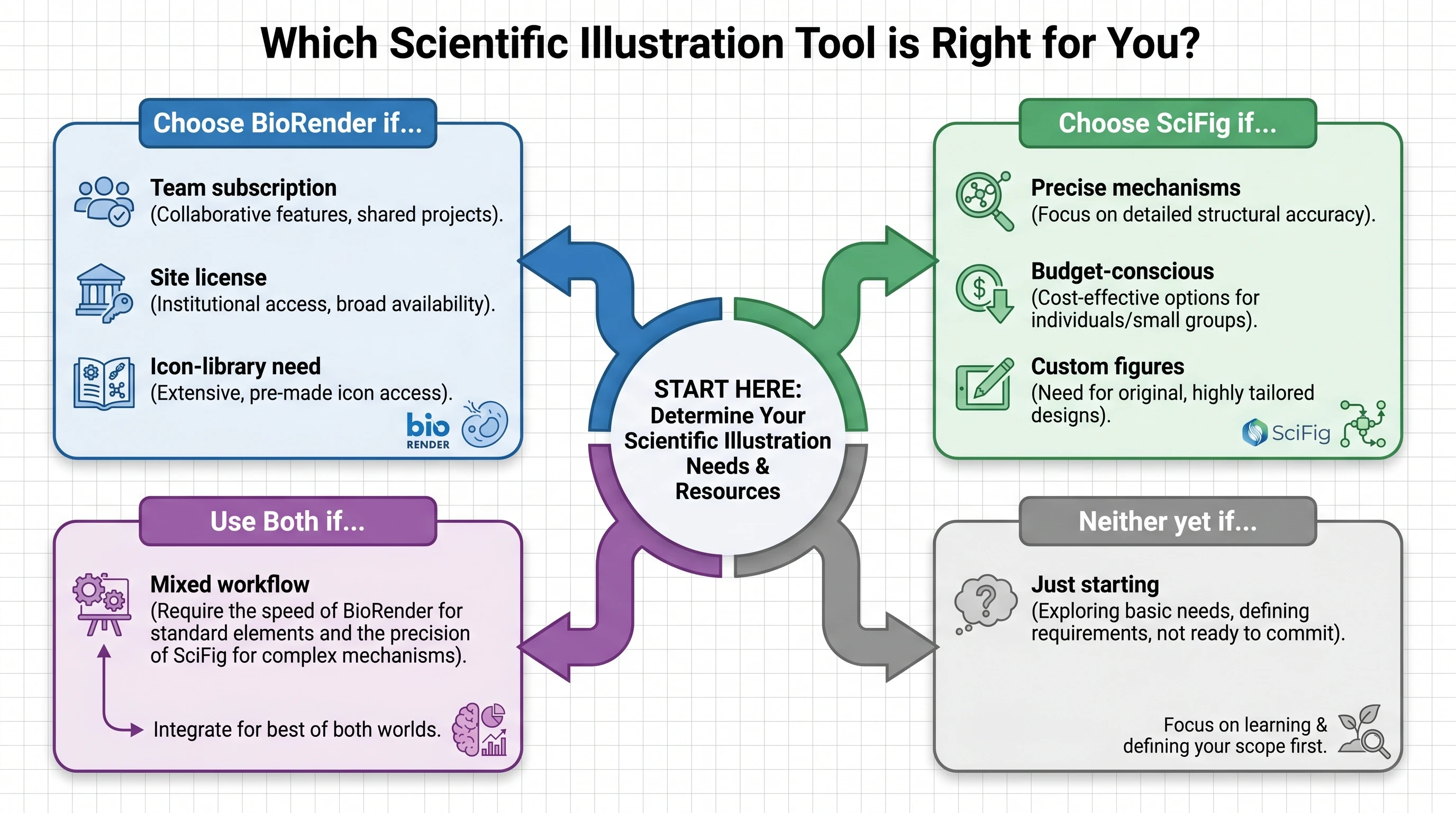
The choice is not binary, but here is the cleanest decision rule we can offer.
Choose BioRender when:
Your institution already has a site license (the marginal cost is zero)
Your figures are compositions of common, well-curated objects (generic cell types, standard pathways)
You value drag-and-drop assembly over text prompting
You need an immediate vector SVG export with no extra step
Your team has standardized on BioRender's visual language for cross-paper consistency
Choose SciFig when:
You're budget-conscious (free tier ≈2,100 credits/month on a full check-in streak or Starter at $100/year (≈$8.33/month) vs BioRender Individual $35–$39/month)
Your mechanisms are niche, novel, or absent from existing libraries
You want to convert sketches, photos, or reference images into figures
You prefer text prompting to drag-and-drop composition
You need the figure tomorrow and the icon you need doesn't exist in BioRender yet
Choose both when:
You work in a lab with BioRender access but generate enough custom mechanisms to need a generative backup
You're producing a paper series with mixed needs: standard icons for context + AI generation for the novel part
Decision matrix: BioRender vs SciFig vs both vs neither (Figure generated with SciFig)
SciFig + BioRender: Can They Coexist?
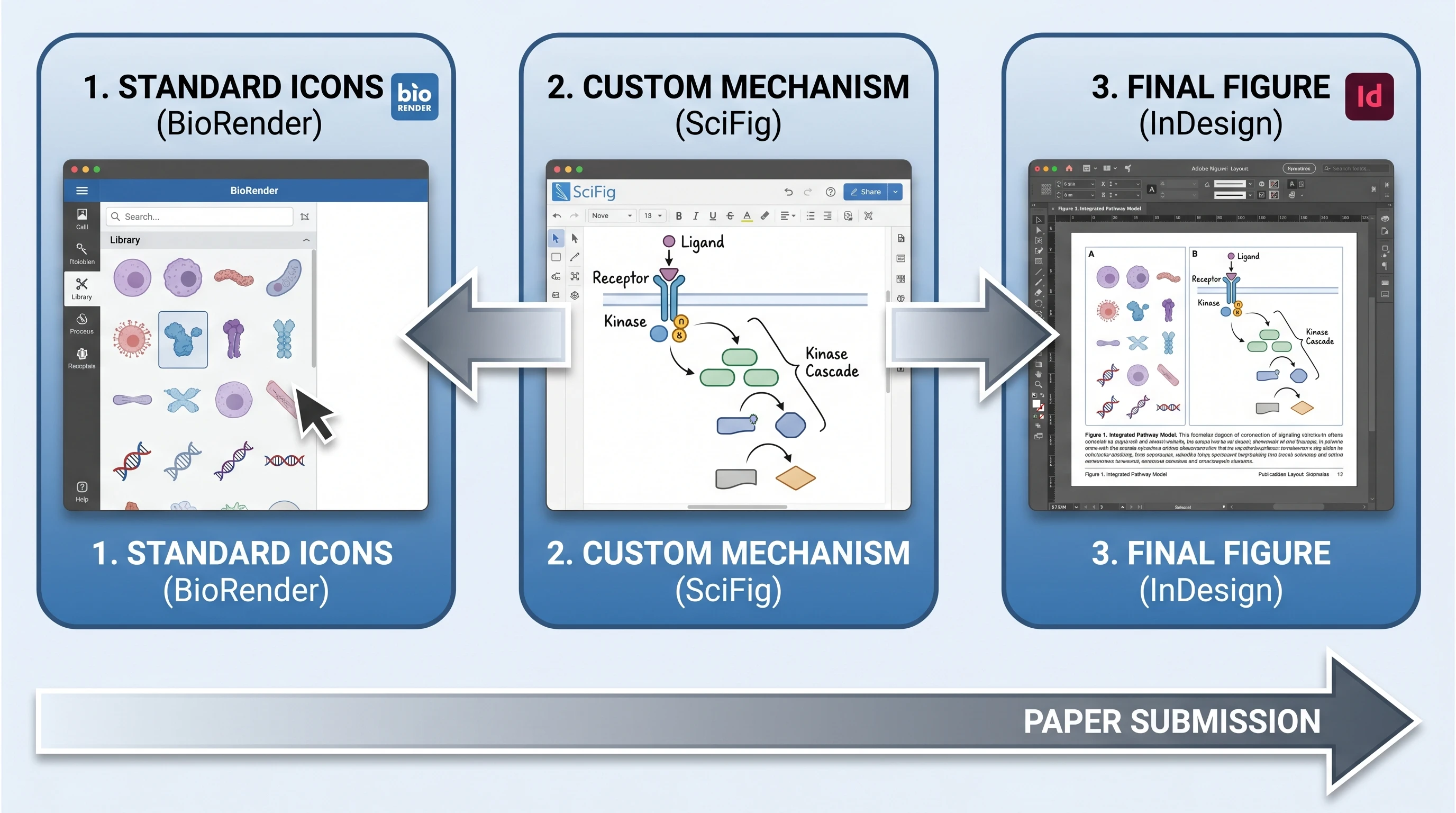
In practice, many researchers we've talked to use both tools in a single paper. The workflow looks like this: BioRender supplies the standard icons that establish context (a generic eukaryotic cell, a labeled organ, a common cytokine receptor), and SciFig generates the novel mechanism diagram that's central to the paper's contribution. The two outputs land in the same Adobe Illustrator or vector-canvas file for final polish, where stroke width and color palette are reconciled so the figure reads as one composition.
The coexistence matters because it's how most labs will use these tools in the next 2–3 years. BioRender solves the "every paper needs a generic cell diagram" problem. SciFig solves the "every paper has one figure that doesn't exist anywhere else" problem. Neither tool needs to win for both to be useful. To see real examples of mixed-source figures published by other researchers, browse the inspiration gallery — it's filterable by mechanism type and tool combination.
Coexist workflow: BioRender icons + SciFig custom + final assembly (Figure generated with SciFig)
The comparison changes when your budget is zero. BioRender's free tier is real, but it is intentionally narrow: low-resolution output, strict figure caps, and limited publication usefulness. For many researchers, that means the free plan is best understood as an evaluation environment, not a long-term figure workflow. If what you need is a free alternative to BioRender that still gets you to a usable draft, SciFig's credit-based free tier is materially different because it is designed around generation volume rather than around three locked showcase figures.
That does not automatically make SciFig better for every case. If your lab already has institutional BioRender access, “free” may effectively mean “already paid for.” But if you are choosing alone, with no lab license and no design budget, the practical question becomes: which tool gets you to a credible first figure with the least friction? In that scenario, SciFig's text-to-figure plus vector-canvas workflow is often the stronger starting point. For a broader market survey beyond this head-to-head, see our BioRender alternatives guide.
Frequently Asked Questions
SciFig is a generative-AI alternative to BioRender's icon library — instead of selecting pre-made icons, you describe a figure in natural language and SciFig generates it. The use cases overlap substantially (research paper figures, slide illustrations, posters), but the workflows are different enough that the tools complement each other in many labs.
Yes, for most academic researchers. SciFig's free tier provides 50 signup credits + a daily check-in of 50–150 credits (≈2,100/month on a full 30-day streak — about 42 standard figures; editable vector export needs a paid plan or a credit pack) and the annual-only Starter plan is $100/year (≈$8.33/month). BioRender's academic Individual plan is $35/month billed annually (≈$420/year) or $39/month monthly. For a typical PhD student paying for full publication rights, the annual cost difference is roughly $420 vs $100 — about 4× in SciFig's favor, before the free tier offsets paid usage.
Yes. SciFig's Nano Banana Pro 2K model is fine-tuned on biology and chemistry literature, which reduces common errors that generic AI models make — wrong scFv domain count, reversed pathway direction, mislabeled cellular components. Every generated figure still needs human review, but the baseline accuracy is high enough to make AI generation practical for routine mechanism diagrams.
BioRender exports SVG directly on paid tiers. SciFig generates raster output natively, then converts to layered SVG via the in-app vector-canvas tool. The vector-canvas step takes 1–2 minutes and produces a journal-ready SVG with editable text, colors, and strokes.
Yes, with proper AI use disclosure in the Methods section. Major journals accept AI-generated figures provided the work is human-supervised and the AI usage is disclosed. The current policy landscape across 12+ journals is summarized in Are AI-Generated Figures Allowed in Journals?.
Direct project import is not supported, but you can upload BioRender exports as reference images in SciFig's reference-to-figure tool to regenerate them in a new style or with modified elements. This works well when you want to preserve the visual language of a figure series while updating the underlying content.
BioRender's drag-and-drop workflow takes 15–90 minutes per figure depending on complexity. SciFig's text-to-figure cycle runs 2–4 minutes to first output plus 5–10 minutes of refinement, for a total of 7–14 minutes. The variability is lower because the first draft is closer to publication quality.
SciFig is currently per-user, with a free tier and Starter ($100/year, annual only) / Plus ($29.9/month) / Pro ($49.9/month) subscriptions. Institutional pricing for labs and departments is available on request through the pricing page. BioRender's institutional model — Lab ($99/month for 5 seats annual) or Institution (custom pricing) — is the strongest legacy advantage that comes from a decade of enterprise sales and university site-license partnerships.
Yes — especially for researchers who want to generate custom figures instead of assembling only from an icon library. SciFig's free tier is more useful as a real drafting workflow than many “free” alternatives because it is designed to let you create multiple figures before paying. The better question is not just whether SciFig is free, but whether its free path gets you to an editable, publication-ready draft faster than other BioRender alternatives.
Start with BioRender if your immediate need is a standard library composition and you are comfortable with the free-plan limits. Start with SciFig if you need a custom mechanism, a faster first draft, or a free workflow that behaves more like figure creation than a locked demo tier. In zero-budget conditions, the deciding factor is usually workflow fit, not brand recognition.
Keep going
Recommended resources
Templates, tools, and further reading for your research